1. تعارف
This manual provides detailed instructions for the setup, operation, and maintenance of your new Richmat Wireless Remote Control. This remote is designed to operate specific adjustable bed bases from Mlily, Bedtech, and Mattress Firm. Please read this manual thoroughly before use to ensure proper functionality.
اہم مطابقت کا نوٹ:
- This remote is compatible only with Mlily, Bedtech, or Mattress Firm 3000 Richmat bases that originally featured a remote identical to the ones pictured (white or black versions).
- Minor button label variations may exist (e.g., M3 button as a flat button, flat button as under bed light, anti-snore as TV lounge on certain Classic Brands remotes). These are functional equivalents.
- This remote will NOT work if your original remote had a Bluetooth logo in the bottom right corner.
- This remote will NOT work if your original remote had a flashlight button on the top row or other button icons/words not listed here.
2. حفاظتی معلومات
- Keep the remote control away from water and excessive moisture.
- Do not expose the remote to direct sunlight or extreme temperatures.
- Do not attempt to disassemble or repair the remote control yourself. Contact qualified service personnel.
- بیٹریاں بچوں کی پہنچ سے دور رکھیں۔ اگر نگل لیا جائے تو فوری طبی امداد حاصل کریں۔
- استعمال شدہ بیٹریوں کو مقامی ضابطوں کے مطابق تلف کریں۔
3. پیکیج کے مشمولات
Upon opening your package, please verify that you have received the following item:
- Richmat Wireless Remote Control (White or Black version)
4. پروڈکٹ ختمview اور کنٹرولز
The Richmat Wireless Remote Control provides a clear layout for operating your adjustable bed base. You may receive either a white or black version of the remote, both offering identical functionality.

Figure 1: White and Black Remote Control Versions. You will receive one of these two versions based on current inventory. Both versions function identically.
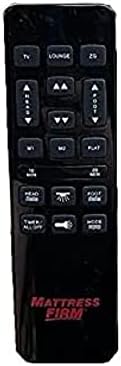
Figure 2: White Remote Control (Example with Mlily branding). This image displays the button layout and functions.

Figure 3: Black Remote Control (Example with Mattress Firm branding). This image displays the button layout and functions.
بٹن کے افعال:
- TV / LOUNGE / ZG (Zero Gravity): Preset positions for watching TV, lounging, or achieving a zero-gravity posture.
- HEAD UP/DOWN Arrows: Adjust the head section of the bed upwards or downwards.
- FOOT UP/DOWN Arrows: Adjust the foot section of the bed upwards or downwards.
- M1/M2: Memory preset buttons to save and recall your favorite bed positions.
- فلیٹ: بستر کو مکمل طور پر فلیٹ پوزیشن پر لوٹاتا ہے۔
- 10 MIN / 20 MIN: Timer buttons for massage functions (if applicable to your base).
- HEAD / FOOT Massage: Activates or adjusts massage intensity for the head or foot sections.
- TIMER / ALL OFF: Turns off all active functions, including massage and under-bed lighting.
- LIGHT (Under Bed Light): Toggles the under-bed lighting on or off.
- ہدایات: Cycles through different massage modes (if applicable).
Note: Button labels and specific functions may vary slightly depending on the adjustable base model. Refer to your adjustable base's manual for full details on its features.
5. سیٹ اپ اور جوڑا بنانے کی ہدایات
To use your new Richmat Wireless Remote Control, it must first be paired with your adjustable bed base. The pairing process is typically straightforward.
5.1. بیٹری کی تنصیب
- ریموٹ کنٹرول کے پیچھے بیٹری کے ٹوکرے کو تلاش کریں۔
- سلائیڈ کرکے بیٹری کور کھولیں۔
- Insert the required batteries (typically AAA, check markings inside the compartment) according to the polarity indicators (+ and -).
- بیٹری کور کو محفوظ طریقے سے بند کریں۔
5.2. ریموٹ کنٹرول کو جوڑنا
The exact pairing procedure may vary slightly depending on your adjustable bed base model. Generally, the steps involve:
- طاقت کو یقینی بنائیں: Make sure your adjustable bed base is plugged into a working power outlet.
- Locate Pairing Button: Find the pairing button on the control box of your adjustable bed base. This box is usually located under the bed frame, near the head or foot end. It may be labeled "PAIR," "SYNC," or have a small button.
- Activate Pairing Mode on Base: Press and hold the pairing button on the control box for approximately 3-5 seconds until you hear a beep or see an indicator light flash. This indicates the base is in pairing mode.
- Activate Pairing Mode on Remote: While the base is in pairing mode (within 10-20 seconds), press and hold the "FLAT" button on your new remote control. Some remotes may require pressing and holding the "HEAD UP" and "FOOT DOWN" buttons simultaneously, or a dedicated "PAIR" button if present.
- جوڑا بنانے کی تصدیق کریں: Release the button(s) on the remote when the indicator light on the control box stops flashing or you hear another beep, signifying successful pairing.
- ٹیسٹ کی فعالیت: Test all remote functions (head/foot adjustment, flat, presets) to ensure proper operation.
If you encounter difficulties, refer to the original instruction manual for your specific adjustable bed base model for precise pairing instructions.
6. آپریٹنگ ہدایات
Once paired, your Richmat Wireless Remote Control allows you to easily adjust your bed to your desired comfort position.
- Adjusting Head/Foot: دبائیں اور تھامیں۔ سر اوپر/نیچے کی طرف or FOOT UP/DOWN arrows to move the respective sections. Release the button when the desired position is reached.
- فلیٹ پوزیشن: دبائیں فلیٹ button to return the bed to a completely flat position.
- پیشگی پوزیشنیں: دبائیں TV, لاؤنج، یا ZG (Zero Gravity) to move the bed to these pre-programmed comfort positions.
- Saving Memory Presets (M1/M2):
- Adjust the bed to your desired position.
- دبائیں اور تھامیں۔ M1 or M2 button for approximately 3 seconds until the bed slightly moves or the remote indicates the position is saved.
- To recall a saved position, simply press the M1 or M2 بٹن
- Massage Functions (if applicable):
- دبائیں HEAD Massage or FOOT Massage to activate the massage for the respective section. Press again to cycle through intensity levels or modes.
- استعمال کریں۔ 10 منٹ or 20 منٹ buttons to set a timer for the massage function.
- دبائیں موڈ to change massage patterns.
- Under Bed Light: دبائیں روشنی button to turn the under-bed light on or off.
- سب بند: دبائیں TIMER / ALL OFF to stop all active functions.
7 دیکھ بھال
7.1 بیٹری کی تبدیلی
When the remote control's range decreases or buttons become unresponsive, it's time to replace the batteries.
- ریموٹ کے پچھلے حصے پر بیٹری کے ٹوکری کا احاطہ کھولیں۔
- پرانی بیٹریاں ہٹا دیں۔
- Insert new batteries (e.g., AAA) ensuring correct polarity (+ and -).
- بیٹری کور کو محفوظ طریقے سے بند کریں۔
- مقامی ضابطوں کے مطابق ذمہ داری کے ساتھ پرانی بیٹریوں کو ضائع کریں۔
7.2. صفائی
To clean the remote control, use a soft, dry cloth. Do not use liquid cleaners, aerosols, or abrasive materials, as these can damage the remote's surface or internal components.
8 خرابیوں کا سراغ لگانا
| مسئلہ | ممکنہ وجہ | حل |
|---|---|---|
| ریموٹ جواب نہیں دے رہا ہے۔ |
|
|
| Bed base only moves in one direction or partially. |
|
|
| دور دراز کی حد ناقص ہے۔ |
|
|
اگر ٹربل شوٹنگ کے اقدامات سے مسئلہ حل نہیں ہوتا ہے، تو مزید مدد کے لیے براہ کرم سپورٹ سیکشن سے رجوع کریں۔
9. وضاحتیں
- ماڈل نمبر: 685650227221
- مینوفیکچرر: رچمت
- ہم آہنگ آلات: Mlily, Bed Tech, or Mattress Firm 3000 Richmat adjustable bases (specific models HJH55, Classic Brands Innova NU203CB, and others featuring identical remote as pictured).
- تعاون یافتہ آلات کی زیادہ سے زیادہ تعداد: 1 (one remote per base)
- رنگ کے اختیارات: White, Silver (Black)
- خصوصی خصوصیت: ایرگونومک ڈیزائن
10. وارنٹی کی معلومات
Specific warranty details for this Richmat Wireless Remote Control are not provided in the product information. Please refer to the documentation that came with your adjustable bed base or contact the original seller/manufacturer of the remote for warranty terms and conditions.
11. کسٹمر سپورٹ
If you require further assistance, have questions, or need to report an issue that cannot be resolved using the troubleshooting guide, please contact the seller or manufacturer of your adjustable bed base or the remote control.
For purchases made through Amazon, you may contact the seller, UTAH RUSTIC FURNITURE, via your Amazon order history for support.


