تعارف
Welcome to the user manual for your BRONDI Amico Flip 4G+ mobile phone. This device combines the classic flip phone design with modern smartphone capabilities, featuring 4G+ LTE connectivity and the Android 8.1 operating system. It is equipped with a 3.5-inch HVGA display and a 2 MP autofocus camera. This manual provides essential information to help you set up, operate, maintain, and troubleshoot your new phone.
Please read this manual carefully to ensure proper use and to maximize the performance and lifespan of your device.
پیکیج کے مشمولات
سیٹ اپ کے ساتھ آگے بڑھنے سے پہلے یقینی بنائیں کہ تمام اشیاء پیکیج میں موجود ہیں۔
- BRONDI Amico Flip 4G+ Mobile Phone
- AC چارجر
- USB ٹائپ سی کیبل
- لتیم آئن بیٹری
- چارجنگ ڈاک
- وائرڈ ائرفون

Image: All components included in the BRONDI Amico Flip 4G+ package.
سیٹ اپ
1 بیٹری اور سم کارڈ کی تنصیب
- پچھلا کور کھولیں: فون کے پچھلے کور کو آہستہ سے ہٹا دیں۔
- سم کارڈ داخل کریں: Locate the SIM card slot(s). Insert your Nano-SIM card(s) into the designated slot(s) with the gold contacts facing down, ensuring it clicks into place.
- بیٹری ڈالیں: Place the Lithium-ion battery into the battery compartment, aligning the contacts.
- پچھلے کور کو تبدیل کریں: Securely attach the back cover until it clicks into place.
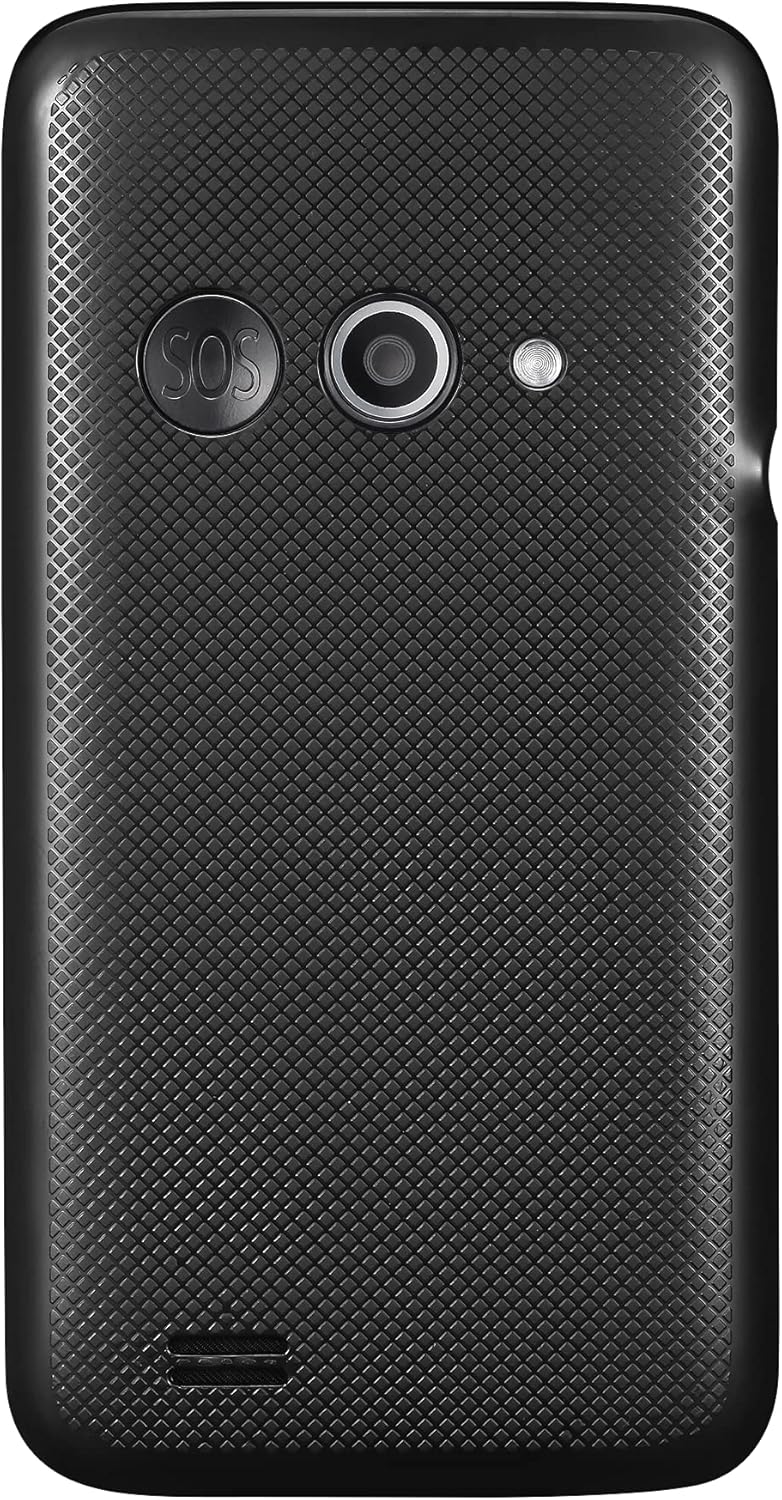
تصویر: پیچھے view of the phone, indicating the area where the back cover is removed for battery and SIM installation.
2. ابتدائی چارجنگ
پہلے استعمال سے پہلے، فون کی بیٹری کو مکمل طور پر چارج کریں۔
- Using the AC Charger: Connect the USB Type-C cable to the phone's charging port and the other end to the AC charger. Plug the charger into a wall outlet.
- چارجنگ ڈاک کا استعمال: Place the phone into the charging dock. Ensure the dock is connected to the AC charger and plugged into a wall outlet. The phone will indicate charging status.

Image: The BRONDI Amico Flip 4G+ phone charging in its dedicated dock.
3. پر / آف پاور
- پاور آن کرنے کے لیے: پاور/اینڈ کال بٹن (عام طور پر سرخ) کو دبائے رکھیں جب تک کہ اسکرین روشن نہ ہوجائے۔
- پاور آف کرنا: پاور/اینڈ کال کے بٹن کو دبائیں اور تھامیں، پھر اسکرین پر موجود اختیارات میں سے "پاور آف" کو منتخب کریں۔
آپریٹنگ ہدایات
بنیادی نیویگیشن
The BRONDI Amico Flip 4G+ features a main display and a physical keypad for navigation.

Image: The BRONDI Amico Flip 4G+ in open position, displaying the screen and keypad.
- Flip Open/Close: Open the phone to answer calls or use functions. Close it to end calls or put it in standby.
- نیویگیشن کیز: Use the directional pad (up, down, left, right) and the central OK button to navigate menus and select options.
- کیپیڈ: Dial numbers, type messages, and access shortcuts using the numeric and function keys.
- والیوم بٹن: Located on the side of the phone, use these to adjust call volume, media volume, or ringer volume.

تصویر: سائیڈ view of the phone highlighting the volume control buttons.
کال کرنا اور وصول کرنا
- کال کرنے کے لیے: Open the phone, dial the number using the keypad, and press the Green Call button.
- کال کا جواب دینے کے لیے: Open the phone or press the Green Call button when the phone rings.
- کال ختم کرنے کے لیے: Close the phone or press the Red End Call button.
پیغام رسانی
Access the messaging application from the main menu to send and receive SMS/MMS messages.
کیمرے کا استعمال
The phone is equipped with a 2 MP autofocus camera.
- Open the phone and navigate to the Camera application.
- ڈسپلے کا استعمال کرتے ہوئے اپنے شاٹ کو فریم کریں۔
- Press the designated camera button or the OK button to capture the image.
Connectivity (Wi-Fi, LTE)
Access network settings to connect to Wi-Fi networks or manage your 4G+ LTE mobile data connection.
- وائی فائی: پر جائیں۔ ترتیبات > نیٹ ورک اور انٹرنیٹ > Wi-Fi to turn Wi-Fi on/off and connect to available networks.
- موبائل ڈیٹا: پر جائیں۔ Settings > Network & Internet > Mobile network to enable/disable mobile data and configure data roaming.
دیکھ بھال
ڈیوائس کی صفائی
- Use a soft, dry, lint-free cloth to clean the phone's screen and body.
- سخت کیمیکلز، صفائی کے سپرے، یا کھرچنے والے مواد کے استعمال سے پرہیز کریں۔
- Keep the charging port and speaker grilles free from dust and debris.
بیٹری کی دیکھ بھال
- بیٹری کو انتہائی درجہ حرارت کے سامنے لانے سے گریز کریں۔
- بیٹری کو پنکچر یا نقصان نہ پہنچائیں۔
- If the battery is removable, ensure it is correctly installed.
- For optimal battery life, avoid frequently discharging the battery completely or keeping it at 100% charge for extended periods.
سافٹ ویئر اپڈیٹس
Periodically check for software updates to ensure your phone has the latest features and security enhancements. Go to سیٹنگز > سسٹم > ایڈوانسڈ > سسٹم اپ ڈیٹ.
خرابی کا سراغ لگانا
| مسئلہ | ممکنہ حل |
|---|---|
| فون آن نہیں ہوتا | Ensure the battery is charged. Connect the phone to the charger and try again. Verify the battery is correctly installed. |
| کوئی نیٹ ورک سگنل نہیں ہے۔ | Check if the SIM card is properly inserted. Ensure mobile data is enabled in settings. Try restarting the phone. Contact your service provider if the issue persists. |
| کالز نہیں کر سکتے | Check network signal strength. Ensure your SIM card is active and has credit/plan. Verify call barring settings. |
| چارجنگ کے مسائل | Ensure the charger and cable are securely connected. Try a different outlet or charger. Clean the charging port for any debris. |
| فون سست یا غیر جوابی ہے۔ | Close unnecessary applications. Clear cache. Restart the phone. If issues persist, consider a factory reset (back up data first). |
فیکٹری ری سیٹ
فیکٹری ری سیٹ آپ کے فون سے تمام ڈیٹا کو مٹا دے گا اور اسے اس کی اصل فیکٹری سیٹنگز میں بحال کر دے گا۔ آگے بڑھنے سے پہلے تمام اہم ڈیٹا کا بیک اپ لیں۔
- پر جائیں۔ Settings > System > Advanced > Reset options.
- منتخب کریں۔ تمام ڈیٹا مٹائیں (فیکٹری ری سیٹ).
- اپنی پسند کی تصدیق کریں اور آن اسکرین پرامپٹس پر عمل کریں۔
وضاحتیں
| فیچر | تفصیل |
|---|---|
| برانڈ | برونڈی |
| ماڈل کا نام | Amico Flip 4G+ |
| آپریٹنگ سسٹم | اینڈرائیڈ 8.1 |
| اسکرین کا سائز | 3.5 انچ |
| ڈسپلے ریزولوشن | 480 x 320 (HVGA) |
| اندرونی اسٹوریج | 64 جی بی |
| پیچھے والا کیمرہ | 2 Megapixels, Autofocus |
| سیلولر ٹیکنالوجی | LTE (4G+) |
| وائرلیس کنیکٹیویٹی | وائی فائی |
| کنیکٹر کی قسم | USB ٹائپ سی |
| بیٹری کی ساخت | لیتھیم آئن |
| رنگ | سیاہ |
وارنٹی اور سپورٹ
وارنٹی کی معلومات
For detailed warranty information, please refer to the warranty card included with your product or visit the official BRONDI webسائٹ وارنٹی کے دعووں کے لیے اپنی خریداری کا ثبوت رکھیں۔
کسٹمر سپورٹ
If you encounter any issues not covered in this manual or require further assistance, please contact BRONDI customer support or the retailer from whom you purchased the device. Contact details can typically be found on the BRONDI webسائٹ یا مصنوعات کی پیکیجنگ میں۔


