1. تعارف
The Hama MW-650 is a versatile 6-button optical wireless mouse designed for multi-device use. It offers flexible connectivity options via a 2.4 GHz USB-A receiver and Bluetooth, allowing seamless switching between up to three devices. The optical sensor provides precise cursor control, and adjustable DPI settings cater to various user preferences. This manual provides detailed instructions for setup, operation, maintenance, and troubleshooting to ensure optimal performance of your device.
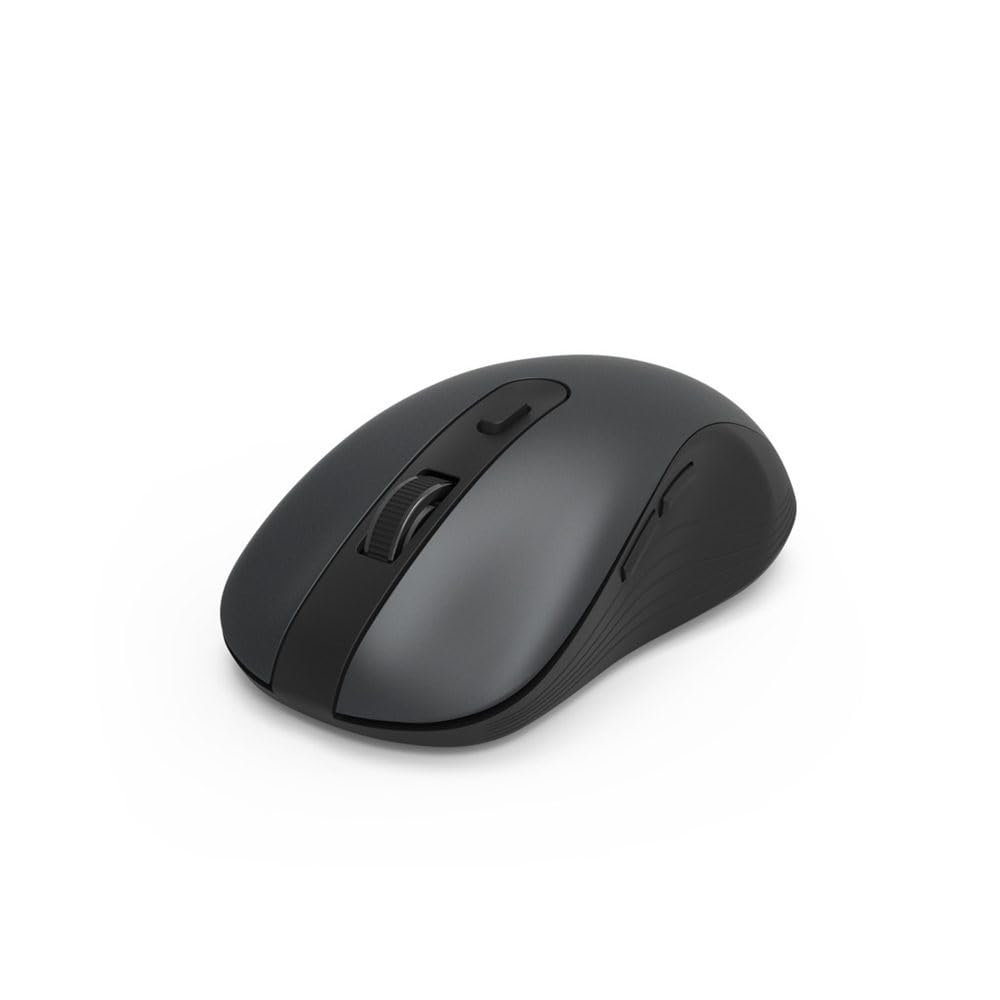
Image 1.1: Hama MW-650 Wireless Mouse (Top View)
2. پیکیج کے مشمولات
براہ کرم درج ذیل اشیاء کے لیے پیکج چیک کریں:
- 1 x Hama MW-650 6-Button Optical Wireless Mouse
- 1 x USB-A وصول کنندہ
- 2 ایکس اے اے میگنن بیٹریاں
- 1 ایکس ہدایات دستی (یہ دستاویز)

Image 2.1: Hama MW-650 Product Packaging
3. سیٹ اپ
3.1. بیٹری کی تنصیب
- ماؤس کے نیچے کی طرف بیٹری کے ٹوکرے کو تلاش کریں۔
- بیٹری کے ٹوکری کا احاطہ کھولیں۔
- Insert the two AA Mignon batteries, ensuring correct polarity (+/-).
- بیٹری کے کمپارٹمنٹ کور کو محفوظ طریقے سے بند کریں۔
3.2. پاور آن/آف
On the underside of the mouse, slide the ON/OFF switch to the 'ON' position to power on the mouse. Slide it to 'OFF' when not in use to conserve battery life.

Image 3.1: Underside of Hama MW-650 Mouse with ON/OFF Switch and Receiver
3.3. کنیکٹیویٹی کے اختیارات
The Hama MW-650 mouse supports two wireless connection methods: 2.4 GHz via USB-A receiver and Bluetooth.
3.3.1. 2.4 GHz USB-A Receiver Connection
- Remove the USB-A receiver from its storage slot on the underside of the mouse.
- Plug the USB-A receiver into an available USB-A port on your computer or laptop.
- The operating system should automatically detect and install the necessary drivers.
- The mouse will connect automatically. The LED indicator for BT1/BT2 will not be lit when using the USB receiver.
3.3.2. بلوٹوت کنکشن
The mouse can connect to two separate Bluetooth devices (BT1 and BT2).
- یقینی بنائیں کہ ماؤس آن ہے۔
- Press the 'BT1' or 'BT2' button on the underside of the mouse to select the desired Bluetooth channel. The corresponding LED will flash slowly.
- To enter pairing mode, press and hold the selected 'BT1' or 'BT2' button for approximately 3 seconds until the LED flashes rapidly.
- On your device (PC, laptop, tablet, smartphone), enable Bluetooth and search for new devices.
- Select "Hama MW-650" from the list of available devices to pair.
- Once successfully paired, the LED will stop flashing and remain steadily lit for a few seconds before turning off.
4. آپریٹنگ ہدایات
4.1. ماؤس کے بنیادی افعال
The Hama MW-650 features 6 buttons and a scroll wheel:
- بائیں کلک کے بٹن: Primary function, typically for selecting items or opening links.
- دائیں کلک کے بٹن: ثانوی فنکشن، عام طور پر سیاق و سباق کے مینو کے لیے۔
- اسکرول وہیل: For scrolling up and down documents or web pages. Can also be pressed for a middle-click function.
- DPI بٹن: Located behind the scroll wheel, used to adjust cursor sensitivity.
- آگے/پیچھے بٹن: Located on the side of the mouse, typically used for navigating web صفحات یا فولڈرز۔
4.2. آلات کے درمیان سوئچنگ
The MW-650 mouse allows you to switch between three connected devices (one via USB receiver, two via Bluetooth).
- To switch to a Bluetooth-connected device, press the 'BT1' or 'BT2' button on the underside of the mouse. The corresponding LED will light up briefly.
- To switch to the device connected via the USB receiver, press the 'USB' button (or the button without a BT label) on the underside of the mouse.

Image 4.1: Multi-Device Connectivity Example

Image 4.2: Multi-Device Setup with Monitor
4.3. DPI Sensitivity Adjustment
The mouse offers adjustable DPI (Dots Per Inch) settings to control cursor speed and sensitivity. Press the DPI button located behind the scroll wheel to cycle through the available sensitivities:
- 800 ڈی پی آئی
- 1200 DPI (پہلے سے طے شدہ)
- 1600 ڈی پی آئی
- 2000 ڈی پی آئی
- 2400 ڈی پی آئی
Each press of the DPI button will change the sensitivity, allowing you to find the setting that best suits your task or preference.
5. پاور مینجمنٹ۔
The Hama MW-650 mouse is designed with intelligent power management features to conserve battery life:
- خودکار اسٹینڈ بائی موڈ: The mouse will automatically enter a standby mode after a period of inactivity. To wake it up, simply move the mouse or click any button.
- آن/آف سوئچ: For extended periods of non-use, slide the ON/OFF switch on the underside of the mouse to the 'OFF' position to completely power down the device and maximize battery life.
6. دیکھ بھال اور دیکھ بھال
6.1. صفائی
اپنے ماؤس کی کارکردگی اور ظاہری شکل کو برقرار رکھنے کے لیے:
- Ensure the mouse is powered off before cleaning.
- ماؤس کی سطح کو صاف کرنے کے لیے نرم، خشک، لنٹ سے پاک کپڑا استعمال کریں۔
- ضدی گندگی کے لیے، قدرے ڈیampur کپڑے میں پانی یا ہلکے صفائی کے محلول سے۔ سخت کیمیکلز یا کھرچنے والے مواد سے پرہیز کریں۔
- Clean the optical sensor area on the underside of the mouse periodically with a cotton swab to ensure accurate tracking.
6.2 بیٹری کی تبدیلی
When the mouse's performance degrades or it stops responding, it may be time to replace the batteries.
- Power off the mouse using the ON/OFF switch.
- بیٹری کے ٹوکری کو نیچے کی طرف کھولیں۔
- Remove the old AA batteries and dispose of them according to local regulations.
- Insert new AA Mignon batteries, observing correct polarity.
- بیٹری کی ٹوکری بند کریں۔
7 خرابیوں کا سراغ لگانا
If you encounter issues with your Hama MW-650 mouse, please refer to the following common solutions:
| مسئلہ | ممکنہ حل |
|---|---|
| ماؤس جواب نہیں دیتا۔ |
|
| Cursor movement is erratic or slow. |
|
| آلات کے درمیان سوئچ نہیں کیا جا سکتا۔ |
|
| بلوٹوتھ جوڑی ناکام ہوجاتی ہے۔ |
|
8. تکنیکی تفصیلات
| ماڈل نمبر | 00182617 (MW-650) |
| کنیکٹوٹی ٹیکنالوجی | 2.4GHz RF (USB-A Receiver), Bluetooth 5.0 |
| موومنٹ ڈیٹیکشن ٹکنالوجی | آپٹیکل |
| DPI حساسیت | 800 / 1200 / 1600 / 2000 / 2400 DPI (adjustable) |
| بٹنوں کی تعداد | 6 (اسکرول وہیل سمیت) |
| فارم فیکٹر | دایاں ہاتھ |
| طاقت کا منبع | 2 x AA Mignon Batteries (included) |
| بیٹری کی زندگی | 288 دن تک (استعمال پر منحصر ہے) |
| ہم آہنگ آپریٹنگ سسٹمز | Windows 11/10/8/7, Android 4.3 or higher, macOS 10.10 or higher, iOS 13 or higher |
| پروڈکٹ کے طول و عرض (L x W x H) | 11.3 x 6.3 x 4 سینٹی میٹر (4.41 x 2.48 x 1.57 انچ) |
| شے کا وزن | 3.62 اونس |
| رنگ | سیاہ |
9. وارنٹی اور سپورٹ
For warranty information and technical support, please refer to the official Hama webسائٹ یا ان کی کسٹمر سروس سے براہ راست رابطہ کریں۔ کسی بھی وارنٹی دعووں کے لیے اپنی خریداری کا ثبوت رکھیں۔
- مینوفیکچرر: ہما جی ایم بی ایچ اینڈ کمپنی کے جی
- Webسائٹ: www.hama.com