1. تعارف
This manual provides essential instructions for the safe and efficient use of your Xiaomi Mi Portable Bluetooth Speaker. Please read this manual thoroughly before using the product and retain it for future reference. The speaker features high-quality sound, True Wireless Stereo (TWS) capability, Bluetooth 5.0 connectivity, and IPX7 waterproofing, making it suitable for various environments.

تصویر: زاویہ دار view of the Xiaomi Mi Portable Bluetooth Speaker, highlighting its compact design and control panel.
2. پیکیج کے مشمولات
یقینی بنائیں کہ تمام اشیاء پیکیج میں موجود ہیں:
- Xiaomi Mi Portable Bluetooth Speaker x1
- Charging Cable x1 (USB-C)
- یوزر مینوئل x1
3. مصنوعات کی خصوصیات
- اعلی معیار کی آواز: Delivers clear and balanced audio.
- حقیقی وائرلیس سٹیریو (TWS): Connect two speakers for an immersive stereo experience.
- بلوٹوتھ 5.0: مستحکم اور موثر وائرلیس کنیکٹیویٹی۔
- IPX7 واٹر پروف: Protected against immersion in water up to 1 meter for 30 minutes.
- طویل کھیل کا وقت: Approximately 13 hours of playback at 50% volume.
- بلٹ ان مائیکروفون: ہینڈز فری کالنگ کے لیے۔
- AUX ان پٹ: وائرڈ آڈیو کنکشن کے لیے۔
4. کنٹرول اور اشارے
Familiarize yourself with the speaker's control buttons and indicators:
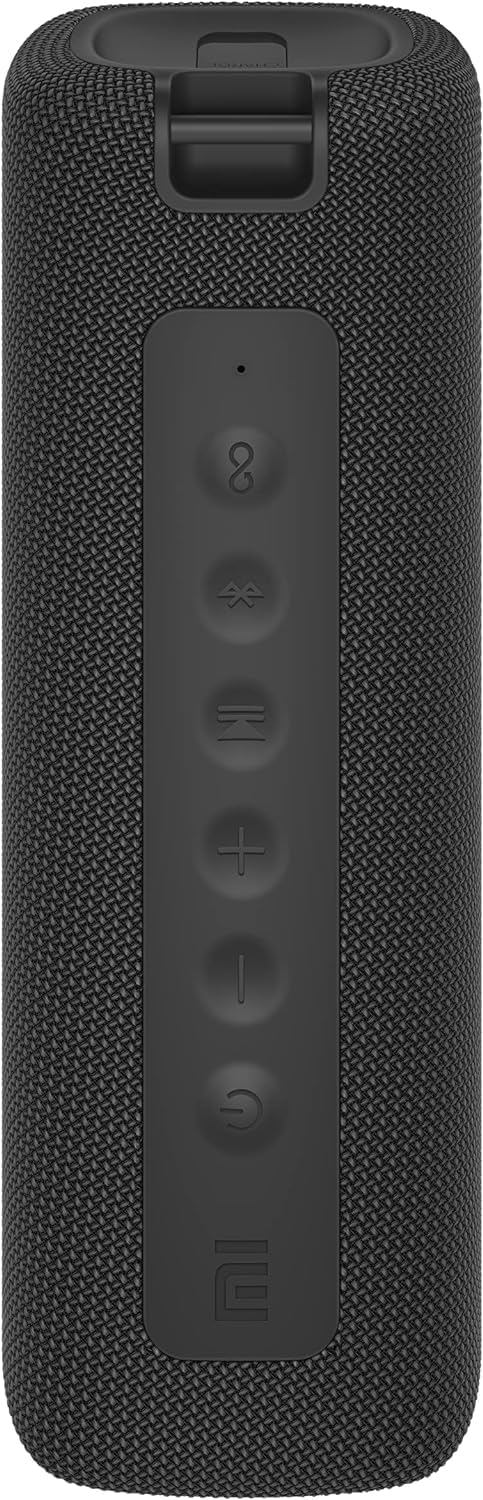
تصویر: سامنے view of the speaker with clearly visible control buttons.
| بٹن/اشارے | فنکشن |
|---|---|
| پاور بٹن (⏻) | Press and hold for 2 seconds to power on/off. Short press to play/pause music or answer/end calls. |
| والیوم کم (-) | Short press to decrease volume. Press and hold for previous track. |
| والیوم اپ (+) | Short press to increase volume. Press and hold for next track. |
| بلوٹوتھ بٹن (Ⓑ) | بلوٹوتھ پیئرنگ موڈ میں داخل ہونے کے لیے مختصر دبائیں۔ |
| TWS بٹن (∞) | Press to initiate True Wireless Stereo pairing with another Mi Portable Bluetooth Speaker. |
| ایل ای ڈی اشارے | پاور سٹیٹس، چارجنگ سٹیٹس اور بلوٹوتھ پیئرنگ سٹیٹس کی نشاندہی کرتا ہے۔ |
5. سیٹ اپ
5.1 اسپیکر کو چارج کرنا
- فراہم کردہ USB-C چارجنگ کیبل کو اسپیکر کے چارجنگ پورٹ سے مربوط کریں۔
- Connect the other end of the cable to a 5V 1A USB power adapter (not included) or a computer's USB port.
- ایل ای ڈی انڈیکیٹر چارجنگ سٹیٹس دکھائے گا (مثال کے طور پر، چارج کرتے وقت سرخ، مکمل چارج ہونے پر آف)۔
- مکمل چارج ہونے میں تقریباً 4 گھنٹے لگتے ہیں۔
5.2 پاور آن/آف
- پاور آن کرنے کے لیے: Press and hold the Power button for 2 seconds. You will hear an audible prompt, and the LED indicator will light up.
- پاور آف کرنا: Press and hold the Power button for 2 seconds. You will hear an audible prompt, and the LED indicator will turn off.
5.3 بلوٹوتھ جوڑی
- Ensure the speaker is powered on. The LED indicator will flash blue, indicating it's in pairing mode.
- اپنے آلے پر (اسمارٹ فون، ٹیبلیٹ، کمپیوٹر)، بلوٹوتھ کو فعال کریں اور دستیاب آلات تلاش کریں۔
- Select "Mi Portable Bluetooth Speaker" from the list of devices.
- جوڑا بننے کے بعد، LED اشارے ٹھوس نیلے رنگ کا ہو جائے گا، اور آپ کو ایک تصدیقی آواز سنائی دے گی۔
- پاور آن ہونے پر، اگر حد کے اندر ہو تو اسپیکر خود بخود آخری جوڑی والے آلے سے جڑ جائے گا۔
5.4 حقیقی وائرلیس سٹیریو (TWS) جوڑا
To pair two Xiaomi Mi Portable Bluetooth Speakers for stereo sound:
- یقینی بنائیں کہ دونوں اسپیکر آن ہیں اور کسی دوسرے بلوٹوتھ ڈیوائس سے منسلک نہیں ہیں۔
- On one speaker (this will be the primary speaker), short press the TWS button (∞). The LED indicator will flash.
- On the second speaker, short press the TWS button (∞).
- The two speakers will automatically connect to each other. You will hear a confirmation sound, and the LED indicators on both speakers will turn solid blue.
- Now, connect your device to the primary speaker via Bluetooth as described in section 5.3. The sound will play in stereo through both speakers.
5.5 آکس کنکشن
For wired audio playback:
- Connect a 3.5mm audio cable (not included) from your audio source to the AUX IN port on the speaker.
- اسپیکر خود بخود AUX موڈ میں بدل جائے گا۔
- Control playback and volume from your audio source device.
6. آپریٹنگ ہدایات
6.1 میوزک پلے بیک
- چلائیں/روکیں: پاور بٹن کو مختصر دبائیں۔
- اواز بڑھایں: والیوم اپ کو مختصر دبائیں (+) بٹن۔
- آواز کم: Short press the Volume Down (-) بٹن۔
- اگلا ٹریک: Press and hold the Volume Up (+) بٹن۔
- پچھلا ٹریک: Press and hold the Volume Down (-) بٹن۔
6.2 کال مینجمنٹ
- جواب / کال ختم کریں: Short press the Power button when a call comes in or during a call.
- کال مسترد کریں: Press and hold the Power button for 2 seconds when a call comes in.
7 دیکھ بھال
- صفائی: اسپیکر کو نرم سے مسح کریں ، d۔amp کپڑا کھرچنے والے کلینر یا سالوینٹس کا استعمال نہ کریں۔
- ذخیرہ: اسپیکر کو ٹھنڈی، خشک جگہ پر براہ راست سورج کی روشنی اور انتہائی درجہ حرارت سے دور رکھیں۔
- پانی کی مزاحمت: The speaker is IPX7 waterproof. Ensure the charging port cover is securely closed before exposure to water. Do not submerge the speaker for extended periods or beyond specified depths.
- بیٹری کی دیکھ بھال: To prolong battery life, avoid fully discharging the speaker frequently. Charge it regularly, even if not in use for long periods.
8 خرابیوں کا سراغ لگانا
| مسئلہ | ممکنہ حل |
|---|---|
| سپیکر پاور آن نہیں کرتا۔ | یقینی بنائیں کہ بیٹری چارج ہے۔ پاور سورس سے جڑیں اور دوبارہ کوشش کریں۔ |
| بلوٹوتھ کے ذریعے جوڑا نہیں بنایا جا سکتا۔ |
|
| کوئی آواز یا کم والیوم نہیں۔ |
|
| TWS جوڑا ناکام ہوجاتا ہے۔ |
|
| ناقص آواز کا معیار۔ |
|
9. وضاحتیں

تصویر: نیچے view of the speaker, displaying model number and certifications.
| پیرامیٹر | قدر |
|---|---|
| ماڈل | MDZ-36-DB |
| مصنوعات کے طول و عرض | W 213 x D 74 x H 74 mm (approx. 8 x 3 x 3 inches) |
| کنیکٹوٹی | Bluetooth 5.0, 3.5mm AUX IN |
| شرح شدہ آؤٹ پٹ | 2 x 8W (16W کل) |
| سگنل ٹو شور کا تناسب | ≥ 70dB |
| TWS Connection Range | ≤ 5m |
| واٹر پروف ریٹنگ | IPX7 |
| بیٹری کی قسم | لتیم آئن، 3.7V |
| بیٹری کی صلاحیت | 2600mAh |
| بیٹری چارج کرنے کا وقت | تقریبا 4 گھنٹے |
| پلے بیک ٹائم | تقریبا 13 گھنٹے (50% والیوم پر) |
| تعدد کی حد | 80Hz سے 20KHz |
| ریٹیڈ Impedance | 4 Ω |
| ترسیل کا فاصلہ | 15m |
| شرح شدہ ان پٹ | 5V 1A |
| شے کا وزن | 500 گرام (1.1 پاؤنڈ) |
10. وارنٹی اور سپورٹ
وارنٹی کی تفصیلی معلومات کے لیے، براہ کرم اپنے پروڈکٹ کے ساتھ شامل وارنٹی کارڈ سے رجوع کریں یا سرکاری Xiaomi پر جائیں webسائٹ
If you encounter any issues not covered in this manual, please contact Xiaomi customer support or visit their official support channels for assistance.


