1. تعارف
The Xiaomi Mesh System AX3000 (Pack of 2) is designed to provide comprehensive Wi-Fi 6 coverage for complex home layouts, extending up to 370 m². This system comes pre-configured from the factory, ensuring a straightforward setup process and immediate readiness for use.
2. حفاظتی معلومات
- اس بات کو یقینی بنائیں کہ آلہ زیادہ گرم ہونے سے بچنے کے لیے اچھی ہوادار جگہ پر رکھا ہوا ہے۔
- صرف آلہ کے ساتھ فراہم کردہ اصل پاور اڈاپٹر استعمال کریں۔
- آلے کو پانی، آگ اور زیادہ درجہ حرارت سے دور رکھیں۔
- آلہ کو خود سے جدا کرنے یا مرمت کرنے کی کوشش نہ کریں۔ مدد کے لیے اہل سروس اہلکاروں سے رابطہ کریں۔
- ڈیوائس کو مضبوط برقی مقناطیسی فیلڈز کے قریب رکھنے سے گریز کریں۔
3. پیکیج کے مشمولات
تصدیق کریں کہ تمام اشیاء آپ کے پیکیج میں موجود ہیں:
- 2 x Xiaomi Mesh System AX3000 Base Units
- 2 ایکس پاور اڈیپٹر
- 1 ایکس ایتھرنیٹ کیبل
- 1 ایکس صارف گائیڈ
4. پروڈکٹ ختمview
4.1. Device Appearance
The Xiaomi Mesh System AX3000 units feature a sleek, minimalist design. Each unit is equipped with status indicators and essential ports for connectivity.

سامنے والا view of the two Xiaomi Mesh System AX3000 units included in the pack.
4.2 بندرگاہیں اور اشارے
Each unit includes multiple Ethernet ports, a power input, and a reset button. The front panel features an LED indicator to show the device's status.
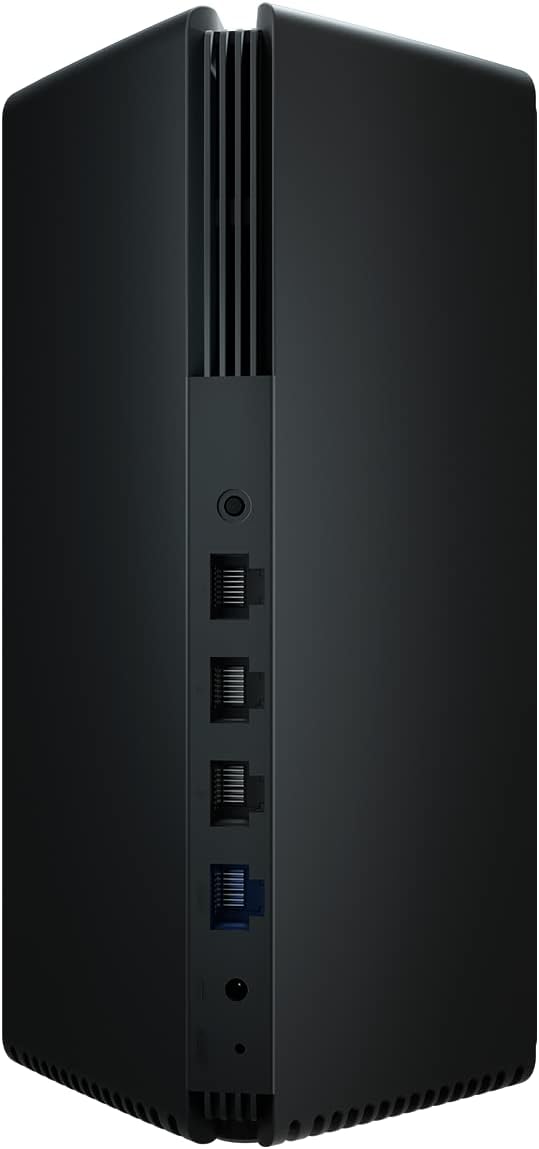
Detail of the rear panel of a Xiaomi Mesh System AX3000 unit, highlighting the Ethernet ports, power connector, and reset button.
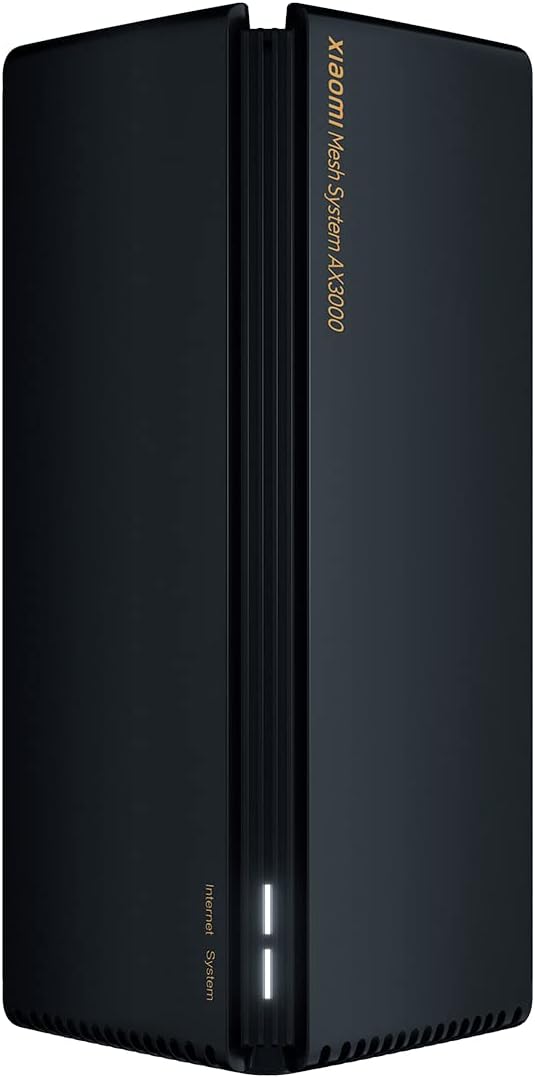
A single Xiaomi Mesh System AX3000 unit, showcasing its sleek design and front status indicator.
5. سیٹ اپ ہدایات
5.1. Initial Setup (Main Unit)
- مین یونٹ کو جوڑیں: Connect one of the Mesh System units to your internet modem or router using the provided Ethernet cable. Plug one end into the WAN port (usually blue) of the Mesh unit and the other end into a LAN port on your modem/router.
- پاور آن: Connect the power adapter to the main Mesh unit and plug it into a power outlet. Wait for the unit to power on and the indicator light to turn solid white (or blue, depending on the model, indicating a stable connection).
- ایپ ڈاؤن لوڈ کریں: Download the Xiaomi Home or Mi Home app from your smartphone's app store.
- ایپ کے ذریعے ترتیب دیں: Open the app, create an account if you don't have one, and follow the on-screen instructions to add your new Mesh System. The app will guide you through setting up your Wi-Fi network name (SSID) and password.
5.2. Mesh Network Setup (Secondary Unit)
- جگہ کا تعین: Place the second Mesh unit in an area where you need extended Wi-Fi coverage, ideally within range of the main unit. Avoid obstructions like thick walls or large metal objects.
- پاور آن: Connect the power adapter to the secondary Mesh unit and plug it into a power outlet.
- خودکار جوڑی: The secondary unit will automatically detect and pair with the main unit. The indicator light will change to reflect a successful mesh connection (e.g., solid white/blue). This process typically takes a few minutes.
- کنکشن کی تصدیق کریں: Use the Xiaomi Home/Mi Home app to verify that both units are connected and functioning correctly within the mesh network.

The Xiaomi Home/Mi Home application interface on a smartphone, used for managing the Mesh System AX3000 network and connected devices.
6. آپریٹنگ ہدایات
6.1. منسلک آلات
Once your Mesh System is set up, devices can connect to the Wi-Fi network using the SSID and password you configured. The mesh system ensures seamless roaming between units, providing a consistent signal throughout your coverage area.
6.2. Network Management via App
The Xiaomi Home/Mi Home app allows you to:
- View connected devices and their network usage.
- Change Wi-Fi settings (SSID, password, security type).
- فرم ویئر اپ ڈیٹس انجام دیں۔
- Set up parental controls or guest networks.
- Monitor network status and troubleshoot issues.
6.3. اعلی درجے کی خصوصیات
- OFDMA Transmission: This technology enables high-efficiency data transmission, allowing the system to process data streams from multiple devices simultaneously, improving overall network performance.
- ٹارگٹ ویک ٹائم (TWT): TWT allows devices to negotiate when and how often they will wake up to send or receive data. This reduces power consumption for connected devices, especially IoT devices, by keeping them in standby mode until a transmission signal is received.
7 دیکھ بھال
- فرم ویئر اپ ڈیٹس: Regularly check for and install firmware updates via the Xiaomi Home/Mi Home app to ensure optimal performance, security, and access to new features.
- صفائی: Gently wipe the exterior of the units with a soft, dry cloth. Do not use liquid cleaners or abrasive materials. Ensure ventilation slots are free from dust.
- بہترین جگہ کا تعین: وقتاً فوقتاً دوبارہview the placement of your mesh units to ensure they are in central locations, away from major obstructions, and not too close to other electronic devices that might cause interference.
8 خرابیوں کا سراغ لگانا
8.1. عام مسائل اور حل
- کوئی انٹرنیٹ کنکشن نہیں:
- چیک کریں کہ آیا آپ کا موڈیم/راؤٹر صحیح طریقے سے کام کر رہا ہے۔
- Ensure the Ethernet cable between the main Mesh unit and your modem is securely connected.
- Restart both your modem/router and the Mesh System units.
- کمزور وائی فائی سگنل:
- Relocate the secondary Mesh unit closer to the main unit or to a more central location.
- Ensure there are no major physical obstructions (e.g., concrete walls, large appliances) between the units.
- مداخلت کے ذرائع (مثلاً مائیکرو ویوز، کورڈ لیس فون) کی جانچ کریں۔
- Wi-Fi سے کنیکٹ نہیں ہو سکتا:
- Verify that you are using the correct Wi-Fi network name (SSID) and password.
- Restart your device (smartphone, laptop, etc.).
- Try connecting to a different Wi-Fi network to rule out device-specific issues.
8.2. فیکٹری ری سیٹ
If you encounter persistent issues, you may need to perform a factory reset. Locate the reset button on the rear of the unit (often a small pinhole). With the unit powered on, use a paperclip to press and hold the reset button for approximately 5-10 seconds until the indicator light changes, then release. The unit will restart with factory default settings, requiring re-configuration.
9. وضاحتیں
| فیچر | تفصیلات |
|---|---|
| برانڈ | XIAOMI |
| ماڈل کا نام | XIAOMI Mesh System AX3000 (2-pack) |
| آئٹم ماڈل نمبر | 33592 |
| وائرلیس مواصلات کا معیار | 802.11ac, 802.11ax, 802.11n (Wi-Fi 6) |
| فریکوئنسی بینڈ کلاس | دوہرا بینڈ |
| کنیکٹوٹی ٹیکنالوجی | ایتھرنیٹ، وائی فائی |
| خصوصی خصوصیت | WPS (Wi-Fi محفوظ سیٹ اپ) |
| ہم آہنگ آلات | Compatible with any type of internet box or router |
| تجویز کردہ استعمال | گھر |
| شامل اجزاء | 2x Xiaomi Mesh System AX3000 Base, Power Adapter, Ethernet Cable, User Guide |
| کارخانہ دار | XIAOMI |
10. وارنٹی اور سپورٹ
10.1. مینوفیکچرر وارنٹی
اس پروڈکٹ کا احاطہ کیا گیا ہے۔ 24 ماہ کی صنعت کار کی وارنٹی خریداری کی تاریخ سے. وارنٹی کے دعووں کے لیے براہ کرم اپنی خریداری کا ثبوت اپنے پاس رکھیں۔
10.2. سافٹ ویئر اپڈیٹس
Software updates for this device are guaranteed until 13 اپریل 2030. Ensure your device is connected to the internet and check the Xiaomi Home/Mi Home app regularly for available updates.
10.3. کسٹمر سپورٹ
For technical assistance, troubleshooting beyond this manual, or warranty inquiries, please visit the official Xiaomi support website or contact their customer service. Refer to the packaging or official webآپ کے علاقے میں مخصوص رابطے کی تفصیلات کے لیے سائٹ۔


