1. تعارف
The iPower 600W Digital Dimmable Electronic Ballast is designed for use with High-Pressure Sodium (HPS) and Metal Halide (MH) grow lights in horticulture and hydroponics applications. This electronic ballast provides stable and efficient power delivery, featuring dimmable options and advanced safety protections to ensure optimal plant growth and system longevity.
Key features include a wide operating voltage range, multiple dimming settings, high-frequency output for increased lumen efficiency, and comprehensive safety mechanisms.

Image 1.1: iPower Dimmable Digital Ballast for HPS & MH Grow Light. This image illustrates the ballast's primary function for horticultural lighting.

Image 1.2: Two iPower 600W Digital Dimmable Electronic Ballasts. This image shows the product as it appears, including the ballast unit and its attached power cord.
2. حفاظتی ہدایات
Please read and understand all safety instructions before operating the iPower Digital Dimmable Electronic Ballast. Failure to follow these instructions may result in electric shock, fire, or other serious injury.
- برقی حفاظت: Ensure the power source matches the ballast's voltage requirements (100V~265V with 120V working voltage). Always connect the ballast to a grounded outlet.
- تنصیب: Install the ballast in a dry, well-ventilated area. Avoid exposure to water, high humidity, or extreme temperatures. Do not block ventilation openings.
- Lamp مطابقت: Use only compatible HPS or MH lamps with the correct wattage. Refer to the lamp manufacturer's specifications.
- ہینڈلنگ: ایل کو مت چھونا۔amp or ballast immediately after operation, as they may be hot. Allow sufficient cooling time.
- دیکھ بھال: Disconnect power before performing any maintenance or cleaning. Do not attempt to open or repair the ballast yourself. Refer all servicing to qualified personnel.
- تحفظ کی خصوصیات: The ballast includes advanced protection against short circuits, power surges, ignition failure, overheating, and end-of-bulb-life. These features are designed for user safety and product longevity.
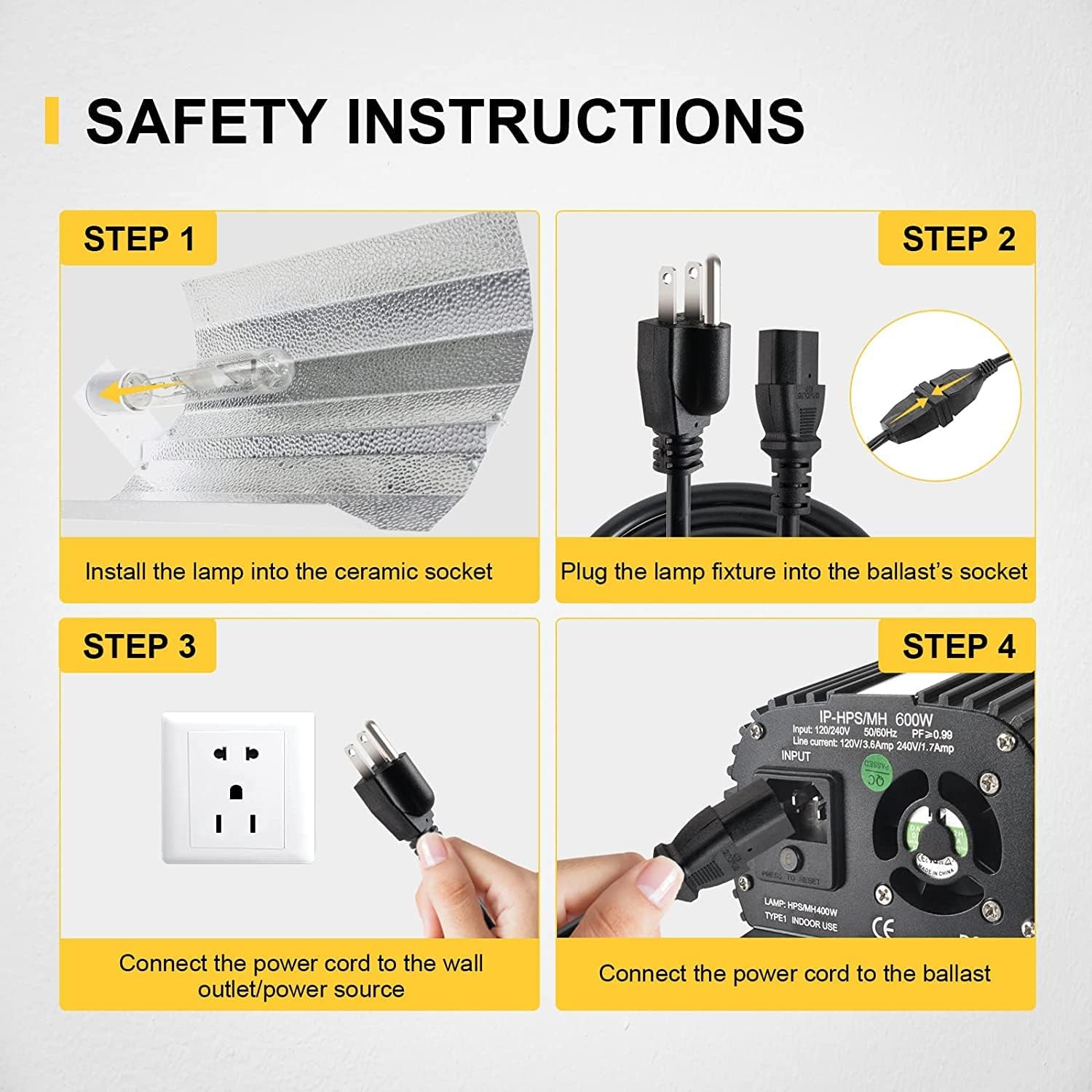
Image 2.1: Safety Instructions for Installation. This image visually guides users through the four essential steps for safely connecting the grow light system.
3. سیٹ اپ
Follow these steps to set up your iPower Digital Dimmable Electronic Ballast and grow light system:
- ایل انسٹال کریں۔amp: Carefully install the HPS or MH lamp into the ceramic socket of your reflector fixture. Ensure the lamp محفوظ طریقے سے بیٹھا ہے.
- ایل کو جوڑیں۔amp Fixture to Ballast: Plug the cord from the lamp fixture into the output socket of the ballast. Ensure a firm connection.
- Connect Power Cord to Ballast: Insert the heavy-duty power cord (included) into the input socket of the ballast. The ballast features an input for 120V/240V operation.
- Connect Power Cord to Wall Outlet: Plug the other end of the heavy-duty power cord into a suitable grounded wall outlet or power source.
Once all connections are made, the system is ready for operation. Ensure the dimming knob is set to the desired output level before powering on.

Image 3.1: Heavy-Duty Power Cord. This image displays the included 8-foot power cord, essential for connecting the ballast to a power source.
4. آپریٹنگ ہدایات
The iPower Digital Dimmable Electronic Ballast offers flexible control over light output to suit various growth stages اور پودوں کی ضروریات۔
4.1 Dimmable Options
The ballast features a dimming knob that allows you to adjust the light intensity. Available dimming options are:
- 50% Output: Reduces light output to 50% of the rated wattage.
- 75% Output: Reduces light output to 75% of the rated wattage.
- 100% Output: Provides full rated wattagای آؤٹ پٹ
- Super Lumens (110%): Boosts light output to 110% of the rated wattage for maximum intensity during critical growth phases.

Image 4.1: Dimmable Options. This image highlights the dimming knob and its settings (50%, 75%, 100%, Super Lumens) for adjusting light intensity.

Image 4.2: Product Details with Dimming Control. This image provides a closer look at the dimming knob and the air-cooled aluminum finned casing, indicating the ballast's adjustable output and heat management. The serial number visible is B:151712578.
4.2 واٹtagای اختیارات
The ballast is compatible with various wattagelamps and can operate at different output levels:
- 250W
- 400W
- 600W
Ensure the selected wattage on the ballast matches the lamp being used for optimal performance and safety.
5 دیکھ بھال
Proper maintenance ensures the longevity and efficient operation of your iPower Digital Dimmable Electronic Ballast.
- صفائی: Regularly clean the exterior of the ballast with a dry, soft cloth. Ensure the ballast is unplugged before cleaning. Do not use liquid cleaners.
- وینٹیلیشن: Keep the ventilation openings clear of dust and debris to ensure proper airflow. The ballast features a built-in cooling fan and finned design for effective heat dissipation.
- معائنہ: Periodically inspect the power cord and connections for any signs of damage or wear. Replace damaged components immediately.
- Spare Fuse: The ballast includes a spare fuse. If the ballast fails to power on, check and replace the fuse if necessary. Always use a fuse of the correct rating.

Image 5.1: Product Introduction with Spare Fuse and Internal Fan. This image details the input section of the ballast, highlighting the location of the spare fuse and the 40mm DC internal fan for cooling.

Image 5.2: Ventilation Opening for Heat Dissipation. This image points out the ventilation opening on the ballast, crucial for maintaining optimal operating temperature. The serial number visible is B:151712578.
6 خرابیوں کا سراغ لگانا
If you encounter issues with your iPower Digital Dimmable Electronic Ballast, refer to the following common troubleshooting steps:
- کوئی طاقت نہیں:
- Check if the power cord is securely plugged into both the ballast and the wall outlet.
- کسی دوسرے آلے میں پلگ لگا کر تصدیق کریں کہ وال آؤٹ لیٹ فعال ہے۔
- Inspect the ballast's fuse and replace it if blown (refer to Image 5.1 for fuse location).
- Lamp Not Igniting:
- ایل کو یقینی بنائیںamp is correctly seated in the fixture socket.
- ایل کی تصدیق کریں۔amp is compatible with the ballast (HPS or MH) and its wattagای ترتیب.
- چیک کریں کہ آیا ایلamp has reached its end-of-life. Try a new, compatible lamp.
- Verify that the dimming knob is not set to 'OFF' or an incorrect setting.
- چمکتی ہوئی روشنی:
- یقینی بنائیں کہ تمام کنکشن سخت اور محفوظ ہیں۔
- ایل کی تصدیق کریں۔amp is not nearing its end-of-life.
- مستحکم والیوم کی جانچ کریں۔tage output from your power source.
- زیادہ گرم ہونا:
- Ensure the ballast is in a well-ventilated area and its cooling fins are not obstructed.
- Clean any dust or debris from the ventilation openings and cooling fan.
If these steps do not resolve the issue, please contact iPower customer support for further assistance.
7. وضاحتیں
Below are the technical specifications for the iPower 600W Digital Dimmable Electronic Ballast:
| فیچر | تفصیلات |
|---|---|
| ماڈل نمبر | 600W Digital Dimmable Electronic |
| واٹtage | 600 واٹ |
| آپریٹنگ والیومtagای رینج | 100V~265V |
| کام کرنے والی جلدtage | 120V |
| Dimmable اختیارات | 50%, 75%, 100%, Super Lumens (110%) |
| Lamp مطابقت | HPS (High Pressure Sodium) and MH (Metal Halide) |
| تعدد | 50/60Hz, Operation frequency: 80kHz |
| پاور کورڈ کی لمبائی | 8 FT heavy-duty |
| مصنوعات کے طول و عرض | 14.57 x 6.5 x 6.3 انچ |
| شے کا وزن | 11.28 پاؤنڈ |
| حفاظتی خصوصیات | Short circuit, power surge, ignition failure, overheat, end-of-bulb-life protection |
| کولنگ | Built-in cooling fan, graduating fin design |

Image 7.1: Suitable Size and Dimensions. This image provides a visual representation of the ballast's dimensions, including length (12.44 inches), width (2.87 inches), and height (4.33 inches).
8. وارنٹی اور سپورٹ
The iPower 600W Digital Dimmable Electronic Ballast comes with a manufacturer's warranty. Please refer to the product packaging or the official iPower website for specific warranty terms and conditions. For technical support, troubleshooting assistance, or warranty claims, please contact iPower customer service.
رابطہ کی معلومات:
Visit the official iPower webسب سے تازہ ترین سپورٹ رابطے کی تفصیلات کے لیے سائٹ۔


