تعارف
This manual provides comprehensive instructions for the setup, operation, and maintenance of your Tesla Smart Pet Feeder (Model TSL-PC-BL4). Please read this manual thoroughly before using the device to ensure proper functionality and safety for your pet.
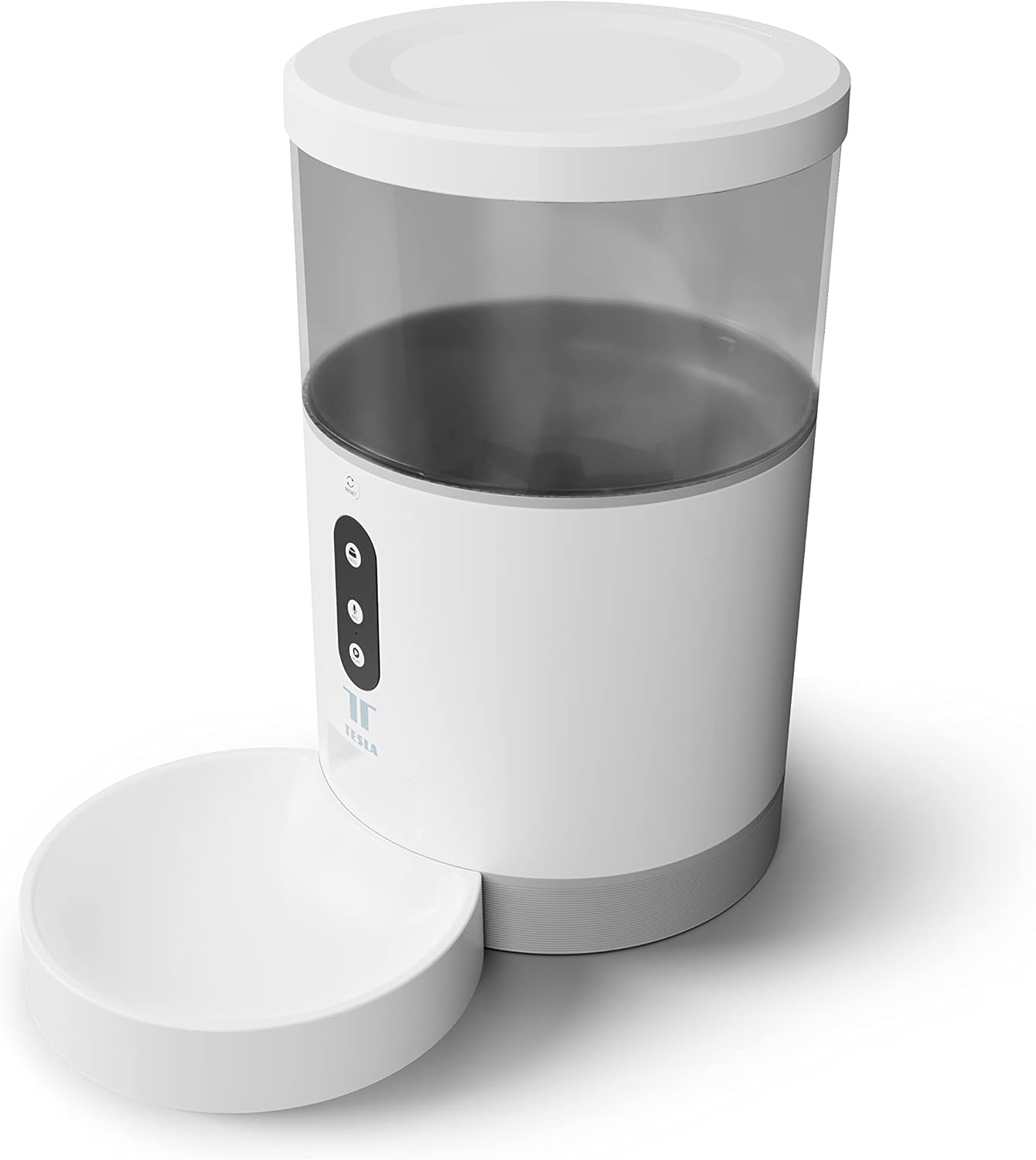
تصویر: سامنے view of the Tesla Smart Pet Feeder, showing the main unit with a transparent food reservoir, control buttons, and an attached white food bowl.
اہم حفاظتی معلومات
آلہ کو چوٹ یا نقصان سے بچنے کے لیے براہ کرم درج ذیل حفاظتی تدابیر پر عمل کریں:
- مین یونٹ کو پانی یا دیگر مائعات میں نہ ڈوبیں۔
- یقینی بنائیں کہ فیڈر ایک مستحکم، سطح کی سطح پر رکھا گیا ہے۔
- Keep out of reach of small children and pets when not in use or during assembly.
- Use only dry pet food with a kibble size up to 10 mm.
- آلہ کو خود سے جدا کرنے یا مرمت کرنے کی کوشش نہ کریں۔ مدد کے لیے کسٹمر سپورٹ سے رابطہ کریں۔
- Always unplug the feeder before cleaning.
پیکیج کے مشمولات
تصدیق کریں کہ پیکیج میں تمام اجزاء موجود ہیں:
- Tesla Smart Pet Feeder Main Unit
- کھانے کا پیالہ
- پاور اڈاپٹر
- صارف دستی (یہ دستاویز)
سیٹ اپ گائیڈ
1. اسمبلی
- مرکزی فیڈر یونٹ کو فلیٹ، مستحکم سطح پر رکھیں۔
- Attach the food bowl to the designated slot at the base of the main unit. Ensure it clicks securely into place.

تصویر: سامنے view of the feeder highlighting the control panel with feed, record, and play buttons.
2. آلہ کو طاقت دینا
- AC پاور: Connect the power adapter to the feeder's power input port and plug it into a standard wall outlet.
- بیٹری بیک اپ (اختیاری): For uninterrupted operation during power outages, insert three LR20 (D-cell) batteries into the battery compartment located at the bottom of the unit. بیٹریاں شامل نہیں ہیں اور انہیں الگ سے خریدنا ضروری ہے۔

تصویر: پیچھے view of the Tesla Smart Pet Feeder, showing the power input and battery compartment location.
3. Filling the Food Container
- Remove the lid from the top of the feeder.
- Pour dry pet food into the transparent container. The feeder has a capacity of 4 liters. Ensure kibble size does not exceed 10 mm to prevent jamming.
- ڑککن کو محفوظ طریقے سے تبدیل کریں۔

تصویر: ایک قریبی اپ view of dry pet food kibble in the feeder's bowl, demonstrating the type of food suitable for the device.
4. ایپ ڈاؤن لوڈ اور وائی فائی کنکشن
- Download the Tesla Smart app from the App Store (iOS) or Google Play Store (Android).
- Open the app and follow the on-screen instructions to create an account and add your Tesla Smart Pet Feeder.
- Ensure your Wi-Fi network is 2.4 GHz for successful connection.
آپریٹنگ ہدایات
1. ایپ کے ذریعے فیڈز کا شیڈولنگ
The primary method for controlling the feeder is through the Tesla Smart app. The app allows you to:
- Set feeding schedules: Define specific times for food dispensing.
- Adjust portion sizes: Control the amount of food dispensed per feeding. The feeder can dispense up to 10 portions per feeding.
- View کھانا کھلانے کی تاریخ

Image: An orange cat resting beside the Tesla Smart Pet Feeder, illustrating the feeder in a home environment.
2. دستی کھانا کھلانا
To dispense food manually, press the "Feed" button on the feeder's control panel. Each press will dispense one portion of food.
3. Voice Recording and Playback
The feeder includes a built-in microphone and speaker, allowing you to record a short message to call your pet at feeding times.
- ریکارڈ: Press and hold the "Record" button (microphone icon) on the control panel. Speak your message. Release the button to save.
- کھیلیں: Press the "Play" button (speaker icon) to play your recorded message. The message will also play automatically at scheduled feeding times.
4. سمارٹ ہوم انٹیگریشن
The Tesla Smart Pet Feeder is compatible with Google Assistant and Amazon Alexa. You can control the feeder using voice commands after linking it through the respective smart home applications.
دیکھ بھال اور صفائی
Regular cleaning ensures the longevity and hygienic operation of your pet feeder.
- کھانے کا پیالہ: The food bowl can be detached and washed by hand with mild soap and water. Rinse thoroughly and dry completely before reattaching.
- Food Container: The transparent food container can be wiped clean with a damp cloth. Ensure it is completely dry before refilling with food.
- مین یونٹ: Wipe the exterior of the main unit with a soft, dry cloth. کھرچنے والے کلینر کا استعمال نہ کریں یا مین یونٹ کو پانی میں نہ ڈوبیں۔
- Food Outlet: Periodically check the food outlet for any blockages or food residue and clear as necessary.
Important: Always unplug the feeder from the power source before cleaning.
خرابی کا سراغ لگانا
| مسئلہ | ممکنہ وجہ | حل |
|---|---|---|
| Feeder not powering on. | No power from outlet; batteries depleted or incorrectly installed. | Check power adapter connection and wall outlet. Replace or install D-cell batteries correctly. |
| Food not dispensing. | Food jammed; container empty; incorrect kibble size; feeder offline. | Check for food blockages in the outlet. Refill container. Ensure kibble is max 10mm. Check Wi-Fi connection and app status. |
| Wi-Fi سے منسلک نہیں ہو سکتا۔ | Incorrect Wi-Fi password; 5GHz network; feeder too far from router. | Verify Wi-Fi password. Ensure you are connecting to a 2.4 GHz network. Move feeder closer to router. Restart feeder and router. |
| Voice recording not working. | Microphone issue; recording procedure incorrect. | Ensure you are pressing and holding the record button correctly. Try restarting the feeder. |
وضاحتیں
| فیچر | تفصیل |
|---|---|
| ماڈل نمبر | TSL-PC-BL4۔ |
| طول و عرض (L x W x H) | 30 x 30 x 20 سینٹی میٹر |
| وزن | 1.92 کلوگرام |
| مواد | پلاسٹک |
| رنگ | سفید |
| صلاحیت | 4 لیٹر |
| کیبل کا سائز | 10 ملی میٹر تک |
| طاقت کا منبع | AC Adapter, 3x LR20 (D-cell) batteries (not included) |
| کنیکٹوٹی | Wi-Fi (2.4 GHz) |
| خصوصی خصوصیات | Wi-Fi and App Control, Voice Recording, Google Assistant/Amazon Alexa Compatible |
وارنٹی اور سپورٹ
For warranty information, technical support, or service inquiries, please refer to the official Tesla Smart webسائٹ یا ان کے کسٹمر سروس ڈیپارٹمنٹ سے رابطہ کریں۔ خریداری کے ثبوت کے طور پر اپنی خریداری کی رسید اپنے پاس رکھیں۔
For the most up-to-date information and support resources, visit: www.teslasmart.com۔


