1. پروڈکٹ ختمview
The Oladance OWS1 Open Ear Headphones offer a unique open-ear design for comfort and situational awareness. These wireless Bluetooth 5.2 headphones feature dual 16.5mm drivers for high-quality sound and extended battery life, making them suitable for various activities.
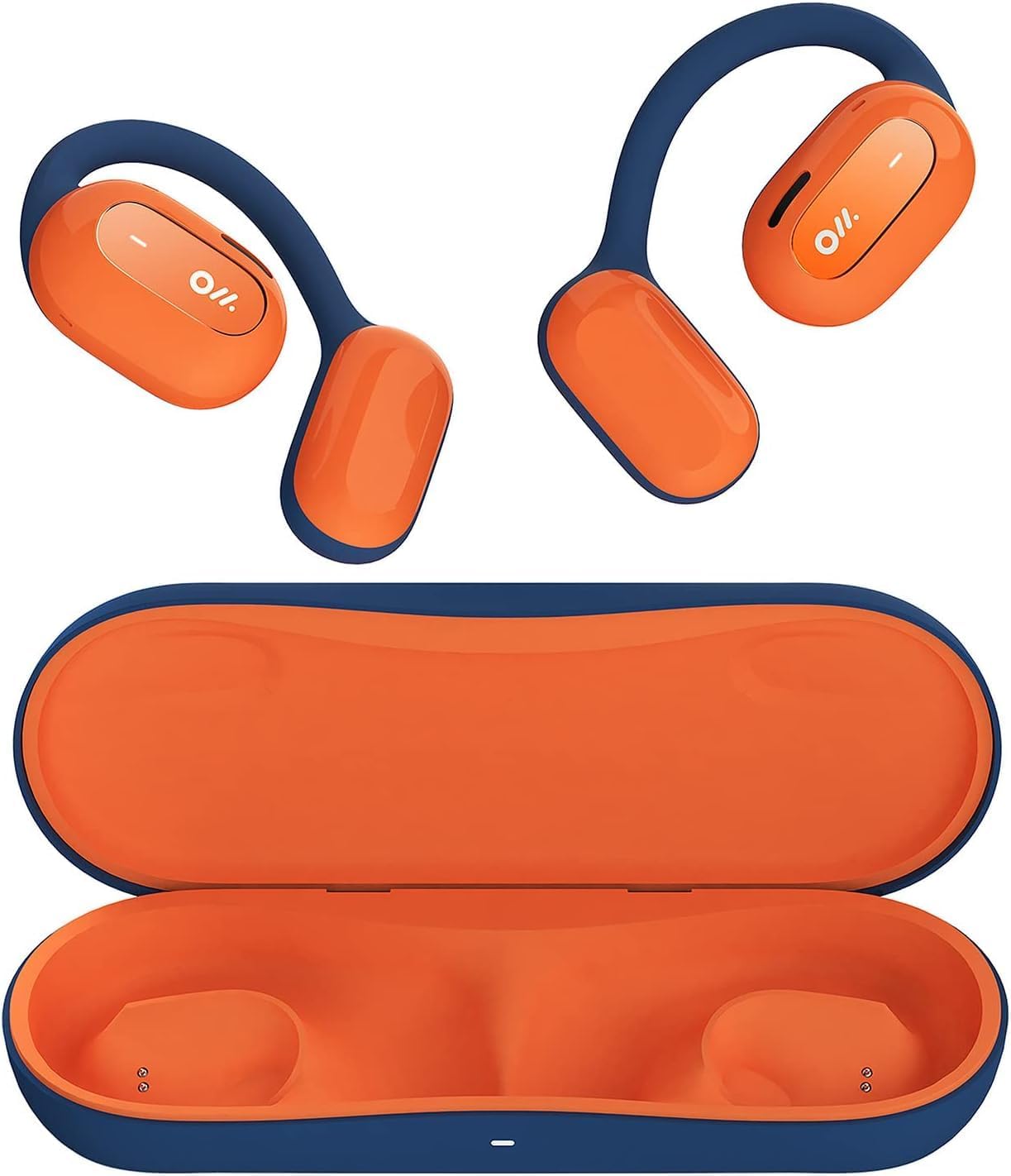
Image 1: Oladance OWS1 Open Ear Headphones and their carry case.
2. باکس میں کیا ہے۔
- 1 × Oladance Wearable Stereo (Pair of Open Ear Headphones)
- 1 × Non-charging Carry Case
- 1 × ٹائپ-سی کیبل
- 1 × یوزر مینوئل
3. کلیدی خصوصیات
- حقیقی کھلے کان کا ڈیزائن: Earbuds rest gently on top of the ear, avoiding insertion into the ear canal for enhanced comfort and situational awareness.
- 360° Superior Sound: Equipped with dual powerful 16.5mm dynamic drivers and bio-diaphragm technology for rich, clear audio across all volume levels.
- Anti-Hearing Loss Focus: Designed to prevent common health issues associated with traditional earbuds by not blocking the ear canal, reducing pressure and potential hearing damage.
- Extended 16-Hour Playtime: Features a built-in 160mAh battery and low-consumption algorithms, providing up to 16 hours of continuous playback on a single charge. Note: A separate charging case is required for extended playtime beyond the included carry case.
- محفوظ اور آرام دہ فٹ: Multi-point support system distributes weight evenly across the ear, ensuring a stable and comfortable fit for various activities.

Image 2: The Oladance OWS1 headphones are designed for a secure and comfortable fit, ideal for activities like yoga.
4. سیٹ اپ گائیڈ
4.1 ابتدائی چارجنگ
Before first use, fully charge your Oladance OWS1 headphones. Connect the provided Type-C cable to the charging port on the headphones and a compatible USB power source. The LED indicator will show charging status.
4.2 پاور آن/آف۔
- پاور آن کرنے کے لیے: Press and hold the power button (location typically on one of the earbud units) for approximately 2-3 seconds until you hear an audible prompt or see an LED indicator light up.
- پاور آف کرنا: Press and hold the power button for approximately 3-5 seconds until you hear an audible prompt or the LED indicator turns off.
4.3 بلوٹوتھ جوڑی
- یقینی بنائیں کہ ہیڈ فون بند ہیں۔
- Press and hold the power button for approximately 5-7 seconds until the LED indicator flashes red and blue alternately. This indicates the headphones are in pairing mode.
- اپنے آلے پر (اسمارٹ فون، ٹیبلیٹ، کمپیوٹر)، بلوٹوتھ کی ترتیبات پر جائیں۔
- تلاش کریں۔ "Oladance OWS1" in the list of available devices.
- Select "Oladance OWS1" to connect. Once connected, the LED indicator will typically flash blue slowly or turn off, and you will hear a confirmation tone.

Image 3: The Oladance OWS1 headphones are designed for an ergonomic and stable fit during various activities.
5. آپریٹنگ ہدایات
5.1 بنیادی کنٹرولز
| فنکشن | ایکشن |
|---|---|
| موسیقی چلائیں/روکیں۔ | ملٹی فنکشن بٹن کو ایک بار دبائیں۔ |
| اگلا ٹریک | ملٹی فنکشن بٹن کو دو بار دبائیں۔ |
| پچھلا ٹریک | ملٹی فنکشن بٹن کو تین بار دبائیں۔ |
| والیوم اپ | والیوم + بٹن کو ایک بار دبائیں۔ |
| والیوم کم | والیوم - بٹن کو ایک بار دبائیں۔ |
| جواب / کال ختم کریں۔ | Single press the Multi-function button during an incoming call or active call. |
| کال کو مسترد کریں۔ | آنے والی کال کے دوران ملٹی فنکشن بٹن کو 2 سیکنڈ تک دبائے رکھیں۔ |
| وائس اسسٹنٹ کو فعال کریں۔ | ملٹی فنکشن بٹن کو 2 سیکنڈ تک دبائے رکھیں۔ |
5.2 ملٹی پوائنٹ کنکشن
The Oladance OWS1 headphones support multi-point connection, allowing them to be connected to two Bluetooth devices simultaneously. This enables seamless switching between devices without re-pairing.
- یقینی بنائیں کہ ہیڈ فون پہلے ڈیوائس کے ساتھ جوڑا گیا ہے۔
- Put the headphones into pairing mode again (usually by holding the power button until the LED flashes red and blue).
- On the second device, search for "Oladance OWS1" in the Bluetooth settings and connect.
- The headphones should now be connected to both devices. Audio will automatically switch to the device playing content or receiving a call.

Image 4: The open-ear design allows for comfortable extended wear, even during work or calls.
6. دیکھ بھال اور دیکھ بھال
- صفائی: Use a soft, dry cloth to wipe the headphones. Avoid using harsh chemicals or abrasive materials.
- ذخیرہ: Store the headphones in their provided non-charging carry case when not in use to protect them from dust and damage.
- پانی کی مزاحمت: The headphones are water-resistant (IPX4 rated). Avoid submerging them in water or exposing them to high-pressure water jets. Dry thoroughly if they get wet.
- درجہ حرارت: ہیڈ فون کو انتہائی درجہ حرارت (گرم یا ٹھنڈا) یا زیادہ نمی کے سامنے لانے سے گریز کریں۔

Image 5: The included carry case protects your Oladance OWS1 headphones during transport and storage.
7 خرابیوں کا سراغ لگانا
- پاور آن نہیں ہو سکتا
- یقینی بنائیں کہ ہیڈ فون پوری طرح سے چارج ہیں۔ Type-C کیبل کا استعمال کرتے ہوئے انہیں پاور سورس سے جوڑیں۔
- ڈیوائس کے ساتھ جوڑا نہیں بن سکتا
- یقینی بنائیں کہ ہیڈ فون پیئرنگ موڈ میں ہیں (ایل ای ڈی چمکتا سرخ اور نیلا)۔
- اپنے آلے کا بلوٹوتھ آف اور آن کریں۔
- اپنے آلے پر سابقہ بلوٹوتھ کنکشنز کو صاف کریں۔
- ہیڈ فون کو اپنے آلے کے قریب لے جائیں۔
- کوئی آواز یا کم والیوم نہیں۔
- ہیڈ فونز اور اپنے منسلک ڈیوائس دونوں پر والیوم لیول چیک کریں۔
- یقینی بنائیں کہ ہیڈ فون آپ کے آلے سے مناسب طریقے سے جڑے ہوئے ہیں۔
- کسی مختلف ایپلیکیشن یا ذریعہ سے آڈیو چلانے کی کوشش کریں۔
- وقفے وقفے سے رابطہ
- یقینی بنائیں کہ ہیڈ فون اور آپ کے آلے کے درمیان کوئی رکاوٹ نہیں ہے۔
- مضبوط برقی مقناطیسی مداخلت سے بچیں۔
- Keep the headphones within the effective Bluetooth range (typically 10 meters).
8. مصنوعات کی تفصیلات
| فیچر | تفصیل |
|---|---|
| ماڈل نمبر | OLA02 |
| برانڈ | اولڈنس |
| کنیکٹوٹی ٹیکنالوجی | وائرلیس (بلوٹوتھ 5.2) |
| کان کی جگہ کا تعین | کان کھولیں۔ |
| فارم فیکٹر | کان کھولیں۔ |
| ڈرائیور کا سائز | Dual 16.5mm Dynamic Drivers |
| بیٹری کی زندگی (اوسط) | 16 گھنٹے تک |
| چارج کرنے کا وقت | تقریباً 2 گھنٹے |
| پانی کی مزاحمت کی سطح | پانی مزاحم (IPX4) |
| مائیکروفون فارمیٹ | بلٹ ان |
| کنٹرول کی قسم | Media Control (Buttons) |
| مواد | پلاسٹک |
| مصنوعات کے طول و عرض | 13 x 11 x 457.2 سینٹی میٹر |
| شے کا وزن | 260 گرام |

Image 6: A close-up of the Oladance OWS1 headphones, highlighting their design and color.
9. وارنٹی اور سپورٹ
Oladance products are covered by a limited warranty. For detailed warranty information, product support, or service inquiries, please refer to the official Oladance webسائٹ یا ان کی کسٹمر سروس سے براہ راست رابطہ کریں۔ وارنٹی کے دعووں کے لیے اپنی خریداری کا ثبوت رکھیں۔
مزید مدد کے لیے، براہ کرم ملاحظہ کریں: www.oladance.com


