1. تعارف
This manual provides detailed instructions for the setup, operation, maintenance, and troubleshooting of your Ducky One 3 Mini 60% Mechanical Keyboard. Please read this manual thoroughly to ensure proper use and to maximize your keyboard's performance and longevity.

Image: The Ducky One 3 Mini 60% Mechanical Keyboard, showcasing اس کا کمپیکٹ لے آؤٹ اور متحرک RGB بیک لائٹنگ۔
2. پیکیج کے مشمولات
Before proceeding with the setup, please verify that all items listed below are present in your package:
- Ducky One 3 Mini 60% Mechanical Keyboard
- ڈی ٹیچ ایبل بریڈڈ USB-C کیبل
- کیکپ پلر
- Ducky Channel Sticker
- Accent Keycaps (additional colored keycaps for customization)
3. سیٹ اپ گائیڈ
3.1 کی بورڈ کو جوڑنا
- Locate the USB-C port on the back of your Ducky One 3 Mini keyboard.
- Connect the smaller end of the provided USB-C cable to the keyboard's USB-C port.
- کیبل کے بڑے USB-A سرے کو اپنے کمپیوٹر پر دستیاب USB پورٹ سے جوڑیں۔
- آپ کے آپریٹنگ سسٹم کے ذریعے کی بورڈ کا خود بخود پتہ چل جائے گا۔ بنیادی فعالیت کے لیے عام طور پر کسی اضافی ڈرائیور کی ضرورت نہیں ہے۔

Image: The detachable braided USB-C cable being connected to the keyboard's port, illustrating the connection process.
3.2 کی بورڈ کی اونچائی کو ایڈجسٹ کرنا
The Ducky One 3 Mini features 3-level adjustable feet to customize the typing angle for optimal comfort.
- نیچے کی طرف پاؤں تک رسائی کے لیے کی بورڈ کو پلٹائیں۔
- Extend the feet to your preferred height. There are two sets of feet for three different angles.

Image: The underside of the Ducky One 3 Mini keyboard, highlighting the adjustable feet that allow for three different typing angles.
4. آپریٹنگ ہدایات
4.1 کی بورڈ کے بنیادی افعال
The Ducky One 3 Mini is a 60% layout keyboard, meaning some keys share functions. The Fn key is used to access secondary functions printed on the front or side of keycaps.
- Primary Keys: Standard alphanumeric keys function as labeled.
- ثانوی افعال: کو دبا کر رکھیں Fn key and press the desired key to activate its secondary function (e.g., arrow keys, F-row keys, Home, End, Page Up/Down).
4.2 آر جی بی لائٹنگ کنٹرول
The keyboard features per-key programmable RGB lighting. Specific key combinations (often involving Fn and other keys) are used to cycle through lighting modes, adjust brightness, and change colors. Refer to the Ducky official website or included quick guide for detailed RGB control commands.
4.3 میکرو پروگرامنگ
The Ducky One 3 Mini supports macro programming, allowing you to assign complex sequences of key presses to a single key. The remapped macro layout provides flexibility for custom commands. Detailed instructions for macro recording and assignment can be found in the comprehensive Ducky software or online resources.
4.4 گرم تبدیل کرنے کے قابل سوئچز
This keyboard is equipped with hot-swappable Kailh Yellow Sockets, allowing you to change mechanical switches without soldering. This feature enables customization of typing feel and sound.
- Use the included keycap puller to remove the keycap.
- Use a switch puller (not included, but often bundled with switches) to gently remove the switch from its socket.
- Align the pins of the new switch with the holes in the socket and press firmly until it clicks into place. Ensure pins are not bent.
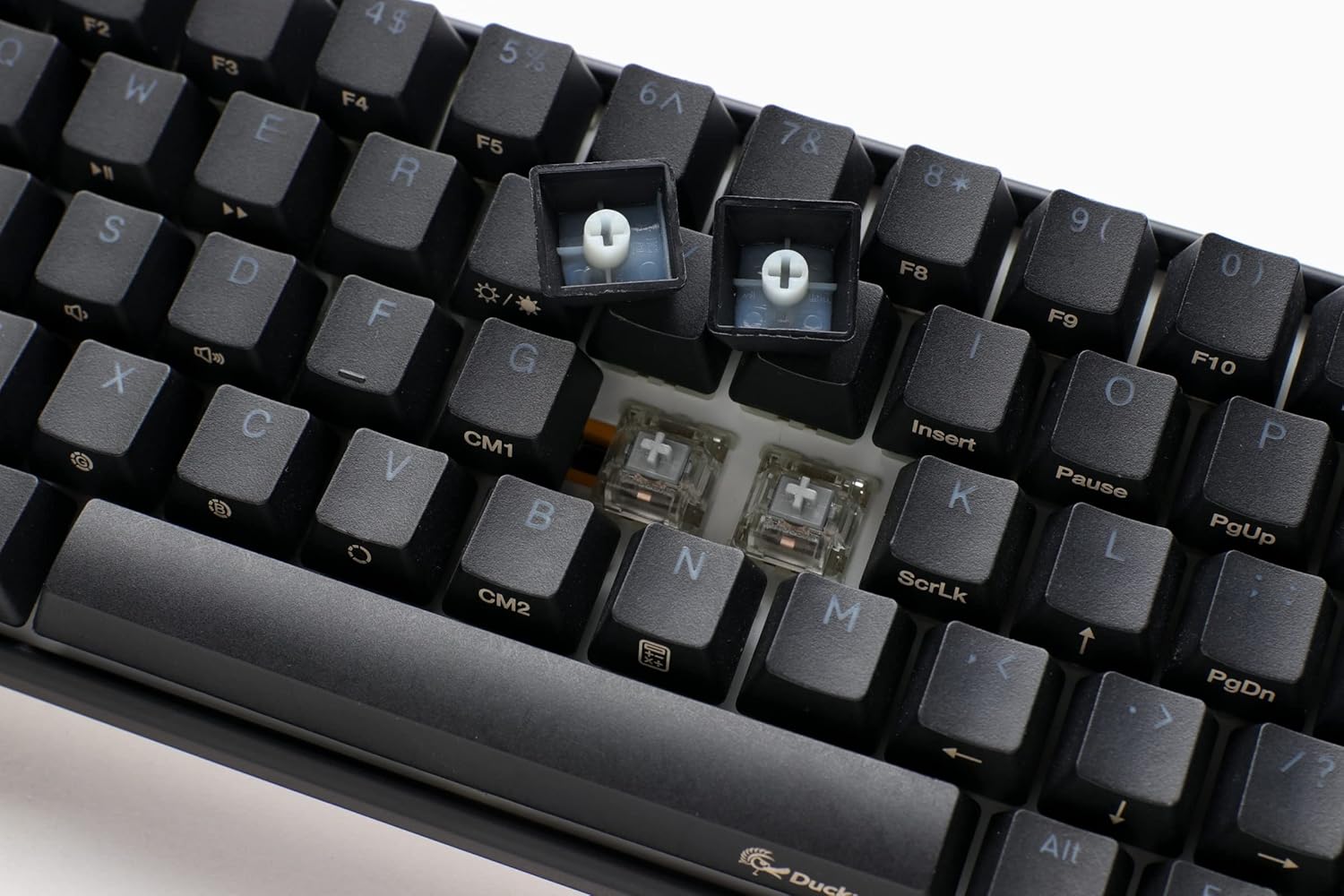
تصویر: ایک قریبی اپ view of the keyboard with several keycaps removed, revealing the hot-swappable mechanical switches beneath, ready for replacement or customization.
4.5 پروڈکٹ اوورview ویڈیو
ایک بصری اوور کے لیےview of the Ducky One 3 series features and design philosophy, please watch the official product video below.
ویڈیو: ایک آفیشل اوورview of the Ducky One 3 keyboard series, detailing its design, features, and the 'QUACK Mechanics' philosophy. This video provides a visual guide to the product's capabilities.
5 دیکھ بھال
5.1 کی بورڈ کی صفائی
باقاعدگی سے صفائی کی بورڈ کی ظاہری شکل اور فعالیت کو برقرار رکھنے میں مدد کرتی ہے۔
- کی کیپس: Use the included keycap puller to carefully remove keycaps. Clean them with a mild soap solution and a soft cloth, then ensure they are completely dry before reattaching.
- کی بورڈ باڈی: نرم، لنٹ فری کپڑا استعمال کریں، تھوڑا سا ڈیampکی بورڈ باڈی کو صاف کرنے کے لیے پانی یا ہلکے صفائی کے محلول سے بند کر دیں۔ ضرورت سے زیادہ نمی سے بچیں۔
- Between Switches: سوئچ کے درمیان سے دھول اور ملبہ ہٹانے کے لیے کمپریسڈ ہوا کا استعمال کریں۔

Image: The Ducky One 3 Mini keyboard featuring a custom spacebar with an intricate design, highlighting the potential for aesthetic customization and the ease of keycap removal for cleaning.
5.2 Switch and Stabilizer Care
The Ducky One 3 Mini features V2 stabilizers for improved stability and sound. While hot-swappable, proper care of switches and stabilizers can prevent issues.
- کی بورڈ پر مائعات پھیلانے سے گریز کریں۔
- When replacing switches, ensure they are inserted straight to prevent bending pins.
6 خرابیوں کا سراغ لگانا
If you encounter issues with your Ducky One 3 Mini keyboard, refer to the following common troubleshooting steps:
- کی بورڈ جواب نہیں دے رہا ہے:
- یقینی بنائیں کہ USB-C کیبل کی بورڈ اور کمپیوٹر دونوں سے محفوظ طریقے سے جڑی ہوئی ہے۔
- اپنے کمپیوٹر پر کی بورڈ کو کسی دوسرے USB پورٹ سے جوڑنے کی کوشش کریں۔
- Test the keyboard on another computer if possible to rule out a system-specific issue.
- آرجیبی لائٹنگ کام نہیں کر رہی:
- کی بورڈ کا دستی چیک کریں یا ڈکی کا website for the correct key combinations to activate and adjust RGB lighting.
- اس بات کو یقینی بنائیں کہ لائٹنگ کنٹرولز میں کوئی سافٹ وئیر تنازعات مداخلت نہیں کر رہے ہیں۔
- Keys Not Registering or Double-Typing (Chatter):
- Due to the hot-swappable design, try removing and re-inserting the affected switch to ensure proper seating.
- If the issue persists, consider replacing the switch with a new one.
- Ensure the keyboard is clean and free of debris that might obstruct switch operation.
- N-Key Rollover (NKRO) Issues:
- The Ducky One 3 Mini supports N-key rollover, meaning all key presses are registered simultaneously. If you experience issues, ensure your operating system and any gaming software are not interfering with this feature.
مزید مدد کے لیے، براہ کرم آفیشل ڈکی سپورٹ پر جائیں۔ webسائٹ یا ان کی کسٹمر سروس سے رابطہ کریں۔
7. وضاحتیں
| فیچر | تفصیل |
|---|---|
| ماڈل نمبر | DKON2161ST-SUSPDCLAWSC1 |
| لے آؤٹ | 60% |
| سوئچ کی قسم | Cherry MX Silent Red (Hot-Swappable) |
| کیکیپس | High-Density PBT Double-shot Seamless Keycaps |
| بیک لائٹنگ | فی کلیدی قابل پروگرام آرجیبی |
| کنیکٹوٹی | Detachable USB-C |
| خصوصی خصوصیات | QUACK Mechanics Design, Silicone Plate Dampener, EVA Foam Case Dampener, Ducky V2 Stabilizers, 3-Level Adjustable Feet, N-Key Rollover |
| مصنوعات کے طول و عرض | 12.2 x 4.33 x 1.57 انچ |
| شے کا وزن | 1.31 پاؤنڈ |
8. وارنٹی اور سپورٹ
Ducky products are manufactured to high-quality standards. This product is covered by a limited warranty against manufacturing defects. The specific terms and duration of your warranty may vary by region and retailer. Please retain your proof of purchase for warranty claims.
For technical support, warranty information, or service inquiries, please visit the official Ducky website or contact your local Ducky distributor or retailer. You can often find FAQs, driver downloads, and contact information on the official Ducky support pages.
آن لائن وسائل:
- ڈکی آفیشل Webسائٹ: www.duckychannel.com.tw
- Ducky Store on Amazon: Visit the Ducky Store


