1. تعارف
This manual provides comprehensive instructions for the setup, operation, and maintenance of your REACHER Small Digital Rainbow LED Alarm Clock, Model N188C-Black. Please read this manual thoroughly to ensure proper use and to maximize the functionality of your device.
2. پروڈکٹ ختمview
اہم خصوصیات:
- Large, colorful LED numbers for clear visibility day or night.
- Compact design (5.6" x 2.9" x 1.9") suitable for various spaces.
- Full range 0-100% brightness dimmer slider for personalized display intensity.
- Adjustable alarm volume from 30dB to 85dB.
- Easy-to-use snooze function by pressing any part of the top surface.
- Outlet powered with included DC adapter.
- Battery backup (2x AAA batteries, not included) to retain time and alarm settings during power outages
باکس میں کیا ہے:
- Small Colorful LED Alarm Clock
- USB کیبل
- پاور اڈاپٹر
- صارف دستی

شکل 2.1: سامنے view of the REACHER Small Digital Rainbow LED Alarm Clock.

Figure 2.2: The alarm clock's compact size, shown held in a hand.
3. سیٹ اپ
3.1 پاور کنکشن
- Connect the provided USB cable to the DC 5V port on the back of the alarm clock.
- Plug the other end of the USB cable into the included power adapter.
- پاور اڈاپٹر کو معیاری الیکٹریکل آؤٹ لیٹ میں داخل کریں۔ گھڑی کا ڈسپلے روشن ہو جائے گا۔
3.2 بیٹری بیک اپ کی تنصیب (اختیاری)
For battery backup functionality, which retains time and alarm settings during a power outage (display will be off to conserve power):
- گھڑی کے نچلے حصے میں بیٹری کا ٹوکری تلاش کریں۔
- بیٹری کے ٹوکری کا احاطہ کھولیں۔
- دو (2) AAA بیٹریاں داخل کریں (شامل نہیں)، درست قطبیت کو یقینی بناتے ہوئے (+/-)۔
- بیٹری کے کمپارٹمنٹ کور کو محفوظ طریقے سے بند کریں۔
4. آپریٹنگ ہدایات

Figure 4.1: Rear controls of the alarm clock.
4.1 وقت کا تعین
- دبائیں اور تھامیں۔ وقت طے button located on the back of the clock. The hour digits will begin to flash.
- استعمال کریں۔ + or - buttons to adjust the hour. Pay attention to the PM indicator if using 12-hour format.
- دبائیں وقت طے گھنٹے کی تصدیق کے لیے دوبارہ بٹن دبائیں اور منٹ ایڈجسٹمنٹ پر جائیں۔ منٹ کے ہندسے چمک اٹھیں گے۔
- استعمال کریں۔ + or - منٹ کو ایڈجسٹ کرنے کے لئے بٹن.
- دبائیں وقت طے button one more time to save the time setting.
4.2 الارم سیٹ کرنا۔
- دبائیں اور تھامیں۔ الارم سیٹ button on the back of the clock. The alarm hour digits will begin to flash, and an alarm icon will appear on the display.
- استعمال کریں۔ + or - الارم گھنٹے کو ایڈجسٹ کرنے کے بٹن۔
- دبائیں الارم سیٹ button again to confirm the alarm hour and move to alarm minute adjustment. The alarm minute digits will flash.
- استعمال کریں۔ + or - الارم منٹ کو ایڈجسٹ کرنے کے لیے بٹن۔
- دبائیں الارم سیٹ button one more time to save the alarm setting.
4.3 Turning Alarm On/Off
مختصراً دبائیں۔ الارم آن / آف button on the back of the clock to toggle the alarm function. The alarm icon on the display indicates if the alarm is active.
4.4 ڈسپلے کی چمک کو ایڈجسٹ کرنا
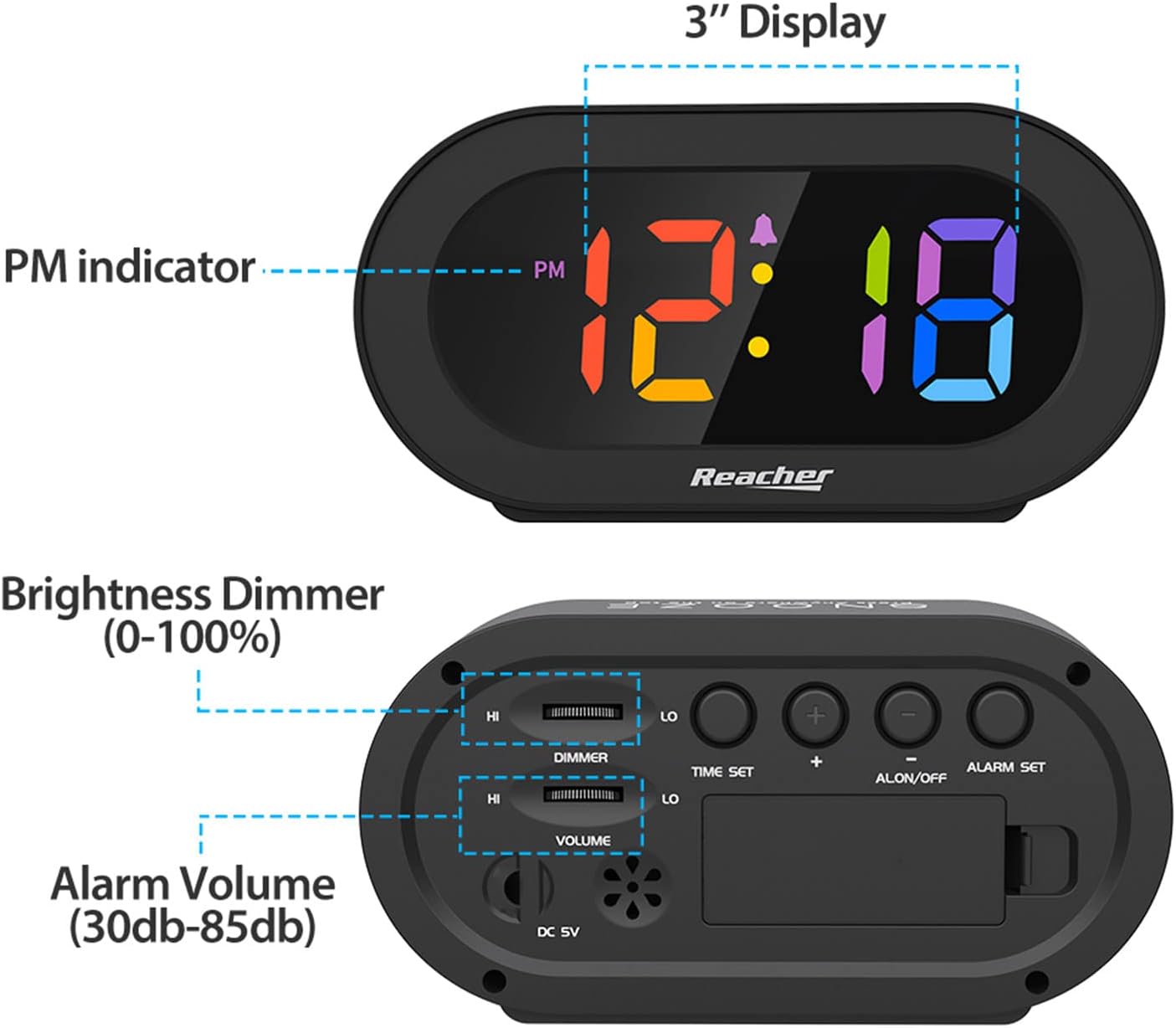
Figure 4.2: Dimmer slider control.
استعمال کریں۔ ڈیمر slider located on the back of the clock to adjust the display brightness from 0% (off) to 100% (maximum brightness). Slide towards 'HI' for brighter, and 'LO' for dimmer.
4.5 الارم والیوم کو ایڈجسٹ کرنا

Figure 4.3: Volume slider control.
استعمال کریں۔ حجم slider located on the back of the clock to adjust the alarm sound level from 30dB (low) to 85dB (high). Slide towards 'HI' for louder, and 'LO' for quieter.
4.6 اسنوز فنکشن۔
When the alarm sounds, press any part of the top surface of the clock to activate the snooze function. The alarm will temporarily pause and sound again after a set interval (typically 9 minutes).
4.7 الارم کو روکنا
To stop the alarm completely after it sounds (not just snooze), press the الارم آن / آف button on the back of the clock. The alarm icon will disappear from the display.
5 دیکھ بھال
To maintain your alarm clock in optimal condition:
- Wipe the clock surface with a soft, dry cloth.
- کھرچنے والے کلینر یا سالوینٹس کے استعمال سے گریز کریں، کیونکہ یہ ختم کو نقصان پہنچا سکتے ہیں۔
- Keep the device away from excessive moisture, direct sunlight, and extreme temperatures.
- If using battery backup, replace AAA batteries annually or if the clock frequently experiences power outages
6 خرابیوں کا سراغ لگانا
| مسئلہ | ممکنہ وجہ | حل |
|---|---|---|
| Clock display is off or dim. | No power, dimmer set to 0%, or battery backup active during power outage. | Ensure power adapter is securely plugged in. Adjust the DIMMER slider. If on battery backup, the display is intentionally off; it will return when main power is restored. |
| الارم نہیں بجتا ہے۔ | Alarm is not set, alarm is turned off, or volume is too low. | Verify alarm time is set correctly. Ensure the alarm icon is visible on the display (alarm is ON). Adjust the VOLUME slider to an audible level. |
| Time/Alarm settings are lost after power outage. | No battery backup installed or batteries are depleted. | Install two fresh AAA batteries for battery backup. |
| بٹن غیر جوابی ہیں۔ | سافٹ ویئر کی عارضی خرابی۔ | Unplug the power adapter, remove backup batteries (if installed), wait 30 seconds, then reconnect power. |
7. وضاحتیں
- ماڈل: N188C-Black
- ڈسپلے کی قسم: Digital LED (Rainbow Digits)
- مصنوعات کے طول و عرض: 5.6" (چوڑائی) x 2.9" (اونچائی) x 1.9" (گہرائی)
- طاقت کا منبع: Corded Electric (DC 5V adapter included)
- بیٹری بیک اپ: 2 x AAA بیٹریاں (شامل نہیں)
- مواد: Acrylonitrile Butadiene Styrene (ABS)، ایکریلک
- آئٹم کا وزن: 5.5 اونس
- کمرے کی قسم: Bedroom, Bedside, Desk, Shelf
8. وارنٹی اور سپورٹ
REACHER is committed to providing high-quality products and excellent customer service. While specific warranty periods may vary by region, we strive to address any product-related concerns promptly.
For technical support, warranty inquiries, or any questions regarding your REACHER Small Digital Rainbow LED Alarm Clock, please contact our customer service team:
- ای میل: کسٹمر@reachershop.com
Please provide your model number (N188C-Black) and a detailed description of the issue when contacting support.


