تعارف
This manual provides essential information for the proper installation, operation, and maintenance of your TELE System TS6105 DVB-T2 HEVC Digital Terrestrial Decoder. Please read these instructions carefully before using the device to ensure optimal performance and safety.
The TS6105 decoder is designed to receive DVB-T2 HEVC 10-bit digital terrestrial television broadcasts, offering Full HD resolution up to 1080p@60Hz. It includes features such as automatic channel scanning (AUTOSCAN), an Electronic Program Guide (EPG), and multimedia playback capabilities via USB.
پیکیج کے مشمولات
یقینی بنائیں کہ تمام اشیاء پیکیج میں موجود ہیں:
- TELE System TS6105 DVB-T2 HEVC Digital Terrestrial Decoder
- ریموٹ کنٹرول
- پاور اڈاپٹر
- صارف دستی (یہ دستاویز)

This image shows the compact design of the TS6105 decoder, highlighting the TELE System logo, model number TS6105 DVB-T2 HEVC, Dolby Audio, and HDMI branding on the front, with ventilation on the side.
سیٹ اپ
1. Connecting the Decoder
Before connecting, ensure your television and the decoder are turned off.

This image displays the rear panel of the TS6105 decoder, featuring the ANT IN, ANT OUT, COAXIAL, HD OUT (HDMI), SCART, and DC IN ports for power and signal connections.
- اینٹینا کنکشن: Connect your terrestrial antenna cable to the ANT IN port on the rear of the decoder. If you wish to loop the signal to another device, connect a coaxial cable from the آؤٹ آؤٹ port to the next device.
- TV کنکشن (HDMI): For the best picture quality, connect an HDMI cable from the ایچ ڈی آؤٹ port on the decoder to an available HDMI input on your television. Select the corresponding HDMI input on your TV.
- TV Connection (SCART): اگر آپ کے ٹی وی میں HDMI ان پٹ نہیں ہے تو، سے ایک SCART کیبل جوڑیں۔ SCART port on the decoder to the SCART input on your television.
- پاور کنکشن: سے پاور اڈاپٹر کو مربوط کریں ڈی سی IN port on the decoder, then plug the adapter into a wall outlet.
2. First-Time Installation and Channel Scan
After connecting the decoder and turning on your TV, switch on the decoder. The first time you use it, an installation wizard will guide you through the initial setup.
- زبان کا انتخاب: Choose your preferred language using the remote control's navigation buttons and press OK.
- Country Selection: Select your country. This helps the decoder apply the correct regional settings for channel scanning.
- آٹوسکین: The decoder will automatically initiate the AUTOSCAN function. This process searches for all available digital terrestrial channels and organizes them logically using the LCN (Logical Channel Number) system. This may take several minutes.
- تکمیل: Once the scan is complete, the decoder will save the channels and display the first available channel.
Operating the Decoder
ریموٹ کنٹرول ختم۔view
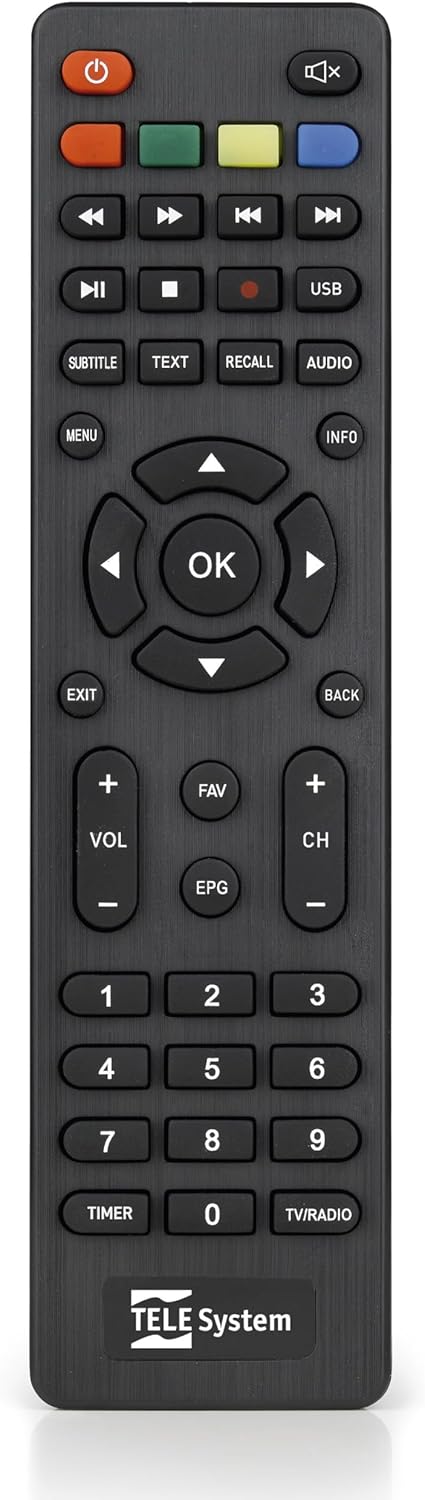
This image presents the remote control for the TS6105 decoder, featuring power, mute, channel, volume, navigation, EPG, media playback, and numeric buttons for comprehensive control.
- پاور بٹن (U): Turns the decoder on or off (standby).
- CH +/-: چینلز کو اوپر یا نیچے تبدیل کرتا ہے۔
- VOL +/-: حجم کی سطح کو ایڈجسٹ کرتا ہے۔
- ٹھیک ہے: Confirms selections in menus or displays channel information.
- مینو: Accesses the main menu for settings and features.
- EXIT/BACK: موجودہ مینو سے باہر نکلتا ہے یا پچھلی اسکرین پر واپس آتا ہے۔
- ای پی جی: الیکٹرانک پروگرام گائیڈ کھولتا ہے۔
- متن: Activates Teletext.
- عنوان: Toggles subtitles on/off or selects subtitle language.
- USB: Accesses the multimedia player.
- رنگین بٹن (سرخ، سبز، پیلا، نیلا): Functionality varies depending on the current menu or EPG.
الیکٹرانک پروگرام گائیڈ (EPG)
دبائیں ای پی جی پر ریموٹ کنٹرول پر بٹن view the Electronic Program Guide. The EPG provides information about current and upcoming programs for all channels. You can navigate through channels and time slots to see program details.
Multimedia Player (USB)
The TS6105 can play multimedia files USB اسٹوریج ڈیوائس سے۔
- Insert a USB drive into the USB port on the decoder.
- دبائیں یو ایس بی button on the remote control or navigate to the multimedia section via the مینو.
- Select the type of media you wish to play (Music, Photo, Video).
- اپنے براؤز کریں files اور دبائیں OK کھیلنے کے لیے
Pause TV / Timeshift
The Pause TV / Timeshift function allows you to pause live television and resume viewing later. This feature requires a USB storage device connected to the decoder.
- ایک پروگرام دیکھتے وقت، دبائیں روکیں۔ button (usually represented by two vertical bars) on the remote control.
- پلے بیک دوبارہ شروع کرنے کے لیے، دبائیں۔ کھیلیں button (usually represented by a right-pointing triangle).
- You can also fast-forward or rewind using the respective buttons.
دیکھ بھال
صفائی
To clean the decoder, ensure it is unplugged from the power outlet.
- بیرونی سطحوں کو صاف کرنے کے لیے نرم، خشک کپڑا استعمال کریں۔
- Do not use liquid cleaners, aerosols, or abrasive materials, as these can damage the device.
- Keep ventilation openings clear of dust and obstructions.
سافٹ ویئر اپڈیٹس
وقتا فوقتا کارخانہ دار کی جانچ کریں۔ website for available software updates. Updates can improve performance, add new features, or resolve issues. Follow the instructions provided with the update file احتیاط سے
خرابی کا سراغ لگانا
If you encounter problems with your decoder, refer to the following common issues and solutions:
- کوئی تصویر/آواز نہیں:
- Ensure all cables (antenna, HDMI/SCART, power) are securely connected.
- تصدیق کریں کہ آپ کا ٹی وی درست ان پٹ سورس پر سیٹ ہے (مثلاً، HDMI 1، AV)۔
- Check if the decoder is powered on and not in standby mode.
- No Channels Found:
- Perform an AUTOSCAN again from the menu.
- Check your antenna connection and ensure the antenna is properly positioned and functional.
- Verify that your region has DVB-T2 HEVC broadcasts.
- ریموٹ کنٹرول جواب نہیں دے رہا ہے:
- ریموٹ کنٹرول میں بیٹریاں تبدیل کریں۔
- Ensure there are no obstructions between the remote control and the decoder's IR sensor.
- پکچر فریزنگ یا پکسلیشن:
- This often indicates a weak or unstable signal. Check your antenna connection and position.
- Try rescanning channels.
وضاحتیں
- ماڈل: TS6105
- برانڈ: ٹیلی سسٹم
- رنگ: سیاہ
- ٹیونر کی قسم: DVB-T2 HEVC 10-bit
- ویڈیو ریزولوشن: Up to 1080p@60Hz (Full HD)
- کنیکٹوٹی: HDMI, USB, SCART, Coaxial (ANT IN/OUT)
- خصوصیات: AUTOSCAN, LCN, EPG, Pause TV/Timeshift, Multimedia Player (USB), Teletext, Subtitle Support
- ماڈل نمبر: 21005353
وارنٹی اور سپورٹ
وارنٹی کی معلومات
This product comes with a manufacturer's warranty of 2 years. Please retain your proof of purchase for warranty claims. The warranty covers defects in materials and workmanship under normal use. It does not cover damage caused by misuse, accidents, unauthorized modifications, or improper installation.
کسٹمر سپورٹ
For technical assistance, troubleshooting beyond this manual, or warranty inquiries, please contact TELE System customer support. Refer to the official TELE System webتازہ ترین رابطے کی معلومات کے لیے سائٹ یا مصنوعات کی پیکیجنگ۔


