تعارف
This manual provides detailed instructions for the installation, operation, and maintenance of your Cloudy Bay In-Wall Dimmer Switch, Model CBLD001WHA. This dimmer switch is designed for use with LED, CFL, and incandescent light fixtures, offering both single-pole and 3-way control options. Please read these instructions carefully before installation and retain them for future reference.

سامنے والا view of the Cloudy Bay In-Wall Dimmer Switch.
حفاظتی معلومات
- انتباہ: To avoid fire, shock, or death, turn off power at the circuit breaker or fuse and test that power is off before wiring.
- تمام قومی اور مقامی برقی کوڈ کے مطابق انسٹال کریں۔
- اگر آپ ان ہدایات کے کسی بھی حصے کے بارے میں مطمئن نہیں ہیں تو ، کسی لائق الیکٹریشن سے مشورہ کریں۔
- غیر مدھم روشنی کے ذرائع کے ساتھ استعمال نہ کریں۔
- This dimmer is for indoor use only.
باکس میں کیا ہے۔
تنصیب شروع کرنے سے پہلے تصدیق کریں کہ تمام اجزاء موجود ہیں:
- 1 ایکس ڈیمر سوئچ
- 1 x Screwless Cover Plate (Outer Plate)
- 1 x Inner Plate (Mounting Frame)
- 4 ایکس وائر نٹس
- 4 ایکس بڑھتے ہوئے پیچ
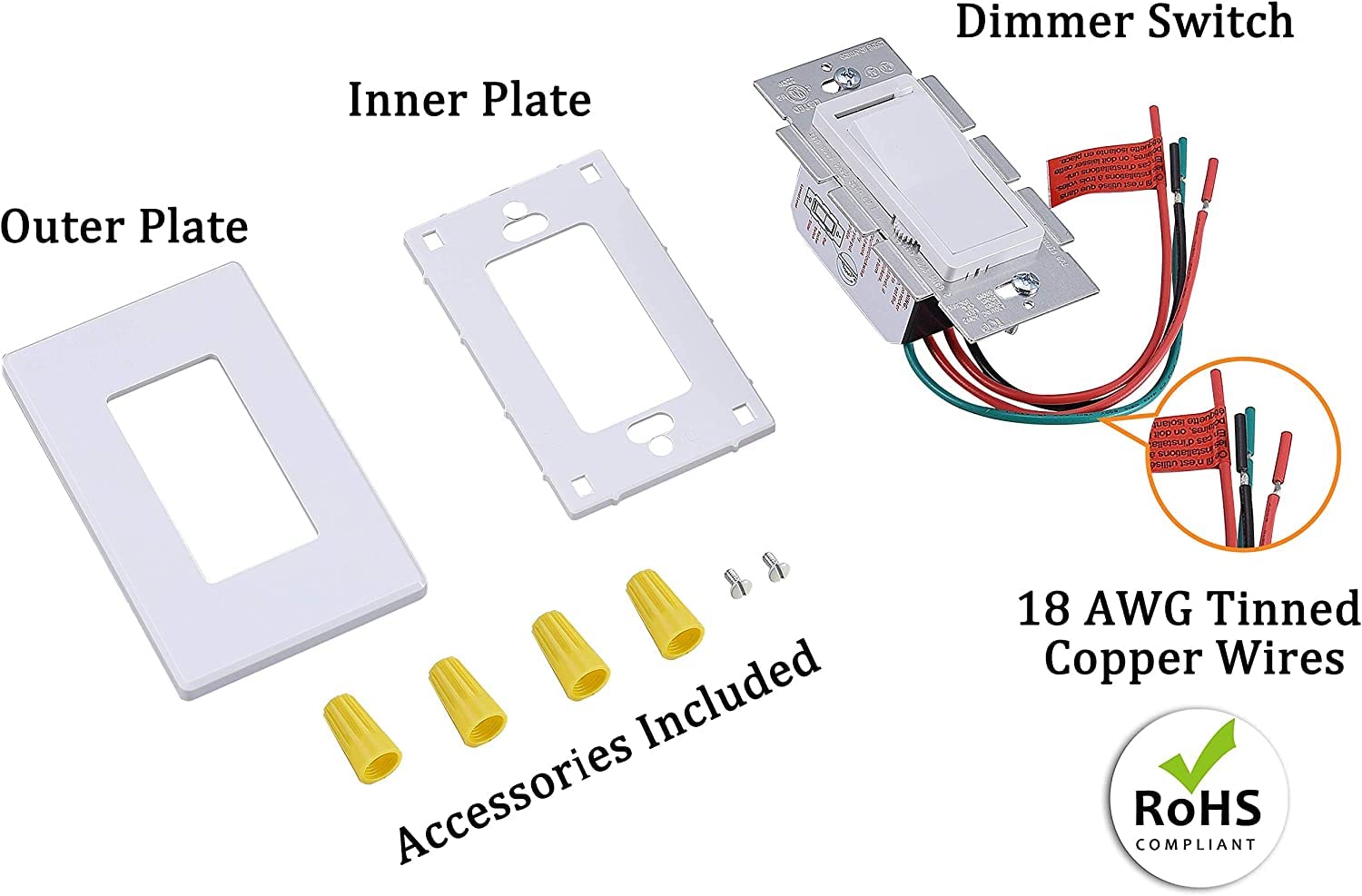
Illustration of the dimmer switch components, including the dimmer unit, inner plate, outer plate, wire nuts, and mounting screws.
سیٹ اپ اور انسٹالیشن
مرحلہ 1: پاور آف کریں۔
Before starting any electrical work, turn off the power at the circuit breaker or fuse box. Ensure the power is off by testing the circuit with a voltagای ٹیسٹر
مرحلہ 2: موجودہ سوئچ کو ہٹا دیں۔
Carefully remove the wall plate and mounting screws from the existing switch. Gently pull the old switch out of the electrical box. Do not disconnect wires yet.
Step 3: Identify Circuit Type and Wires
Determine if your wiring is a single-pole or 3-way configuration. A single-pole circuit controls lights from one location, while a 3-way circuit controls lights from two locations.
سنگل پول وائرنگ:
Typically involves two wires connected to the switch (Hot Input and Load) plus a ground wire. One of the red wires on the dimmer will be capped off.

Diagram illustrating single-pole wiring for the dimmer switch, showing connections for hot input, load, and ground wires.
3 طرفہ وائرنگ:
Involves three wires connected to the switch (Hot Input, Traveler 1, Traveler 2) plus a ground wire. The dimmer switch will replace one of the existing 3-way switches.

Diagram illustrating 3-way wiring for the dimmer switch, showing connections for hot input, two traveler wires, and ground.
Step 4: Wire Your New Dimmer
Connect the dimmer switch wires to the house wires using the provided wire nuts. Ensure all connections are secure.
- مربوط کریں۔ سبز یا ننگے تانبے کی زمینی تار from the wall box to the سبز تار مدھم پر
- مربوط کریں۔ black dimmer wire کو hot input wire from the wall box.
- کے لیے واحد قطب: Connect one of the red dimmer wires کو load wire (to the light fixture). Cap off the other red dimmer wire with a wire nut.
- کے لیے 3-طریقہ: Connect the two red dimmer wires دونوں کو traveler wires from the wall box. If the on/off direction is reversed after wiring, try switching the two red wires.

Detailed diagram showing wiring connections for both single-pole and 3-way installations, along with steps for mounting and adjusting the dimming range.
Step 5: Mount the Dimmer
Carefully push all wires into the wall box, leaving enough room to insert the dimmer. Secure the dimmer to the wall box using the provided mounting screws.
Step 6: Separate Mounting Frame from Wall Plate
Gently insert a flat-head screwdriver into the slots on the side of the wall plate to separate the inner mounting frame from the outer decorative wall plate.

Illustration demonstrating the separation of the face plate from the mounting frame.
مرحلہ 7: وال پلیٹ انسٹال کریں۔
Place the decorative wall plate over the installed mounting frame. Snap the outer plate onto the inner frame until it clicks securely into place.
Step 8: Adjust Dimming Range (Sensitivity Adjustment)
A trim dial located below the cover plate allows for sensitivity adjustment to optimize compatibility with various LED lamps and prevent flickering at low light levels.
- سرکٹ بریکر پر پاور آن کریں۔
- Turn the dimmer on and set the slide control to the lowest dimming level.
- Remove the outer wall plate to access the trim dial.
- Use a small screwdriver to turn the trim dial clockwise to increase the minimum brightness or counter-clockwise to decrease it. Adjust until the desired minimum light level is achieved without flickering.
- Turn the dimmer off, then back on to ensure the bulbs turn on consistently at the minimum setting.
- Once adjusted, replace the outer wall plate.

Illustration detailing the location and function of the dimming range adjustment wheel.
آپریٹنگ ہدایات
The Cloudy Bay Dimmer Switch features a rocker switch for on/off control and a slide control for dimming.
- راکر سوئچ: Press the top of the rocker switch to turn lights ON. Press the bottom to turn lights OFF.
- سلائیڈ کنٹرول: Move the slider up to increase brightness and down to decrease brightness.
Illustration of the dimmer switch controls: rocker switch for on/off and slide control for brightness adjustment.
مطابقت
This dimmer switch is compatible with the following bulb types:
- تاپدیپت: Up to 600W (120V/60Hz)
- Dimmable CFL: Up to 150W (120V/60Hz)
- dimmable LED: Up to 150W (120V/60Hz)
اہم نوٹس:
- Do not mix bulb types on the same dimmer circuit.
- Dimmable LEDs may not dim to the same low level as incandescent or halogen bulbs. The dimming range of LEDs can vary by manufacturer. If your bulbs hum, buzz, or flicker, they may not be fully compatible with this dimmer. Refer to the 'Adjusting Dimming Range' section for optimization.

Visual representation of the dimmer's compatibility with different bulb types and associated wattagای ریٹنگز
دیکھ بھال
The dimmer switch requires minimal maintenance. To clean, gently wipe the surface with a soft, damp کپڑا کھرچنے والے کلینر یا سالوینٹس کا استعمال نہ کریں۔
خرابی کا سراغ لگانا
| مسئلہ | حل |
|---|---|
| Light flashes in the whole dimming range |
|
| Light flashes in low dimming range | Slightly turn the adjustment dial counter-clockwise to achieve full compatibility with the lights. Refer to 'Adjusting Dimming Range' section. |
| دیگر مسائل | Obtain a dimmer compatibility list from your light bulb/lighting fixture supplier. A broader dimmer list often means less dimming issues like flicker or buzz. Consider using FCC compliant lighting products for stable performance. |

Visual representation of the troubleshooting guide, outlining common problems and their respective solutions.
وضاحتیں
| فیچر | تفصیلات |
|---|---|
| ماڈل نمبر | CBLD001WHA |
| آپریشن موڈ | آن مدھم آف |
| موجودہ درجہ بندی | 1.25 Amps |
| آپریٹنگ والیومtage | 120 وولٹ |
| رابطہ کی قسم | عام طور پر کھولیں۔ |
| کنیکٹر کی قسم | Clamp |
| ٹرمینل | پیچ |
| سرکٹ کی قسم | 3 طرفہ / واحد قطب |
| ایکچیویٹر کی قسم | Push Button (Rocker) |
| زیادہ سے زیادہ تاپدیپت لوڈ | 600W |
| زیادہ سے زیادہ Dimmable LED/CFL لوڈ | 150W |
| طول و عرض (L x W x H) | 1.85 x 2.76 x 4.53 انچ |
| سرٹیفیکیشنز | یو ایل لسٹڈ |

Detailed dimensions of the dimmer switch, inner plate, and outer plate.
وارنٹی اور سپورٹ
This Cloudy Bay Dimmer Switch comes with a 1-Year Warranty. If you encounter any issues with dimming or have questions regarding the product, please contact Cloudy Bay customer support for assistance.
For further support, please visit the CLOUDY BAY Store or refer to the official product documentation.


