1. پروڈکٹ ختمview
The UNV NVR302-16E2 is a high-performance Network Video Recorder (NVR) designed for advanced surveillance systems. It supports 4K resolution recording and playback, offering robust video management capabilities for up to 32 channels. This NVR is compatible with various camera protocols, including ONVIF, and features Ultra H.265 compression for efficient storage.
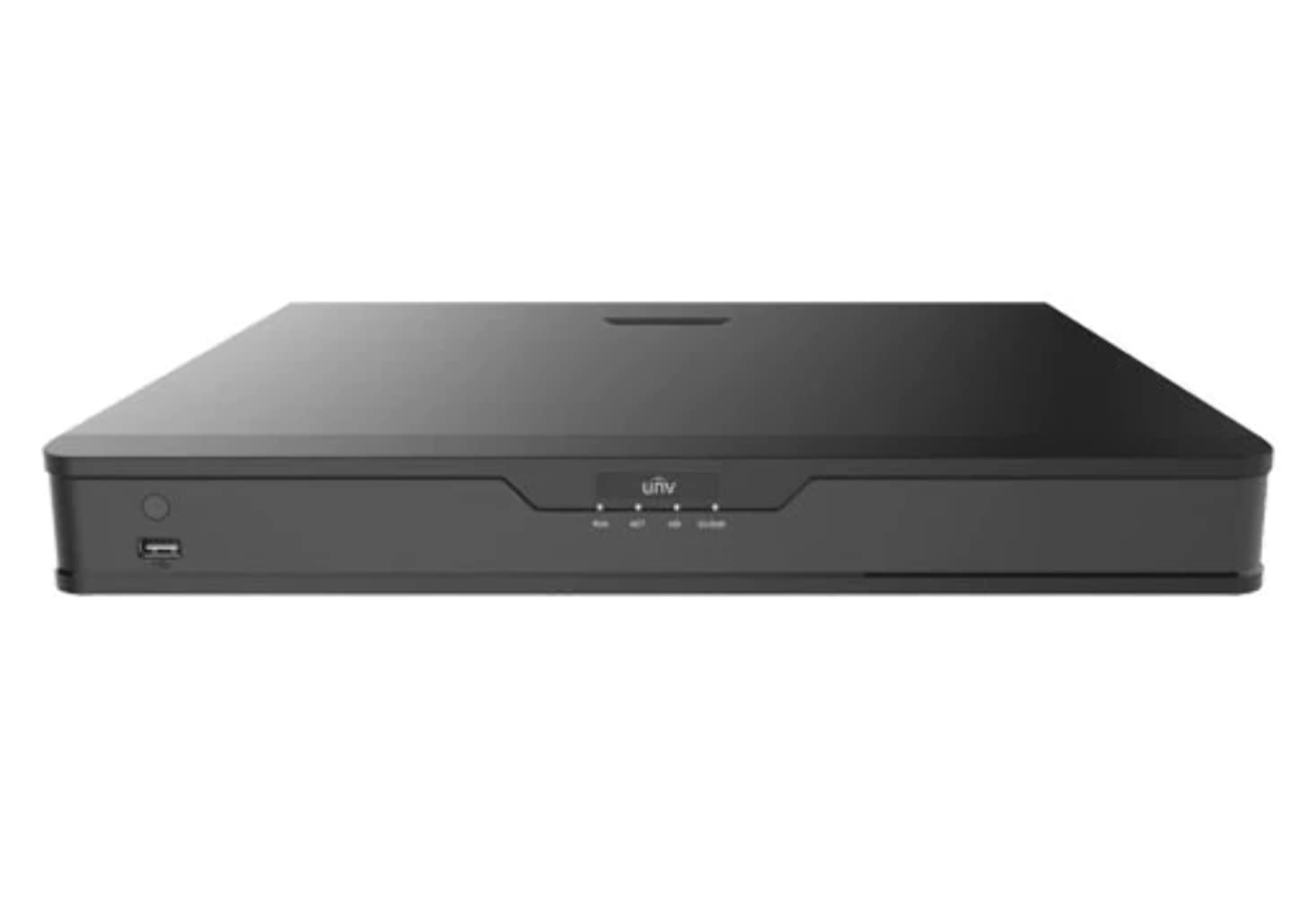
شکل 1: سامنے view of the UNV NVR302-16E2 4K NVR. The front panel includes a power button, a USB port, and indicator lights for power, HDD activity, network status, and alarm.
2. کلیدی خصوصیات
- Supports Ultra H.265/H.265/H.264 video formats for efficient compression.
- 8/16-channel input with Plug & Play functionality via independent PoE network interfaces.
- Compatibility with mainstream cameras supporting ONVIF conformance (Profile ایس ، پرو۔file جی ، پرو۔file T) and RTSP protocols.
- Equipped with 1-channel HDMI and 1-channel VGA outputs, with HDMI supporting up to 4K (3840x2160) resolution.
- Independent HDMI and VGA outputs for flexible display options.
- Supports recording resolutions up to 12 Megapixels.
- Accommodates 2 SATA HDDs, with support for up to 10TB per HDD.
- Features various fisheye dewarping modes for live view and playback, accessible via both web interface and GUI.
- Incorporates ANR (Automatic Network Replenishment) technology to enhance storage reliability during network disconnections.
- Supports cloud upgrade for convenient firmware updates.
3. پیکیج کے مشمولات
Please check the package contents upon unboxing. If any items are missing or damaged, contact your vendor immediately.
- UNV NVR302-16E2 NVR Unit
- پاور اڈاپٹر
- USB ماؤس
- SATA Data Cables (for HDD installation)
- HDD Mounting Screws
- کوئیک اسٹارٹ گائیڈ
4. سیٹ اپ
4.1 جسمانی تنصیب
- ایچ ڈی ڈی کی تنصیب:
Unscrew and remove the NVR cover. Securely mount the SATA hard disk drives (HDDs) into the designated bays using the provided screws. Connect the SATA data and power cables from the NVR motherboard to the HDDs. Replace the NVR cover and secure it with screws.
- کنیکٹ ڈسپلے:
Connect a monitor to the NVR's HDMI or VGA output port using a compatible cable.
- ماؤس کو جوڑیں:
USB ماؤس کو NVR کی USB پورٹس میں سے ایک میں لگائیں۔
- نیٹ ورک جڑیں:
NVR کے LAN پورٹ سے ایک ایتھرنیٹ کیبل کو اپنے نیٹ ورک روٹر یا سوئچ سے جوڑیں۔
- کیمروں کو جوڑیں:
For PoE cameras, connect them directly to the NVR's independent PoE ports. For non-PoE cameras, ensure they are connected to the same network as the NVR and powered separately.
- پاور سے رابطہ کریں:
پاور اڈاپٹر کو NVR کے پاور ان پٹ سے جوڑیں اور پھر اسے پاور آؤٹ لیٹ میں لگائیں۔ NVR خود بخود آن ہو جائے گا۔
4.2 ابتدائی کنفیگریشن
Upon the first boot, the NVR will guide you through an initial setup wizard. Follow the on-screen prompts to configure essential settings.
- ایڈمنسٹریٹر پاس ورڈ سیٹ کریں: Create a strong password for the 'admin' user. This is crucial for security.
- نیٹ ورک کی ترتیبات: Configure the NVR's IP address (DHCP or Static IP). Ensure it is on the same network as your cameras for proper communication.
- تاریخ اور وقت: صحیح تاریخ، وقت اور ٹائم زون سیٹ کریں۔
- ایچ ڈی ڈی شروع کرنا: The NVR will prompt you to initialize (format) the newly installed HDDs. This step is necessary before recording can begin.
- کیمرہ تلاش کریں اور شامل کریں: The NVR will automatically search for connected cameras. Select and add the cameras you wish to manage.
5. NVR کو چلانا
5.1 لائیو View
سیٹ اپ کے بعد، NVR لائیو ڈسپلے کرے گا۔ view منسلک کیمروں کا۔ آپ سنگل کیمرہ کے درمیان سوئچ کر سکتے ہیں۔ view، ملٹی کیمرہ گرڈ view, and customize the display layout.
- چینل کا انتخاب: Click on a channel window to select it.
- پی ٹی زیڈ کنٹرول: If using PTZ cameras, use the on-screen controls or joystick (if connected) to pan, tilt, and zoom.
- فوری پلے بیک: Right-click on a channel and select "Instant Playback" to view حالیہ ریکارڈنگ.
5.2 ریکارڈنگ کا انتظام
The NVR supports various recording modes.
- شیڈول ریکارڈنگ: Configure recording schedules based on time, day, and event (e.g., motion detection).
- تحریک کا پتہ لگانے کی ریکارڈنگ: حرکت کا پتہ لگانے کے زونز اور ہر کیمرے کے لیے حساسیت کو سیٹ اپ کریں تاکہ ریکارڈنگ صرف حرکت کا پتہ چل جائے۔
- دستی ریکارڈنگ: Start or stop recording manually from the live view انٹرفیس
5.3 پلے بیک
ریکارڈ شدہ foo تک رسائی حاصل کریں۔tagدوبارہ کے لیے eview.
- Navigate to the "Playback" menu.
- Select the camera(s) and date/time range for playback.
- ریکارڈنگ کے ذریعے نیویگیٹ کرنے کے لیے ٹائم لائن کا استعمال کریں۔
- Options include fast forward, rewind, pause, and frame-by-frame playback.
5.4 بیک اپ
Export recorded video clips to an external USB drive.
- NVR کے USB پورٹ میں USB فلیش ڈرائیو داخل کریں۔
- Go to the "Backup" menu.
- Select the camera, time range, and desired video format for export.
- Start the backup process.
5.5 ریموٹ رسائی
Access your NVR remotely via a web browser or mobile application.
- Web براؤزر: Enter the NVR's IP address into a web browser on a computer connected to the same network. Log in with your credentials.
- موبائل ایپ: آفیشل یونی ڈاؤن لوڈ کریں۔view mobile application (e.g., EZView). Register an account, add your NVR by scanning the QR code or entering its serial number, and view live feeds or playback remotely.
6 دیکھ بھال
6.1 فرم ویئر اپڈیٹس
Regularly check for and install firmware updates to ensure optimal performance, security, and access to new features. Updates can typically be performed via the NVR's web interface or local GUI, often with cloud upgrade support.
6.2 HDD Management
Monitor the health and status of your hard drives. The NVR provides tools to check HDD status, format drives, and configure overwrite settings when storage is full.
6.3 سسٹم لاگز
Review system logs for any errors, warnings, or important events. This can assist in troubleshooting and system monitoring.
7 خرابیوں کا سراغ لگانا
| مسئلہ | ممکنہ وجہ | حل |
|---|---|---|
| مانیٹر پر کوئی ویڈیو آؤٹ پٹ نہیں ہے۔ | Loose cable connection; incorrect display resolution; NVR not powered on. | Check HDMI/VGA cable connections. Ensure NVR is powered. Try a different monitor or cable. Adjust NVR output resolution if possible. |
| کیمرے ڈسپلے نہیں ہو رہے ہیں۔ | Network issue; incorrect camera IP; camera not powered; camera not added to NVR. | Verify network connectivity. Ensure cameras are powered. Check camera IP addresses and add them to the NVR if not already done. |
| دور سے NVR تک رسائی حاصل نہیں کر سکتے۔ | Network configuration issue (port forwarding, DDNS); NVR offline; incorrect credentials. | Verify NVR's network settings. Ensure necessary ports are forwarded on your router. Check internet connection. Confirm login credentials. |
| کوئی ریکارڈنگ نہیں۔ | HDD not initialized or full; recording schedule not set; camera not recording. | Initialize the HDD. Check recording schedules and ensure they are active. Verify camera status and ensure it's configured to record. |
8. وضاحتیں
| فیچر | تفصیل |
|---|---|
| ماڈل نمبر | NVR302-16E2 |
| ویڈیو فارمیٹس سپورٹڈ | Ultra H.265 / H.265 / H.264 |
| چینل ان پٹ | 8/16-channel (with independent PoE interfaces) |
| HDMI آؤٹ پٹ | 1-channel, up to 4K (3840x2160) resolution |
| وی جی اے آؤٹ پٹ | 1-چینل |
| زیادہ سے زیادہ ریکارڈنگ ریزولوشن | 12 میگا پکسلز تک |
| ایچ ڈی ڈی سپورٹ | 2 SATA HDDs, up to 10TB each (20TB total) |
| کنیکٹوٹی ٹیکنالوجی | HDMI, VGA, Ethernet, USB |
| ہم آہنگ آلات | IP Cameras (ONVIF Profile S, G, T; RTSP) |
| مصنوعات کے طول و عرض | 18 x 14 x 4 انچ (45.72 x 35.56 x 10.16 سینٹی میٹر) |
| شے کا وزن | 3.97 پاؤنڈ (1.8 کلوگرام) |
| کارخانہ دار | یونیview |
9. وارنٹی اور سپورٹ
یونیview products typically come with a limited manufacturer's warranty. For specific warranty terms and conditions, please refer to the warranty card included with your product or visit the official Uniview webسائٹ
For technical support, troubleshooting assistance, or service inquiries, please contact Uniview customer support through their official channels. You can usually find contact information, FAQs, and support resources on the Uniview webسائٹ (www.uniview.com).
متعلقہ دستاویزات - NVR302-16E2
 |
ٹربل شوٹ یونیview NVR دو طرفہ آڈیو مسائل | یونیview حمایت یونی پر دو طرفہ آڈیو مسائل کو حل کرنے اور حل کرنے کے لیے جامع گائیڈview NVRs اور کیمرے۔ کے لیے اقدامات شامل ہیں۔ web انٹرفیس، موبائل ایپ، اور NVR GUI۔ |
 |
یونیview Network Video Recorder Quick Guide A quick guide for Uniview Network Video Recorders (NVRs), covering device indicators, interface ports, disk installation for various HDD configurations (1, 2, 4, 8, 9, 16-bay), startup and shutdown procedures, local operations like adding IP devices and playback, UNV-Link mobile app usage, web login, and essential safety warnings, disclaimers, and regulatory compliance information. |
 |
یونی کو کیسے تبدیل کیا جائے۔view NVR کے وقت کی ترتیبات یونی کے لیے وقت اور تاریخ کی ترتیبات کو ایڈجسٹ کرنے کے طریقے کے بارے میں ایک مرحلہ وار گائیڈview نیٹ ورک ویڈیو ریکارڈرز (NVRs) بشمول مختلف طریقوں کا استعمال کرتے ہوئے web انٹرفیس، براہ راست مانیٹر تک رسائی، EZTools سافٹ ویئر، اور موبائل ایپس جیسے EZView اور UNV-Link۔ |
 |
یونیview XVR301-G3 سیریز ڈیجیٹل ویڈیو ریکارڈر: NDAA کمپلائنٹ ڈیٹا شیٹ یونیورسٹی کے لیے جامع ڈیٹا شیٹview XVR301-G3 سیریز ڈیجیٹل ویڈیو ریکارڈر، بشمول XVR301-04G3، XVR301-08G3، اور XVR301-16G3۔ تفصیلات خصوصیات، وضاحتیں، کنیکٹوٹی، اور تعمیل۔ |
 |
یونیview 2021 پروڈکٹ گائیڈ: نیٹ ورک کیمرے، NVRs، VMS اور سیکیورٹی سلوشنز جامع یونی دریافت کریں۔view 2021 Product Guide, detailing a wide array of professional video surveillance solutions. This guide covers Network Cameras, NVRs, VMS, Professional Storage, Display & Control systems, and Accessories, featuring advanced technologies like LightHunter and PixelSense. Find detailed specifications and model information for Easy, Prime, and Pro series products, suitable for various applications from residential security to large-scale enterprise deployments. |
 |
NVR-B3601.33.45.221212 ریلیز نوٹس - Zhejiang Uniview ٹیکنالوجیز Zhejiang Uni کے لیے سرکاری ریلیز نوٹview ٹیکنالوجیز کا NVR-B3601.33.45.221212 نیٹ ورک ویڈیو ریکارڈر سافٹ ویئر، ورژن کی معلومات، نئی خصوصیات، تبدیلیاں، اور اپ گریڈ کے طریقہ کار کی تفصیل۔ |