1. تعارف
This manual provides essential information for the proper setup, operation, and maintenance of your Sharp 32FG6EA 32-inch HD Android TV. The Sharp 32FG6EA offers a wide range of connection options and features the Android TV operating system, providing a modern and intuitive television experience. It functions as an all-in-one entertainment hub, integrating Google Assistant for a smarter viewing experience. Users can quickly access entertainment, control smart devices, and obtain on-screen information using voice commands.
2. حفاظتی معلومات
براہ کرم ٹیلی ویژن استعمال کرنے سے پہلے تمام حفاظتی ہدایات کو بغور پڑھیں۔ مستقبل کے حوالے کے لیے اس دستی کو رکھیں۔
- بجلی کی فراہمی: یقینی بنائیں کہ TV صحیح والیوم کے ساتھ پاور سورس سے منسلک ہے۔tage پاور آؤٹ لیٹس کو اوورلوڈ نہ کریں۔
- وینٹیلیشن: وینٹیلیشن کے سوراخوں کو مسدود نہ کریں۔ زیادہ گرم ہونے سے بچنے کے لیے مناسب ہوا کے بہاؤ کے لیے ٹی وی کے ارد گرد مناسب جگہ دیں۔
- پانی اور نمی: Do not expose the TV to rain, moisture, or excessive humidity. Avoid placing objects filled with liquids on or near the TV.
- صفائی: Unplug the TV before cleaning. Use a soft, dry cloth. Do not use liquid cleaners or aerosol sprays.
- جگہ کا تعین: Place the TV on a stable, level surface. If wall-mounting, ensure the mount is securely installed and can support the TV's weight.
- سروسنگ: خود ٹی وی کی خدمت کرنے کی کوشش نہ کریں۔ تمام خدمات کا حوالہ اہل سروس اہلکاروں کو دیں۔
3. پیکیج کے مشمولات
تصدیق کریں کہ تمام اشیاء پیکیجنگ میں موجود ہیں:
- Sharp 32FG6EA 32-inch HD Android TV
- ریموٹ کنٹرول (2 AAA بیٹریوں کے ساتھ)
- Stand Type Base
- ہدایت نامہ
- پاور کیبل
4. سیٹ اپ
4.1 پیک کھولنا
Carefully remove the TV and all accessories from the packaging. Retain the packaging materials for future transport or servicing.
4.2 اسٹینڈ کو جوڑنا
If you are not wall-mounting the TV, attach the included stand base:
- نقصان سے بچنے کے لیے ٹی وی اسکرین کو نرم، چپٹی سطح پر رکھیں۔
- اسٹینڈ بیس کو ٹی وی کے نچلے حصے میں بڑھتے ہوئے سوراخوں کے ساتھ سیدھ میں رکھیں۔
- فراہم کردہ پیچ کا استعمال کرتے ہوئے اسٹینڈ کو محفوظ کریں۔ یقینی بنائیں کہ اسٹینڈ مضبوطی سے جڑا ہوا ہے۔
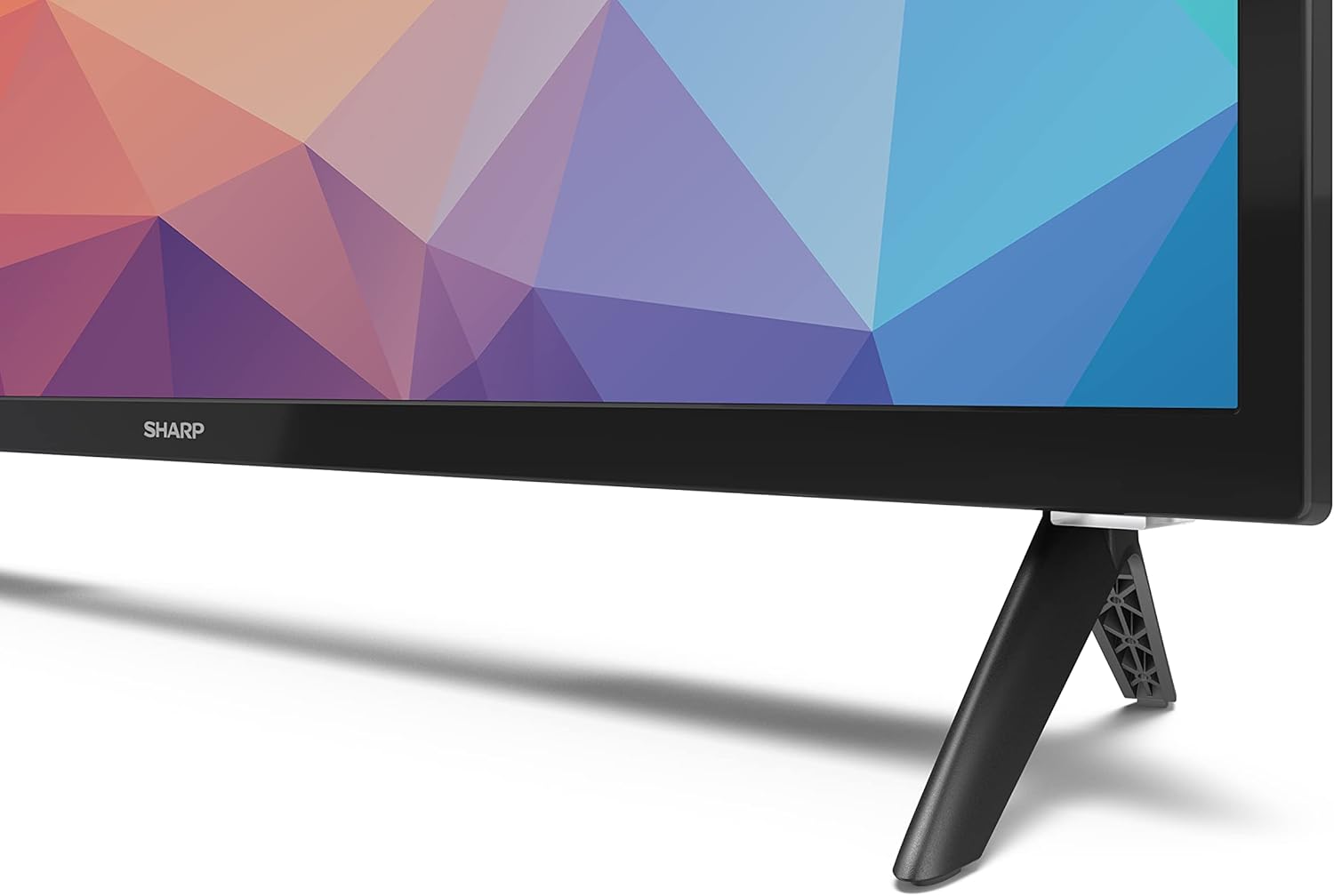
Image: Close-up of the TV stand attachment.
4.3 وال ماونٹنگ
The Sharp 32FG6EA supports VESA wall mounts with dimensions of 75 x 75 mm. Wall mount hardware is not included. Follow the instructions provided with your wall mount kit.
4.4 بیرونی آلات کو جوڑنا
Your TV features multiple ports for connecting various devices:
- HDMI: Connect Blu-ray players, game consoles, or set-top boxes to the 2 HDMI ports.
- USB: Connect USB storage devices for media playback to the 2 USB ports.
- اینٹینا/کیبل: Connect an antenna or cable TV source for broadcast channels.
- ایتھرنیٹ: وائرڈ انٹرنیٹ کنکشن کے لیے۔
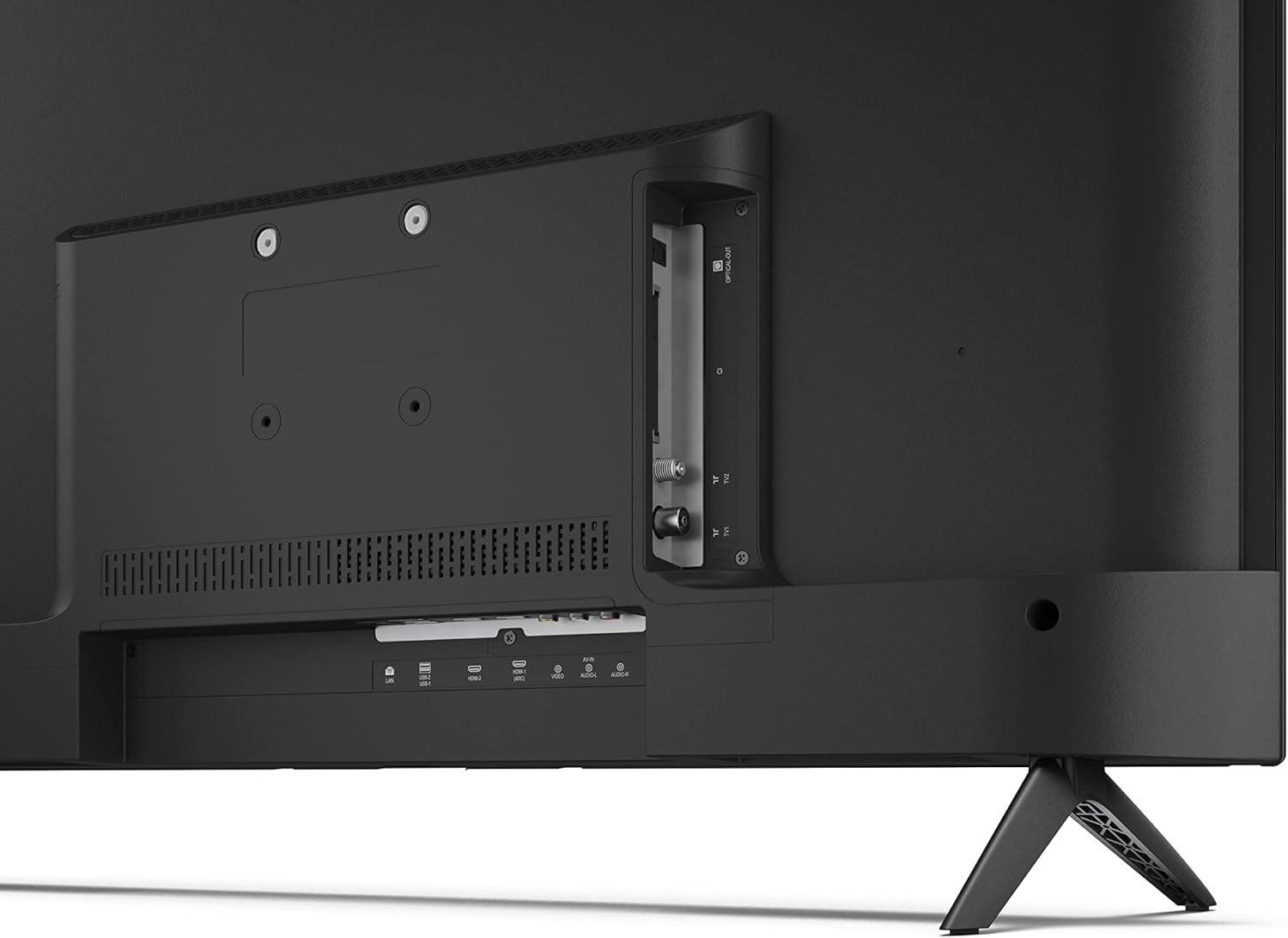
تصویر: پیچھے view کنکشن پورٹس کے ساتھ ٹی وی کا۔
4.5 پاور کنکشن
After connecting all necessary devices, plug the power cable into the TV and then into a wall outlet.
4.6 ابتدائی سیٹ اپ وزرڈ
پہلی بار پاور آن ہونے پر، TV ابتدائی سیٹ اپ کے عمل میں آپ کی رہنمائی کرے گا۔ اس میں شامل ہیں:
- زبان کا انتخاب۔
- نیٹ ورک کنکشن (وائی فائی یا ایتھرنیٹ)۔
- Google اکاؤنٹ سائن ان (مکمل Android TV خصوصیات کے لیے درکار ہے)۔
- چینل سکیننگ۔
5. آپریٹنگ
5.1 ریموٹ کنٹرول اوورview
The included remote control allows you to navigate the TV's features. Insert the 2 AAA batteries into the remote control before use.
- پاور بٹن: ٹی وی کو آن یا آف کرتا ہے۔
- Directional Pad (D-Pad) & OK Button: مینوز پر جائیں اور انتخاب کی تصدیق کریں۔
- پیچھے کا بٹن: پچھلی اسکرین پر واپس آجاتا ہے۔
- ہوم بٹن: Android TV ہوم اسکرین تک رسائی حاصل کرتا ہے۔
- والیوم اوپر/نیچے: آڈیو والیوم کو ایڈجسٹ کرتا ہے۔
- چینل اوپر/نیچے: ٹی وی چینلز بدلتے ہیں۔
- گوگل اسسٹنٹ بٹن: صوتی کنٹرول کو چالو کرتا ہے۔
- ایپ شارٹ کٹ بٹن: Dedicated buttons for popular streaming services like Netflix, Prime Video, and YouTube.
5.2 Android TV Interface Navigation
The Android TV home screen provides access to your installed apps, recommended content, and settings. Use the directional pad on your remote to navigate through the interface.
5.3 گوگل اسسٹنٹ
Press the Google Assistant button on your remote and speak into the microphone to:
- تلاش کریں۔ فلمیں، شوز، یا معلومات۔
- سمارٹ ہوم ڈیوائسز کو کنٹرول کریں۔
- ایپلیکیشنز کھولیں۔
- ٹی وی کی ترتیبات کو ایڈجسٹ کریں۔
5.4 Chromecast بلٹ ان
The TV includes Chromecast built-in, allowing you to cast content from compatible apps on your smartphone, tablet, or computer directly to the TV screen.
5.5 بلوٹوتھ کنیکٹیویٹی
Connect Bluetooth devices such as headphones or speakers to your TV for a personalized audio experience. Navigate to the TV's settings menu to pair new Bluetooth devices.
5.6 آڈیو سیٹنگز
The TV supports Dolby Audio with 2 x 6 W RMS speakers. You can adjust audio settings, including sound modes and equalizer, through the TV's settings menu.
6 دیکھ بھال
6.1 ٹی وی کی صفائی
To clean the TV screen and cabinet:
- دیوار کے آؤٹ لیٹ سے بجلی کی ہڈی کو ان پلگ کریں۔
- Use a soft, lint-free cloth to gently wipe the screen and surfaces.
- ضدی نشانات کے لیے، تھوڑا سا ڈیampur پانی کے ساتھ کپڑا یا خصوصی سکرین کلینر (کپڑے پر لگائیں، براہ راست سکرین پر نہیں)۔
- کھرچنے والے کلینر، موم یا سالوینٹس کا استعمال نہ کریں۔
6.2 سافٹ ویئر اپ ڈیٹس
آپ کا Android TV کارکردگی کو بہتر بنانے اور نئی خصوصیات شامل کرنے کے لیے وقفہ وقفہ سے سافٹ ویئر اپ ڈیٹس حاصل کر سکتا ہے۔ یقینی بنائیں کہ یہ اپ ڈیٹس حاصل کرنے کے لیے آپ کا TV انٹرنیٹ سے منسلک ہے۔ آپ ٹی وی کے سیٹنگ مینو میں دستی طور پر اپ ڈیٹس کی جانچ کر سکتے ہیں۔
7 خرابیوں کا سراغ لگانا
اگر آپ کو اپنے ٹی وی کے ساتھ مسائل کا سامنا ہے، تو درج ذیل عام مسائل اور حل دیکھیں:
- کوئی طاقت نہیں: اس بات کو یقینی بنائیں کہ پاور کیبل محفوظ طریقے سے TV اور ورکنگ وال آؤٹ لیٹ دونوں میں لگا ہوا ہے۔ ایک مختلف آؤٹ لیٹ آزمائیں۔
- کوئی تصویر/آواز نہیں: Check that the correct input source is selected. Verify all cables (HDMI, antenna) are properly connected.
- ریموٹ کنٹرول کام نہیں کر رہا: بیٹریاں چیک کریں اور یقینی بنائیں کہ وہ صحیح طریقے سے ڈالی گئی ہیں۔ ریموٹ کو براہ راست TV کے IR سینسر کی طرف رکھیں۔
- ناقص تصویر کا معیار: Check antenna/cable connections. Adjust picture settings in the TV menu. For streaming content, ensure a stable internet connection.
- کوئی انٹرنیٹ کنکشن نہیں: Verify Wi-Fi password or Ethernet cable connection. Restart your router and the TV.
- ایپس کام نہیں کر رہی ہیں: Ensure the TV's software is up to date. Try clearing the app's cache or reinstalling the app.
If problems persist, consult the Sharp support webسائٹ یا کسٹمر سروس سے رابطہ کریں۔
8. وضاحتیں
| فیچر | تفصیلات |
|---|---|
| ماڈل نمبر | 32FG6EA |
| برانڈ | تیز |
| اسکرین کا سائز | 32 انچ (81 سینٹی میٹر اخترن) |
| ڈسپلے ٹیکنالوجی | ایل ای ڈی |
| قرارداد | 720p (1366 x 768 پکسلز) |
| پہلو کا تناسب | 16:9 |
| ریفریش ریٹ | 50 Hz |
| آپریٹنگ سسٹم | اینڈرائیڈ ٹی وی 11 |
| خصوصی خصوصیات | Android TV, Google Assistant, Chromecast built-in |
| آڈیو آؤٹ پٹ | 2 x 6 W RMS, Dolby Audio |
| HDMI پورٹس | 2 |
| USB پورٹس | 2 |
| کنیکٹوٹی | وائی فائی، بلوٹوتھ، ایتھرنیٹ |
| VESA وال ماؤنٹ | 75 x 75 ملی میٹر |
| اسٹینڈ کے ساتھ طول و عرض (W x H x D) | 731 x 486 x 177 ملی میٹر |
| اسٹینڈ کے بغیر طول و عرض (W x H x D) | 731 x 433 x 68 ملی میٹر |
| پروڈکٹ کے طول و عرض (D x W x H) | 16 x 73 x 46.4 cm (approximate, with stand) |
| وزن | 3.9 کلوگرام |
| توانائی کی کارکردگی کی کلاس | E |

Image: TV dimensions diagram.

Image: Energy Label. For more details, visit EPREL ڈیٹا بیس.
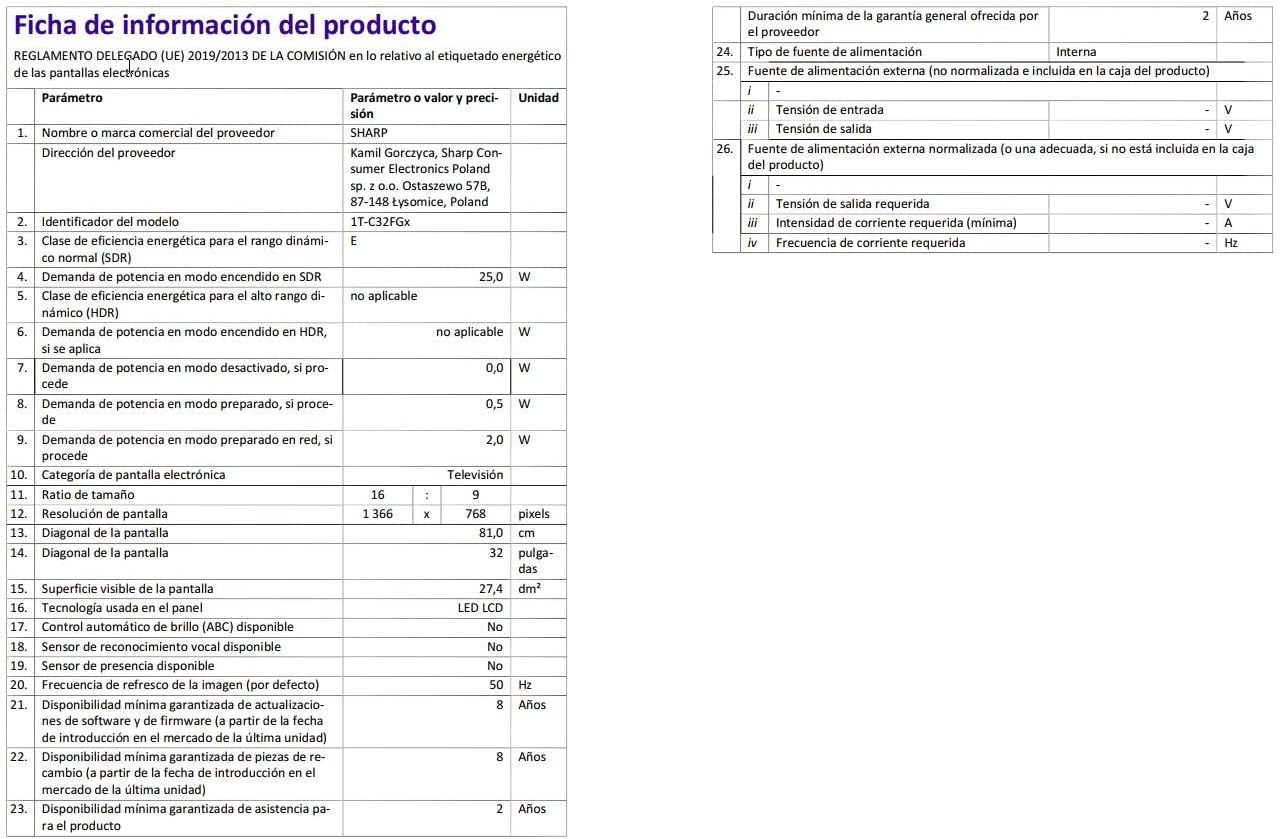
Image: Detailed product information sheet.
9. وارنٹی اور سپورٹ
The Sharp 32FG6EA television comes with a minimum general warranty duration of 2 years from the provider.
For technical support, warranty claims, or further assistance, please refer to the contact information provided with your purchase documentation or visit the official Sharp support webآپ کے علاقے کے لیے سائٹ۔


