1. تعارف
Thank you for choosing the AgfaPhoto Powerstation PPS 600 Pro. This portable power bank is designed to provide reliable power for various devices during outdoor activities, travel, and emergency situations. This manual provides essential information for safe operation, setup, maintenance, and troubleshooting. Please read it thoroughly before using the product.
2. حفاظتی ہدایات
- Do not disassemble, repair, or modify the unit. Incorrect reassembly may cause fire or injury.
- Do not expose the unit to fire or extreme temperatures (above 60°C / 140°F).
- یونٹ کو باتھ روم میں یا پانی یا نمی کے سامنے والے علاقے میں استعمال یا ذخیرہ نہ کریں۔
- Do not drop, hit, or subject the unit to strong impacts.
- بچوں کی پہنچ سے دور رکھیں۔
- Use only recommended accessories and charging cables.
- زیادہ گرمی سے بچنے کے لیے استعمال اور چارجنگ کے دوران مناسب وینٹیلیشن کو یقینی بنائیں۔
- In case of leakage from the battery, avoid contact with skin and eyes. Rinse affected areas with water and seek medical attention.
3. پیکیج کے مشمولات
تصدیق کریں کہ تمام آئٹمز باکس میں موجود ہیں:
- AgfaPhoto Powerstation PPS 600 Pro
- Power Cord (for AC charging)
- کار سگریٹ لائٹر اڈاپٹر
- صارف دستی
4. پروڈکٹ ختمview
Familiarize yourself with the ports, buttons, and display of your Powerstation PPS 600 Pro.

Image: Front panel of the AgfaPhoto Powerstation PPS 600 Pro, showing the LCD screen, DC output, USB-A ports, USB-C port, and AC output switch.
The unit features a clear LCD display that shows battery level, input power, and output power. Various ports are available for charging different devices simultaneously.
- LCD ڈسپلے: Shows battery status, input/output wattage, and error indicators.
- ڈی سی آؤٹ پٹ: For devices requiring DC power.
- USB-A پورٹس: اسمارٹ فونز، ٹیبلیٹس، اور USB سے چلنے والے دیگر آلات کو چارج کرنے کے لیے۔
- USB-C پورٹ: تیزی سے چارج کرنے والے ہم آہنگ آلات کے لیے۔
- AC آؤٹ پٹ: Standard wall outlet for appliances.
- ان پٹ پورٹ: For charging the power station itself.
5. سیٹ اپ
5.1 ابتدائی چارجنگ
Before first use, fully charge your AgfaPhoto Powerstation PPS 600 Pro. This ensures optimal battery performance and longevity.
- Connect the provided power cord to the AC input port on the power station.
- پاور کورڈ کے دوسرے سرے کو ایک معیاری وال آؤٹ لیٹ میں لگائیں۔
- The LCD display will show the charging status. The unit is fully charged when the battery indicator shows 100%.
Charging can also be done via a solar panel (sold separately) or a car cigarette lighter adapter.

Image: Illustration of the three charging methods for the power station: via car cigarette lighter, AC wall adapter, and solar panel.
6. آپریٹنگ ہدایات
6.1 پاور آن/آف۔
- To turn on the unit, press and hold the main power button for a few seconds. The LCD display will illuminate.
- To turn off the unit, press and hold the main power button again until the display turns off.
6.2 بیرونی آلات کو چارج کرنا
The Powerstation PPS 600 Pro offers multiple output options:
- USB آؤٹ پٹ: Connect your USB-powered devices (smartphones, tablets, drones, cameras) to the USB-A or USB-C ports. The unit will automatically detect and begin charging.
- AC آؤٹ پٹ: For devices requiring standard wall power (laptops, mini-refrigerators, LED TVs), press the AC ON/OFF button to activate the AC outlet. Plug your device into the AC outlet. Remember to turn off the AC output when not in use to conserve battery.
- ڈی سی آؤٹ پٹ: For 12V DC devices, connect them to the DC output port.

Image: The AgfaPhoto Powerstation PPS 600 Pro connected and charging a laptop, demonstrating its use for portable electronics.

Image: The power station in use during a power outage, providing light and charging a smartphone, highlighting its emergency backup capability.
7 دیکھ بھال
7.1 اسٹوریج
- Store the power station in a cool, dry place, away from direct sunlight and heat sources.
- طویل مدتی اسٹوریج کے لیے، بیٹری کی صحت کو برقرار رکھنے کے لیے یونٹ کو ہر 3-6 ماہ بعد تقریباً 50-80% چارج کریں۔
- Avoid storing in environments with high humidity or extreme temperatures.
7.2 صفائی
- یونٹ کے بیرونی حصے کو صاف کرنے کے لئے نرم ، خشک کپڑے کا استعمال کریں۔
- کھرچنے والے کلینر یا سالوینٹس کا استعمال نہ کریں۔
- یقینی بنائیں کہ تمام بندرگاہیں دھول اور ملبے سے پاک ہیں۔
8 خرابیوں کا سراغ لگانا
If you encounter issues with your Powerstation PPS 600 Pro, refer to the following common problems and solutions:
| مسئلہ | ممکنہ وجہ | حل |
|---|---|---|
| یونٹ آن نہیں ہوتا ہے۔ | بیٹری مکمل طور پر ڈسچارج ہے۔ | Charge the unit using the AC adapter. |
| No output from AC port | AC output not activated. Device exceeds power limit. | Press the AC ON/OFF button. Check device wattage against unit specifications. |
| Slow charging of external devices | Device requires higher current. Cable issue. | Ensure you are using the correct USB port (e.g., USB-C PD). Try a different cable. |
| یونٹ زیادہ گرم ہو رہا ہے۔ | ناقص وینٹیلیشن۔ ضرورت سے زیادہ بوجھ۔ | Ensure vents are clear. Reduce the number or power of connected devices. Allow unit to cool down. |
اگر مسئلہ برقرار رہتا ہے، تو براہ کرم کسٹمر سپورٹ سے رابطہ کریں۔
9. وضاحتیں
Technical details for the AgfaPhoto Powerstation PPS 600 Pro:
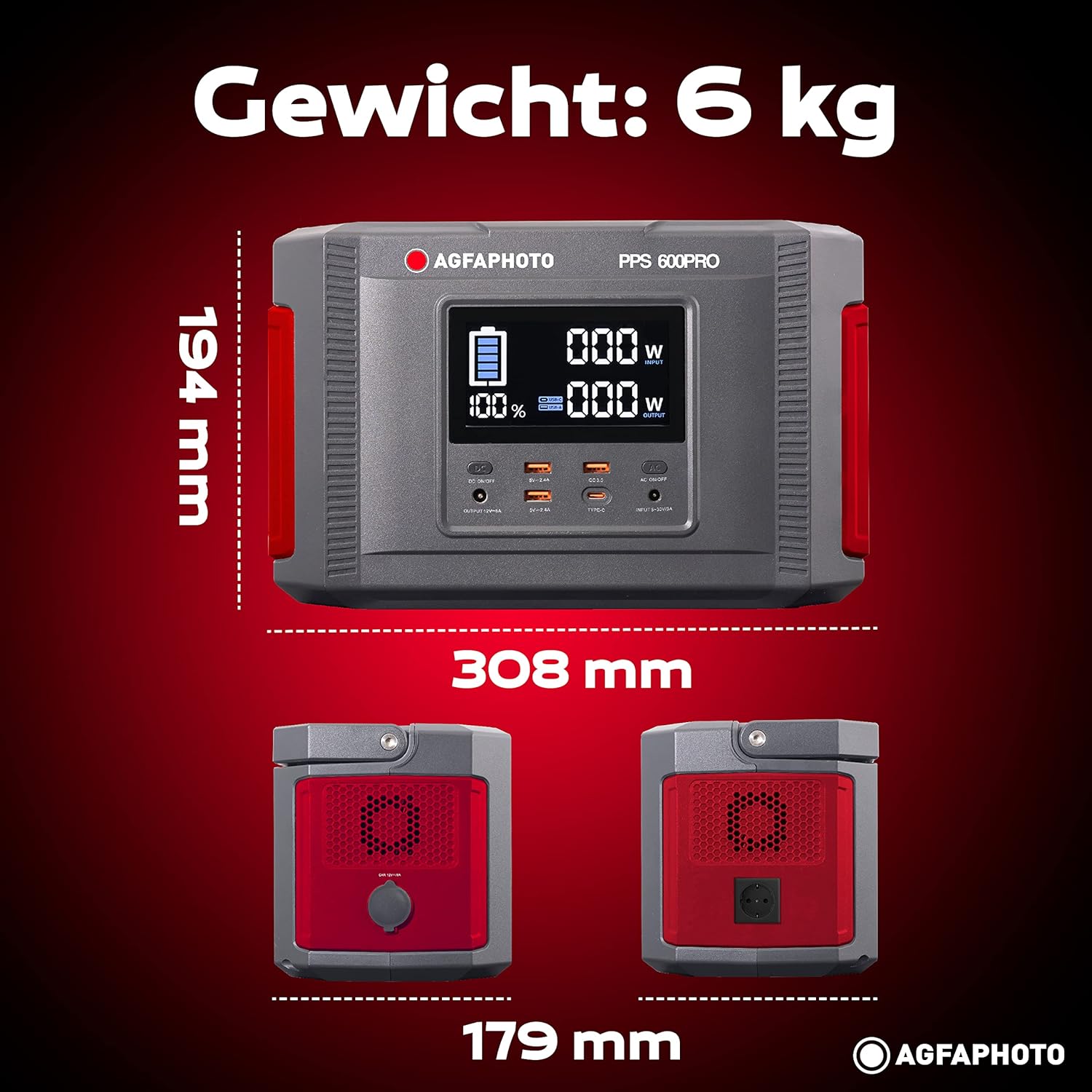
Image: Visual representation of the AgfaPhoto Powerstation PPS 600 Pro's dimensions (308 x 179 x 194 mm) and weight (6 kg).
| فیچر | تفصیلات |
|---|---|
| برانڈ | AgfaPhoto |
| ماڈل نمبر | 717-854742 (PPS600) |
| بیٹری کی صلاحیت | 644 Wh |
| آؤٹ پٹ پاور (مسلسل) | 600 ڈبلیو |
| آؤٹ پٹ پاور (چوٹی) | 1000 ڈبلیو |
| والیومtage | 220 وولٹ |
| شے کا وزن | 6.1 کلوگرام |
| طول و عرض (L x W x H) | 308 x 179 x 194 ملی میٹر |
| طاقت کا منبع | Battery Powered (Solaire, électricité) |
| تجویز کردہ استعمال | Mobile phones, cameras, laptops, tablets |
| شامل اجزاء | Power cord, USB ports, LCD screen, car cigarette lighter adapter |
| خصوصی خصوصیت | کمپیکٹ ڈیزائن |
10. وارنٹی اور سپورٹ
AgfaPhoto products are manufactured to high-quality standards and are covered by a manufacturer's warranty. For specific warranty terms and conditions, please refer to the warranty card included with your product or visit the official AgfaPhoto webسائٹ
For technical support, troubleshooting assistance, or spare parts inquiries, please contact AgfaPhoto customer service. Contact details can typically be found on the product packaging or the official brand webسائٹ


