تعارف
Thank you for choosing the Brondi BRAVO MOON cordless phone. This manual provides essential information for setting up, operating, and maintaining your new phone. The BRAVO MOON is designed for ease of use, featuring a large illuminated display, a comfortable raised keypad, and high-volume options, making it suitable for various users.
پیکیج کے مشمولات
براہ کرم چیک کریں کہ تمام اشیاء آپ کے پیکیج میں موجود ہیں:
- Brondi BRAVO MOON Handset
- بیس اسٹیشن
- بیس اسٹیشن کے لیے پاور اڈاپٹر
- ٹیلی فون لائن کی ہڈی
- صارف دستی (یہ دستاویز)
- Rechargeable Batteries (Note: Batteries are required but not included in the package. Please purchase separately.)
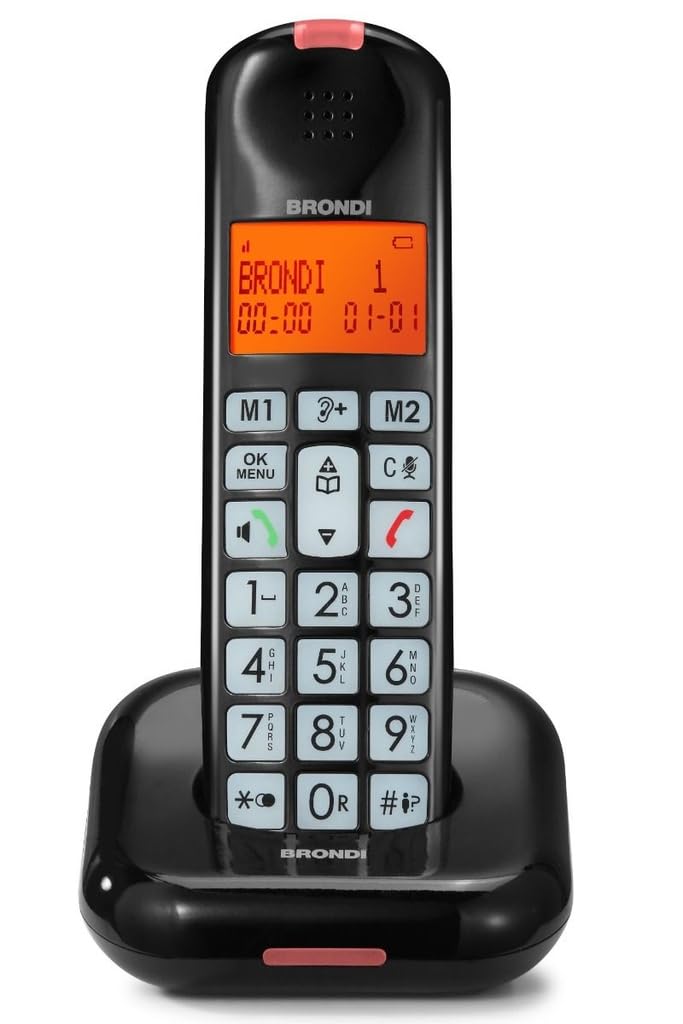
Image: Brondi BRAVO MOON cordless phone, black, showing the handset and base station.
سیٹ اپ
1. بیٹری کی تنصیب
- ہینڈ سیٹ کے پچھلے حصے پر بیٹری کے ٹوکری کا احاطہ تلاش کریں۔
- کور کو سلائیڈ کریں۔
- Insert the required rechargeable batteries (e.g., AAA NiMH) according to the polarity markings (+ and -).
- بیٹری کے کمپارٹمنٹ کور کو تبدیل کریں، اس بات کو یقینی بناتے ہوئے کہ یہ جگہ پر کلک کرتا ہے۔
2 بیس اسٹیشن کنکشن
- Connect one end of the power adapter to the DC IN socket on the base station.
- پاور اڈاپٹر کے دوسرے سرے کو معیاری الیکٹریکل آؤٹ لیٹ میں لگائیں۔
- ٹیلی فون لائن کی ہڈی کے ایک سرے کو بیس اسٹیشن پر لائن ساکٹ سے جوڑیں۔
- Plug the other end of the telephone line cord into your telephone wall jack.
3. ابتدائی چارجنگ
Place the handset on the base station. Ensure the charging indicator on the handset or base illuminates. For optimal battery performance, allow the handset to charge continuously for at least 12-15 hours before its first use, even if the display indicates a full charge earlier.
آپریٹنگ ہدایات
کال کرنا
- ہینڈسیٹ اٹھاو یا دبائیں کال کریں۔ بٹن
- Dial the desired phone number using the keypad. The numbers will appear on the illuminated display.
- دبائیں کال کریں۔ کال شروع کرنے کے لیے دوبارہ بٹن دبائیں۔
- کال ختم کرنے کے لیے، دبائیں۔ END بٹن دبائیں یا ہینڈ سیٹ کو واپس بیس اسٹیشن پر رکھیں۔
کال وصول کرنا
جب فون بجتا ہے، دبائیں کال کریں۔ button to answer. To end the call, press the END button or return the handset to the base station.
Hands-Free Function (Speakerphone)
کال کے دوران ، دبائیں اسپیکر button (often indicated by a speaker icon) to activate the hands-free function. Press it again to switch back to the handset earpiece.
Adjusting Ringer and Call Volume
Use the dedicated volume buttons (often اوپر/نیچے arrows) on the side or front of the handset to adjust the ringer volume when the phone is idle, or the call volume during a conversation. The Brondi BRAVO MOON features a high ringer volume for improved audibility.
کالر ID
When an incoming call is received, the caller's number (and name, if available and subscribed to Caller ID service) will be displayed on the handset's screen. You can review a list of recent calls by accessing the call log feature (refer to your phone's on-screen menu for navigation).
رنگ ٹون کا انتخاب
The phone offers 5 polyphonic melodies and 5 standard ringtones. To change the ringtone, navigate through the phone's menu settings. Typically, this involves pressing a مینو button, selecting 'Settings' or 'Ringtone', and then choosing your preferred melody.
دیکھ بھال
صفائی
To clean your phone, use a soft, dry cloth. Do not use liquid or abrasive cleaners, as these can damage the phone's surface or internal components. Keep the charging contacts on the handset and base station clean to ensure proper charging.
بیٹری کی دیکھ بھال
- Always use the recommended type of rechargeable batteries (e.g., NiMH AAA).
- اگر فون ایک طویل مدت تک استعمال نہیں کیا جائے گا، تو بیٹریوں کو ہٹا دیں تاکہ رساو کو روکا جا سکے۔
- Replace batteries when their performance significantly degrades (e.g., shorter talk time, frequent low battery warnings).
- مقامی ضابطوں کے مطابق ذمہ داری کے ساتھ پرانی بیٹریوں کو ضائع کریں۔
خرابی کا سراغ لگانا
| مسئلہ | ممکنہ وجہ | حل |
|---|---|---|
| No power/Handset display is blank | Batteries not installed or discharged; Power adapter not connected. | Ensure batteries are correctly installed and charged. Check power adapter connection to base and electrical outlet. |
| کوئی ڈائل ٹون نہیں۔ | Telephone line cord disconnected; Service issue. | Check that the telephone line cord is securely connected to the base and the wall jack. Test with another phone if possible. |
| Poor reception, crackling, or dropped calls | ہینڈ سیٹ بیس سے بہت دور؛ دوسرے الیکٹرانک آلات سے مداخلت۔ | Move closer to the base station. Relocate the base station away from other electronic devices (Wi-Fi routers, microwaves, computers). |
| Short battery life or handset not charging | Batteries not fully charged; Old or faulty batteries; Dirty charging contacts. | Ensure handset is properly seated on the base for charging. Clean charging contacts. Replace old batteries with new rechargeable ones. |
| کالر ID ظاہر نہیں کی گئی ہے۔ | Caller ID service not subscribed; Caller blocked their number. | اپنے ٹیلی فون سروس فراہم کنندہ سے رابطہ کریں اس بات کو یقینی بنانے کے لیے کہ کالر آئی ڈی سروس آپ کی لائن پر فعال ہے۔ |
وضاحتیں
- برانڈ: برونڈی۔
- ماڈل: BRAVO MOON (BRO-BRAVOMOON)
- فون کی قسم: بے تار
- رنگ: سیاہ
- مواد: Acrylonitrile Butadiene Styrene (ABS)
- ڈسپلے: Large illuminated display with large numbers
- کیپیڈ: Large raised keypad
- رنگ ٹونز: 5 polyphonic melodies + 5 standard ringtones
- خصوصیات: High ringer volume, Hands-free function, Caller ID indicator, LED notification on handset
- Compatible Peripherals: پبلک سوئچڈ ٹیلی فون نیٹ ورک (PSTN)
- طاقت کا منبع: Battery (rechargeable, not included)
- گفتگو کا وقت: 10 گھنٹے تک
- اسٹینڈ بائی ٹائم: 50 گھنٹے تک
- آئٹم کا وزن: 1 کلوگرام
- پیکیج کے طول و عرض: 19 x 12 x 8 سینٹی میٹر
وارنٹی اور سپورٹ
The Brondi BRAVO MOON cordless phone comes with a standard manufacturer's warranty. For specific warranty terms and conditions, please refer to the warranty card included with your purchase or visit the official Brondi website. For technical support, troubleshooting assistance beyond this manual, or to inquire about replacement parts, please contact Brondi customer service through their official channels.


