تعارف
Thank you for choosing the LATEC Digital Wall Clock (Model 06-5063). This clock features a large, clear display, DCF-77 radio-controlled time synchronization, automatic Daylight Saving Time (DST) adjustment, an alarm with snooze function, and displays indoor temperature, humidity, date, and day of the week. This manual provides detailed instructions to help you set up and operate your new clock.

Image: LATEC Digital Wall Clock displaying time, date, temperature, humidity, and alarm.

تصویر: ختمview of LATEC Digital Wall Clock features including DCF time, alarm, calendar, temperature, humidity, backlight, battery operation, auto DST, low battery warning, and 12/24H display.
سیٹ اپ
1. بیٹری کی تنصیب
- گھڑی کے پچھلے حصے میں بیٹری کے ٹوکری کا احاطہ کھولیں۔
- Insert the required batteries (not specified in input, typically AA or AAA) according to the polarity markings (+ and -).
- بیٹری کے کمپارٹمنٹ کور کو بند کریں۔

Image: Close-up of the back of the LATEC Digital Wall Clock showing the battery compartment with batteries installed.
2. Initial Time Synchronization (DCF-77)
Upon battery installation, the clock will automatically attempt to receive the DCF-77 radio signal to set the time. This process can take up to 7 minutes. During this period, most buttons will be inactive except for the "DOWN/RCC" button.
- سگنل کے بہتر استقبال کے لیے گھڑی کو کھڑکی کے قریب رکھیں۔
- The DCF symbol (antenna icon) on the display will flash during reception and become solid once synchronized.
- The clock will automatically adjust for Daylight Saving Time (DST).
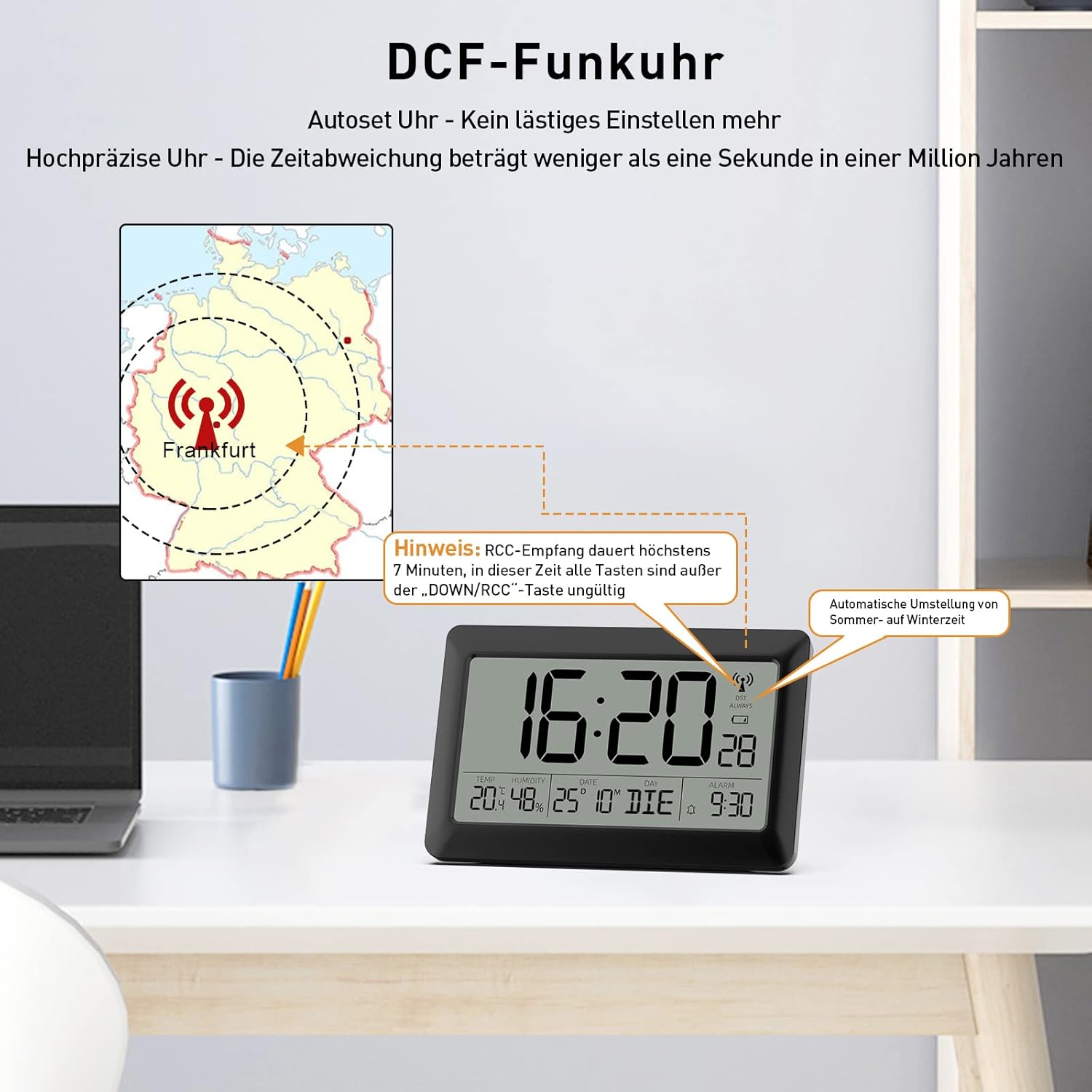
Image: Illustration of the LATEC Digital Wall Clock receiving DCF-77 radio signal from Frankfurt, Germany, with a note about the 7-minute reception time and automatic summer/winter time adjustment.
3. Manual Time Setting (if needed)
If DCF signal reception is poor or unavailable, you can set the time manually.
- Press and hold the "SET" button to enter time setting mode.
- Use the "UP" and "DOWN/RCC" buttons to adjust the values (e.g., hour, minute, year, month, day).
- Press "SET" again to confirm each setting and move to the next.
- Press "SET" one last time to exit setting mode.
4. تعیناتی کے اختیارات
The clock can be used as a wall clock or a table clock.
- دیوار چڑھانا: Use the three hanging holes on the back of the clock.
- ٹیبل ٹاپ کا استعمال: Extend the foldable stand on the back for stable placement on a flat surface. The stand is designed to be firm; open it with confidence.

Image: Two placement options for the LATEC Digital Wall Clock: wall-mounted or tabletop with stand.
آپریٹنگ ہدایات
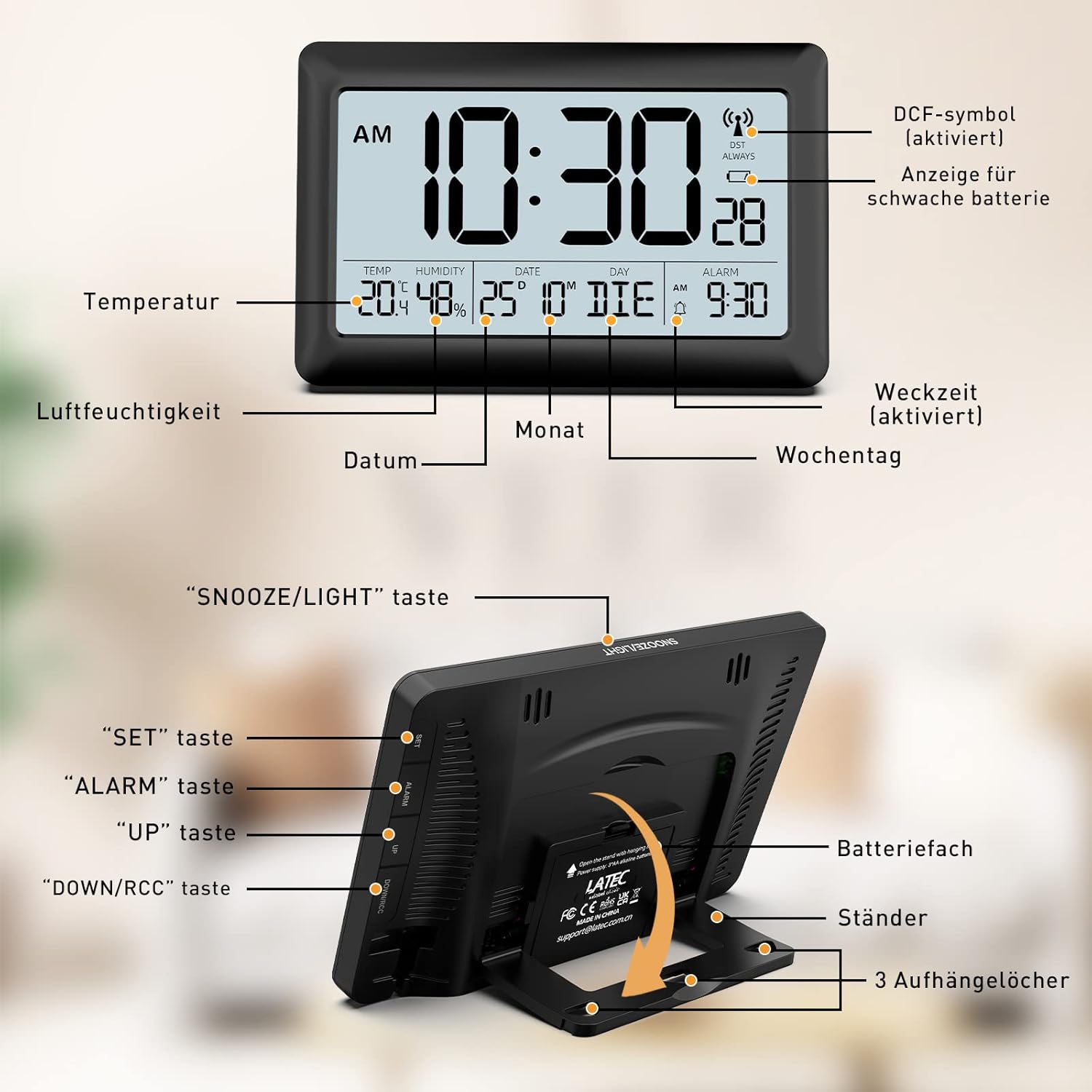
Image: Diagram of the clock's display and control buttons.
1. Time Display (12/24 Hour Format)
The clock can display time in either 12-hour (with AM/PM indicator) or 24-hour format.
- To switch between 12-hour and 24-hour format, press the "UP" button.

Image: Switching between 12-hour and 24-hour time display.
2. Alarm Setting and Snooze
The clock features a classic beeping alarm and a snooze function.
- Press the "ALARM" button once to view موجودہ الارم کا وقت
- Press and hold the "ALARM" button to enter alarm setting mode.
- Use the "UP" and "DOWN/RCC" buttons to adjust the alarm hour and minute.
- Press "ALARM" again to confirm and exit.
- To activate/deactivate the alarm, press the "ALARM" button briefly when not in setting mode. An alarm icon will appear/disappear on the display.
- When the alarm sounds, press the large "SNOOZE/LIGHT" button on top to activate the 5-minute snooze function.
- To stop the alarm completely, press any other button.
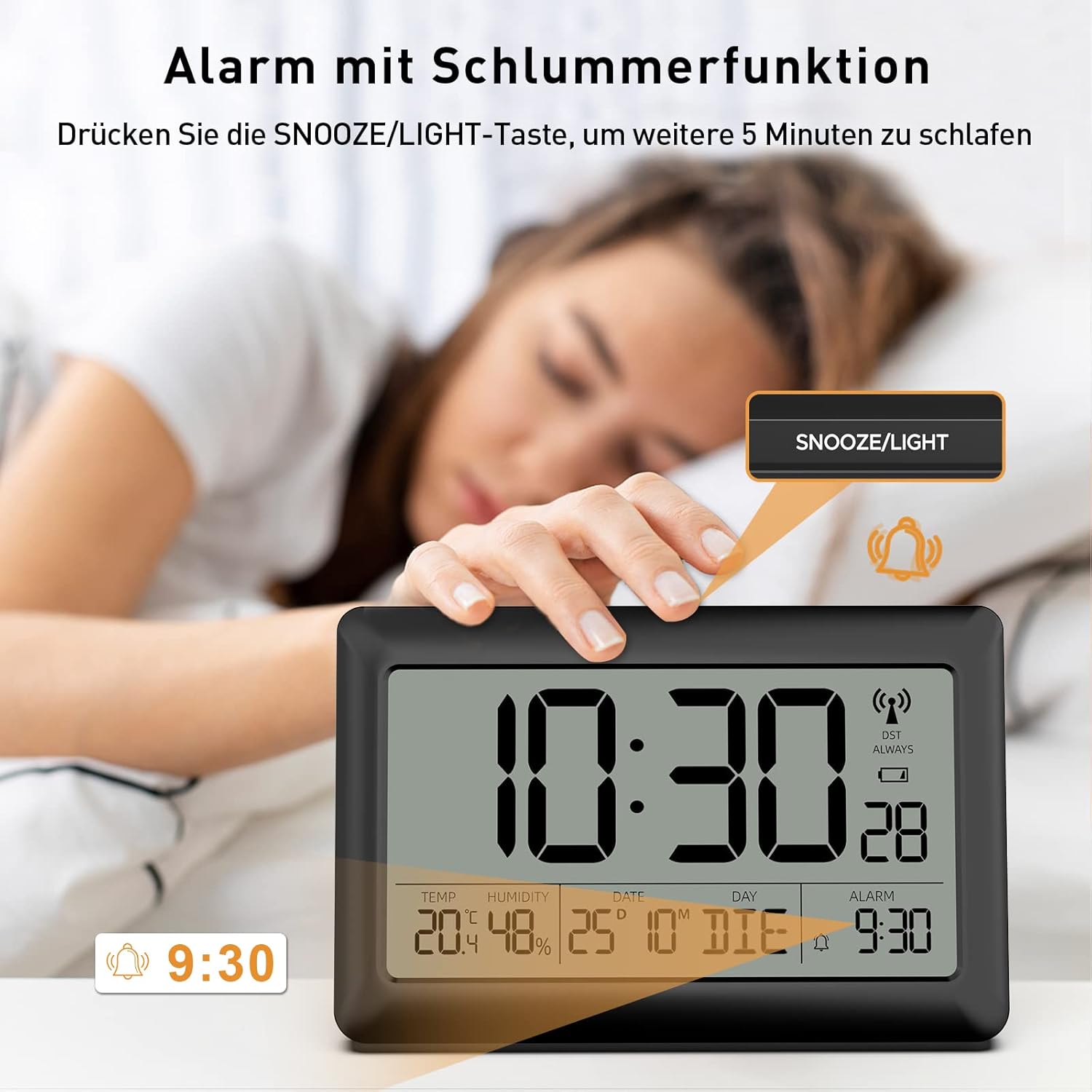
Image: Activating the snooze function by pressing the SNOOZE/LIGHT button.

Image: Alarm with 5-minute snooze and 2-minute alarm duration.
3 درجہ حرارت اور نمی ڈسپلے
The clock features an integrated sensor to display current indoor temperature and humidity.
- The temperature is displayed in Celsius.
- The humidity is displayed as a percentage.
- The readings update approximately every 30 seconds.

Image: Close-up of temperature and humidity display with accuracy details.

Image: The clock functioning as an indoor temperature and humidity monitor.
4. Calendar Display
The clock displays the date (day and month) and the day of the week.
- The day of the week can be displayed in 7 languages. (Specific language selection method not detailed in input, typically part of initial setup or a dedicated button).
5. بیک لائٹ فنکشن
For improved visibility in low-light conditions, the clock has a temporary backlight.
- Press the "SNOOZE/LIGHT" button on the top of the clock to activate the backlight for 10 seconds.

Image: Demonstration of the 10-second backlight function.

Image: Backlight for convenient night viewing
دیکھ بھال
1. صفائی
- گھڑی کو نرم، خشک کپڑے سے صاف کریں۔
- Do not use abrasive cleaners or solvents, as these may damage the display or casing.
2 بیٹری کی تبدیلی
- When the low battery indicator appears on the display, replace all batteries with new ones.
- سیٹ اپ سیکشن میں بیان کردہ بیٹری کی تنصیب کے مراحل پر عمل کریں۔
خرابی کا سراغ لگانا
| مسئلہ | ممکنہ وجہ | حل |
|---|---|---|
| Clock does not display anything. | بیٹریاں مردہ ہیں یا غلط طریقے سے ڈالی گئی ہیں۔ | بیٹری کی قطبیت کو چیک کریں یا نئی بیٹریوں سے تبدیل کریں۔ |
| وقت غلط ہے یا خود بخود ترتیب نہیں دیتا ہے۔ | Poor DCF-77 signal reception. | Move the clock closer to a window or to a different location. Allow up to 7 minutes for signal reception. Manually set the time if necessary. |
| الارم نہیں بجتا ہے۔ | الارم چالو نہیں ہے۔ | Ensure the alarm icon is visible on the display. Press the "ALARM" button to toggle activation. |
| بیک لائٹ کام نہیں کر رہی ہے۔ | بیٹریاں کم یا مردہ ہیں۔ | بیٹریاں تبدیل کریں۔ |
وضاحتیں
- برانڈ: LATEC
- ماڈل: 06-5063
- رنگ: سیاہ
- مصنوعات کے طول و عرض: 20 x 3.81 x 13 سینٹی میٹر (7.87 x 1.5 x 5.12 انچ)
- مواد: پلاسٹک
- خصوصی خصوصیات: Alarm, Large display, Humidity display, Temperature display, DCF-77 Radio Control, Automatic DST, Backlight, Calendar
- آئٹم کا وزن: 360 گرام (0.79 پونڈ)
- ڈسپلے کی قسم: ڈیجیٹل LCD
- انداز: جدید
- طاقت کا منبع: بیٹری سے چلنے والا
- اندرونی/بیرونی استعمال: انڈور
- درجہ حرارت کی حد: -10°C سے 50°C (14°F سے 122°F)
- نمی کی حد: 1% RH سے 99% RH

Image: Dimensions and display features of the LATEC Digital Wall Clock.

Image: Detailed dimensions of the clock.
وارنٹی
LATEC offers a lifetime warranty for this product. This warranty covers manufacturing defects and ensures the product functions as intended under normal use. Please retain your proof of purchase for warranty claims.
حمایت
If you have any questions, encounter issues, or require assistance with your LATEC Digital Wall Clock, please do not hesitate to contact our customer support team. We are committed to resolving your concerns within 24 hours.
- رابطہ کی معلومات: Please refer to the contact details provided with your product packaging or visit the official LATEC webسپورٹ کے اختیارات کے لیے سائٹ۔


