تعارف
Thank you for choosing the Genai True Wireless Earphones. This manual provides detailed instructions on how to set up, operate, maintain, and troubleshoot your new earphones. Please read this manual carefully before use to ensure optimal performance and longevity of your device.
پروڈکٹ ختمview
The Genai True Wireless Earphones feature a digital intelligence LED display on the charging case, tap control for easy operation, and Bluetooth 5.0 for stable connectivity. They are designed for comfortable in-ear wear and deliver clear stereo sound.
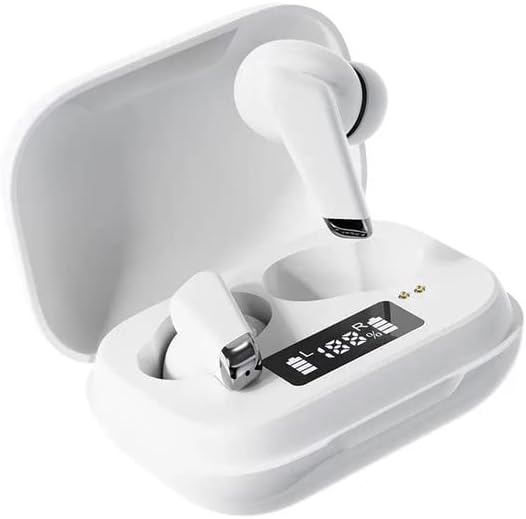
Image: Genai True Wireless Earphones in their charging case, showcasing the digital LED display indicating battery levels.
اہم خصوصیات:
- حقیقی وائرلیس سٹیریو (TWS): Seamless audio experience without cables.
- ٹیپ کنٹرول: Intuitive touch-sensitive controls for music and calls.
- Digital Intelligence LED Display: Shows real-time battery status of earbuds and charging case.
- بلوٹوتھ 5.0: مستحکم اور موثر وائرلیس کنکشن کو یقینی بناتا ہے۔
- ایرگونومک ان ایئر ڈیزائن: Comfortable and secure fit.
سیٹ اپ گائیڈ
1. ائرفون اور کیس چارج کرنا
- ابتدائی چارج: Before first use, fully charge the charging case and earbuds. Place the earbuds into the charging case.
- چارجر کو جوڑیں: موازن USB کیبل کا استعمال کرتے ہوئے چارجنگ کیس کو پاور سورس سے جوڑیں۔
- مانیٹر ایل ای ڈی ڈسپلے: The digital LED display on the case will show the charging status and battery percentage. Ensure both earbuds and the case are fully charged before proceeding.

Image: The charging case with its digital LED display, indicating the charge level of both the case and the individual earbuds.
2. اپنے آلے کے ساتھ جوڑا بنانا
- پاور آن: Open the charging case. The earbuds will automatically power on and enter pairing mode. You may hear an audible prompt.
- بلوٹوتھ کو چالو کریں: On your smartphone or other Bluetooth-enabled device, go to the Bluetooth settings and enable Bluetooth.
- ڈیوائس منتخب کریں: Look for "Genai Earphones" (or similar name) in the list of available devices and select it to connect.
- تصدیق: Once successfully paired, you will hear a confirmation sound, and the earbuds will be ready for use.

Image: A visual representation of the Bluetooth 5.0 chipset, highlighting the stable wireless connection technology.
آپریٹنگ ہدایات
The Genai True Wireless Earphones feature intuitive tap controls. The specific functions may vary slightly, but common controls are listed below:
پاور آن/آف
- پاور آن: Open the charging case, or long-press the touch area on both earbuds for a few seconds.
- بجلی بند: Place the earbuds back into the charging case and close the lid, or long-press the touch area on both earbuds for several seconds until they power off.
میوزک پلے بیک
- چلائیں/روکیں: دونوں ایئربڈ پر ایک بار تھپتھپائیں۔
- اگلا ٹریک: دائیں ایئربڈ پر دو بار تھپتھپائیں۔
- پچھلا ٹریک: بائیں ایئربڈ پر دو بار تھپتھپائیں۔
کال مینجمنٹ
- جواب / کال ختم کریں: آنے والی کال یا ایکٹیو کال کے دوران ایئربڈ پر ایک بار تھپتھپائیں۔
- کال مسترد کریں: آنے والی کال کے دوران دونوں ایئربڈ پر دیر تک دبائیں۔
وائس اسسٹنٹ
- متحرک صوتی معاون: Triple tap on either earbud (functionality may vary by device).

Image: An illustration showing an earbud comfortably and ergonomically fitted within the ear canal.
دیکھ بھال
صفائی
- ایئربڈز اور چارجنگ کیس کو صاف کرنے کے لیے نرم، خشک، لنٹ فری کپڑا استعمال کریں۔
- کھرچنے والے کلینر، سالوینٹس، یا ایروسول سپرے استعمال نہ کریں۔
- Gently clean the ear tips and speaker mesh to remove any earwax or debris.
ذخیرہ
- ائرفونز کو ان کے چارجنگ کیس میں محفوظ کریں جب ان کی حفاظت اور چارج رکھنے کے لیے استعمال میں نہ ہوں۔
- انتہائی درجہ حرارت، براہ راست سورج کی روشنی، یا زیادہ نمی میں ذخیرہ کرنے سے گریز کریں۔
خرابی کا سراغ لگانا
- Earbuds not pairing with each other or with device:
- یقینی بنائیں کہ دونوں ایئربڈز چارج ہیں۔
- دونوں ایئربڈز کو چارجنگ کیس میں واپس رکھیں، ڈھکن بند کریں، چند سیکنڈ انتظار کریں، پھر ڈھکن دوبارہ کھولیں۔
- On your device, forget/delete the "Genai Earphones" from the Bluetooth list and try pairing again.
- کوئی آواز یا کم والیوم نہیں:
- اپنے آلے اور ایئربڈز دونوں پر والیوم لیول چیک کریں۔
- یقینی بنائیں کہ ایئربڈز آپ کے آلے سے صحیح طریقے سے جڑے ہوئے ہیں۔
- ایئربڈ اسپیکر میش سے کسی بھی ملبے کو صاف کریں۔
- چارجنگ کے مسائل:
- یقینی بنائیں کہ چارجنگ کیبل کیس اور پاور سورس دونوں سے محفوظ طریقے سے جڑی ہوئی ہے۔
- تصدیق کریں کہ طاقت کا منبع فعال ہے۔
- ائربڈز اور کیس دونوں پر چارج کرنے والے رابطوں کو صاف کریں۔
وضاحتیں
| فیچر | تفصیل |
|---|---|
| ماڈل | B0BX5G53VT |
| کنیکٹوٹی ٹیکنالوجی | وائرلیس (بلوٹوتھ 5.0) |
| ایرکپس کی قسم | نیم کھلا۔ |
| ڈرائیوروں کی تعداد | 2 |
| چارج کرنے کا طریقہ | چارجنگ کیس |
| ہیڈ فون پیڈ مواد | سلیکون |
| ڈرائیور قطر | 10 ملی میٹر |
| ٹوٹل ہارمونک ڈسٹورشن | 0.02% |
| رکاوٹ کی حد | 32 Ω تک |
| مواد | سلیکون |
| کان کی جگہ کا تعین | کان میں |
| فارم فیکٹر | حقیقی وائرلیس |
وارنٹی اور سپورٹ
The Genai True Wireless Earphones come with a 12 ماہ کی وارنٹی from the date of purchase, covering manufacturing defects. For any quality problems or support inquiries, please contact the seller directly through your purchase platform.
We are committed to ensuring 100% customer satisfaction. If you encounter any issues, please do not hesitate to reach out for assistance, including full refunds or replacements as applicable.


