1. تعارف
This manual provides comprehensive instructions for the Maxcom Fit FW55 Aurum Pro Smartwatch. It covers essential information regarding product setup, operation, maintenance, and troubleshooting to ensure optimal performance and user experience. Please read this manual carefully before using your device.
2. پیکیج کے مشمولات
براہ کرم تصدیق کریں کہ نیچے دی گئی تمام اشیاء آپ کے پروڈکٹ پیکیج میں موجود ہیں:
- Maxcom Fit FW55 Aurum Pro Smartwatch
- چارجنگ کیبل
- صارف دستی (یہ دستاویز)
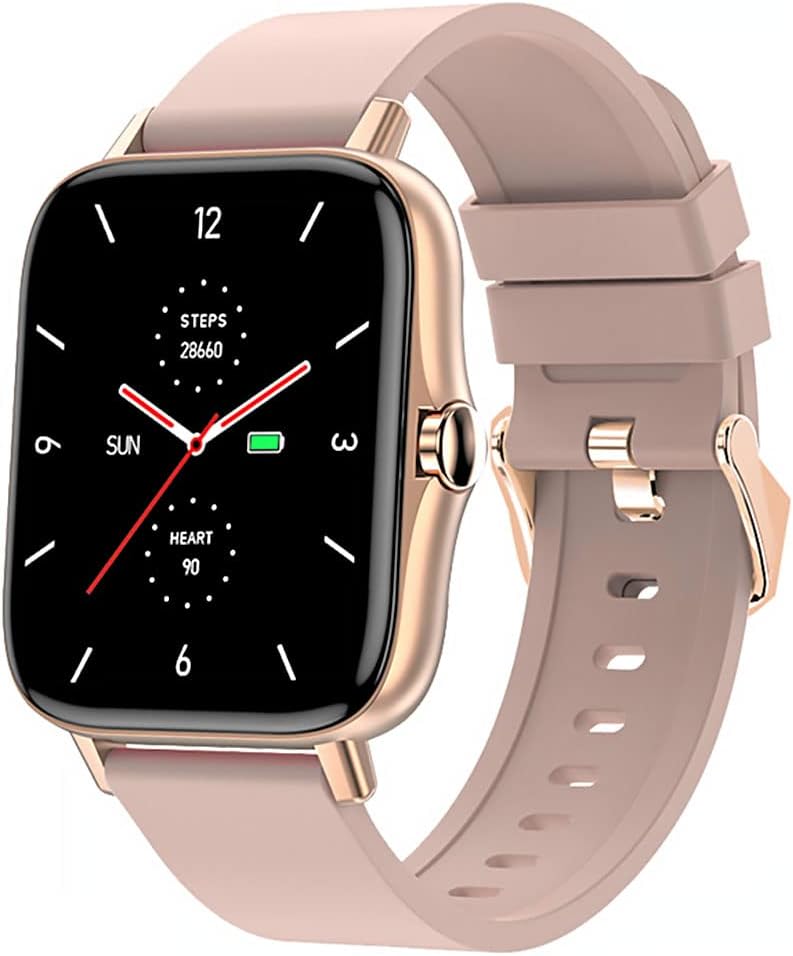
Image 1: Maxcom Fit FW55 Aurum Pro Smartwatch with a pink silicone band. The watch face displays steps, heart rate, and time.
3. سیٹ اپ
3.1 اسمارٹ واچ کو چارج کرنا
Before initial use, fully charge your Maxcom Fit FW55 Aurum Pro Smartwatch. Connect the provided charging cable to the charging port on the back of the smartwatch and plug the other end into a standard USB power adapter (not included) or a computer's USB port. The watch display will indicate charging status.
- Ensure the charging pins are clean and properly aligned with the watch's charging contacts.
- مکمل چارج ہونے میں عام طور پر تقریباً 2 گھنٹے لگتے ہیں۔
3.2. اپنے اسمارٹ فون کے ساتھ جوڑا بنانا
To unlock the full functionality of your smartwatch, you need to pair it with your smartphone via Bluetooth.
- ایپ ڈاؤن لوڈ کریں: تلاش کریں۔ the official Maxcom Fit application in your smartphone's app store (iOS App Store or Google Play Store) and install it.
- بلوٹوتھ کو فعال کریں: یقینی بنائیں کہ آپ کے اسمارٹ فون پر بلوٹوتھ فعال ہے۔
- ایپ کھولیں: Launch the Maxcom Fit application on your smartphone.
- ڈیوائس شامل کریں: Follow the in-app instructions to add a new device. Select "FW55 Aurum Pro" from the list of available devices.
- جوڑا بنانے کی تصدیق کریں: A pairing request may appear on both your smartphone and the smartwatch. Confirm the pairing on both devices.
Once successfully paired, the smartwatch will synchronize data with your phone, and you can customize settings through the app.
4. اسمارٹ واچ کو چلانا
4.1. پاور آن/آف
- پاور آن: Press and hold the side button for a few seconds until the Maxcom logo appears.
- بجلی بند: From the watch face, swipe down to access quick settings, or navigate to the 'Settings' menu. Select 'Power Off' and confirm. Alternatively, press and hold the side button and select 'Power Off'.
4.2. بنیادی نیویگیشن
- ٹچ اسکرین: The FW55 Aurum Pro features a 1.7-inch touch screen for intuitive interaction.
- اوپر/نیچے سوائپ کریں: Scroll through notifications, menus, or quick settings.
- بائیں/دائیں سوائپ کریں: Access different widgets or main functions (e.g., heart rate, activity data).
- تھپتھپائیں: ایک آئٹم منتخب کریں یا کسی عمل کی تصدیق کریں۔
- سائیڈ بٹن: Press to return to the watch face or wake the screen. A long press may access power options.
4.3. کلیدی خصوصیات
The Maxcom Fit FW55 Aurum Pro Smartwatch offers a range of features to support your daily activities and health monitoring:
- سرگرمی سے باخبر رہنا: اٹھائے گئے اقدامات، فاصلہ طے کرنے، اور جلنے والی کیلوریز کی نگرانی کرتا ہے۔
- دل کی دھڑکن کی نگرانی: ریئل ٹائم دل کی شرح کا ڈیٹا فراہم کرتا ہے۔
- نیند کی نگرانی: نیند کے نمونوں اور معیار کو ٹریک کرتا ہے۔
- اطلاعات: آپ کے جوڑا بنائے گئے سمارٹ فون سے کالز، پیغامات اور ایپ کی اطلاعات کے لیے الرٹس وصول کرتا ہے۔
- GPS: Integrated GPS for accurate outdoor activity tracking.
- حسب ضرورت گھڑی کے چہرے: Personalize your watch face through the companion app.

Image 2: Maxcom Fit FW55 Aurum Pro Smartwatch featuring a gold metal mesh band. The watch face displays digital time, steps, and heart rate.
5 دیکھ بھال
Proper care and maintenance will extend the lifespan of your smartwatch.
- صفائی: Regularly wipe the watch screen and body with a soft, dry, lint-free cloth. For stubborn dirt, slightly dampپانی کے ساتھ کپڑے. سخت کیمیکلز یا کھرچنے والے مواد کے استعمال سے پرہیز کریں۔
- پٹے کی دیکھ بھال: Clean the watch strap according to its material. Silicone straps can be washed with mild soap and water. Metal straps may require specific cleaning agents.
- انتہائی حالات سے بچیں: Do not expose the smartwatch to extreme temperatures, direct sunlight for prolonged periods, or corrosive liquids.
- پانی کی مزاحمت: While the watch may have some water resistance, it is not suitable for diving or high-pressure water activities. Refer to the product specifications for detailed water resistance ratings.
6 خرابیوں کا سراغ لگانا
If you encounter issues with your Maxcom Fit FW55 Aurum Pro Smartwatch, try the following solutions:
- آن نہ ہونے کی گھڑی: یقینی بنائیں کہ گھڑی پوری طرح سے چارج ہے۔ اسے چارجر سے کم از کم 30 منٹ تک جوڑیں۔
- اسمارٹ فون کے ساتھ جوڑا نہیں بنایا جا سکتا:
- یقینی بنائیں کہ آپ کے فون اور گھڑی پر بلوٹوتھ فعال ہے۔
- یقینی بنائیں کہ گھڑی آپ کے فون کی بلوٹوتھ رینج کے اندر ہے۔
- اپنے فون اور سمارٹ واچ دونوں کو دوبارہ شروع کریں۔
- ایپ کے ذریعے آلہ کا جوڑا ختم کرنے اور دوبارہ جوڑا بنانے کی کوشش کریں۔
- غلط ڈیٹا (قدمے، دل کی دھڑکن):
- یقینی بنائیں کہ گھڑی آپ کی کلائی پر اچھی طرح پہنی ہوئی ہے، آپ کی کلائی کی ہڈی کے اوپر تقریباً ایک انگلی کی چوڑائی۔
- گھڑی کے پیچھے سینسر کو صاف کریں۔
- Update the companion app to the latest version.
- اطلاعات موصول نہیں ہوئیں:
- Check notification settings in the Maxcom Fit app.
- Ensure your phone's notification permissions are granted to the app.
- تصدیق کریں کہ گھڑی کامیابی کے ساتھ جوڑ دی گئی ہے اور آپ کے فون سے منسلک ہے۔
If problems persist, consult the Maxcom support webسائٹ یا کسٹمر سروس سے رابطہ کریں۔
7. وضاحتیں
Below are the technical specifications for the Maxcom Fit FW55 Aurum Pro Smartwatch:
| فیچر | تفصیل |
|---|---|
| برانڈ | میکس کام |
| ماڈل نمبر | FW55 Aurum Pro |
| اسکرین کا سائز | 1.7 انچ |
| کنیکٹوٹی ٹیکنالوجی | بلوٹوتھ |
| وائرلیس مواصلات کا معیار | بلوٹوتھ |
| ہم آہنگ آلات | اسمارٹ فون |
| جی پی ایس | انٹیگریٹڈ GPS |
| شکل | مربع |
| ہدفی سامعین | بالغ یونیسیکس |
| شامل اجزاء | چارجر |

تصویر 3: سامنے view of the Maxcom Fit FW55 Aurum Pro Smartwatch with a pink silicone band, highlighting the square display.
8. وارنٹی اور سپورٹ
For warranty information and customer support, please refer to the documentation included with your purchase or visit the official Maxcom webسائٹ وارنٹی کے دعووں کے لیے اپنی خریداری کا ثبوت رکھیں۔
For technical assistance or further inquiries, please contact Maxcom customer service through their official channels.