1. تعارف
Thank you for choosing the SABLUTE KM61 Wireless Mechanical Gaming Keyboard. This manual provides essential information for setting up, operating, maintaining, and troubleshooting your new keyboard. Please read it carefully to ensure optimal performance and longevity of your device.
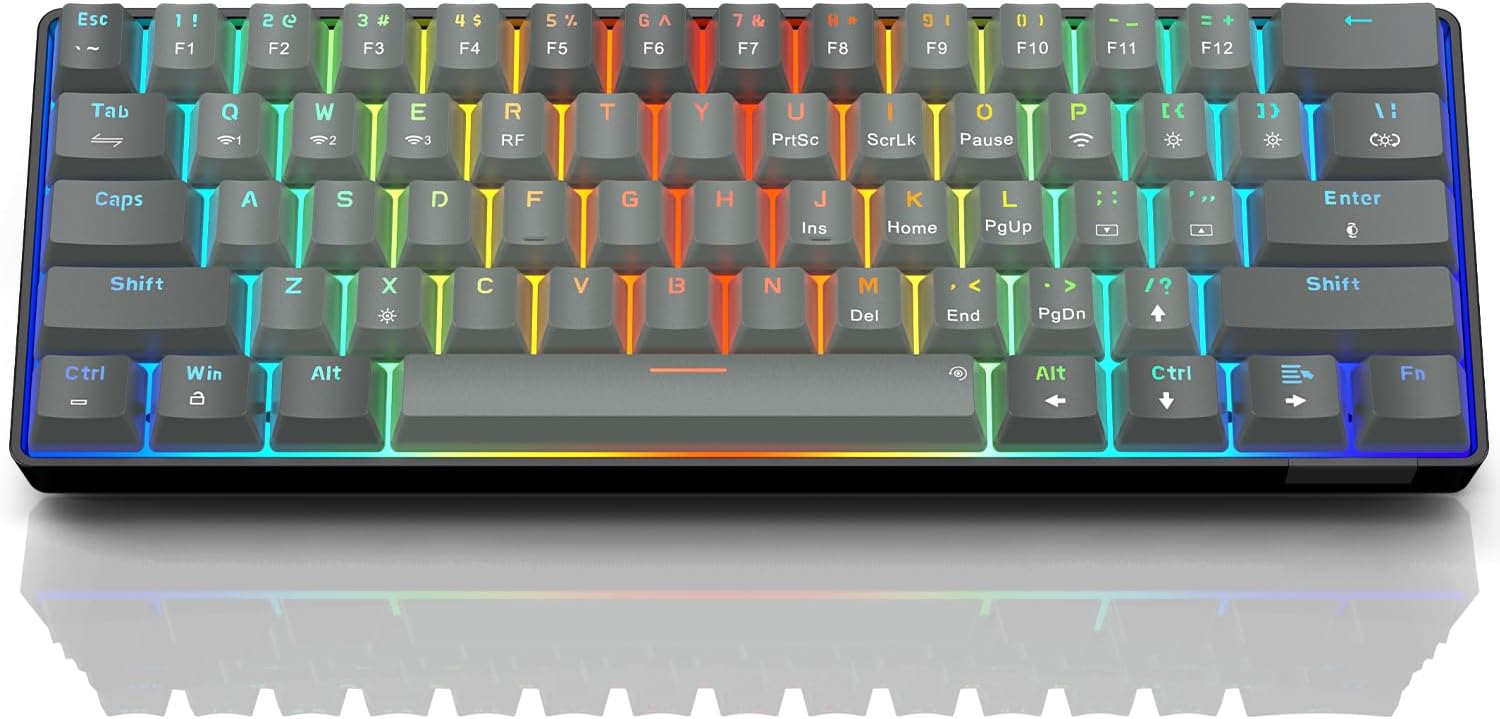
Image: The SABLUTE KM61 Wireless Mechanical Gaming Keyboard showcasing اس کا کمپیکٹ ڈیزائن اور متحرک RGB بیک لائٹنگ۔
2. باکس میں کیا ہے۔
براہ کرم یقینی بنائیں کہ تمام اشیاء پیکیج میں موجود ہیں:
- SABLUTE KM61 Wireless Mechanical Gaming Keyboard
- USB ٹائپ سی کیبل
- USB-A 2.4G Wireless Dongle
- ہدایت نامہ
3. کلیدی خصوصیات
- ٹرائی موڈ کنیکٹیویٹی: Supports Bluetooth, 2.4G USB Wireless, and Wired (USB Type-C) connections.
- 60% کومپیکٹ لے آؤٹ: 61-key design for space-saving and portability.
- Mechanical Red Switches: Linear switches designed for fast response and durability (100,000,000 keystroke test).
- گرم تبدیل کرنے کے قابل: Allows for easy replacement of switches without soldering, supporting 3-pin/5-pin switches.
- آرجیبی بیک لائٹنگ: Features 20 backlight effects, 7 pure colors, 5 brightness levels, and 5 speed adjustments.
- اسمارٹ پاور سیونگ: Includes a 60-second smart sleep mode, offering up to 600 hours of working time (with lights off) and 365 days of standby time.
- ایرگونومک ڈیزائن: Features a ladder key layout and adjustable height for comfortable typing.
- N-Key رول اوور: تیز رفتار ٹائپنگ یا گیمنگ کے دوران بھی، ہر کلید کو درست طریقے سے رجسٹر کرنے کو یقینی بناتا ہے۔
- وسیع مطابقت: Compatible with Chrome OS, Android, Windows 7-11, Mac, and Linux systems.

Image: The compact 61-key layout of the SABLUTE KM61 keyboard, highlighting its space-saving design.
4. سیٹ اپ اور کنکشن
The SABLUTE KM61 keyboard offers three connection modes: Wired, 2.4G Wireless, and Bluetooth. Ensure the keyboard is charged before initial wireless use.
4.1. وائرڈ کنکشن۔
- فراہم کردہ USB Type-C کیبل کو کی بورڈ کے Type-C پورٹ سے جوڑیں۔
- Plug the other end of the USB Type-C cable into an available USB port on your computer.
- کی بورڈ خود بخود وائرڈ موڈ میں تبدیل ہو جائے گا اور چارج کرنا شروع کر دے گا۔
4.2. 2.4G وائرلیس کنکشن
- Locate the USB-A 2.4G wireless dongle. It is typically stored in a compartment on the back of the keyboard.
- Plug the 2.4G wireless dongle into an available USB-A port on your computer.
- Turn the power switch on the back of the keyboard to the 'ON' position.
- دبائیں
Fn+Rto activate 2.4G wireless mode. The keyboard should connect automatically.
4.3. بلوٹوت کنکشن
کی بورڈ تین بلوٹوتھ آلات تک کو سپورٹ کرتا ہے۔
- Turn the power switch on the back of the keyboard to the 'ON' position.
- دبائیں
Fn+Q,Fn+W، یاFn+Eبلوٹوتھ چینل کو منتخب کرنے کے لیے۔ منتخب چینل کے لیے اشارے کی روشنی تیزی سے چمکے گی، جوڑی کے موڈ کی نشاندہی کرتی ہے۔ - اپنے آلے پر (کمپیوٹر، ٹیبلیٹ، اسمارٹ فون)، بلوٹوتھ کو فعال کریں اور دستیاب آلات تلاش کریں۔
- Select "SABLUTE KM61" or a similar name from the list to pair.
- ایک بار جوڑا بننے کے بعد، اشارے کی روشنی چمکنا بند کر دے گی اور ٹھوس رہے گی۔
- جوڑا بنائے گئے بلوٹوتھ آلات کے درمیان سوئچ کرنے کے لیے، دبائیں۔
Fn+Q,Fn+W، یاFn+E.

Image: Visual representation of the three connection methods: Bluetooth, 2.4G USB Wireless, and Wired.
ویڈیو: ایک اوورview of the SABLUTE KM61 Mini Mechanical Gaming Keyboard, demonstrating its features and connectivity options.
5. آپریٹنگ ہدایات
5.1 آر جی بی بیک لائٹ کنٹرول
The KM61 keyboard features customizable RGB backlighting:
- Change Backlight Effect: دبائیں
Fn+|\20 مختلف بیک لائٹ اثرات سے گزرنا۔ - چمک کو ایڈجسٹ کریں: دبائیں
Fn+[{چمک کو کم کرنے کے لئے، اورFn+]}چمک بڑھانے کے لیے (5 درجے)۔ - رفتار کو ایڈجسٹ کریں: دبائیں
Fn+;:اثر کی رفتار کو کم کرنے کے لیے، اورFn+'"to increase effect speed (5 levels). - رنگ تبدیل کریں: دبائیں
Fn+Enterto cycle through 7 pure colors. - بیک لائٹ آن/آف کریں: دبائیں
Fn+Xبیک لائٹ کو ٹوگل کرنے کے لیے۔
Video: Demonstration of the RGB lighting effects and color changes on the SABLUTE keyboard.
Video: A close-up view of the SABLUTE keyboard with its backlight turned off, showcasing the keycap design.
5.2. Smart Power Saving
The keyboard enters a 60-second smart sleep mode when inactive to conserve battery. It can provide up to 600 hours of working time with the backlight off and 365 days of standby time. Keystroke will wake up the keyboard. Note that the backlight does not turn off when connected via Type-C cable.

Image: The keyboard connected via its Type-C cable, illustrating the charging process.
6 دیکھ بھال
6.1. صفائی
To clean your keyboard, first disconnect it from all power sources. Use a soft, dry cloth to wipe down the keycaps and chassis. For deeper cleaning, use the provided keycap puller to remove keycaps and clean underneath with compressed air or a small brush.
6.2. Replacing Switches (Hot-Swappable)
The KM61 keyboard features hot-swappable switches, allowing you to easily replace them without soldering:
- مطلوبہ کی کیپ کو آہستہ سے ہٹانے کے لیے کی کیپ پلر کا استعمال کریں۔
- Use the switch puller to carefully grip the switch and pull it straight up to remove it from the PCB.
- پی سی بی کے سوراخوں کے ساتھ نئے سوئچ کے پنوں کو سیدھ میں رکھیں۔
- آہستہ سے نئے سوئچ کو اس وقت تک دبائیں جب تک کہ یہ محفوظ طریقے سے کلک نہ کرے۔
- کی کیپ کو دوبارہ جوڑیں۔

Image: A close-up of the keyboard demonstrating the hot-swappable feature, with switches being removed and inserted.
7 خرابیوں کا سراغ لگانا
- کی بورڈ جواب نہیں دے رہا ہے: Ensure the keyboard is properly connected (wired, 2.4G dongle, or Bluetooth). Check battery level if using wireless modes. Try restarting your computer or device.
- وائرلیس کنکشن کے مسائل: Ensure the 2.4G dongle is securely plugged in or Bluetooth is enabled and paired correctly. Move closer to the receiver/device to reduce interference.
- بیک لائٹ کام نہیں کر رہی: Ensure the backlight is turned on (
Fn+X). Adjust brightness levels (Fn+[{/]}). - کلیدیں رجسٹر نہیں ہو رہی ہیں یا ڈبل ٹائپنگ نہیں کر رہی ہیں: This could indicate a faulty switch. Utilize the hot-swappable feature to replace the affected switch.
- MacOS compatibility: Some multimedia keys may not be fully compatible with Mac systems. Refer to your Mac's system preferences for keyboard settings.
8. وضاحتیں
| فیچر | تفصیلات |
|---|---|
| ماڈل | KM61 |
| کنیکٹوٹی | Bluetooth, 2.4G USB Wireless, Wired (USB Type-C) |
| سوئچ کی قسم | مکینیکل ریڈ سوئچ |
| لے آؤٹ | 60% (61 کلیدیں) |
| بیک لائٹ | RGB (20 effects, 7 colors, 5 brightness, 5 speeds) |
| گرم ، شہوت انگیز تبادلہ | ہاں (3-پن/5-پن سوئچز) |
| بیٹری | 1 لیتھیم میٹل بیٹری (شامل) |
| Working Time (Light Off) | 600 گھنٹے تک |
| اسٹینڈ بائی ٹائم | 365 دن |
| چارج کرنے کا وقت | تقریبا 4 گھنٹے |
| مصنوعات کے طول و عرض | 11.5"L x 4"W x 1.46"H |
| شے کا وزن | 1.35 پاؤنڈ |
| مطابقت | Chrome OS, Android, Windows 7-11, Mac, Linux |
9. وارنٹی اور سپورٹ
SABLUTE products are designed for quality and reliability. For warranty information, technical support, or any product-related inquiries, please contact SABLUTE customer support. Refer to the contact details provided in your product packaging or visit the official SABLUTE webسائٹ
Thank you for your purchase and support!


