1. تعارف
Thank you for choosing the SPLITSKY NZFS Kids Alarm Clock. This device combines an alarm clock, white noise sleep aid, and an 8-mode RGB night light, designed to assist with sleep and wake-up routines for children and adults. Please read this manual thoroughly to understand its features and ensure proper operation.
حفاظتی معلومات:
- آلے کو پانی اور زیادہ نمی والے ماحول سے دور رکھیں۔
- ڈیوائس کو الگ کرنے یا مرمت کرنے کی کوشش خود نہ کریں۔
- Use only the provided USB-C power cable or a certified equivalent.
- ڈیوائس کے ارد گرد مناسب وینٹیلیشن کو یقینی بنائیں۔
2. پیکیج کے مشمولات
تصدیق کریں کہ تمام اشیاء آپ کے پیکیج میں موجود ہیں:
- SPLITSKY NZFS Kids Alarm Clock
- 1.2M (4.7 inch) USB-C Power Cable
- صارف دستی (یہ دستاویز)
- 1 x CR2032 Lithium Ion Battery (pre-installed for memory backup)
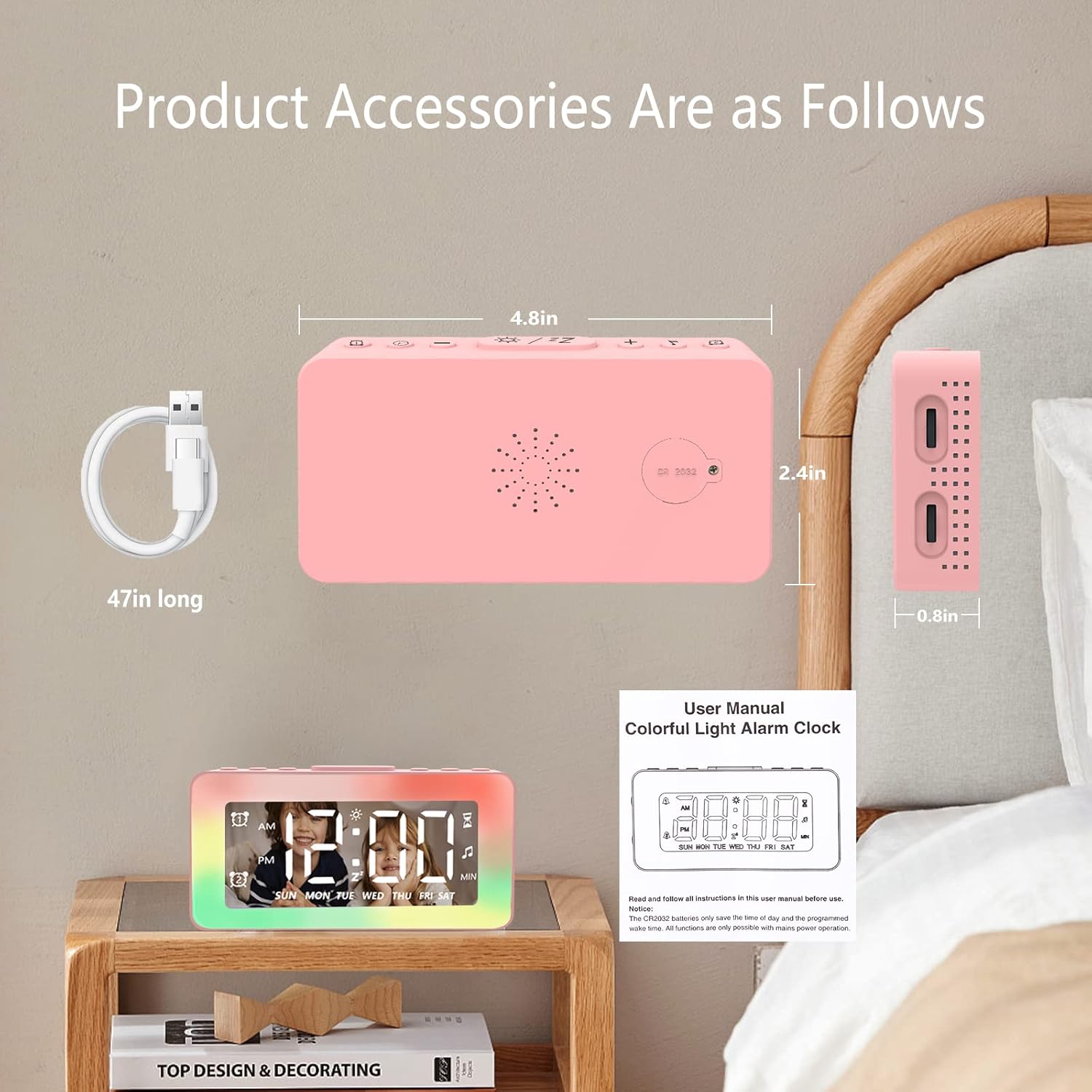
Image: The SPLITSKY NZFS Kids Alarm Clock, a USB-C power cable, and the user manual are included in the package.
3. پروڈکٹ ختمview
Familiarize yourself with the buttons and ports on your alarm clock:

تصویر: تفصیلی view of the alarm clock's top buttons and side ports, including Alarm 1, Time Setting, Light Minus/Settings, Snooze/Light Mode Switch, Light Plus/Setup, Music Switch, Alarm 2, Volume Setting, Time Brightness Setting, USB Output Charging Port, and Type-C Input Interface.
- الارم 1 بٹن: Set and activate Alarm 1.
- ٹائم سیٹنگ بٹن: موجودہ وقت کو ایڈجسٹ کریں۔
- Light Minus / Settings Button: Decrease light brightness or navigate settings.
- Snooze / Light Mode Switch Button: Activate snooze, or cycle through light modes.
- Light Plus / Setup Button: Increase light brightness or confirm settings.
- Music Switch Button: Cycle through white noise sounds.
- الارم 2 بٹن: Set and activate Alarm 2.
- Volume Setting Wheel (Side): Adjust alarm and white noise volume.
- Time Brightness Setting Wheel (Side): ڈسپلے کی چمک کو ایڈجسٹ کریں۔
- USB Output Charging Port (Side): Charge external devices.
- Type-C Input Interface (Side): Connect power cable to the alarm clock.
4. سیٹ اپ
4.1 پاور کنکشن
- Connect the provided USB-C power cable to the Type-C Input Interface on the side of the alarm clock.
- USB-C کیبل کے دوسرے سرے کو ایک ہم آہنگ USB پاور اڈاپٹر (شامل نہیں) یا USB پورٹ میں لگائیں۔
- ڈسپلے روشن ہو جائے گا، یہ بتاتا ہے کہ گھڑی آن ہے۔

Image: The SPLITSKY NZFS Kids Alarm Clock is shown powered on and connected via its USB-C port, also demonstrating its capability to charge a smartphone.
4.2 Battery Installation (Memory Backup)
The alarm clock includes a pre-installed CR2032 battery. This battery serves as a memory backup to retain time and alarm settings during a power outage or when the main power is disconnected. It does not power the clock for regular operation.
- If the battery needs replacement, locate the battery compartment on the back of the unit.
- ٹوکری کھولنے کے لیے ایک چھوٹا سکریو ڈرایور استعمال کریں۔
- درست قطبیت کو یقینی بناتے ہوئے، نئی CR2032 بیٹری سے تبدیل کریں۔
- ٹوکری کو محفوظ طریقے سے بند کریں۔
5. آپریٹنگ ہدایات
5.1 Setting the Time (12H/24H Format)
- دبائیں اور تھامیں۔ ٹائم سیٹنگ بٹن جب تک گھنٹے کے ہندسے چمکنا شروع نہیں ہوتے۔
- استعمال کریں۔ Light Minus / Settings Button (نیچے) یا Light Plus / Setup Button (up) to adjust the hour.
- دبائیں ٹائم سیٹنگ بٹن again to move to minute adjustment. Adjust minutes using the Light Minus/Plus buttons.
- دبائیں ٹائم سیٹنگ بٹن a third time to select 12-hour or 24-hour format. Adjust using the Light Minus/Plus buttons.
- دبائیں ٹائم سیٹنگ بٹن ایک بار پھر تصدیق کرنے اور ٹائم سیٹنگ موڈ سے باہر نکلنے کے لیے۔
5.2 Setting Alarms (Dual Alarm, Daily/Weekday/Weekend Mode)
گھڑی دو آزاد الارم (الارم 1 اور الارم 2) کو سپورٹ کرتی ہے۔
- دبائیں اور تھامیں۔ الارم 1 بٹن (for Alarm 1) or الارم 2 بٹن (for Alarm 2) until the alarm hour digits flash.
- استعمال کریں۔ Light Minus / Settings Button or Light Plus / Setup Button گھنٹے کو ایڈجسٹ کرنے کے لئے.
- Press the respective Alarm Button again to move to minute adjustment. Adjust minutes using the Light Minus/Plus buttons.
- Press the respective Alarm Button again to select the alarm mode:
- ڈیلی موڈ: الارم ہر روز بجتا ہے۔
- Weekday Mode: الارم پیر سے جمعہ تک بجتا ہے۔
- Weekend Mode: Alarm sounds Saturday and Sunday.
- Press the respective Alarm Button once more to confirm and exit alarm setting mode.
- To enable/disable an alarm, short press the الارم 1 بٹن or الارم 2 بٹن. An alarm icon will appear/disappear on the display.
5.3 اسنوز فنکشن۔
When an alarm sounds, tap the Snooze / Light Mode Switch Button on top to activate snooze. The alarm will pause for 9 minutes and then sound again. This can be repeated multiple times.
5.4 Night Light (8 Modes RGB, 10-level dimming)
The alarm clock features 6 solid color lights and 2 ambient colorful lights.
- مختصر دبائیں Snooze / Light Mode Switch Button to turn on the night light and cycle through the 8 color modes.
- To adjust the brightness (10 levels), use the Light Minus / Settings Button or Light Plus / Setup Button while the night light is active.
- To turn off the night light, continue pressing the Snooze / Light Mode Switch Button جب تک لائٹ بند نہ ہو جائے۔

Image: Multiple SPLITSKY NZFS Kids Alarm Clocks are shown, each displaying a different color from the 8 available RGB night light modes.
5.5 White Noise Sleep Aid (8 Sounds)
The clock offers 8 soothing sounds to aid sleep.
- مختصر دبائیں میوزک سوئچ بٹن to turn on the white noise and cycle through the available sounds.
- To adjust the volume (16 levels), use the Volume Setting Wheel on the side of the clock.
- To turn off the white noise, continue pressing the میوزک سوئچ بٹن until the sound stops.

Image: The SPLITSKY NZFS Kids Alarm Clock is displayed on a bedside table, with icons illustrating the various white noise options such as rain, cicadas, piano, bonfire, waves, birdsong, and church bells.
5.6 Sleep Timer (10-120 minutes)
The sleep timer allows you to set a duration for the white noise and/or night light to play before automatically turning off.
- While white noise or night light is active, press and hold the میوزک سوئچ بٹن (for white noise timer) or Snooze / Light Mode Switch Button (for light timer).
- استعمال کریں۔ Light Minus / Settings Button or Light Plus / Setup Button to select the desired timer duration (10, 20, 30, 60, 90, 120 minutes).
- Press the respective button again to confirm the timer setting. The timer icon will appear on the display.
5.7 ڈسپلے برائٹنس ایڈجسٹمنٹ
Adjust the brightness of the LED time display using the Time Brightness Setting Wheel on the side of the clock.
5.8 USB چارجنگ پورٹ
The USB output charging port on the side of the alarm clock can be used to charge other small electronic devices, such as smartphones. Connect your device's charging cable to this port.
6 دیکھ بھال
6.1 صفائی
- یقینی بنائیں کہ آلہ صاف کرنے سے پہلے ان پلگ ہے۔
- سطح کو نرم، خشک کپڑے سے صاف کریں۔
- کھرچنے والے کلینر، سالوینٹس یا کیمیائی سپرے استعمال نہ کریں۔
6.2 اسٹوریج
When not in use for extended periods, store the alarm clock in a cool, dry place, away from direct sunlight and extreme temperatures.
7 خرابیوں کا سراغ لگانا
If you encounter issues with your SPLITSKY NZFS Kids Alarm Clock, refer to the table below for common problems and solutions.
| مسئلہ | ممکنہ وجہ | حل |
|---|---|---|
| Clock display is off or dim. | Not connected to power; Time brightness set too low. | Ensure USB-C cable is securely connected to a power source. Adjust the Time Brightness Setting Wheel. |
| الارم نہیں بجتا ہے۔ | Alarm not activated; Alarm volume too low. | Check if the alarm icon is displayed. If not, short press the respective Alarm Button to activate. Adjust the Volume Setting Wheel. |
| Time/settings reset after power disconnection. | CR2032 backup battery is depleted or missing. | Replace the CR2032 battery in the battery compartment. |
| Night light or white noise not working. | Function not activated; Sleep timer active. | مختصر دبائیں Snooze / Light Mode Switch Button or میوزک سوئچ بٹن to activate. Check if a sleep timer is set. |
8. وضاحتیں
| فیچر | تفصیل |
|---|---|
| برانڈ | اسپلٹسکی |
| ماڈل نمبر | NZFS |
| ڈسپلے کی قسم | ڈیجیٹل ایل ای ڈی |
| مصنوعات کے طول و عرض | 3.17"W x 3.17"H (approximately 8.05 cm W x 8.05 cm H) |
| شے کا وزن | 8.1 اونس (تقریباً 230 گرام) |
| طاقت کا منبع | Corded Electric (USB-C), Battery Powered (CR2032 for memory) |
| نائٹ لائٹ موڈز | 8 (6 solid colors, 2 ambient colorful) with 10-level dimming |
| سفید شور کی آوازیں۔ | 8 آرام دہ آوازیں۔ |
| الارم ٹونز | 7 wake-up alarm tones with 16-level volume control |
| الارم کی خصوصیات | Dual Alarm, Daily/Weekday/Weekend modes, 9-minute Snooze |
| ٹائمر فنکشن | 10-120 minute sleep timer for sounds and lights |
| کنیکٹوٹی | USB-C Input, USB-A Output (for charging external devices) |
| مواد | ایکریلونائٹریل بوٹاڈیئن اسٹیرن |
9. وارنٹی اور سپورٹ
9.1 وارنٹی کی معلومات
Please refer to the warranty information provided at the time of purchase or contact your retailer for details regarding the product warranty. Keep your proof of purchase for any warranty claims.
9.2 کسٹمر سپورٹ
For technical assistance, troubleshooting beyond this manual, or general inquiries, please contact the seller through the platform where you purchased the product. Provide your order number and a detailed description of the issue for prompt support.


