1. تعارف
This manual provides detailed instructions for the setup, operation, and maintenance of your Creative Sound Blaster Katana SE Multi-Channel Gaming Soundbar. Designed for an immersive audio experience, this soundbar features 180W peak power, a bi-amplified 4-driver design, Super X-Fi technology, and customizable RGB lighting. Please read this manual thoroughly before using your device to ensure optimal performance and safety.

Figure 1: Creative Sound Blaster Katana SE Gaming Soundbar
2. اہم حفاظتی معلومات
- ان ہدایات کو پڑھیں۔
- یہ ہدایات رکھیں۔
- تمام انتباہات پر دھیان دیں۔
- تمام ہدایات پر عمل کریں۔
- اس آلے کو پانی کے قریب استعمال نہ کریں۔
- صرف خشک کپڑے سے صاف کریں۔
- وینٹیلیشن کے کسی بھی سوراخ کو مسدود نہ کریں۔ کارخانہ دار کی ہدایات کے مطابق انسٹال کریں۔
- گرمی کے کسی بھی ذرائع جیسے ریڈی ایٹرز، ہیٹ رجسٹر، چولہے، یا دیگر آلات (بشمول amplifiers) جو گرمی پیدا کرتی ہے۔
- بجلی کی ہڈی کو چلنے یا چوٹکی ہونے سے بچائیں، خاص طور پر پلگ، سہولت رسیپٹیکلز، اور اس مقام پر جہاں وہ آلات سے باہر نکلتے ہیں۔
- صرف مینوفیکچرر کی طرف سے مخصوص منسلکات/لوازمات استعمال کریں۔
- بجلی کے طوفان کے دوران یا طویل عرصے تک غیر استعمال ہونے پر اس آلات کو ان پلگ کریں۔
3. پیکیج کے مشمولات
تصدیق کریں کہ تمام اشیاء آپ کے پیکیج میں موجود ہیں:
- Creative Sound Blaster Katana SE Soundbar
- Subwoofer (wired)
- ریموٹ کنٹرول
- پاور اڈاپٹر
- USB-C کیبل
- آپٹیکل کیبل
4. پروڈکٹ ختمview
The Sound Blaster Katana SE is an all-in-one soundbar designed for powerful and immersive audio. It features a sleek design with integrated controls and a front-facing display.
4.1 ساؤنڈ بار کے اجزاء
- ٹاپ پینل کنٹرولز: Power, Volume Up/Down, Source, Mode, SXFI.
- سامنے کا ڈسپلے: Shows current source (USB, AUX, OPTICAL, BT, TV), volume level, and selected sound mode.
- Front Headphone Jack: For connecting headphones directly.
- بلٹ ان مائیکروفون: صوتی رابطے کے لیے۔
- RGB Lighting Strip: Customizable lighting effects located at the bottom of the soundbar.
- ڈرائیورز: دو-amplified 4-driver design for clear and precise audio.

شکل 2: سامنے view of the Sound Blaster Katana SE with RGB lighting
4.2. ریئر پینل کنکشنز
The rear panel provides various ports for connecting to your devices:
- HDMI Out (ARC): For connecting to a TV with Audio Return Channel support.
- SXFI Out: Dedicated port for Super X-Fi enabled headphones.
- USB آڈیو میں: For digital audio connection to PC/Mac.
- آکس ان: 3.5mm analog audio input.
- آپٹیکل ان: ڈیجیٹل آپٹیکل آڈیو ان پٹ۔
- سب آؤٹ: For connecting the wired subwoofer.
- پاور ان پٹ: پاور اڈاپٹر کے لیے۔

Figure 3: Rear panel with HDMI ARC, SXFI Out, USB Audio In, Aux In, Optical In, Sub Out, and Power Input.
4.3. سب ووفر
The included wired subwoofer enhances bass response for a more dynamic audio experience.

شکل 4: اندرونی view showing the soundbar's bi-amplified drivers and the subwoofer's design.
5. سیٹ اپ
Follow these steps to set up your Sound Blaster Katana SE:
- جگہ کا تعین: Place the soundbar on a stable surface below your TV or monitor. Position the subwoofer on the floor near the soundbar for optimal bass.
- سب ووفر کو مربوط کریں: Connect the wired subwoofer cable to the 'Sub Out' port on the soundbar's rear panel.
- پاور سے رابطہ کریں: Connect the power adapter to the soundbar's power input and then plug it into a wall outlet.
- آڈیو ماخذ کو مربوط کریں: Choose your preferred audio connection method (HDMI ARC, Optical, USB, Aux, or Bluetooth) and connect the appropriate cable.
Video 1: Official product video demonstrating the Sound Blaster Katana SE's features and connectivity options.
6. کنیکٹیویٹی کے اختیارات
The Sound Blaster Katana SE offers a wide range of connectivity to suit various devices:
- HDMI Out (ARC): اعلی معیار کی آڈیو اور کنٹرول کے لیے اپنے TV کے HDMI ARC پورٹ سے جڑیں۔
- USB آڈیو میں: Ideal for connecting to PCs, Macs, or gaming consoles that support USB audio.
- آکس ان: اینالاگ آڈیو آؤٹ پٹ والے آلات سے جڑنے کے لیے 3.5mm آڈیو کیبل استعمال کریں۔
- آپٹیکل ان: For digital audio connection from TVs, game consoles, or other media players.
- بلوٹوتھ 5.0: Pair wirelessly with your mobile devices, tablets, or computers for convenient audio streaming.
- SXFI Out: Connect Super X-Fi certified headphones for a personalized holographic audio experience.

Figure 5: Soundbar showcasing versatile connectivity with gaming consoles and mobile devices.
7. آپریٹنگ ہدایات
7.1. پاور آن/آف
Press the Power button on the soundbar's top panel or the remote control to turn the device on or off.
7.2. والیوم کنٹرول
Use the Volume Up (+) and Volume Down (-) buttons on the soundbar or remote to adjust the audio level. The current volume will be displayed on the front panel.
7.3. ماخذ کا انتخاب
Press the 'Source' button on the soundbar or remote to cycle through available input sources (HDMI ARC, USB, Aux, Optical, Bluetooth).
7.4. ساؤنڈ موڈز
The soundbar features optimized sound modes for different content types. Press the 'Mode' button on the soundbar or remote to switch between:
- موسیقی: Enhanced for musical playback.
- فلمیں: سنیما آڈیو کے لیے آپٹمائزڈ۔
- گیمنگ: Tailored for immersive gaming soundscapes.
- Effects Off: Neutral audio profile.
7.5. ریموٹ کنٹرول کا استعمال
The included remote control provides full functionality for the soundbar, including power, volume, source, mode, SXFI, RGB lighting, and custom buttons.
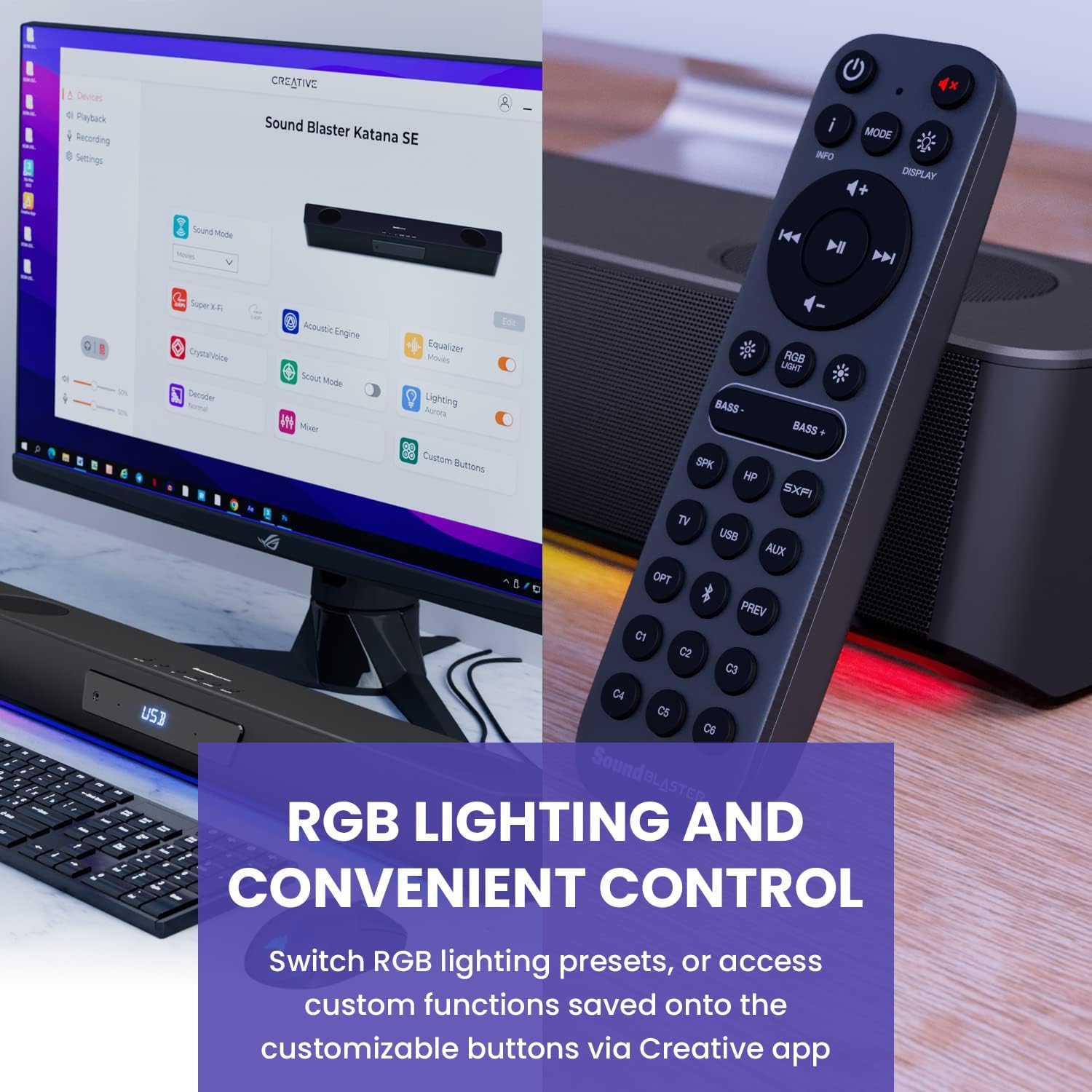
Figure 6: Remote control for the Sound Blaster Katana SE.
7.6. Creative App Customization
For advanced customization, download the Creative app on your PC or Mac. The app allows you to:
- Tune Audio Performance: Adjust EQ settings and activate Sound Blaster processing technologies.
- آرجیبی لائٹنگ کو حسب ضرورت بنائیں: Select from various RGB presets or create your own custom lighting effects.
- Map Custom Functions: Assign specific commands to the six customizable buttons on the remote control.

Figure 7: Creative app interface showing sound mode, Super X-Fi, Acoustic Engine, Equalizer, CrystalVoice, Scout Mode, Lighting, Decoder, Mixer, and Custom Buttons.
8. Super X-Fi Technology
Super X-Fi technology personalizes your headphone audio experience for optimized and realistic listening. It recreates the soundstage of a multi-speaker system in your headphones.
- SXFI Battle Mode: مسابقتی ایڈوان حاصل کریں۔tage in FPS games by accurately pinpointing enemy locations through enhanced audio cues.

Figure 8: Super X-Fi and SXFI Battle Mode for enhanced gaming audio.
9. بلٹ میں مائیکروفون
The Sound Blaster Katana SE includes a built-in beamforming microphone, allowing you to participate in calls or in-game voice chat directly through the soundbar.
10. آرجیبی لائٹنگ
The integrated RGB lighting strip can be customized to match your setup or mood. Use the remote control to cycle through presets or the Creative app for advanced color and effect adjustments.
11 دیکھ بھال
To ensure the longevity and performance of your Sound Blaster Katana SE:
- آلے کو نرم، خشک کپڑے سے صاف کرکے صاف رکھیں۔
- Avoid using liquid cleaners or aerosols.
- اس بات کو یقینی بنائیں کہ وینٹیلیشن کھلنے میں رکاوٹ نہیں ہے۔
- آلہ کو انتہائی درجہ حرارت یا نمی کے سامنے نہ رکھیں۔
12 خرابیوں کا سراغ لگانا
اگر آپ کو اپنے ساؤنڈ بار کے ساتھ مسائل درپیش ہیں، تو درج ذیل عام حل سے رجوع کریں:
- کوئی آواز نہیں: Check all cable connections (power, audio source, subwoofer). Ensure the correct input source is selected on the soundbar. Verify the volume is not muted or too low.
- مسخ شدہ آواز: Try reducing the volume. Check audio cable integrity. Ensure the audio source is providing a clean signal.
- بلوٹوتھ کنیکٹیویٹی کے مسائل: Ensure the soundbar is in Bluetooth pairing mode. Delete the soundbar from your device's Bluetooth list and re-pair. Move closer to the soundbar to reduce interference.
- ریموٹ کنٹرول کام نہیں کر رہا: Check battery levels and replace if necessary. Ensure there are no obstructions between the remote and the soundbar.
- آر جی بی لائٹس کام نہیں کر رہی ہیں: Check settings in the Creative app. Ensure RGB lighting is enabled via the remote or app.
13. وضاحتیں
| فیچر | تفصیلات |
|---|---|
| ماڈل کا نام | 51MF8415AA000 27585486 |
| اسپیکر کی قسم | ساؤنڈ بار |
| چڑھنے کی قسم | ٹیبلٹاپ ماؤنٹ |
| خصوصی خصوصیت | Bass Boost, Built In Microphone, Radio, Stereo Pairing, USB Port |
| مصنوعات کے لیے تجویز کردہ استعمال | For Gaming Consoles, For Computers |
| ہم آہنگ آلات | Desktop, Laptop, MP3 Player, Projector, Smartphone, Tablet, Television |
| یونٹ شمار | 1.0 شمار |
| سراؤنڈ ساؤنڈ چینل کنفیگریشن | 5.1 |
| رنگ | 180W Peak Power with Bluetooth 5.0 |
| شامل اجزاء | ریموٹ |
| مصنوعات کے طول و عرض | 25.6"D x 4.3"W x 3.1"H |
| شے کا وزن | 5.9 پاؤنڈز |
| واٹر پروف ہے۔ | غلط |
| وارنٹی کی قسم | محدود |
| اشیاء کی تعداد | 1 |
| کنٹرول کا طریقہ | ریموٹ |
| وائرلیس کمیونیکیشن ٹیکنالوجی | بلوٹوتھ |
| اسپیکر کا سائز | 1 انچ |
| طاقت کا منبع | کورڈڈ الیکٹرک |
| Tweeter قطر | 1 انچ |
| پانی کی مزاحمت کی سطح | پانی مزاحم نہیں |
| کسٹمر پیکیج کی قسم | ایف ایف پی |
| آڈیو ڈرائیور کی قسم | متحرک ڈرائیور |
| سب ووفر کنیکٹیویٹی ٹیکنالوجی | وائرلیس |
| پاور لیولز کی تعداد | 1 |
| مصنوعات کے لیے مخصوص استعمال | Gaming Consoles, Computers |
| یو پی سی | 054651195639 |
| کارخانہ دار | تخلیقی لیبز |
| شکل | مستطیل پرزم |
| شے کا وزن | 5.9 پاؤنڈ |
| ASIN | B0C5DFMB93 |
| آئٹم ماڈل نمبر | MF8415 |
| پہلی تاریخ دستیاب ہے۔ | 16 مئی 2023 |
| برانڈ | تخلیقی |
| اسپیکر زیادہ سے زیادہ آؤٹ پٹ پاور | 100 واٹ |
| تعدد رسپانس | 20000 Hz |
| کنیکٹوٹی ٹیکنالوجی | بلوٹوتھ |
| آڈیو آؤٹ پٹ وضع | گھیراؤ، سٹیریو |
14. وارنٹی اور سپورٹ
Your Creative Sound Blaster Katana SE comes with a Limited Warranty. For detailed warranty information, product registration, technical support, and customer service, please visit the official Creative webسائٹ یا اپنے پیکج میں شامل وارنٹی کارڈ کا حوالہ دیں۔


