تعارف
This manual provides essential information for the safe and efficient operation of your TECNO Pova 5 Pro 5G smartphone. Please read it thoroughly before using your device to ensure optimal performance and longevity.

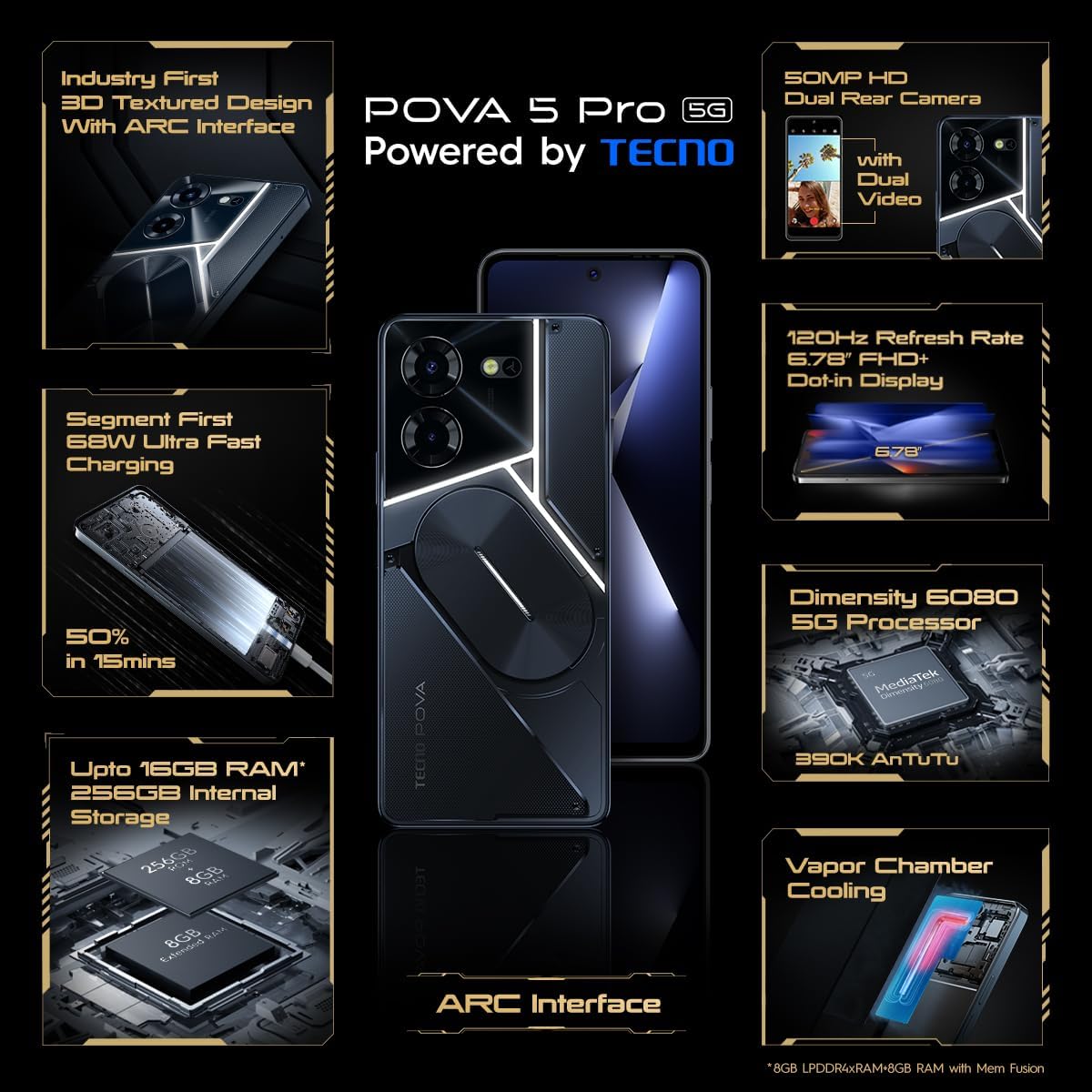
Image: The TECNO Pova 5 Pro 5G smartphone, showcasing its design and key feature of 68W Ultra Fast Charging.
باکس میں کیا ہے۔
تصدیق کریں کہ تمام اشیاء پیکیجنگ میں موجود ہیں:
- اسمارٹ فون
- 68 ڈبلیو پاور اڈاپٹر۔
- ٹائپ سی کیبل
- TPU Cover
- سم ایجیکٹر ٹول

Image: A flat lay of the TECNO Pova 5 Pro 5G packaging contents, showing the smartphone, 68W power adapter, USB-C cable, TPU protective cover, and the SIM ejector tool.
سیٹ اپ
ابتدائی سیٹ اپ
- Insert SIM/SD Card: Locate the SIM tray on the side of the device. Use the provided SIM ejector tool to open the tray. Insert your Nano-SIM card(s) and/or microSD card into the designated slots. Ensure the tray is fully reinserted.
- پاور آن: Press and hold the Power button (located on the right side) until the TECNO logo appears.
- آن اسکرین پرامپٹس پر عمل کریں: The device will guide you through initial setup, including language selection, Wi-Fi connection, Google account setup, and security settings.
ڈیوائس کو چارج کرنا
The TECNO Pova 5 Pro 5G supports 68W Ultra Fast Charging.
- Type-C کیبل کو فون کے نیچے چارجنگ پورٹ سے جوڑیں۔
- کیبل کے دوسرے سرے کو 68W پاور اڈاپٹر سے جوڑیں۔
- پاور اڈاپٹر کو وال آؤٹ لیٹ میں لگائیں۔
- A full charge typically takes approximately 45 minutes, with 50% charge achievable in about 15 minutes.
تصویر: ایک واضح سامنے view of the TECNO Pova 5 Pro 5G smartphone, highlighting its display and front camera.
ڈیوائس کو آپریٹ کرنا
بنیادی نیویگیشن
- ٹچ اسکرین: منتخب کرنے کے لیے تھپتھپائیں، اسکرول کرنے کے لیے سوائپ کریں، زوم کرنے کے لیے چوٹکی۔
- پاور بٹن: اسکرین کو جگانے/سونے کے لیے دبائیں۔ پاور آف کرنے یا دوبارہ شروع کرنے کے لیے دبائیں اور ہولڈ کریں۔
- والیوم بٹن: میڈیا والیوم، کال والیوم، یا رنگ ٹون والیوم کو ایڈجسٹ کریں۔
کیمرے کا استعمال
The device features a 50MP AI Dual Rear Camera and a 16MP Selfie Camera.
- ہوم اسکرین یا ایپ ڈراور سے کیمرہ ایپ کھولیں۔
- مطلوبہ موڈ منتخب کریں (تصویر، ویڈیو، پورٹریٹ، وغیرہ)۔
- تصاویر کیپچر کرنے یا ویڈیو ریکارڈنگ شروع/روکنے کے لیے شٹر بٹن کو تھپتھپائیں۔
- Utilize AI enhancements for optimized scene recognition and image quality.
ARC Interface and Notifications
The TECNO Pova 5 Pro 5G features a unique multi-color ARC interface with backlighting.
- The ARC interface provides customizable light effects for notifications, incoming calls, gaming, and music playback.
- Access settings to personalize the light patterns and colors for different alerts.

تصویر: پیچھے view of the TECNO Pova 5 Pro 5G, showcasing its distinctive 3D textured design and the illuminated ARC interface.

تصویر: ایک تفصیلی view of the TECNO Pova 5 Pro 5G's ARC interface, illustrating the multi-color backlighting feature.
دیکھ بھال
- بیٹری کی دیکھ بھال: To prolong battery life, avoid exposing the device to extreme temperatures. Do not fully discharge the battery regularly.
- صفائی: اسکرین اور جسم کو صاف کرنے کے لیے نرم، لنٹ سے پاک کپڑا استعمال کریں۔ سخت کیمیکلز یا کھرچنے والے مواد کے استعمال سے پرہیز کریں۔
- سافٹ ویئر اپ ڈیٹس: Regularly check for and install system updates to ensure optimal performance, security, and access to new features. Navigate to Settings > System > System update.
- اسٹوریج مینجمنٹ: وقتا فوقتا غیر ضروری صاف کریں۔ files اور ایپس کافی ذخیرہ کرنے کی جگہ اور آلہ کی رفتار کو برقرار رکھنے کے لیے۔
خرابی کا سراغ لگانا
- ڈیوائس آن نہیں ہو رہی ہے: Ensure the battery is charged. Connect the device to the charger for at least 15 minutes before attempting to power on again. If the issue persists, perform a forced restart by holding the Power button for 10-15 seconds.
- چارجنگ کے مسائل: Verify that the charging cable and adapter are securely connected and undamaged. Try using a different outlet.
- ایپ کو کریش کرنا/جمنا: Close the problematic app and reopen it. If the issue continues, clear the app's cache and data in Settings > Apps. As a last resort, uninstall and reinstall the app.
- ناقص نیٹ ورک کنیکٹیویٹی: Check if Airplane Mode is off. Restart the device. If using mobile data, ensure your SIM card is properly inserted and your data plan is active.
- زیادہ گرم ہونا: Avoid using the device in direct sunlight or during intensive tasks for extended periods. Close background applications.
وضاحتیں
| فیچر | تفصیلات |
|---|---|
| ماڈل کا نام | Pova 5 Pro 5G |
| آپریٹنگ سسٹم | اینڈرائیڈ 13.0 |
| پروسیسر | Dimensity 6080 (2.4 GHz Octa-Core) |
| رام | 8 GB (expandable up to 16 GB with Memory Fusion) |
| اندرونی اسٹوریج | 256 GB (UMCP) |
| ڈسپلے | 6.78-inch FHD+ Dot-in Display |
| ریفریش ریٹ | 120 Hz |
| پیچھے والا کیمرہ | 50MP AI ڈوئل کیمرہ |
| سامنے والا کیمرہ | 16 MP Selfie Camera |
| بیٹری | 5000 ایم اے ایچ لیتھیم پولیمر |
| چارج ہو رہا ہے۔ | 68W Ultra Fast Charging |
| طول و عرض | 16.9 x 7.7 x 16.9 سینٹی میٹر |
| وزن | 214 گرام |
| کنیکٹوٹی | 5G (10 bands supported), NFC, Bluetooth 5.1 |

Image: An internal diagram or view of the TECNO Pova 5 Pro 5G, illustrating its vapor chamber cooling system for efficient heat dissipation.
وارنٹی اور سپورٹ
Your TECNO Pova 5 Pro 5G comes with a manufacturer's warranty. Please refer to the warranty card included in your product packaging for specific terms and conditions.
For technical support, service, or warranty claims, please contact TECNO customer service. TECNO maintains a large service network with over 1200 service centers in India.
You can find more information and support resources by visiting the official Tecno store on Amazon: Tecno Store


