1. تعارف
Thank you for choosing the De'Longhi Rivelia EXAM440.35.BG Automatic Coffee Machine. This appliance is designed to provide a premium coffee experience with ease of use and customizable options. Please read this manual carefully before using the appliance to ensure proper operation, maintenance, and safety.
2. اہم حفاظتی ہدایات
آگ، برقی جھٹکا، اور افراد کو چوٹ لگنے کے خطرے کو کم کرنے کے لیے برقی آلات کا استعمال کرتے وقت ہمیشہ بنیادی حفاظتی احتیاطی تدابیر پر عمل کریں۔
- استعمال سے پہلے تمام ہدایات پڑھیں۔
- گرم سطحوں کو مت چھونا۔ ہینڈل یا نوبس کا استعمال کریں۔
- آگ، بجلی کے جھٹکے، اور ذاتی چوٹ سے بچانے کے لیے، ڈوری، پلگ، یا آلات کو پانی یا دیگر مائع میں نہ ڈبویں۔
- جب کوئی بھی آلات بچوں کے ذریعہ یا اس کے قریب استعمال ہوتا ہے تو قریبی نگرانی ضروری ہے۔
- استعمال میں نہ ہونے پر اور صفائی سے پہلے آؤٹ لیٹ سے ان پلگ کریں۔ پرزے لگانے یا اتارنے سے پہلے، اور آلات کو صاف کرنے سے پہلے ٹھنڈا ہونے دیں۔
- کسی بھی آلے کو خراب شدہ ڈوری یا پلگ سے یا آلات کی خرابی کے بعد، یا کسی بھی طرح سے نقصان پہنچانے کے بعد نہ چلائیں۔ جانچ، مرمت، یا ایڈجسٹمنٹ کے لیے آلات کو قریب ترین مجاز سروس سہولت پر واپس کریں۔
- آلات کے مینوفیکچرر کی طرف سے تجویز کردہ آلات کے اٹیچمنٹ کے استعمال کے نتیجے میں آگ لگ سکتی ہے، بجلی کا جھٹکا لگ سکتا ہے، یا ذاتی چوٹ لگ سکتی ہے۔
- باہر استعمال نہ کریں۔
- ڈوری کو میز یا کاؤنٹر کے کنارے پر لٹکنے نہ دیں، یا گرم سطحوں کو چھونے نہ دیں۔
- گرم گیس یا الیکٹرک برنر پر یا اس کے قریب یا گرم تندور میں نہ رکھیں۔
- ہمیشہ پلگ کو پہلے آلات سے جوڑیں، پھر دیوار کے آؤٹ لیٹ میں کورڈ لگائیں۔ منقطع کرنے کے لیے، کسی بھی کنٹرول کو "آف" کریں، پھر وال آؤٹ لیٹ سے پلگ ہٹا دیں۔
- مطلوبہ استعمال کے علاوہ آلات کا استعمال نہ کریں۔
- گرم بھاپ کو ٹھکانے لگاتے وقت انتہائی احتیاط برتیں۔
3. پروڈکٹ ختمview
The De'Longhi Rivelia EXAM440.35.BG is a compact automatic coffee machine featuring a 3.5-inch color touchscreen, a manual milk frother, and the innovative Bean Switch System for easily changing coffee bean varieties.

تصویر 3.1: سامنے والا view of the De'Longhi Rivelia EXAM440.35.BG coffee machine in Sand Beige.
کلیدی اجزاء:
- 3.5" Full-Touch Color Display: For intuitive control and personalized coffee routines.
- Bean Switch System: Two interchangeable 250g bean containers for different coffee varieties.
- دستی دودھ: For preparing creamy milk foam for lattes and cappuccinos.
- پانی کا ٹینک: ہٹنے کے قابل، 1.4 لیٹر کی گنجائش۔
- ڈرپ ٹرے اور گراؤنڈز کنٹینر: For collecting excess water and used coffee grounds.
- کافی کی ٹونٹی: مختلف کپ سائز کے لیے سایڈست اونچائی۔

تصویر 3.2: The De'Longhi Rivelia series, showcasing various color options including Sand Beige.
4. ابتدائی سیٹ اپ
4.1 پیک کھولنا اور جگہ کا تعین کرنا
- مشین کو اس کی پیکیجنگ سے احتیاط سے ہٹا دیں۔
- مشین کو پانی کے چھینٹے اور گرمی کے ذرائع سے دور، ایک مستحکم، سطحی سطح پر رکھیں۔
- وینٹیلیشن اور اجزاء تک رسائی کے لیے مشین کے ارد گرد مناسب جگہ کو یقینی بنائیں۔
4.2 پانی کے ٹینک کو بھرنا
- مشین کی طرف سے پانی کے ٹینک کو ہٹا دیں۔
- ٹینک کو تازہ، ٹھنڈے نل کے پانی سے MAX سطح کے اشارے تک بھریں۔
- پانی کے ٹینک کو مشین میں محفوظ طریقے سے تبدیل کریں۔
4.3 Filling the Bean Container (Bean Switch System)
The Rivelia features two interchangeable bean containers. You can switch between them to enjoy different coffee varieties.
- Lift the lid of a bean container.
- کنٹینر میں تازہ کافی پھلیاں ڈالیں۔ ضرورت سے زیادہ نہ بھریں۔
- Place the filled bean container onto the machine's bean hopper. Ensure it is seated correctly.
- To switch beans, simply lift the current container, replace it with another filled container, and the machine will detect the change.

تصویر 4.1: The Bean Switch System with two interchangeable bean containers.

تصویر 4.2: Illustration of filling the bean container with fresh coffee beans.
4.4 First Use and Rinsing Cycle
Before making your first coffee, perform a rinsing cycle to clean the internal circuits.
- مشین کو پاور آؤٹ لیٹ میں لگائیں۔
- پاور بٹن کا استعمال کرتے ہوئے مشین کو آن کریں۔
- Follow the on-screen instructions for the initial setup, including language selection and water hardness.
- The machine will automatically perform a rinsing cycle. Place a container under the coffee spouts and hot water spout to collect the water.
- Once the rinsing cycle is complete, the machine is ready for use.
5. آپریشن
5.1 Using the 3.5" Full-Touch Color Display
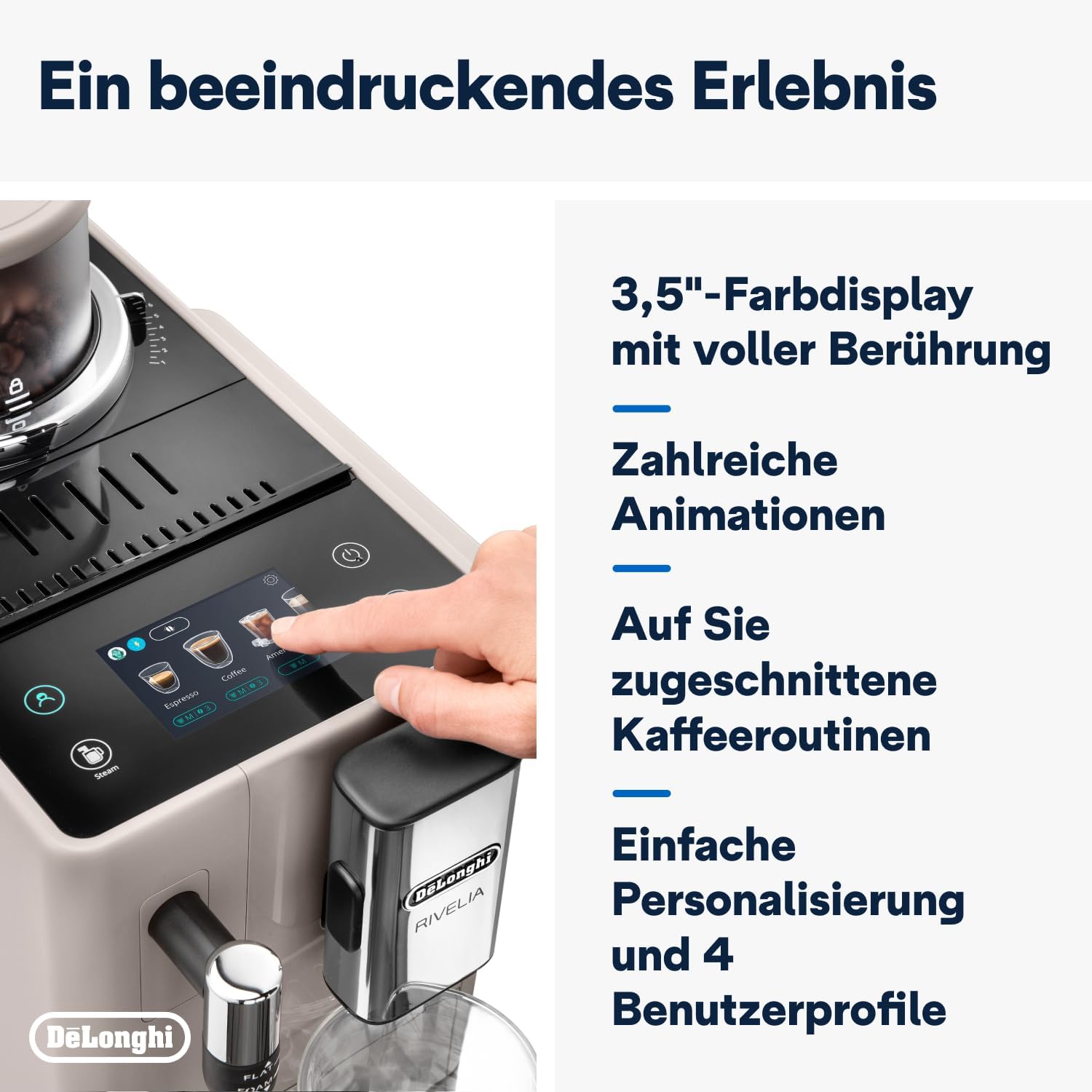
The intuitive touchscreen allows you to select beverages, customize settings, and manage user profiles.

تصویر 5.1: The 3.5-inch full-touch color display in use, showing beverage selection.
- Beverage Selection: Swipe through the menu to choose from 8 pre-programmed coffee recipes.
- حسب ضرورت: Adjust coffee strength, temperature, and volume for each drink.
- یوزر پرو۔files: Create up to 4 personalized user profiles to save your favorite settings. The machine adapts its menu based on your routine.
- بین اڈاپٹ ٹیکنالوجی: This technology automatically adjusts grinding parameters, dosage, and brewing temperature to optimize extraction for the selected coffee bean variety.
5.2 کافی مشروبات کی تیاری
- Ensure the water tank is filled and a bean container is in place.
- کافی کے ٹکڑوں کے نیچے ایک کپ رکھیں۔
- ٹچ اسکرین مینو سے اپنا مطلوبہ مشروب منتخب کریں۔
- Adjust settings (strength, volume) if desired.
- Press the "Start" icon to begin brewing.

تصویر 5.2: A selection of coffee drinks, including espresso, americano, and milk-based beverages.
5.3 Using the Manual Milk Frother
The integrated steam wand allows you to manually froth milk for creamy cappuccinos and lattes.
- دودھ کے جگ کو ٹھنڈے دودھ سے بھریں (ڈیری یا نان ڈیری)۔
- بھاپ کی چھڑی کو دودھ میں، سطح کے بالکل نیچے رکھیں۔
- Activate the steam function via the touchscreen.
- Move the jug up and down to create desired foam texture.
- Once frothed, turn off the steam function and clean the wand immediately.

تصویر 5.3: Demonstrating the manual milk frother for creating creamy milk foam.
5.4 گرم پانی کی تقسیم
The machine can also dispense hot water for teas or other hot beverages.
- Place a cup under the hot water spout (usually the steam wand).
- Select the hot water function from the touchscreen.
- Press "Start" to dispense hot water.
6. صفائی اور دیکھ بھال
باقاعدگی سے صفائی بہترین کارکردگی کو یقینی بناتی ہے اور آپ کی کافی مشین کی عمر میں توسیع کرتی ہے۔
6.1 روزانہ صفائی
- ڈرپ ٹرے اور گراؤنڈز کنٹینر: روزانہ خالی اور کللا کریں۔ جب گراؤنڈ کنٹینر کو خالی کرنے کی ضرورت ہو تو مشین آپ کو بتائے گی۔
- پانی کا ٹینک: روزانہ کللا کریں اور تازہ پانی سے بھریں۔
- کافی کے اسپاؤٹس: اشتہار سے صاف کریں۔amp کپڑا
- دودھ کا بھائی: ہر استعمال کے بعد، بھاپ کی چھڑی کو اشتہار سے صاف کریں۔amp cloth and purge steam briefly to clear any milk residue.
6.2 ہفتہ وار صفائی
- مرکب یونٹ: Remove the brew unit (refer to the machine's internal instructions for removal) and rinse it thoroughly under running water. Allow it to air dry before reinserting.
- Bean Containers: Empty and clean the bean containers, especially when switching bean types, to prevent oil buildup.
6.3 ڈیسکلنگ
The machine will indicate when descaling is required. Use only De'Longhi descaling solution and follow the on-screen instructions precisely. Descaling regularly prevents limescale buildup and maintains coffee quality.
7 خرابیوں کا سراغ لگانا
This section addresses common issues you might encounter with your De'Longhi Rivelia EXAM440.35.BG.
| مسئلہ | ممکنہ وجہ | حل |
|---|---|---|
| مشین آن نہیں ہوتی۔ | پلگ ان نہیں؛ پاور آؤٹ لیٹ ناقص۔ | بجلی کی ہڈی کا کنکشن چیک کریں؛ ایک مختلف دکان کی کوشش کریں. |
| "پانی کے ٹینک کو بھریں" پیغام ظاہر ہوتا ہے، لیکن ٹینک بھرا ہوا ہے۔ | پانی کے ٹینک کو صحیح طریقے سے نہیں ڈالا گیا؛ سینسر کا مسئلہ | Remove and reinsert the water tank firmly. Ensure the float in the tank moves freely. |
| کافی بہت کمزور یا پانی والی ہے۔ | ترتیب کو بہت موٹے پیسنا؛ کافی کی ناکافی خوراک؛ پرانی پھلیاں. | Adjust grind setting finer; increase coffee strength via menu; use fresh beans. |
| دودھ سے جھاگ پیدا نہیں ہوتا ہے۔ | بھاپ کی چھڑی مسدود دودھ کافی ٹھنڈا نہیں ہے؛ دودھ کی غلط قسم | Clean steam wand thoroughly; use cold milk; ensure milk is suitable for frothing. |
| Touchscreen unresponsive or scratched. | عارضی سافٹ ویئر کی خرابی؛ جسمانی نقصان. | Restart the machine. If scratched, contact customer support for service options. Avoid abrasive cleaners. |
8. تکنیکی تفصیلات
| فیچر | تفصیل |
|---|---|
| برانڈ | ڈی لونگی۔ |
| ماڈل نمبر | EXAM440.35.BG |
| رنگ | ریت خاکستری |
| طول و عرض (L x W x H) | 43 x 24.5 x 38.5 سینٹی میٹر |
| وزن | 9.8 کلوگرام |
| واٹر ٹینک کی گنجائش | 1.4 لیٹر |
| طاقت | 1450 واٹ |
| والیومtage | 240 وولٹ |
| مواد | دھات |
| خصوصی خصوصیات | 4 یوزر پرو۔files, 8 coffee beverages, Bean Switch System, Integrated steam wand, Coffee routines, Bean Adapt Technology |
| خودکار شٹ آف | جی ہاں |
تصویر 8.1: Product dimensions: 245mm (width) x 430mm (depth) x 385mm (height).
9. وارنٹی اور سپورٹ
9.1 وارنٹی کی معلومات
Your De'Longhi Rivelia EXAM440.35.BG coffee machine comes with a standard manufacturer's warranty. Please refer to the warranty card included in your product packaging for specific terms and conditions, including the warranty period and coverage details. Keep your proof of purchase for warranty claims.
9.2 کسٹمر سپورٹ
For technical assistance, spare parts, or service, please contact De'Longhi customer support. You can find contact information on the official De'Longhi webسائٹ یا آپ کے آلات کے ساتھ فراہم کردہ دستاویزات میں۔
- آن لائن مدد: سرکاری ڈی لونگی کا دورہ کریں۔ webFAQs، ٹربل شوٹنگ گائیڈز، اور پروڈکٹ رجسٹریشن کے لیے سائٹ۔
- ٹیلی فون سپورٹ: Contact numbers are typically listed in your warranty booklet or on the brand's webسائٹ


