1. پروڈکٹ ختمview
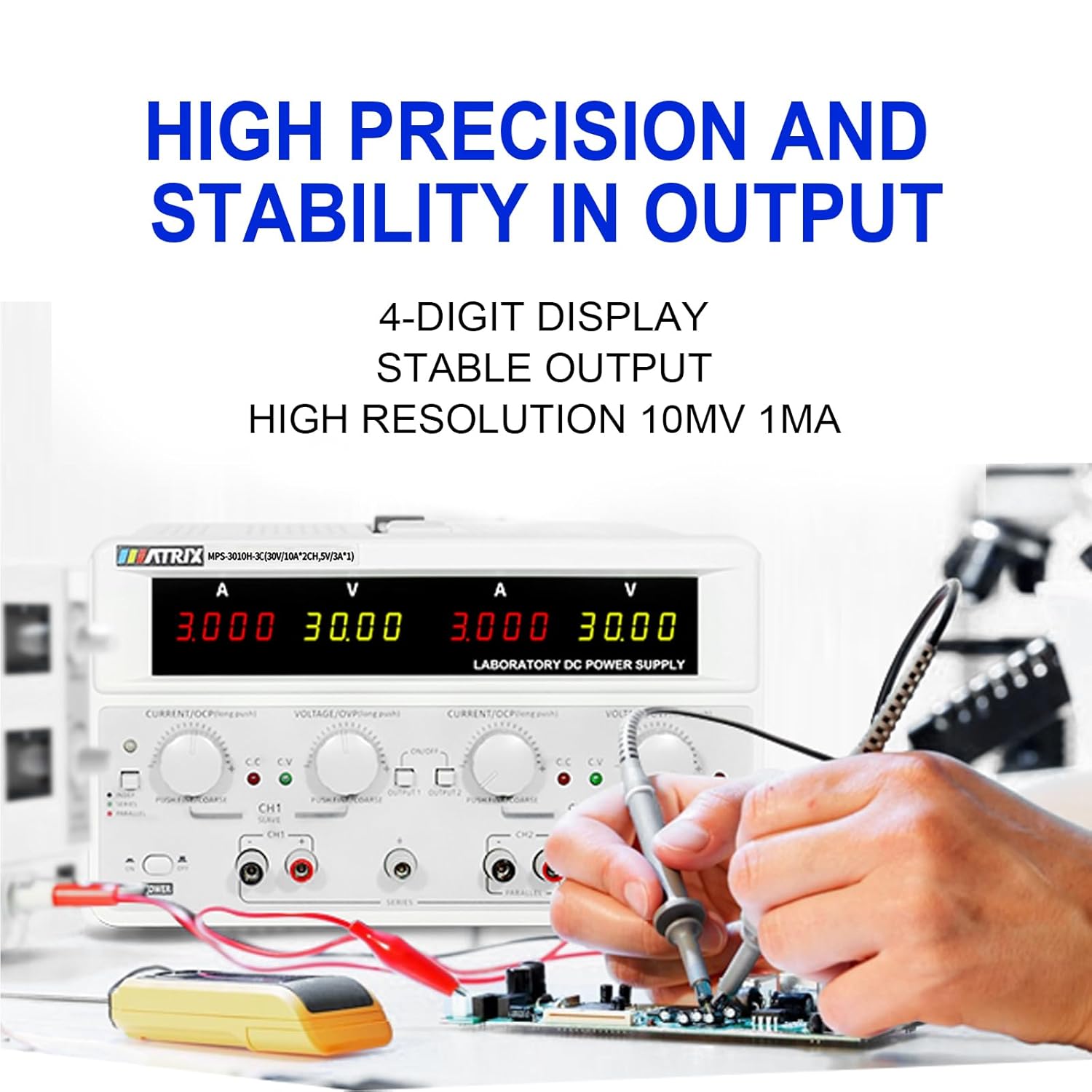
The MATRIX MPS-3010H-3C is a high-precision, 3-channel adjustable DC power supply designed for various applications including laboratory work, electronic repair, and DIY projects. It features two adjustable channels (CH1 and CH2) providing 0-30V / 0-10A each, and one fixed 5V / 3A channel (CH3), with a total power output of up to 615W. The unit offers a 4-digit bright screen display for voltage and current, independent control for CH1 and CH2, and supports 110V/220V input voltagای سوئچنگ
Key features include high precision (0.03% + 10 mV, 0.1% + 5 mA) and stability with 10 mV, 1 mA resolution and low ripple (2 mVrms, 5 mArms). It incorporates a power-on slow-start circuit for stable and accurate DC output. The power supply allows for easy switching between independent, series, and parallel modes with a single button, eliminating the need for manual wire reconnection. It also supports presetting current and voltage without short circuits. User-friendly features include precision encoder adjustment knobs for accurate value changes, OCP/OVP/OTP protection, an intelligent fan system, and USB, RS-232, and RS-485 interfaces for computer or automated device connectivity.

2. حفاظتی ہدایات
براہ کرم ڈیوائس کو چلانے سے پہلے تمام حفاظتی ہدایات کو پڑھیں اور سمجھیں۔ ان ہدایات پر عمل کرنے میں ناکامی کا نتیجہ برقی جھٹکا، آگ، یا مصنوعات کو نقصان پہنچا سکتا ہے۔
- پاور سپلائی کو ہمیشہ گراؤنڈ آؤٹ لیٹ سے جوڑیں۔
- آلے کو گیلے یا ڈی میں نہ چلائیں۔amp حالات
- زیادہ گرمی سے بچنے کے لیے مناسب وینٹیلیشن کو یقینی بنائیں۔ وینٹیلیشن کے سوراخوں کو مسدود نہ کریں۔
- سی کو نہ کھولیں۔asinبجلی کی فراہمی کا جی۔ اندر کوئی صارف کے قابل خدمت حصے نہیں ہیں۔ کوالیفائیڈ اہلکاروں کو سروسنگ کا حوالہ دیں۔
- ان پٹ والیوم کی تصدیق کریں۔tage selector (110V/220V) is set correctly for your region before connecting to AC power.
- Use only the provided power cord and test leads, or equivalent replacements that meet safety standards.
- Avoid touching output terminals when the device is powered on.
- آؤٹ پٹ ٹرمینلز سے کنکشن بنانے یا تبدیل کرنے سے پہلے پاور منقطع کریں۔
3. پیکیج کے مشمولات
Carefully unpack the power supply and check for any damage. Retain the packaging for future transport or storage. Verify that all items listed below are included:
- MATRIX MPS-3010H-3C DC Power Supply Unit
- AC پاور کورڈ
- ٹیسٹ لیڈز (سرخ اور سیاہ)
- صارف دستی (یہ دستاویز)
4. مصنوعات کی خصوصیات
- 3-چینل آؤٹ پٹ: Two adjustable channels (0-30V/0-10A) and one fixed channel (5V/3A).
- High Precision & Resolution: 10mV / 1mA resolution with 0.03% + 10mV voltage accuracy and 0.1% + 5mA current accuracy.
- Low Ripple & Noise: ≤2mVrms and ≤5mArms for stable output.
- 4 عددی ڈسپلے: Clear and bright display for voltagای اور موجودہ ریڈنگز۔
- Series/Parallel Mode: One-button switching for series or parallel operation without manual rewiring.
- پیش سیٹ فنکشن: Ability to preset current and voltage without short-circuiting the output.
- تحفظ کے طریقہ کار: Over Current Protection (OCP), Over Voltagای پروٹیکشن (OVP)، اور اوور ٹمپریچر پروٹیکشن (OTP)۔
- Intelligent Cooling: Fan system adjusts speed based on temperature to maintain optimal performance.
- کنیکٹوٹی: Equipped with USB, RS-232, and RS-485 interfaces for remote control and automation.
- میموری فنکشن: Saves output status and values before shutdown.
- بزر کنٹرول: Buzzer sound can be turned on or off.


5. سیٹ اپ گائیڈ
5.1 پیک کھولنا اور جگہ کا تعین کرنا
Remove the power supply from its packaging. Place the unit on a stable, level surface with adequate space around it for ventilation. Ensure that the front and rear panels are easily accessible.
5.2 AC پاور کو جوڑنا
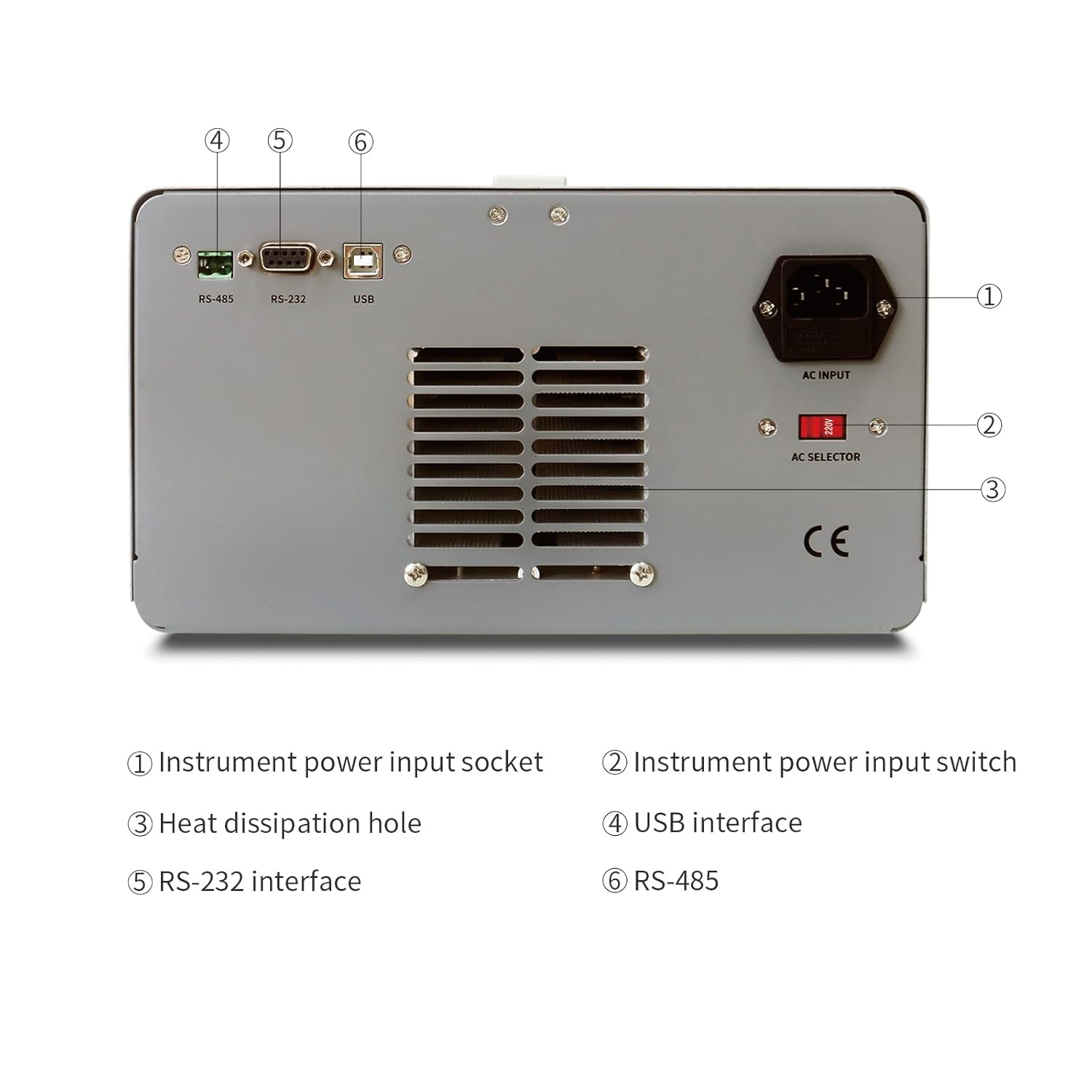
- Locate the AC input socket and the AC selector switch on the rear panel of the power supply.
- اہم: Before connecting the power cord, ensure the AC selector switch is set to the correct voltage (110V or 220V) for your local power grid. Incorrect setting can damage the unit.
- Connect the provided AC power cord to the AC input socket on the rear panel.
- AC پاور کورڈ کے دوسرے سرے کو گراؤنڈڈ الیکٹریکل آؤٹ لیٹ میں لگائیں۔
5.3 کنیکٹنگ لوڈ
Use the provided test leads to connect your load to the output terminals. Ensure correct polarity (red for positive, black for negative). For CH1 and CH2, use the corresponding output terminals. CH3 (fixed 5V) also has dedicated output terminals.
6. آپریٹنگ ہدایات
6.1 فرنٹ پینل اوورview
The front panel provides all necessary controls and displays for operating the power supply.

- CH1 V, A display: Digital displays for Voltage and Current of Channel 1.
- CH2 V, A display: Digital displays for Voltage and Current of Channel 2.
- CH1 Adjustment knob: Encoder knob for setting Voltage and Current for Channel 1. Push to switch between coarse/fine adjustment.
- CH2 Adjustment knob: Encoder knob for setting Voltage and Current for Channel 2. Push to switch between coarse/fine adjustment.
- موڈ اشارے: Lights indicating CC (Constant Current) or CV (Constant Voltage) mode.
- مینو: Button for accessing menu options.
- CH1, CH2 Output switch: Buttons to enable/disable output for Channel 1 and Channel 2 independently.
- آؤٹ پٹ ٹرمینل: Binding posts for connecting test leads (Red for positive, Black for negative).
- بجلی کے سوئچ: Main power ON/OFF switch for the unit.
6.2 Basic Operation (Independent Mode)
- Ensure the power supply is connected to AC power and the AC selector is correct.
- مین کو دبائیں۔ پاور switch to turn on the unit. The displays will illuminate.
- For CH1 or CH2, rotate the respective والیومTAGE knob to set the desired output voltage. Push the knob to toggle between coarse and fine adjustment.
- Rotate the respective کرنٹ knob to set the desired current limit. This acts as a maximum current the channel will supply.
- Connect your load to the corresponding output terminals (CH1, CH2, or CH3).
- دبائیں آؤٹ پٹ 1 or آؤٹ پٹ 2 switch to enable the output for the selected channel. The output indicator will light up.
- The display will show the actual output voltagای اور موجودہ.
- To disable an output, press its respective آؤٹ پٹ دوبارہ سوئچ کریں.
6.3 Series and Parallel Mode
The MPS-3010H-3C allows for easy configuration of CH1 and CH2 in series or parallel mode.
- سیریز موڈ: Connect the positive terminal of CH1 to the negative terminal of CH2 using a short wire. Then, use the negative terminal of CH1 and the positive terminal of CH2 as the combined output. Press the سیریز button. The voltage CH1 اور CH2 والیوم کا مجموعہ ہوگا۔tages, while the current limit will be that of the lower-set channel.
- متوازی وضع: Connect the positive terminals of CH1 and CH2 together, and the negative terminals of CH1 and CH2 together. Press the متوازی button. The current will be the sum of CH1 and CH2 currents, while the voltage will be that of the lower-set channel.
In both series and parallel modes, the display will show the combined current and voltage values, providing intuitive readings.
6.4 Fixed 5V Output (CH3)
The CH3 output provides a fixed 5V at 3A. This channel is always active when the power supply is on and does not have independent ON/OFF control or adjustable settings.
6.5 تحفظ کی خصوصیات
- او سی پی (اوور کرنٹ پروٹیکشن): If the output current exceeds the set limit, the power supply will enter constant current mode (CC) or shut down the output, depending on the setting.
- OVP (اوور والیومtagای تحفظ): اگر آؤٹ پٹ والیومtage exceeds a preset limit, the output will be shut down to protect the connected load.
- OTP (درجہ حرارت سے زیادہ تحفظ): The unit will automatically shut down if its internal temperature exceeds a safe operating limit.
7. Connectivity and Remote Control
The MPS-3010H-3C offers multiple interfaces for remote control and integration into automated systems.
7.1 انٹرفیس ختمview

- USB انٹرفیس: For direct connection to a personal computer.
- RS-232 انٹرفیس: A standard serial communication port.
- RS-485 انٹرفیس: A robust serial communication standard suitable for longer distances and multi-drop networks.
7.2 کسی کمپیوٹر سے رابطہ قائم کرنا
To control the power supply remotely, connect the appropriate cable (USB, RS-232, or RS-485) from the power supply to your computer. You will need to install the necessary drivers and control software, typically available from the MATRIX product support website. Refer to the software documentation for detailed instructions on remote operation and programming.
8 دیکھ بھال
مناسب دیکھ بھال آپ کی بجلی کی فراہمی کی لمبی عمر اور قابل اعتماد آپریشن کو یقینی بناتی ہے۔
- صفائی: Disconnect the power supply from all power sources and loads before cleaning. Use a soft, dry cloth to wipe the exterior. Do not use abrasive cleaners or solvents.
- وینٹیلیشن: Regularly check that the ventilation openings on the sides and rear of the unit are clear of dust and obstructions.
- ذخیرہ: جب لمبے عرصے تک استعمال نہ ہو، تو بجلی کی فراہمی کو خشک، دھول سے پاک ماحول میں ذخیرہ کریں۔
- انشانکن: For applications requiring high accuracy, periodic calibration by a qualified service center is recommended.
9 خرابیوں کا سراغ لگانا
یہ سیکشن عام مسائل کو حل کرتا ہے جن کا آپ کو سامنا ہو سکتا ہے۔ اگر مسئلہ برقرار رہتا ہے تو، کسٹمر سپورٹ سے رابطہ کریں۔
| مسئلہ | ممکنہ وجہ | حل |
|---|---|---|
| آن ہونے پر بجلی نہیں ہے۔ | Power cord not connected; AC selector incorrect; Blown fuse | Check power cord connection; Verify AC selector setting; Replace fuse (refer to service manual or contact support). |
| کوئی آؤٹ پٹ والیمtagای/موجودہ | Output switch OFF; OVP/OCP triggered; Load disconnected or faulty | Press output switch ON; Check OVP/OCP settings and reset if necessary; Verify load connection and functionality. |
| غلط جلدtage/current reading | Poor connection; Device malfunction | Check test lead connections; Contact customer support for calibration or repair. |
| یونٹ زیادہ گرم ہوتا ہے۔ | Blocked ventilation; Excessive load | Ensure ventilation openings are clear; Reduce load or operate within specified limits. |
10. تکنیکی تفصیلات
The following table details the technical specifications of the MATRIX MPS-3010H-3C DC Power Supply.

| پیرامیٹر | تفصیلات |
|---|---|
| ماڈل | MPS-3010H-3C |
| شرح شدہ ان پٹ والیوم۔tage | AC220V/110V ±10% |
| چینل 1 آؤٹ پٹ | 0-30V / 0-10A |
| چینل 2 آؤٹ پٹ | 0-30V / 0-10A |
| چینل 3 آؤٹ پٹ | 5V/3A |
| کل پاور | 615W |
| والیومtage Set Resolution | 10mV |
| Current Set Resolution | 1mA |
| والیومtage Set Accuracy | ≤0.03% + 10mV |
| Current Set Accuracy | ≤0.1% + 5mA |
| لہر اور شور (جلدtage) | ≤2mVrms |
| لہر اور شور (موجودہ) | m5mArms |
| کام کرنے کا درجہ حرارت | 0-40°C, ≤80%RH |
| پروڈکٹ کے طول و عرض (L x W x H) | 9.8 x 5.9 x 13 انچ |
| شے کا وزن | 26.4 پونڈ (12 کلوگرام) |
| انٹرفیس | RS-232, RS-485, USB |
11. وارنٹی اور کسٹمر سپورٹ
MATRIX TECHNOLOGY INC. provides a 3-year after-sales service for all MATRIX-branded products. For technical assistance, warranty claims, or general inquiries, please contact MATRIX customer support through the official website or your point of purchase. Please have your model number (MPS-3010H-3C) and purchase date available when contacting support.


