تعارف
This manual provides detailed instructions for the setup, operation, and maintenance of your ATTACK SHARK M71 75% TKL Wireless Mechanical Keyboard. Please read this guide thoroughly to ensure proper use and to maximize your keyboard's performance and lifespan.

Image: The ATTACK SHARK M71 keyboard showcasing its 68% layout and key features like aluminum alloy body, three-mode connection, and RGB backlight.
پیکیج کے مشمولات
تصدیق کریں کہ تمام اشیاء پیکیج میں موجود ہیں:
- ATTACK SHARK M71 Wireless Mechanical Keyboard
- ٹائپ سی کیبل
- 2.4G وائرلیس وصول کنندہ
- Keycap Puller / Switch Puller (Two-in-one tool)
- Complimentary 61 additional PBT OEM keycaps (different color layout)
- صارف دستی

Image: A visual representation of the items included in the ATTACK SHARK M71 keyboard package, including the keyboard, cables, and extra keycaps.
Video: Unboxing the Blueberry version of the M71 keyboard, showing the package contents and a demonstration of its typing sound.
پروڈکٹ ختمview
The ATTACK SHARK M71 is a 75% TKL wireless mechanical keyboard featuring a full aluminum CNC chassis, multi-mode connectivity, hot-swappable switches, and RGB lighting. Its compact design and robust construction are engineered for both gaming and productivity.
اہم خصوصیات:
- Full Aluminum CNC Body: Constructed from international standard 6063 aluminum alloy for durability and a premium feel.
- تھری موڈ کنیکٹیویٹی: Supports Bluetooth 5.0/3.0, 2.4G wireless, and wired USB-C connections.
- گرم تبدیل کرنے کے قابل سوئچز: Compatible with 3/5-pin switches, allowing for easy customization without soldering.
- Gasket Mount Structure: Incorporates anti-static IPEX switch pads, PORON sound-absorbing cotton, and PET acoustic switch pads to enhance typing feel and reduce noise.
- آرجیبی ایل ای ڈی لائٹنگ: Features customizable RGB backlighting and a side LED light strip.
- 4600mAh بیٹری: توسیعی وائرلیس استعمال فراہم کرتا ہے۔
- PBT OEM Keycaps: Durable keycaps with GMK-like characters.
اجزاء:
Familiarize yourself with the main components of your keyboard:
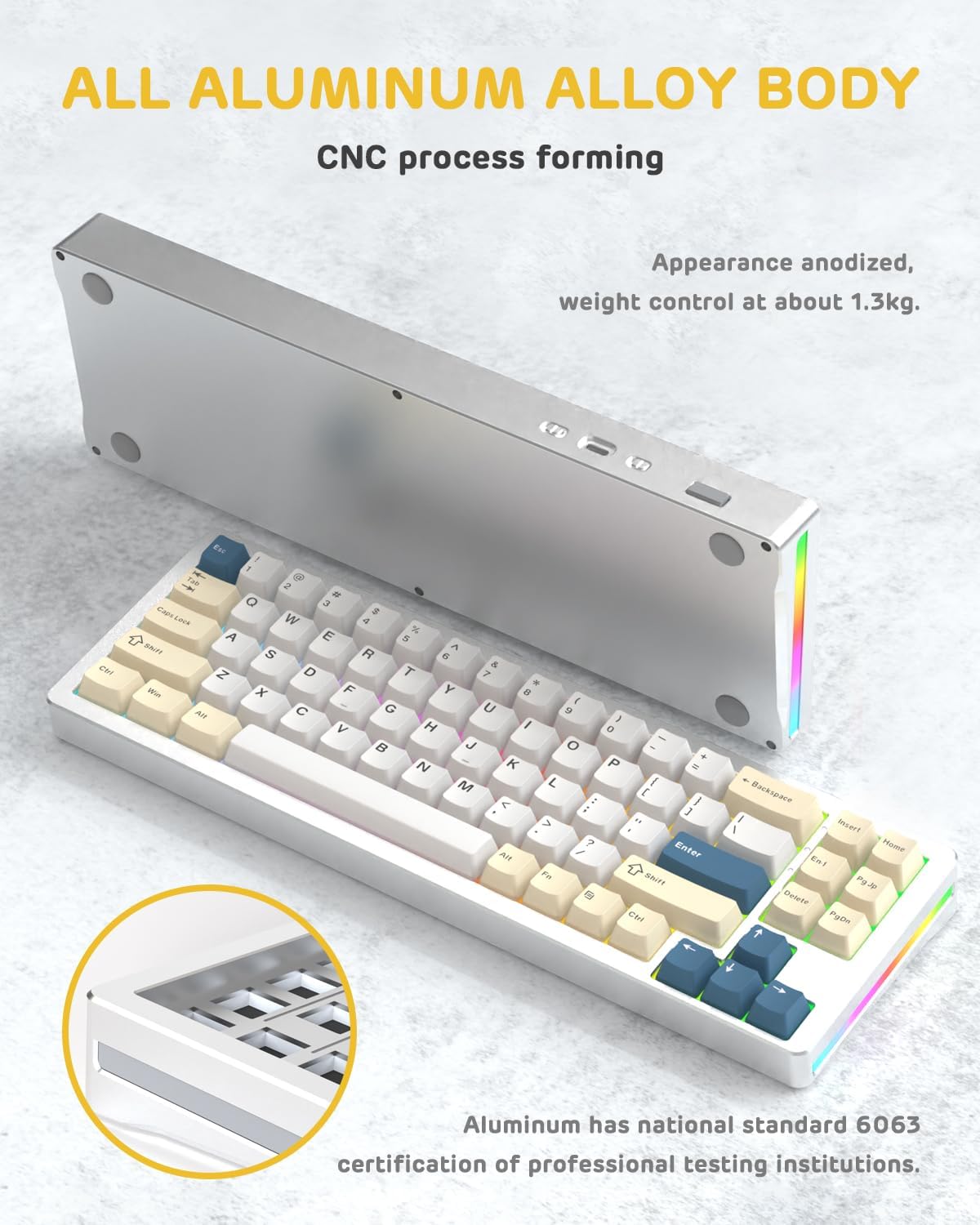
تصویر: ایک طرف view of the M71 keyboard highlighting its full aluminum alloy body and CNC process forming.

تصویر: ایک دھماکہ view illustrating the multi-layered gasket mount structure, including the PBT keycaps, aluminum alloy upper cover, customized switch body, PC positioning board, PORON filled cotton, anti-static IPEX switch underpad, PET singing pad, PCB board, PORON shaft seat cushion, PET sound backing pad, wing light strip, and aluminum alloy base.
سیٹ اپ
1. Connectivity Modes:
The M71 keyboard supports three connection modes: Bluetooth, 2.4G wireless, and wired USB-C.
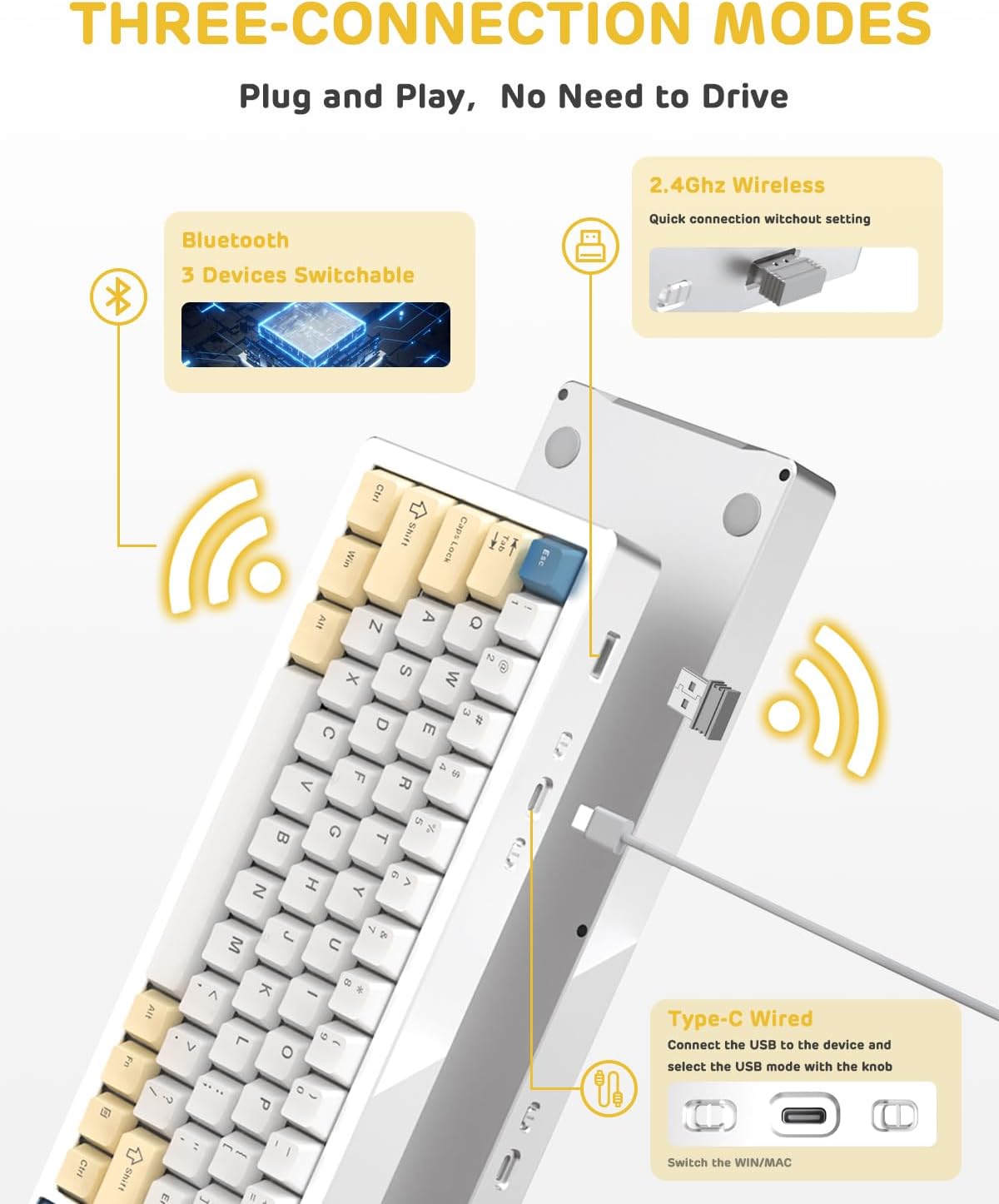
Image: A visual guide to the three connectivity options: Bluetooth for up to 3 devices, 2.4GHz wireless with a receiver, and wired Type-C connection.
وائرڈ کنکشن:
- Connect the provided Type-C cable to the keyboard's USB-C port and to your computer's USB port.
- Ensure the mode switch on the keyboard is set to the wired (USB-C) position.
- کی بورڈ خود بخود آپ کے سسٹم کے ذریعہ پہچان لیا جائے گا۔
2.4G وائرلیس کنکشن:
- Locate the 2.4G wireless receiver (dongle) in the package.
- 2.4G ریسیور کو اپنے کمپیوٹر پر دستیاب USB پورٹ میں لگائیں۔
- Set the mode switch on the keyboard to the 2.4G wireless position.
- کی بورڈ خود بخود جڑ جانا چاہیے۔
بلوٹوت کنکشن:
- Set the mode switch on the keyboard to the Bluetooth position.
- اپنے کمپیوٹر یا ڈیوائس پر بلوٹوتھ سیٹنگز کھولیں اور نئے آلات تلاش کریں۔
- The keyboard should appear as "ATTACK SHARK M71" or similar. Select it to pair.
- The keyboard can connect to up to 3 Bluetooth devices. Use Fn + 1/2/3 جوڑی والے آلات کے درمیان سوئچ کرنے کے لیے۔
2. Battery Charging and Status:
The M71 keyboard is equipped with a 4600mAh battery. To charge, connect the keyboard via the USB-C cable to a power source (e.g., computer USB port, USB wall adapter).

Image: A diagram showing how to check the battery level using Fn+ALT(R) and the visual indicators on the keyboard's side LED strip.
- وائرلیس موڈ میں بیٹری کی سطح کو چیک کرنے کے لیے، دبائیں۔ Fn + ALT (Right). The side LED strip will indicate the charge level.
- Battery life is approximately 1-2 weeks with lighting enabled and up to 4 weeks with lighting disabled.
آپریٹنگ ہدایات
1. Multimedia Keys:
The keyboard features 12 multimedia keys accessible via the Fn کلیدی امتزاج:
- Fn + F1-F12: Access various multimedia functions (e.g., volume control, play/pause, calculator, email).
- Fn + 1/2: Control screen brightness.
2. آرجیبی لائٹنگ کنٹرول:
Customize the keyboard's RGB backlight and side LED strip:

Image: The M71 keyboard displaying its RGB backlight and side LED strip, along with a close-up of the PBT keycaps.
- Fn + Ctrl (Right): Switch between different side LED light strip modes.
- Fn + Tab: Toggle white light mode.
- Refer to the full user manual for additional lighting effect controls and customization options via the programmable software.
3. Programmable Software:
The keyboard supports a dedicated driver program for advanced customization. You can download the software from the official ATTACK SHARK website to personalize lighting effects, key assignments, and macros. The keyboard is compatible with Windows 2000/XP/Vista/7/8/10/11, Android, and iOS.
دیکھ بھال
1. صفائی:
- کی بورڈ کی سطح کو صاف کرنے کے لیے نرم، خشک کپڑا استعمال کریں۔
- For deeper cleaning, remove keycaps using the provided keycap puller and use compressed air to clear debris from between switches.
- سخت کیمیکلز یا کھرچنے والے مواد کے استعمال سے پرہیز کریں۔
2. Hot-Swapping Switches:
The M71 keyboard features hot-swappable sockets, allowing you to change switches without soldering.

تصویر: ایک قریبی اپ view of the hot-swappable White Jade linear switches on the M71 keyboard, demonstrating how they can be easily removed and replaced.
- کی بورڈ کو بند کریں یا اسے اپنے آلے سے منقطع کریں۔
- سوئچ کو احتیاط سے پکڑنے اور اسے سیدھا اوپر کھینچنے کے لیے سوئچ پلر ٹول کا استعمال کریں۔
- Align the pins of the new switch with the holes on the PCB and press down gently until it clicks into place. Ensure pins are not bent.
- The PCB supports both 3-pin and 5-pin switches.
Video: A demonstration of the disassembly process for the M71 keyboard, showing how to remove keycaps and switches, revealing the gasket mount structure.
خرابی کا سراغ لگانا
| مسئلہ | ممکنہ حل |
|---|---|
| کی بورڈ وائرلیس موڈ میں جواب نہیں دے رہا ہے۔ |
|
| کلیدیں رجسٹر یا ڈبل ٹائپنگ نہیں کر رہی ہیں۔ |
|
| آرجیبی لائٹنگ کام نہیں کررہی ہے یا غلط ہے۔ |
|
| بلوٹوتھ جوڑا بنانے کے مسائل۔ |
|
وضاحتیں
| فیچر | تفصیل |
|---|---|
| ماڈل | ایم 71 |
| لے آؤٹ | 75% TKL (71 keys) |
| کنیکٹوٹی | Bluetooth 5.0/3.0, 2.4G Wireless, USB-C Wired |
| سوئچ کرتا ہے۔ | Hot-swappable (3/5-pin compatible), Pre-lubed Linear White Jade Switch |
| کیکیپس | PBT OEM Keycaps |
| بڑھتے ہوئے انداز | گسکیٹ ماؤنٹ |
| چیسس مواد | Full Aluminum CNC (6063 alloy) |
| بیٹری کی صلاحیت | 4600mAh |
| لائٹنگ | RGB Backlight, RGB LED Side Light Strip |
| مطابقت | Windows 2000/XP/Vista/7/8/10/11, Android, iOS, Mac |
| مصنوعات کے طول و عرض | 13.78"L x 4.53"W x 1.22"H |
| شے کا وزن | 2.86 پاؤنڈ |
وارنٹی اور سپورٹ
وارنٹی معلومات اور تکنیکی مدد کے لیے، براہ کرم آفیشل ATTACK SHARK سے رجوع کریں۔ webسائٹ یا ان کی کسٹمر سروس سے براہ راست رابطہ کریں۔ کسی بھی وارنٹی دعووں کے لیے خریداری کے ثبوت کے طور پر اپنی خریداری کی رسید رکھیں۔
مینوفیکچرر: حملہ شارک
بیچنے والا: Ajazz US
تاریخ پہلی دستیابی: 4 اگست 2023


