ایمیزون ایکو شو 21 یوزر مینوئل
ماڈل: ایکو شو 21
1. تعارف
Welcome to your new Amazon Echo Show 21. This smart display is designed to be the central hub for your home, offering a large Full HD screen for entertainment, organization, and communication. With built-in Fire TV and Alexa, you can stream content, manage your smart home, make video calls, and keep your family organized with customizable widgets.

Figure 1.1: Amazon Echo Show 21 Overview
The Echo Show 21 integrates seamlessly into your daily life, providing a visual and interactive experience for all your Alexa commands.
2. شروع کرنا: سیٹ اپ
2.1 باکس میں کیا ہے۔
- ایکو شو 21 ڈیوائس
- Alexa Voice Remote with batteries (2 AAA included)
- پاور اڈاپٹر (30W) اور 5 فٹ کی ہڈی (سفید)
- Wall mount, anchors, screws, mounting template
- فوری آغاز گائیڈ
2.2 ابتدائی سیٹ اپ
The Echo Show 21 is designed for simple setup. You will need a Wi-Fi connection.
- پاور آن: Connect the power adapter to your Echo Show 21 and plug it into a wall outlet. The device will automatically power on.
- وائی فائی کنکشن: Follow the on-screen instructions to connect your device to your Wi-Fi network. Amazon Wi-Fi simple setup can automatically connect your device if you are a Prime member and have previously saved your Wi-Fi credentials.
- ایمیزون اکاؤنٹ لاگ ان: اپنے ایمیزون اکاؤنٹ کی اسناد کے ساتھ لاگ ان کریں۔
- ذاتی بنانا: Customize your home screen, set up profiles, and configure your preferred settings.
- ریموٹ پیئرنگ: The included Alexa Voice Remote should pair automatically. If not, follow the on-screen instructions or refer to the quick start guide for manual pairing.
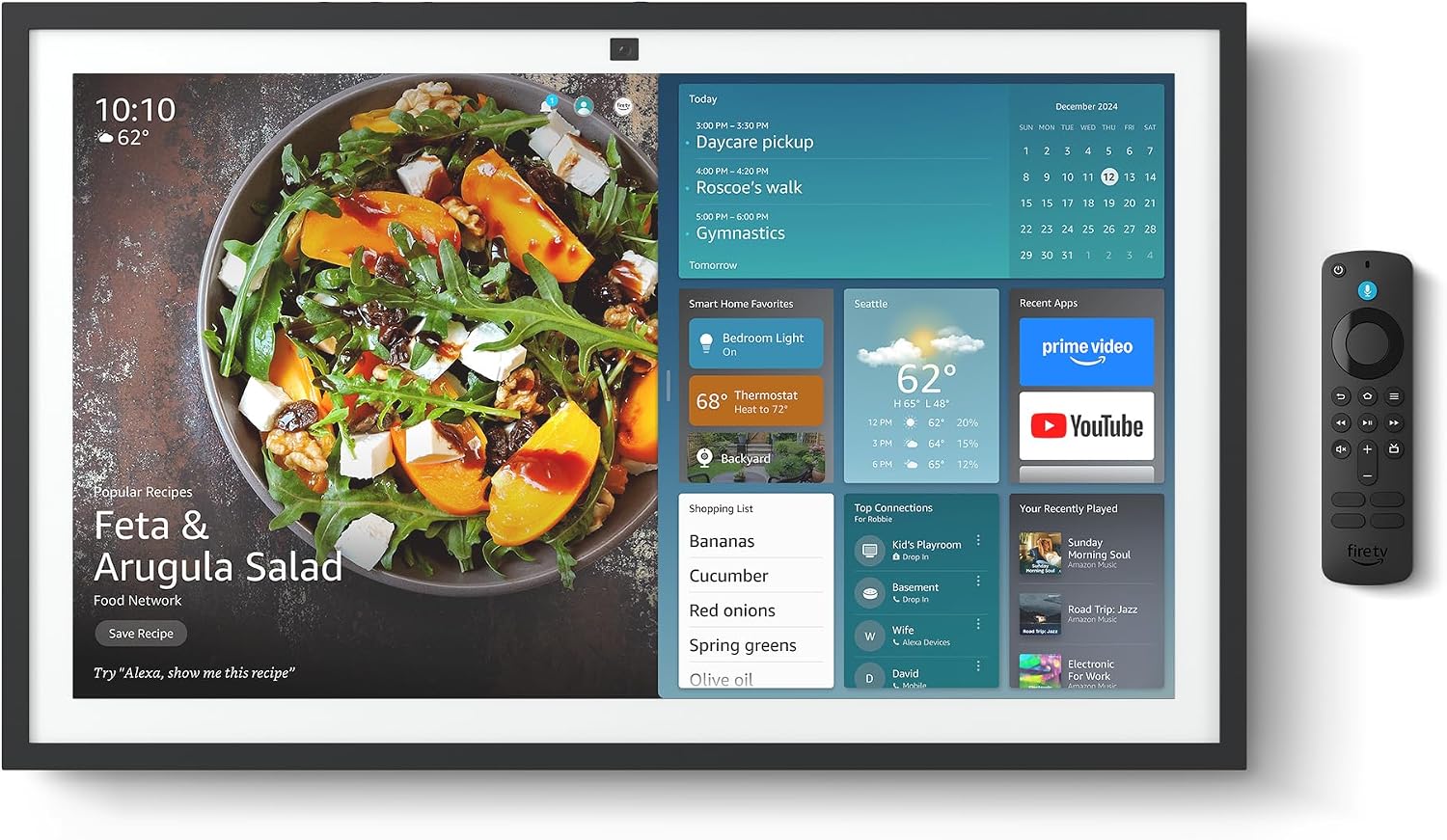
Figure 2.1: Echo Show 21 with Alexa Voice Remote
2.3 بڑھتے ہوئے اختیارات
The Echo Show 21 can be wall-mounted using the included hardware or placed on a stand (sold separately). Wall mounting requires an electric drill.
3. آپریٹنگ یورو ایکو شو 21
3.1 الیکسا کے ساتھ وائس کنٹرول
Your Echo Show 21 is primarily controlled by voice using Alexa. Simply say the wake word "Alexa" followed by your command or question.
- جنرل احکام: "الیکسا، موسم کیسا ہے؟"، "الیکسا، 10 منٹ کے لیے ٹائمر سیٹ کریں۔"
- موسیقی اور آڈیو: "Alexa, play pop music," "Alexa, play my morning playlist."
- Video & Entertainment: "Alexa, open Prime Video," "Alexa, play The Boys on Netflix."
3.2 فائر ٹی وی انٹیگریشن
Enjoy endless entertainment with built-in Fire TV. Use the included Alexa Voice Remote or voice commands to navigate.

Figure 3.1: Fire TV Interface
- Access thousands of apps like Prime Video, Netflix, YouTube, Apple TV.
- Stream movies, TV shows, and live content.
- The Fire TV remote allows for traditional navigation and playback control.
3.3 Home Screen & Widgets
The 21-inch display is ideal for organizing your day with customizable widgets.

Figure 3.2: Customizable Home Screen Widgets
- Keep important information like calendars, shopping lists, and weather in view.
- Personalize your home screen with family photos.
3.4 اسمارٹ ہوم کنٹرول
Control compatible smart devices using your voice or the smart home dashboard.

Figure 3.3: Smart Home Dashboard
- Turn lights on/off, adjust thermostats, or view live camera feeds.
- Supports Zigbee, Matter, and Thread Border Router for broad compatibility.
3.5 Video Calling
Connect with family and friends using the 13 MP camera with auto-framing, wide field of vision, 3.3x zoom, and noise reduction.

Figure 3.4: Echo Show 21 as a Digital Photo Frame
The camera can also be used to display your favorite memories as a digital photo frame.
4 دیکھ بھال
اپنے ایکو شو 21 کی لمبی عمر اور بہترین کارکردگی کو یقینی بنانے کے لیے، دیکھ بھال کے ان رہنما خطوط پر عمل کریں:
- سکرین کی صفائی: اسکرین کو آہستہ سے صاف کرنے کے لیے نرم، لنٹ سے پاک کپڑا استعمال کریں۔ ضدی smudges کے لئے، تھوڑا سا dampen the cloth with water. Avoid abrasive cleaners or sprays directly on the screen.
- ڈیوائس کے جسم کی صفائی: Wipe the exterior surfaces with a dry, soft cloth. Do not use harsh chemicals or solvents.
- وینٹیلیشن: اس بات کو یقینی بنائیں کہ زیادہ گرم ہونے سے بچنے کے لیے آلے کے وینٹیلیشن کے سوراخوں کو مسدود نہیں کیا گیا ہے۔
- سافٹ ویئر اپ ڈیٹس: Your Echo Show 21 receives automatic software security updates. Ensure your device is connected to Wi-Fi to receive these updates.
5 خرابیوں کا سراغ لگانا
If you encounter issues with your Echo Show 21, try the following common solutions:
- آلہ جواب نہیں دے رہا ہے: Try saying "Alexa" again clearly. If unresponsive, unplug the power adapter for a few seconds and then plug it back in to restart the device.
- کوئی وائی فائی کنکشن نہیں: Check your router and modem to ensure they are working correctly. Restart your router. On the Echo Show 21, go to Settings > Network to re-select your Wi-Fi network and re-enter the password.
- آڈیو کے مسائل: Ensure the volume is not muted or too low. Say "Alexa, turn up the volume." Check audio settings in the device menu.
- کیمرہ کام نہیں کر رہا: Ensure the physical camera shutter is open and the mic/camera-off button is not activated (red light indicates off).
- ریموٹ جواب نہیں دے رہا ہے: Check the batteries in the Alexa Voice Remote. If necessary, replace them. Re-pair the remote if it becomes disconnected.
6. تکنیکی تفصیلات
| فیچر | تفصیلات |
|---|---|
| سائز | 21.4"W x 13.2"H x 1.5"D |
| وزن | 10.7 پونڈ |
| ڈسپلے | 21” with 1920 x 1080 resolution (landscape or portrait) |
| کیمرہ | 13 ایم پی + شٹر |
| آڈیو | Two 2” woofers + two 0.6” tweeters |
| وائی فائی کنیکٹیویٹی | Wi-Fi 6E (802.1ax)، ٹرائی بینڈ، ڈوئل اینٹینا (MIMO)۔ 802.11a/b/g/n/ac کو سپورٹ کرتا ہے۔ |
| اسمارٹ ہوم حب | زیگبی + میٹر + تھریڈ بارڈر راؤٹر |
| پروسیسر | ایمیزون AZ2 نیورل نیٹ ورک انجن کے ساتھ اوکٹا کور SoC |
| سینسر | ALS RGB + ایکسلرومیٹر |
| زبان | انگریزی اور ہسپانوی۔ |

Figure 6.1: Echo Show 15 vs. Echo Show 21 Dimensions
7. رازداری کی خصوصیات
ایکو شو 21 پرائیویسی کنٹرولز کی متعدد پرتوں کے ساتھ ڈیزائن کیا گیا ہے:
- مائیک/کیمرہ آف بٹن: A physical button to electronically disconnect the microphones and camera.
- کیمرہ شٹر: A built-in physical shutter to cover the camera lens.
- ویک ورڈ ٹیکنالوجی: Alexa devices only begin recording and sending audio to the cloud after detecting the wake word.
- سلسلہ بندی کے اشارے: بصری اشارے اس وقت دکھاتے ہیں جب آڈیو یا ویڈیو کو کلاؤڈ پر سٹریم کیا جا رہا ہو۔
- Voice Recording Control: کرنے کی صلاحیت view اور اپنی آواز کی ریکارڈنگ کو حذف کر دیں۔

Figure 7.1: Mic/Camera-Off Button and Camera Shutter
For more details, visit the Alexa Privacy Hub.
8. قابل رسائی خصوصیات
The Echo Show 21 includes various accessibility features to personalize Alexa to your abilities:
- الیکسا پر ٹیپ کریں: آن اسکرین ٹائلز یا کی بورڈ کے ذریعے ٹچ کے ذریعے Alexa تک رسائی حاصل کریں۔
- موافق سننا: Alexa کے جواب دینے سے پہلے بات ختم کرنے کے لیے مزید وقت فراہم کرتا ہے۔
- ترجیحی بولنے کی شرح: کنٹرول کریں کہ Alexa کتنی تیز یا آہستہ بولتا ہے۔
- کیپشننگ: Alexa Captioning, Call Captioning, and Closed Captioning provide text for supported content.
- دکھائیں اور بتائیں: Helps users who are blind or visually impaired identify products.
- آوازView اسکرین ریڈر: Enables access for customers who are blind or visually impaired.
- اسکرین میگنیفائر: زوم ان/آؤٹ کریں اور اسکرین کے ارد گرد پین کریں۔
- کنڈل اونچی آواز میں پڑھیں: الیکسا کو اپنی Kindle کتابیں بلند آواز میں پڑھنے کو کہیں۔
- ریئل ٹائم ٹیکسٹ: ویڈیو کال میں لائیو ٹیکسٹ ٹائپ کریں۔
These features can be enabled via Settings > Accessibility on your device.
9. وارنٹی اور سپورٹ
9.1 پروڈکٹ وارنٹی
Your Echo Show 21 comes with a 1 سال کی محدود وارنٹی اور سروس. Optional 1-year, 2-year, and 3-year extended warranties are available for U.S. customers, sold separately.
Use of Echo Show 21 and Fire TV on Echo Show 21 is subject to their respective terms of service.
9.2 کسٹمر سپورٹ
For further assistance, troubleshooting, or to learn more about your device, please visit the Amazon support webسائٹ یا ایمیزون کسٹمر سروس سے رابطہ کریں۔


