1. تعارف
The Phenyx Pro PDM35 is an overhead condenser microphone designed for capturing the nuanced sounds of hi-hats, percussions, and string instruments. It features a cardioid polar pattern for focused sound capture and a wide frequency response for detailed audio reproduction. This manual provides essential information for the proper setup, operation, and maintenance of your PDM35 microphone.
باکس کے مشمولات
تصدیق کریں کہ نیچے دی گئی تمام اشیاء آپ کے پیکیج میں شامل ہیں:
- 1 x PDM35 Overhead Condenser Microphone
- 1 ایکس مائکروفون کلپ
- 1 x Microphone Foam Cover
- 1 ایکس مائیکروفون بیگ
- 1 ایکس یوزر مینوئل (یہ دستاویز)
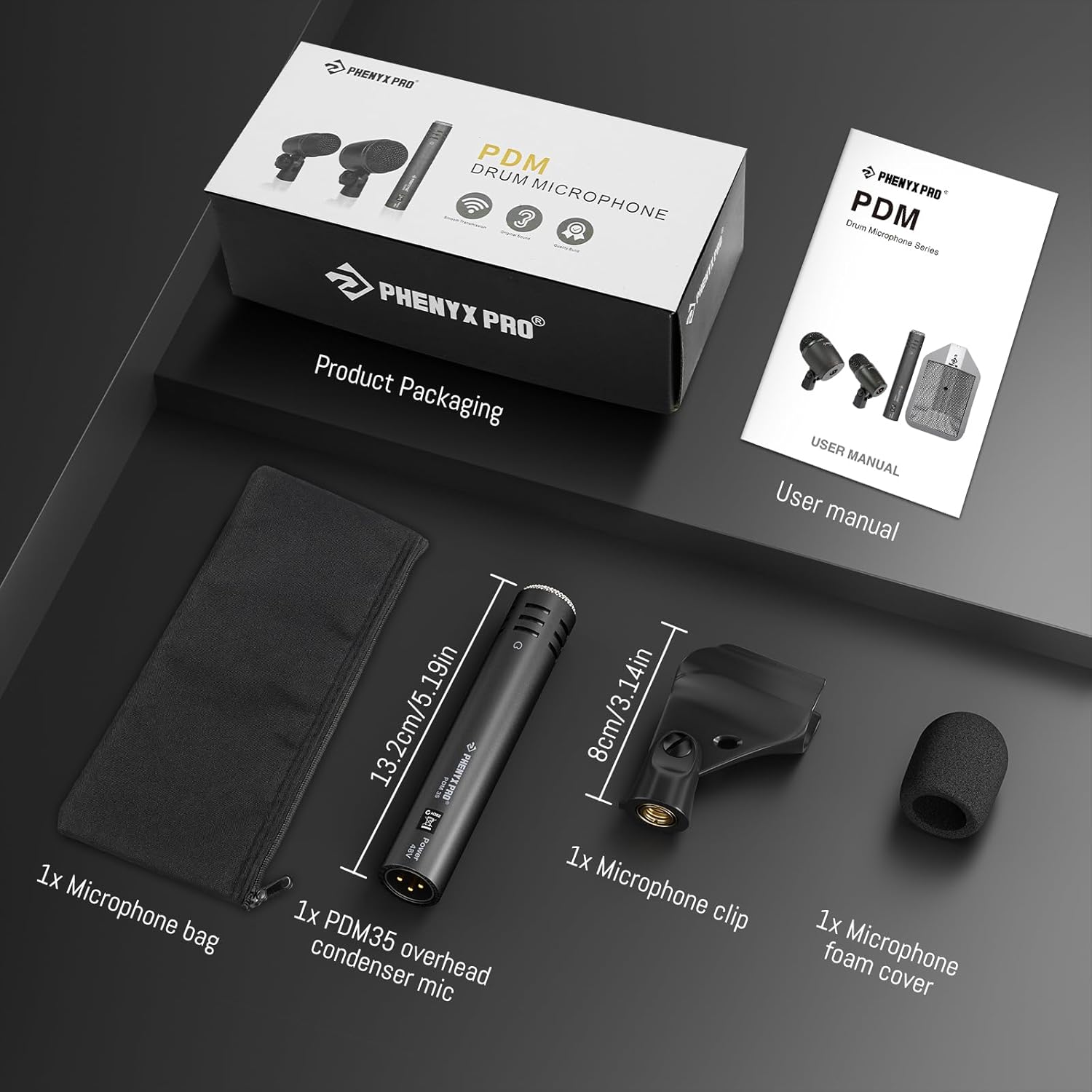
تصویر 1.1: PDM35 Box Contents. This image displays the Phenyx Pro PDM35 overhead condenser microphone along with its included accessories: a microphone clip, a foam cover, a carrying bag, and the user manual, all presented next to the product's retail packaging.
2. سیٹ اپ ہدایات
Follow these steps to properly set up your PDM35 microphone for optimal performance.
2.1 Phantom Power Requirement
The PDM35 is a condenser microphone and requires +48V فینٹم پاور to operate. Ensure your mixer or audio interface provides this power. Failure to supply phantom power will result in no sound output from the microphone.

تصویر 2.1: PDM35 setup on a drum kit, highlighting the need for +48V phantom power.
2.2 مائیکروفون لگانا
- Attach the included microphone clip to a standard microphone stand. The clip features an integrated standard thread for compatibility.
- Gently insert the PDM35 microphone into the microphone clip.
- Position the microphone as desired for your instrument. The flexible mic placement allows for effortless adjustment to capture optimal sound.

تصویر 2.2: Flexible microphone placement using the adjustable mic clip.
2.3 آڈیو آلات سے جڑنا
Connect the PDM35 microphone to your mixer or audio interface using a standard XLR cable. The microphone features a gold-plated XLR connector for stable and balanced signal transmission.

تصویر 2.3: Standard XLR connector for reliable signal transfer.
3. آپریٹنگ ہدایات
Understanding the PDM35's characteristics will help you achieve the best sound capture.
3.1 کارڈیوڈ پولر پیٹرن
The PDM35 features a cardioid polar pattern, which means it is most sensitive to sound coming from the front and rejects sound from the sides and rear. This is ideal for isolating specific instruments like cymbals or percussion, minimizing background noise and bleed from other sound sources.

تصویر 3.1: Cardioid pattern for focused sound capture and noise rejection.
3.2 تعدد جواب
The microphone offers a wide frequency response, capturing crisp high-frequency detail and a balanced overall sound. This allows for a full-spectrum audio experience, especially beneficial for instruments with rich harmonic content.

تصویر 3.2: Extended frequency response for detailed sound.
3.3 آلے کی جگہ کا تعین
Position the PDM35 microphone strategically to capture the desired sound. For hi-hats and cymbals, aim the microphone towards the edge or bell depending on the desired tone. For percussion, experiment with distance and angle to capture the instrument's full character. For string instruments, placement near the soundboard or bridge can yield excellent results.

تصویر 3.3: PDM35 in various recording and performance applications.
4 دیکھ بھال
Proper care will extend the life and performance of your PDM35 microphone.
- صفائی: مائیکروفون کے جسم کو صاف کرنے کے لیے نرم، خشک کپڑا استعمال کریں۔ سخت کیمیکلز یا کھرچنے والے مواد کے استعمال سے پرہیز کریں۔
- ذخیرہ: When not in use, store the microphone in the included microphone bag to protect it from dust and physical damage.
- Foam Cover: Use the microphone foam cover to reduce plosives and protect the capsule from moisture and dust during use.
- ماحولیاتی حالات: مائیکروفون کو انتہائی درجہ حرارت، زیادہ نمی، یا براہ راست سورج کی روشنی کے سامنے لانے سے گریز کریں۔
5 خرابیوں کا سراغ لگانا
If you encounter issues with your PDM35 microphone, refer to the following common problems and solutions.
5.1 کوئی ساؤنڈ آؤٹ پٹ نہیں۔
- فینٹم پاور چیک کریں: Ensure that +48V phantom power is enabled on your mixer or audio interface. The PDM35 requires phantom power to function.
- کیبل کنکشن: Verify that the XLR cable is securely connected to both the microphone and your audio equipment. Try a different XLR cable to rule out a faulty cable.
- ان پٹ انتخاب: Confirm that the correct input channel is selected on your mixer or interface.
- حاصل کی سطح: Check the gain (preamp) level on your mixer or interface. It might be set too low.
5.2 Poor Sound Quality / Excessive Noise
- مائیکروفون کی جگہ کا تعین: Adjust the microphone's position relative to the sound source. Incorrect placement can lead to muffled or thin sound.
- قطبی پیٹرن: Remember the cardioid pattern. Ensure the microphone is pointed directly at the desired sound source and away from unwanted noise.
- ماحولیاتی شور: Identify and reduce any external noise sources in the recording environment.
- کیبل کی سالمیت: A damaged XLR cable can introduce noise. Test with a known good cable.
- ان پٹ اوورلوڈ: If the sound is distorted, the input gain might be too high. Reduce the gain on your mixer or interface.
6. وضاحتیں
| فیچر | تفصیل |
|---|---|
| مائیکروفون فارم فیکٹر | اوور ہیڈ |
| طاقت کا منبع | کورڈڈ الیکٹرک (+48V فینٹم پاور کی ضرورت ہے) |
| مواد | دھات |
| سگنل ٹو شور کا تناسب | 60 ڈی بی |
| ہارڈ ویئر پلیٹ فارم | Boundary Microphone, Clip-On Design, Stand-Mounted |
| چینلز کی تعداد | 1 |
| تعدد رسپانس | 20 Hz - 20000 Hz |
| شے کا وزن | 14.4 اونس (0.41 کلوگرام) |
| آئٹم ماڈل نمبر | PDM35 |
| رنگ | گرے |
| کنیکٹوٹی ٹیکنالوجی | XLR |
| کنیکٹر کی قسم | XLR |
| خصوصی خصوصیت | Condenser mic, integral stand mount, mic clip, super-cardioid pattern, wide frequency response |
| ہم آہنگ آلات | Personal Computer, Tablet, Professional Audio Equipment |
| پولر پیٹرن | سپر کارڈیوڈ |
7. وارنٹی اور سپورٹ
Phenyx Pro products are manufactured with high-quality components and precision engineering, ensuring reliability and performance. We are committed to standing behind our products.
For warranty claims, technical support, or any questions regarding your PDM35 microphone, please contact Phenyx Pro customer service. Refer to the official Phenyx Pro website or your purchase documentation for contact details and specific warranty terms.


