1. تعارف
خریداری کے لیے آپ کا شکریہasing the PPLEE RGB Digital Alarm Clock, Model CR1008R. This clock is designed to provide accurate timekeeping, customizable alarm functions, and convenient charging options. Please read this manual thoroughly before use to ensure proper operation and to maximize your product experience.
2. حفاظتی معلومات
- Ensure the power adapter is compatible with your local power supply (100-240V).
- آلے کو پانی یا ضرورت سے زیادہ نمی کے سامنے نہ رکھیں۔
- گھڑی کو گرمی کے ذرائع کے قریب یا براہ راست سورج کی روشنی میں رکھنے سے گریز کریں۔
- صرف فراہم کردہ پاور اڈاپٹر استعمال کریں۔
- بچوں کی پہنچ سے دور رکھیں۔
- Insert AAA batteries correctly for backup function (not included).
3. پیکیج کے مشمولات
تصدیق کریں کہ تمام اشیاء آپ کے پیکیج میں موجود ہیں:
- 1 x PPLEE RGB Digital Clock
- 1 ایکس پاور اڈاپٹر
- 1 ایکس پاور کی ہڈی
- 1 ایکس یوزر مینوئل (یہ دستاویز)

Image: The package includes the RGB digital clock, power adapter, power cord, and user manual.
4. پروڈکٹ ختمview
اپنی الارم گھڑی کے اہم اجزاء سے خود کو واقف کرو۔

تصویر: سامنے view of the PPLEE RGB Digital Alarm Clock displaying time with RGB digits and a smartphone charging via its USB port.
فرنٹ پینل: Large LED display for time, AM/PM indicator, DST indicator, Alarm indicator.
ٹاپ پینل: Snooze/Light bar, Hour button, Minute button.
ریئر پینل:
- DC IN Port: For power adapter connection.
- USB Charging Port: For charging external devices.
- Type-C Charging Port: For charging external devices.
- Alarm ON/OFF Switch.
- Alarm Volume Control (Low/Med/High).
- Dimmer Control (for display brightness).
- Time Format Switch (12H/24H).
- DST (Daylight Saving Time) Switch.
- Set Time Button.
- Set Alarm Button.
- Multi-Color Button (for display and night light).
- Battery Compartment (for 2x AAA backup batteries).

تصویر: پیچھے view of the alarm clock highlighting the various control buttons and charging ports, including dimmer, alarm volume, time/alarm set, and time format switches.
5. سیٹ اپ
5.1 پاور کنکشن
- Connect the power cord to the DC IN port on the back of the clock.
- Plug the power adapter into a standard electrical outlet (AC 100-240V).
- The clock display will light up.
5.2 بیٹری بیک اپ کی تنصیب
For battery backup, which saves settings during power outages and can trigger the alarm, install 2 AAA batteries (not included) into the battery compartment on the back of the clock.
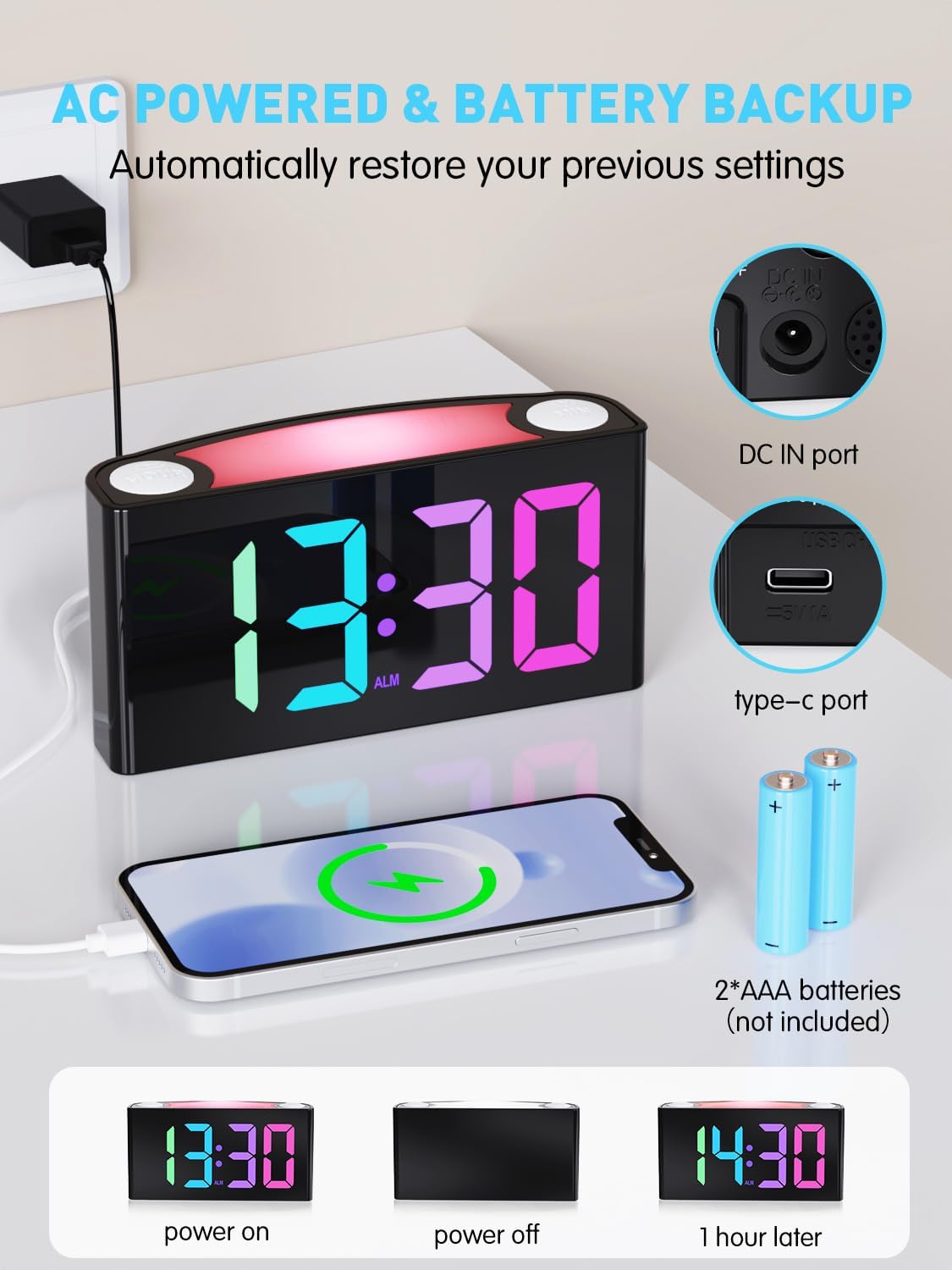
Image: The alarm clock is shown connected to AC power, with an open battery compartment indicating where to insert 2 AAA batteries for backup. The display shows "13:30" (power on), a blank screen (power off), and "14:30" (1 hour later, demonstrating time retention).
نوٹ: The clock's main functions (display, USB charging, alarm) require AC power. Batteries only provide backup for time memory and alarm trigger during power interruptions.
6. آپریٹنگ ہدایات
6.1 وقت کا تعین
- دبائیں "SET TIME" button on the rear panel. The display will start flashing.
- دبائیں "HOUR" button (on top) to adjust the hour.
- دبائیں "MIN" button (on top) to adjust the minute.
- دبائیں "SET TIME" again to save, or wait 5 seconds for automatic confirmation.
Video: Demonstrates how to set the time on the PPLEE RGB Digital Alarm Clock, including adjusting hours and minutes and confirming the setting.
6.2 الارم سیٹ کرنا۔
- سلائیڈ کریں۔ "ALARM ON/OFF" switch to the "ON" position. The alarm indicator will light up.
- دبائیں "SET ALARM" button on the rear panel. The alarm time display will start flashing.
- دبائیں "HOUR" button (on top) to adjust the alarm hour.
- دبائیں "MIN" button (on top) to adjust the alarm minute.
- دبائیں "SET ALARM" again to save, or wait 5 seconds for automatic confirmation.
الارم بند کرنے کے لیے، سلائیڈ کریں۔ "ALARM ON/OFF" switch to the "OFF" position. The alarm indicator will disappear.
6.3 Display Brightness (Dimmer)
The clock features a 7-level dimmer for the time display (0%-100% brightness).
- استعمال کریں۔ "DIMMER" button on the rear panel to cycle through brightness levels.

Image: The alarm clock display shows various brightness levels from 0% to 100%, illustrating the 7-level dimmer function.
6.4 نائٹ لائٹ موڈز
The clock includes an 8-mode/7-color night light with 3 adjustable brightness settings.
- دبائیں "SNOOZE/LIGHT" bar on top to turn the night light on/off and cycle through colors/modes.
- To adjust night light brightness, press and hold the "SNOOZE/LIGHT" بار

Image: A person sleeping next to the alarm clock, which emits a soft yellow night light from its top bar. Below are icons indicating 3-level adjustable brightness for the night light.
6.5 الارم والیوم
Adjust the alarm volume to your preference (Low, Medium, High).
- استعمال کریں۔ "ALARM VOLUME" switch on the rear panel to select the desired volume level.

Image: A person reaching for the snooze bar on the alarm clock, which displays "8:30". The image also illustrates the 3-level adjustable alarm volume (90db, 103db, 110db).
6.6 اسنوز فنکشن۔
جب الارم بجتا ہے تو بڑے کو دبائیں۔ "SNOOZE/LIGHT" bar on top to activate snooze for 9 extra minutes of sleep.
The alarm will sound again after 9 minutes. To completely turn off the alarm, use the "ALARM ON/OFF" سوئچ
6.7 12/24 Hour Format and DST
- استعمال کریں۔ "TIME FORMAT" switch on the rear panel to toggle between 12-hour and 24-hour display.
- استعمال کریں۔ "DST" switch on the rear panel to enable or disable Daylight Saving Time (adjusts time by 1 hour).
6.8 Dual Charging Ports
The clock is equipped with a Type-C output port and a USB output port for charging your devices.

Image: The alarm clock with its display showing "12:00" and two smartphones connected to its USB and Type-C charging ports, indicating active charging.
Simply connect your device's charging cable to the appropriate port on the back of the clock.
7 دیکھ بھال
- گھڑی کو نرم، خشک کپڑے سے صاف کریں۔ کھرچنے والے کلینر یا سالوینٹس کا استعمال نہ کریں۔
- صاف کرنے سے پہلے یقینی بنائیں کہ گھڑی ان پلگ ہے۔
- If not in use for an extended period, remove the backup batteries.
8 خرابیوں کا سراغ لگانا
| مسئلہ | حل |
|---|---|
| گھڑی کا ڈسپلے خالی ہے۔ | Check if the power adapter is securely plugged into both the clock and the wall outlet. Ensure the outlet has power. |
| الارم نہیں بجتا ہے۔ | Verify the "ALARM ON/OFF" switch is in the "ON" position. Check the alarm volume setting. Ensure the alarm time is correctly set. |
| اقتدار ou کے بعد وقت غلط ہے۔tage. | Ensure 2 AAA batteries are installed in the battery compartment for backup. If batteries were not present or depleted, reset the time manually. |
| Devices not charging via USB/Type-C. | Confirm the clock is connected to AC power. Check the charging cable and the device being charged. |
| رات کی روشنی کام نہیں کر رہی ہے۔ | Press the "SNOOZE/LIGHT" bar to cycle through modes and turn on the light. Check if the clock is powered. |
9. وضاحتیں
| ماڈل نمبر | CR1008R |
| برانڈ | پی پی ایل ای |
| ڈسپلے کی قسم | Digital LED (RGB) |
| مصنوعات کے طول و عرض | 6.46"W x 3.39"H |
| طاقت کا منبع | Corded Electric (AC 100-240V) |
| بیٹری بیک اپ | 2 x AAA بیٹریاں (شامل نہیں) |
| چارجنگ پورٹس | 1 x USB, 1 x Type-C |
| چمک دکھائیں۔ | 7-level adjustable dimmer |
| نائٹ لائٹ | 8 modes / 7 colors, 3-level adjustable brightness |
| الارم والیوم | 3-level adjustable (Low, Medium, High) |
| اسنوز کا دورانیہ | 9 منٹ |
10. وارنٹی اور سپورٹ
For warranty information or technical support, please refer to the contact details provided with your purchase or visit the official PPLEE webسائٹ وارنٹی کے دعووں کے لیے اپنی خریداری کی رسید اپنے پاس رکھیں۔
ای میل: support@pplec.net


