1. تعارف
The Zebronics Astra 30 is a portable Bluetooth speaker designed for a versatile audio experience. It features 14W output, dual 52mm drivers, dual passive radiators for enhanced bass, and multiple connectivity options including Bluetooth v5.3, FM radio, AUX, USB, and mSD card support. This manual provides instructions for setting up, operating, and maintaining your speaker.
2. پیکیج کے مشمولات
براہ کرم درج ذیل اشیاء کے لیے پیکج چیک کریں:
- اسپیکر - 1 یونٹ
- Charging cable - 1 unit
- User manual - 1 unit
3. پروڈکٹ ختمview
اسپیکر کے اجزاء اور کنٹرولز سے اپنے آپ کو واقف کرو۔

تصویر 3.1: سامنے والا view of the Zebronics Astra 30 speaker, showcasing its sleek black design and speaker grille.
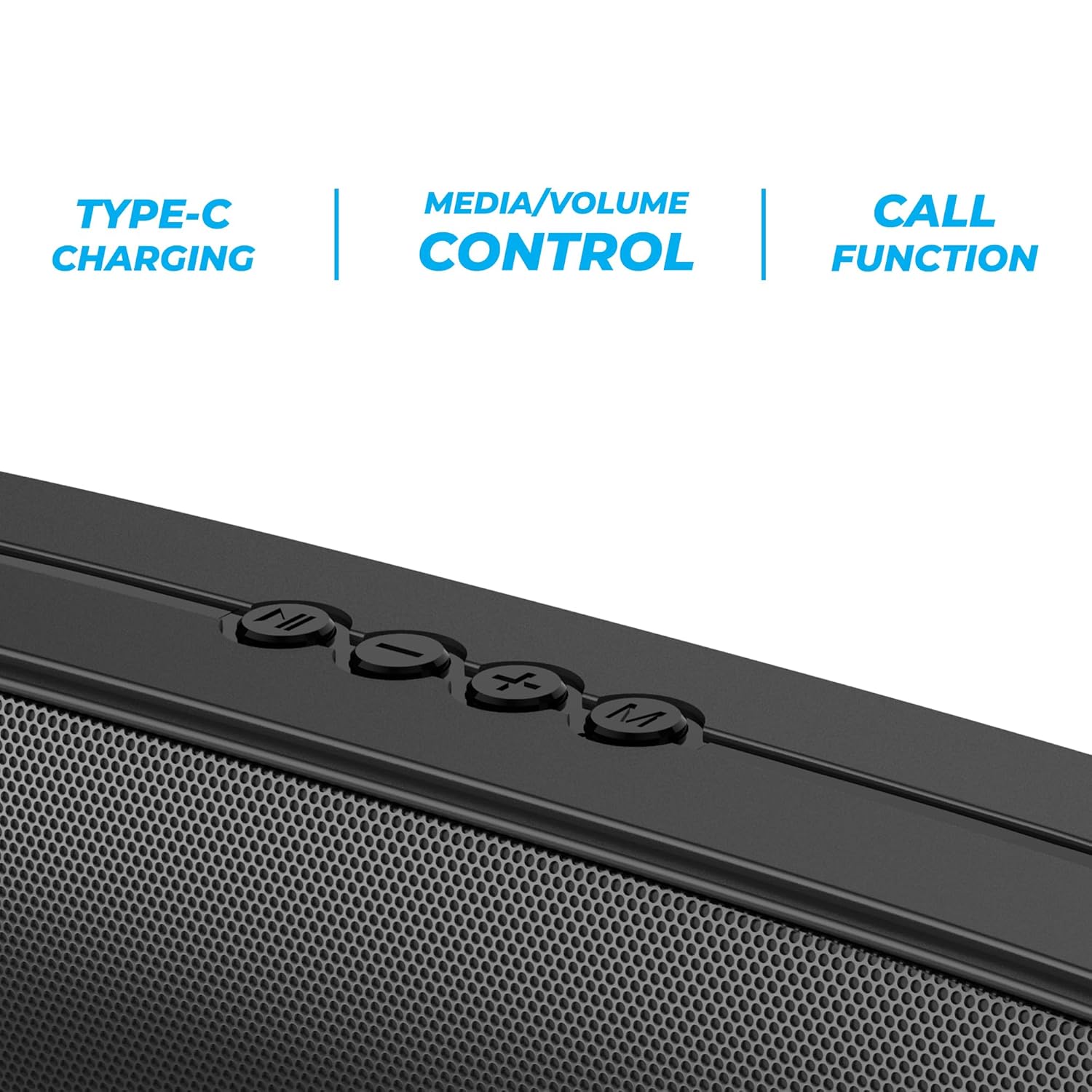
تصویر 3.2: Close-up of the control panel buttons on the top of the speaker, including power, volume, and mode controls.

تصویر 3.3: پیچھے view of the speaker showing the multi-connectivity ports: USB, Micro SD slot, AUX input, and Type-C charging port.
4. سیٹ اپ
4.1 اسپیکر کو چارج کرنا
Before initial use, fully charge the speaker. The Zebronics Astra 30 features a built-in rechargeable battery with Type-C charging.
- فراہم کردہ Type-C چارجنگ کیبل کو اسپیکر پر چارجنگ پورٹ سے جوڑیں۔
- کیبل کے دوسرے سرے کو USB پاور اڈاپٹر (شامل نہیں) یا کمپیوٹر کے USB پورٹ سے جوڑیں۔
- The charging indicator will illuminate during charging and turn off once fully charged.
A full charge takes approximately 4 hours and provides up to 12 hours of playback time at 50% volume.

تصویر 4.1: Illustration indicating the speaker's 12-hour playback capability on a single charge.
4.2 پاور آن/آف۔
To power on or off the speaker, press and hold the power button located on the control panel until you hear an audible prompt or see the indicator light change.
5. آپریٹنگ ہدایات
5.1 بلوٹوتھ جوڑی
The Zebronics Astra 30 uses Bluetooth v5.3 for wireless audio streaming.
- اسپیکر پر پاور۔ یہ خود بخود بلوٹوتھ پیئرنگ موڈ میں داخل ہو جائے گا، جس کی نشاندہی ایک چمکتی ہوئی LED سے ہوتی ہے۔
- اپنے سمارٹ فون، ٹیبلیٹ، یا دیگر ڈیوائس پر بلوٹوتھ کو فعال کریں۔
- تلاش کریں۔ "ZEB-ASTRA 30" in the list of available Bluetooth devices.
- Select "ZEB-ASTRA 30" to connect. Once paired, the speaker will confirm with an audible tone, and the LED will stop flashing.
- اگر پاس ورڈ کے لیے کہا جائے تو "0000" درج کریں۔
5.2 حقیقی وائرلیس سٹیریو (TWS) فنکشن
Connect two Zebronics Astra 30 speakers for a true wireless stereo experience.
- Ensure both ZEB-ASTRA 30 speakers are powered on and not connected to any Bluetooth device.
- On one of the speakers (this will be the primary speaker), press and hold the TWS button (often combined with the Mode button) until you hear a pairing tone.
- دونوں اسپیکر خود بخود ایک دوسرے سے جڑ جائیں گے۔ ایک بار منسلک ہونے کے بعد، آپ کو ایک تصدیقی ٹون سنائی دے گا۔
- Now, connect your device to the primary speaker via Bluetooth as described in Section 5.1. Audio will play in stereo through both speakers.

تصویر 5.1: Visual representation of two Zebronics Astra 30 speakers connected via TWS for stereo sound.
5.3 ایف ایم ریڈیو موڈ
بلٹ ان ایف ایم ریڈیو استعمال کرنے کے لیے:
- اسپیکر پر طاقت
- FM ریڈیو موڈ پر سوئچ کرنے کے لیے 'M' (موڈ) بٹن دبائیں۔
- دستیاب ایف ایم سٹیشنز کو خودکار طور پر اسکین کرنے اور محفوظ کرنے کے لیے، پلے/پاز بٹن کو دبائے رکھیں۔ اسپیکر خود بخود اسٹیشنوں کو اسکین اور اسٹور کرے گا۔
- محفوظ کردہ اسٹیشنوں کے درمیان نیویگیٹ کرنے کے لیے پچھلا/اگلا ٹریک بٹن استعمال کریں۔
- For optimal reception, ensure the charging cable is connected as an antenna.
5.4 AUX ان پٹ موڈ
Connect external audio devices using the AUX input:
- اسپیکر پر طاقت
- Press the 'M' (Mode) button to switch to AUX mode.
- اسپیکر پر موجود AUX پورٹ سے 3.5mm آڈیو کیبل (شامل نہیں) کے ایک سرے کو جوڑیں۔
- دوسرے سرے کو اپنے آلے کے آڈیو آؤٹ پٹ سے جوڑیں (مثلاً اسمارٹ فون، MP3 پلیئر)۔
- آڈیو اب آپ کے منسلک آلے سے اسپیکر کے ذریعے چلے گا۔
5.5 USB and Micro SD Card Playback
آڈیو چلائیں۔ files directly from a USB pen drive or Micro SD card:
- اسپیکر پر طاقت
- Insert a USB pen drive (up to 32GB) or a Micro SD card into the respective slot.
- اسپیکر خود بخود اسٹوریج ڈیوائس کا پتہ لگائے گا اور آڈیو چلانا شروع کردے گا۔ files. If not, press the 'M' (Mode) button to switch to USB or SD card mode.
- پلے بیک کو کنٹرول کرنے کے لیے پلے/پاز اور پچھلا/اگلا ٹریک بٹن استعمال کریں۔
5.6 کال فنکشن
بلوٹوتھ کے ذریعے اسمارٹ فون سے منسلک ہونے پر، اسپیکر کو ہینڈز فری کالز کے لیے استعمال کیا جاسکتا ہے۔
- جواب / کال ختم کریں: پلے/پاز بٹن کو ایک بار دبائیں۔
- کال مسترد کریں: پلے/پاز بٹن کو دبائیں اور تھامیں۔
- آخری نمبر دوبارہ ڈائل کریں: پلے/پاز بٹن کو دو بار دبائیں۔
5.7 Volume and Media Control
The speaker features integrated controls for audio playback:
- اواز بڑھایں: '+' بٹن دبائیں۔
- آواز کم: '-' بٹن دبائیں۔
- اگلا ٹریک: '+' بٹن دبائیں اور تھامیں۔
- پچھلا ٹریک: '-' بٹن کو دبائیں اور تھامیں۔
- چلائیں/روکیں: پلے/پاز بٹن دبائیں۔
6 دیکھ بھال
- اسپیکر کو نرم، خشک کپڑے سے صاف کریں۔ سخت کیمیکل یا کھرچنے والے کلینر کا استعمال نہ کریں۔
- اسپیکر کو انتہائی درجہ حرارت، براہ راست سورج کی روشنی اور نمی سے دور رکھیں۔
- سپیکر کو شدید اثرات سے گریز کرنے یا اس کے تابع کرنے سے گریز کریں۔
- سپیکر کو ٹھنڈی، خشک جگہ پر ذخیرہ کریں جب طویل مدت تک استعمال نہ ہو۔
- The speaker is rated as waterproof. However, avoid submerging it in water for prolonged periods. Ensure the port cover is securely closed to maintain water resistance.
7 خرابیوں کا سراغ لگانا
| مسئلہ | ممکنہ حل |
|---|---|
| سپیکر پاور آن نہیں کرتا۔ | یقینی بنائیں کہ بیٹری چارج ہے۔ ٹائپ سی کیبل کا استعمال کرتے ہوئے اسپیکر کو پاور سورس سے جوڑیں۔ |
| بلوٹوتھ کے ذریعے جوڑا نہیں بنایا جا سکتا۔ |
|
| کوئی آواز یا کم والیوم نہیں۔ |
|
| ایف ایم ریڈیو کا استقبال ناقص ہے۔ | Ensure the Type-C charging cable is connected to act as an antenna. Try repositioning the speaker. |
| TWS جوڑا ناکام ہوجاتا ہے۔ |
|
8. وضاحتیں
| فیچر | تفصیل |
|---|---|
| ماڈل کا نام | زیب آسٹرا 30 |
| آؤٹ پٹ پاور | 14 واٹ |
| ڈرائیور کا سائز | دوہری 52 ملی میٹر |
| بلوٹوتھ ورژن | v5.3 |
| کنیکٹیویٹی کے اختیارات | Bluetooth, FM, AUX, USB, Micro SD |
| USB/Micro SD Max Capacity | 32 جی بی |
| بیٹری کی زندگی | 12 گھنٹے تک (50% والیوم پر) |
| چارج کرنے کا وقت | 4 گھنٹے |
| چارج کرنے کی قسم | ٹائپ سی |
| پانی کی مزاحمت | واٹر پروف |
| پروڈکٹ کے طول و عرض (D x W x H) | 5.7 x 35.4 x 6.5 سینٹی میٹر |
| شے کا وزن | 645 گرام |
| رکاوٹ | 3 اوہم |
| سگنل ٹو شور کا تناسب | 75 ڈی بی |

تصویر 8.1: Graphic highlighting the 14W RMS output and dual 52mm drivers of the Zebronics Astra 30 speaker.
9. وارنٹی اور سپورٹ
The Zebronics Astra 30 speaker comes with a 1 سال کی محدود وارنٹی خریداری کی تاریخ سے. وارنٹی کے دعووں کے لیے براہ کرم اپنی خریداری کی رسید اپنے پاس رکھیں۔
For technical support, service, or warranty inquiries, please contact Zebronics customer service. Contact details can typically be found on the official Zebronics webسائٹ یا آپ کی مصنوعات کی پیکیجنگ پر۔
مینوفیکچرر: زیبرونکس انڈیا پرائیویٹ لمیٹڈ
Address: 13/7, Smith Road, Royapettah, Chennai-600002


