1. تعارف
Thank you for choosing the Havit H2038U RGB Wired Gaming Headset. This manual provides essential information for setting up, operating, and maintaining your headset. Please read it carefully to ensure optimal performance and longevity of your product.
اہم حفاظتی معلومات:
- سماعت کو پہنچنے والے نقصان کو روکنے کے لیے زیادہ مقدار میں سننے سے گریز کریں۔
- ہیڈسیٹ کو انتہائی درجہ حرارت، نمی، یا سنکنرن مادوں کے سامنے نہ رکھیں۔
- ہیڈسیٹ کو پانی اور مائعات سے دور رکھیں۔
- ہیڈسیٹ کو الگ کرنے یا اس میں ترمیم کرنے کی کوشش نہ کریں۔ اس سے وارنٹی ختم ہو جائے گی۔
2. پروڈکٹ ختمview
2.1 پیکیج کے مشمولات
- Havit H2038U RGB Wired Gaming Headset
- ڈی ٹیچ ایبل مائیکروفون
- صارف دستی (یہ دستاویز)
2.2 ہیڈسیٹ کے اجزاء
The Havit H2038U headset features a comfortable over-ear design with soft earcups and an adjustable headband. It includes a detachable microphone for clear communication and integrated RGB lighting for an enhanced gaming experience.

تصویر 2.1: سامنے والا view of the Havit H2038U RGB Wired Gaming Headset. This image displays the white over-ear headphones with RGB lighting elements on the earcups and the adjustable headband.
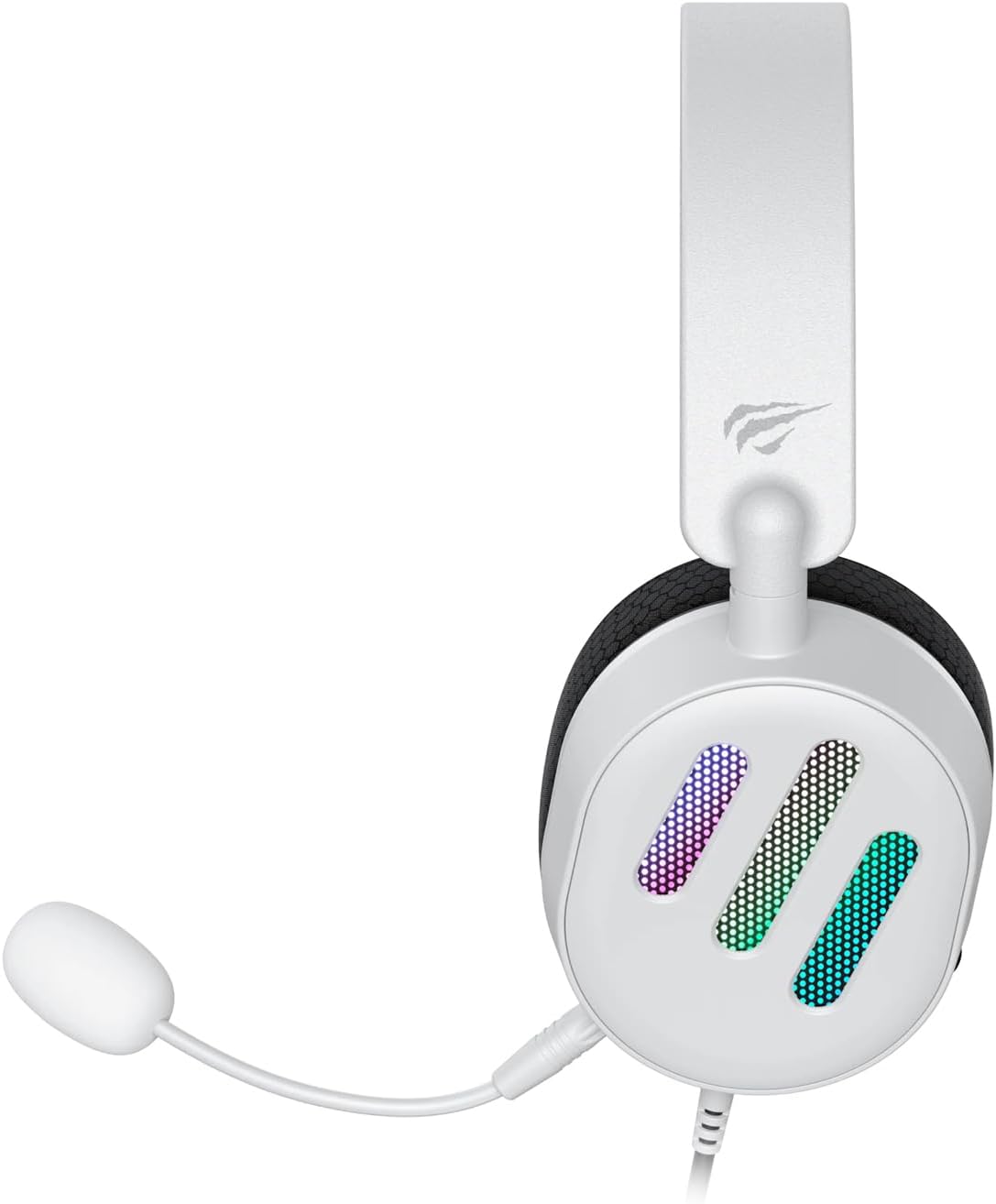
تصویر 2.2: طرف view of the Havit H2038U RGB Wired Gaming Headset, showing the detachable microphone connected to the left earcup. The volume control wheel is also visible on the earcup.

تصویر 2.3: اوپر view of the Havit H2038U RGB Wired Gaming Headset, highlighting the adjustable headband and the soft, breathable earcups.
3. سیٹ اپ
The Havit H2038U headset utilizes a dual-connection system for full functionality: a 3.5mm jack for audio and a USB connection for RGB lighting and virtual 7.1 surround sound.

تصویر 3.1: کلوز اپ view illustrating the detachable microphone connection (3.5mm jack) and the USB connection for the Havit H2038U headset. This image also indicates 360-degree sound direction and 7.1 USB connectivity.
- مائیکروفون کو جوڑیں: Insert the detachable microphone into the 3.5mm microphone jack located on the left earcup until it clicks into place. Ensure it is securely connected.
- آڈیو کے لیے جڑیں: Plug the 3.5mm audio jack from the headset into the corresponding audio output port on your computer, gaming console, or mobile device.
- Connect for RGB Lighting and 7.1 Surround Sound: Plug the USB connector from the headset into an available USB port on your computer or gaming console. This connection powers the RGB lighting and enables the virtual 7.1 surround sound feature.
- ہیڈسیٹ فٹ کو ایڈجسٹ کریں: Adjust the headband to ensure a comfortable and secure fit over your ears. The earcups should fully enclose your ears for optimal sound isolation.
- System Configuration (for PC):
- آڈیو آؤٹ پٹ: Go to your operating system's sound settings and ensure the Havit H2038U is selected as the default playback device.
- مائیکروفون ان پٹ: In the sound settings, select the Havit H2038U as the default recording device.
- 7.1 آس پاس کی آواز: If applicable, install any necessary drivers from the Havit official website to enable and configure the virtual 7.1 surround sound feature.
4. آپریٹنگ ہدایات
4.1 والیوم کنٹرول
The headset features an integrated volume control wheel, typically located on the left earcup or inline on the cable. Rotate the wheel to increase or decrease the audio volume.
4.2 مائیکروفون کا استعمال
The detachable microphone can be positioned for optimal voice pickup. Adjust its flexible arm to bring the microphone close to your mouth, ensuring clear communication. For privacy, you may mute the microphone using software settings on your device if no physical mute button is present on the headset.
4.3 آر جی بی لائٹنگ
The RGB lighting on the earcups is powered via the USB connection. Once connected, the lighting will activate automatically. Specific control options for lighting patterns or colors may be available through dedicated software, if provided by Havit.

تصویر 4.1: The Havit H2038U RGB Wired Gaming Headset displayed with its active RGB lighting feature, showcasing the illuminated earcups.
4.4 Virtual 7.1 Surround Sound
When connected via USB, the headset supports virtual 7.1 surround sound. This feature enhances spatial audio awareness in games and media. Ensure relevant drivers are installed and configured through your system's sound settings or Havit's software for optimal experience.

تصویر 4.2: An illustrative image demonstrating the virtual 7.1 surround sound capability of the Havit H2038U headset, enhancing immersive audio experiences.
5 دیکھ بھال
5.1 صفائی
- Use a soft, dry cloth to wipe the exterior surfaces of the headset.
- ایئرکپس کے لیے، تھوڑا سا ڈی سے آہستہ سے صاف کریں۔amp کپڑے اور استعمال سے پہلے مکمل طور پر خشک ہونے دیں۔
- سخت کیمیکلز، سالوینٹس یا کھرچنے والے کلینر استعمال نہ کریں۔
5.2 اسٹوریج
When not in use, store the headset in a clean, dry place, away from direct sunlight and extreme temperatures. Avoid tangling the cables to prevent damage.
6 خرابیوں کا سراغ لگانا
| مسئلہ | ممکنہ وجہ | حل |
|---|---|---|
| ہیڈسیٹ سے کوئی آڈیو نہیں۔ | 3.5mm jack not fully inserted; incorrect audio output selected; volume too low. | Ensure 3.5mm jack is fully connected. Check system sound settings to select Havit H2038U as default playback device. Increase volume using the headset's control wheel and system volume. |
| مائکروفون کام نہیں کر رہا ہے۔ | Microphone not fully inserted; incorrect input device selected; microphone muted. | Ensure microphone is securely attached. Check system sound settings to select Havit H2038U as default recording device. Unmute microphone in software settings. |
| آر جی بی لائٹنگ کام نہیں کر رہی ہے۔ | USB cable not connected; faulty USB port. | یقینی بنائیں کہ USB کیبل محفوظ طریقے سے کام کرنے والے USB پورٹ میں لگائی گئی ہے۔ ایک مختلف USB پورٹ آزمائیں۔ |
| 7.1 Surround Sound not active | USB cable not connected; drivers not installed/configured. | Ensure the USB cable is connected. Install and configure necessary drivers from the Havit official webسائٹ |
7. وضاحتیں
| فیچر | تفصیلات |
|---|---|
| ماڈل | H2038U |
| کنیکٹوٹی ٹیکنالوجی | Wired (3.5mm Jack + USB) |
| ہیڈ فون فارم فیکٹر | کان کے اوپر |
| رکاوٹ | 24 اوہم |
| تعدد رسپانس | 20 Hz - 20 KHz |
| حساسیت | 114 ڈی بی |
| کنٹرول کی قسم | والیوم کنٹرول، پش بٹن |
| مواد | پلاسٹک |
| شے کا وزن | 550 گرام |
| مصنوعات کے طول و عرض | 11.2 x 21.9 x 28.5 سینٹی میٹر |
| رنگ | سفید |
| خصوصی خصوصیات | RGB Lighting, Detachable Microphone, Virtual 7.1 Surround Sound |
8. وارنٹی اور سپورٹ
Havit products are designed for reliability and performance. For information regarding warranty coverage, technical support, or service, please refer to the warranty card included with your product or visit the official Havit webسائٹ وارنٹی دعووں کے لیے خریداری کے ثبوت کے طور پر اپنی خریداری کی رسید رکھیں۔
رابطہ کی معلومات:
- سرکاری حوایت Webسائٹ: www.havit.com (براہ کرم علاقائی کے لیے چیک کریں۔ websites for specific support)


