1. تعارف
This user manual provides detailed instructions for the installation, operation, and maintenance of your LS VISION 4K 180-Degree Ultra-Wide Angle 4G Solar-Powered Outdoor Security Camera. Please read this manual thoroughly before using the product to ensure proper functionality and safety.
2. پروڈکٹ ختمview
2.1 کلیدی خصوصیات
- 4K/8MP Resolution for clear video capture.
- 180-Degree Ultra-Wide Angle Dual Lens for comprehensive coverage without distortion.
- Integrated 4G Module for connectivity without Wi-Fi, ideal for remote locations.
- Solar-Powered with 6W solar panel and built-in 18000 mAh batteries for continuous operation. Supports integrated and separate solar panel installation.
- Two-Way Audio for real-time communication.
- Cloud Storage and local TF card storage (up to 128GB, TF card not included).
- ریموٹ Viewing and Playback via Niview app (Android/iOS).
- PIR + Human Detection with automatic human tracking, wake-up video recording, and push notifications.
- Multiple Recording Modes: 24-hour continuous recording, 24-hour + trigger recording, and three trigger recording modes.
- Dual Light Source Design: Full-color night vision up to 20 meters and infrared night vision up to 40 meters.
- IP66 Waterproof Rating for outdoor durability.
2.2 پروڈکٹ ڈایاگرام
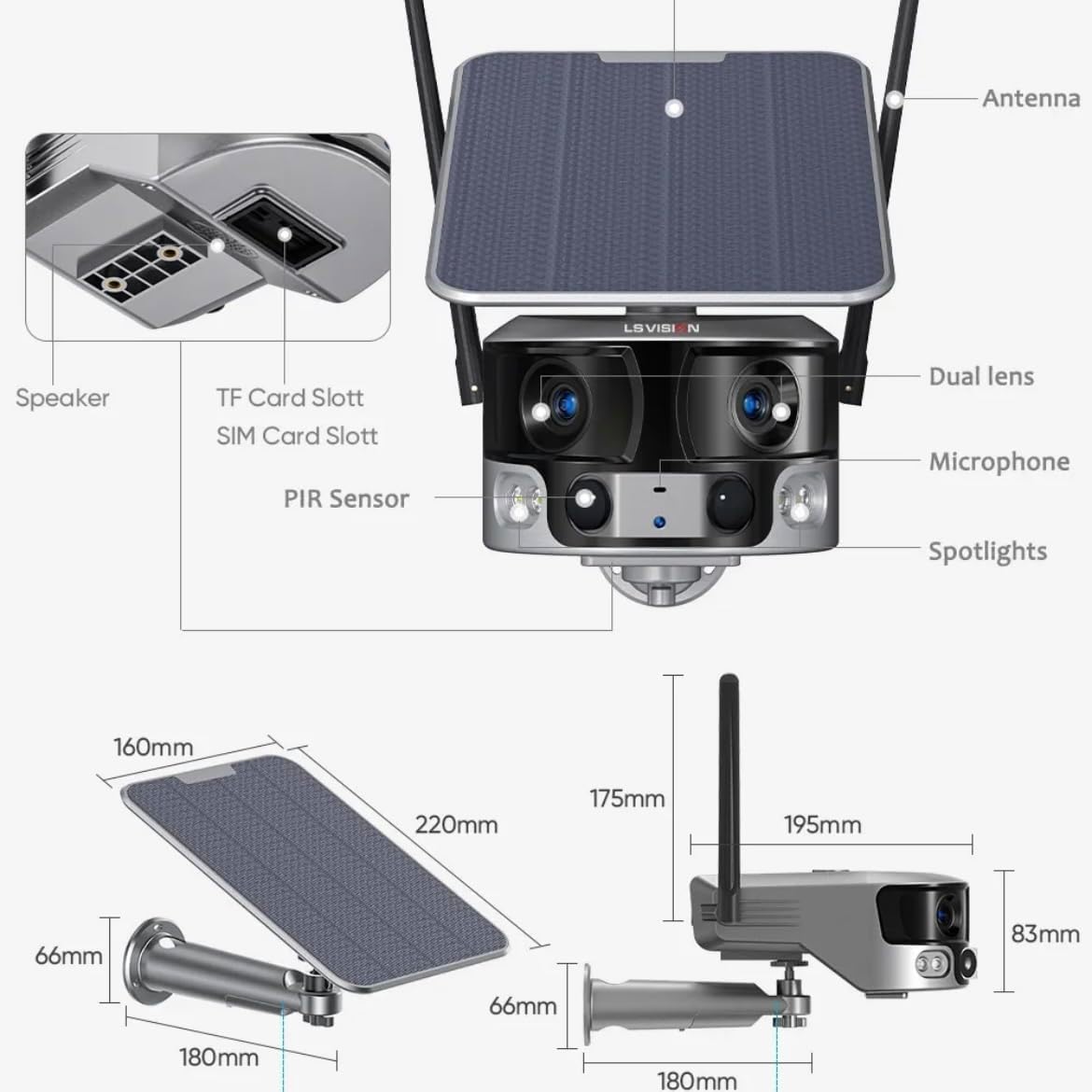
Figure 2.1: Product components and dimensions. Key parts include the solar panel, antennas, dual lens, microphone, spotlights, PIR sensor, speaker, TF card slot, and SIM card slot.
3. پیکیج کے مشمولات
براہ کرم پیکیج کے مواد کو کھولنے پر چیک کریں تاکہ یہ یقینی بنایا جا سکے کہ تمام اشیاء موجود ہیں اور بغیر کسی نقصان کے:
- 1 x LS VISION 4K 180-Degree Ultra-Wide Angle 4G Solar-Powered Outdoor Security Camera
- 1 x Solar Panel (6W)
- بڑھتے ہوئے بریکٹ کا 1 x سیٹ
- 1 x 4G اینٹینا
- 1 x Set of Screws and Wall Plugs
- 1 x 2-meter Extension Cable for Solar Panel
4. سیٹ اپ گائیڈ
4.1 ابتدائی چارجنگ
Although the camera is solar-powered, it is recommended to fully charge the built-in batteries before the first use. Connect the camera to a 5V/2A USB power adapter (not included) using a standard USB cable for initial charging. The charging indicator will show the status.
4.2 SIM Card & TF Card Installation
Locate the SIM card slot and TF card slot on the camera (refer to Figure 2.1). Ensure the camera is powered off before inserting or removing cards.
- Open the protective cover of the card slots.
- Insert a standard 4G SIM card into the SIM card slot with the gold contacts facing down. Ensure it clicks into place.
- Insert a TF (microSD) card (up to 128GB, not included) into the TF card slot with the gold contacts facing down. Ensure it clicks into place.
- Close the protective cover firmly to maintain the IP66 waterproof rating.
4.3 کیمرہ لگانا
The camera is designed for wall mounting and outdoor use. Consider the following for optimal placement:
- کے ساتھ ایک مقام کا انتخاب کریں۔ ampسولر پینل کے لیے براہ راست سورج کی روشنی۔
- یقینی بنائیں کہ کیمرہ صاف ہے۔ view جس علاقے کی آپ نگرانی کرنا چاہتے ہیں۔
- Mount the camera at a height that provides good coverage and deters tampeering

Figure 4.1: The LS VISION camera shown with its solar panel and mounting bracket, ready for outdoor installation.

Figure 4.2: The camera operates on a 4G network, eliminating the need for a Wi-Fi router, making it suitable for locations without existing Wi-Fi infrastructure.
The solar panel can be installed integrated with the camera or separately using the 2-meter extension cable for optimal sun exposure.
4.4 ایپ انسٹالیشن اور کنکشن
To access and control your camera, download the Niview آپ کے اسمارٹ فون کے ایپ اسٹور سے ایپ (Android اور iOS کے لیے دستیاب)۔
- تلاش کریں۔ "Niview" in the App Store or Google Play Store and install it.
- ایک نیا اکاؤنٹ رجسٹر کریں یا لاگ ان کریں اگر آپ کے پاس پہلے سے ہے۔
- اپنا کیمرہ شامل کرنے کے لیے درون ایپ ہدایات پر عمل کریں۔ اس میں عام طور پر کیمرے پر QR کوڈ اسکین کرنا یا دستی طور پر اس کی ID درج کرنا شامل ہے۔
- ایک بار جڑ جانے کے بعد، آپ کر سکتے ہیں۔ view لائیو فوtage, access recordings, and configure settings.
5. آپریٹنگ ہدایات
5.1 لائیو View & پلے بیک۔
Access the Niview app on your smartphone or tablet to view live video streams from your camera anytime, anywhere. The app also allows you to review ریکارڈ شدہ footage.

Figure 5.1: The Niview app interface demonstrating real-time monitoring and timeline playback, ensuring no moment is missed.
5.2 حرکت کا پتہ لگانا اور الرٹس
The camera features advanced PIR and human detection capabilities. When motion or a human figure is detected, the camera will:
- Automatically begin recording a wake-up video.
- Send instant push notifications to your connected smartphone.
- Initiate automatic human tracking to follow the detected subject.

Figure 5.2: The camera's human tracking feature automatically follows detected individuals, ensuring continuous monitoring of their movement.
5.3 نائٹ ویژن
The camera is equipped with a dual light source design for enhanced night vision:
- فل کلر نائٹ ویژن: Provides clear, colored images up to 20 meters in low-light conditions when spotlights are activated.
- انفراریڈ (IR) نائٹ ویژن: Offers black and white vision up to 40 meters using infrared LEDs.
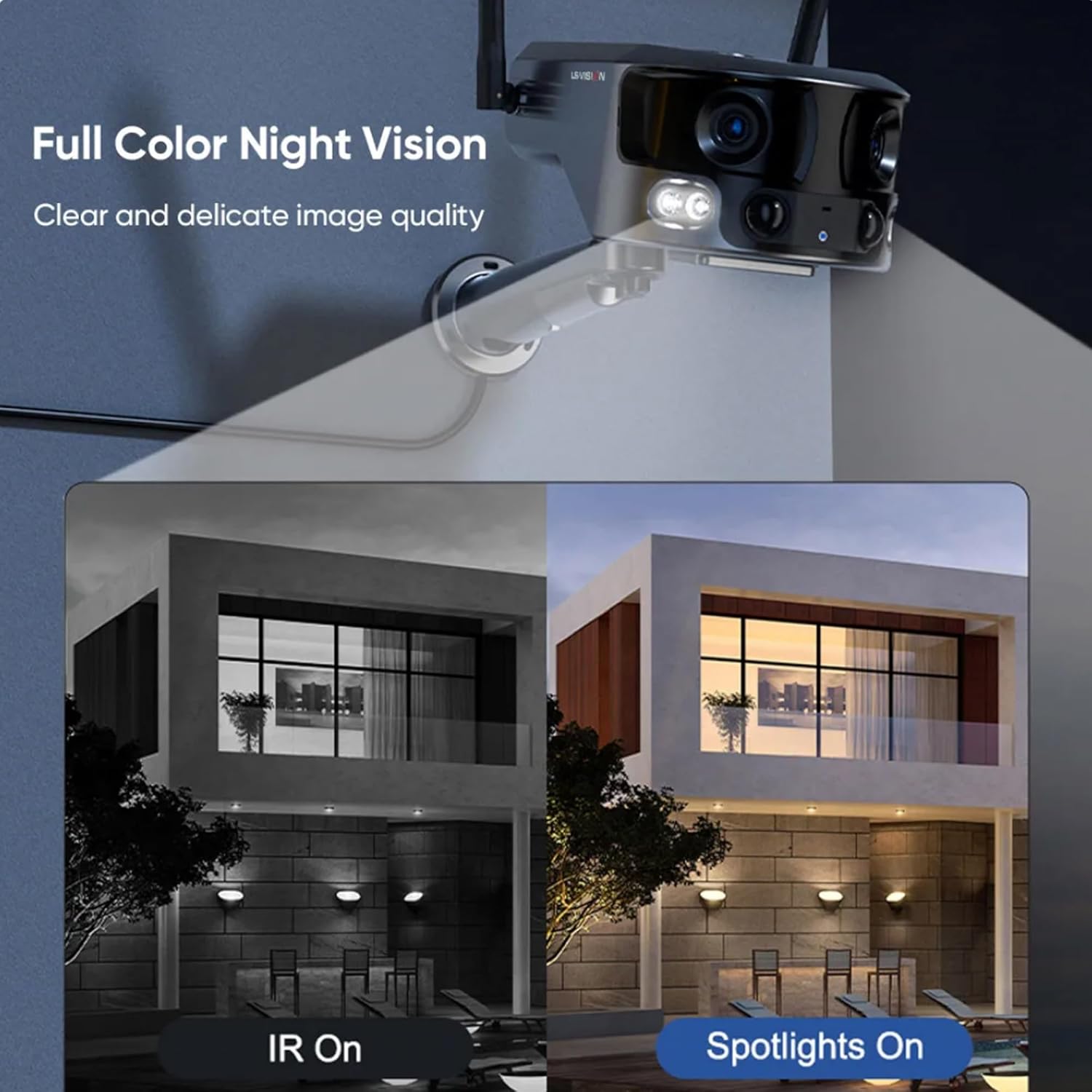
Figure 5.3: Comparison illustrating the difference between standard IR night vision and full-color night vision when the camera's spotlights are active.
5.4 دو طرفہ آڈیو
Utilize the built-in microphone and speaker for two-way audio communication through the Niview app. This allows you to listen in on the camera's surroundings and speak through the camera.
5.5 ریکارڈنگ موڈز
The camera supports various recording modes to suit your needs:
- 24 گھنٹے مسلسل ریکارڈنگ: Records continuously throughout the day.
- Trigger Recording: Records only when motion or human detection is triggered. This mode has three sub-options for customization.
6 دیکھ بھال
باقاعدگی سے دیکھ بھال آپ کے کیمرے کی بہترین کارکردگی اور لمبی عمر کو یقینی بناتی ہے:
- صفائی: وقتاً فوقتاً کیمرے کے لینس اور سولر پینل کو نرم، ڈی سے صاف کریں۔amp دھول اور ملبے کو دور کرنے کے لیے کپڑا۔ سخت کیمیکل استعمال نہ کریں۔
- بیٹری کی دیکھ بھال: Ensure the solar panel is exposed to sufficient sunlight to keep the built-in batteries charged. In prolonged periods of low sunlight, consider manually charging the camera.
- فرم ویئر اپ ڈیٹس: Check the Niview فرم ویئر اپ ڈیٹس کے لیے باقاعدگی سے ایپ۔ فرم ویئر کو اپ ڈیٹ رکھنا تازہ ترین خصوصیات اور حفاظتی پیچ کو یقینی بناتا ہے۔
- ماحولیاتی تحفظ: While IP66 rated, avoid exposing the camera to extreme weather conditions beyond its specified operating range if possible.

Figure 6.1: The camera's IP66 industrial-grade waterproof design ensures reliable operation even in adverse outdoor weather conditions like rain.
7 خرابیوں کا سراغ لگانا
اگر آپ کو اپنے کیمرے کے ساتھ مسائل کا سامنا کرنا پڑتا ہے، تو درج ذیل عام مسائل اور حل دیکھیں:
| مسئلہ | ممکنہ وجہ | حل |
|---|---|---|
| کیمرہ آف لائن | No 4G signal; Low battery; SIM card issue. | Check 4G signal strength; Recharge battery; Reinsert SIM card or try a different one. |
| خراب تصویر کا معیار | Dirty lens; Insufficient light; Network bandwidth. | Clean the lens; Ensure adequate lighting or enable night vision; Check 4G network speed. |
| حرکت کا پتہ لگانا کام نہیں کر رہا ہے۔ | Detection sensitivity too low; Incorrect settings; Obstructions. | Adjust sensitivity in app; Verify detection zone settings; Clear any obstructions. |
| بیٹری چارج نہیں ہو رہی | Insufficient sunlight; Dirty solar panel; Faulty connection. | Relocate solar panel to direct sunlight; Clean solar panel; Check cable connections. |
اگر مسئلہ برقرار رہتا ہے، تو براہ کرم کسٹمر سپورٹ سے رابطہ کریں۔
8. وضاحتیں
| فیچر | تفصیلات |
|---|---|
| ماڈل کا نام | LS-MS2 |
| ویڈیو کیپچر ریزولوشن | 4K |
| Viewآئی اینگل | 180 Degrees (Ultra-Wide) |
| کنیکٹوٹی ٹیکنالوجی | 4G Cellular Network (also supports Wi-Fi) |
| طاقت کا منبع | Solar Powered (6W Solar Panel) |
| بیٹری کی صلاحیت | 18000 mAh (بلٹ ان) |
| Night Vision Range (Color) | 20 میٹر تک |
| Night Vision Range (IR) | 40 میٹر تک |
| ذخیرہ | Cloud Storage, TF Card (Max 128GB, not included) |
| واٹر پروف ریٹنگ | آئی پی 66 |
| مواد | Acrylonitrile Butadiene Styrene (ABS) and Metal |
| تنصیب کی قسم | وال ماؤنٹ |
| ہم آہنگ آلات | Tablet, Smartphone (Android/iOS) |
| مصنوعات کے طول و عرض | 18 x 18 x 15 سینٹی میٹر |
| شے کا وزن | 1.25 کلوگرام |
9. وارنٹی کی معلومات
This product comes with a standard manufacturer's warranty. For specific warranty terms, duration, and claim procedures, please refer to the warranty card included in your product packaging or contact the retailer/manufacturer directly. Keep your purchase receipt as proof of purchase.
10. کسٹمر سپورٹ
For technical assistance, product inquiries, or troubleshooting beyond this manual, please contact LS VISION customer support. Contact details can typically be found on the product packaging, the manufacturer's official webسائٹ، یا آپ کی خریداری کے نقطہ کے ذریعے.


