1. تعارف
This manual provides essential information for the proper setup, operation, and maintenance of your Tele System SMART24 LS2 A11 24-inch Android Smart TV. Please read it thoroughly before using the product to ensure safe and efficient operation.
2. باکس میں کیا ہے۔
تصدیق کریں کہ تمام اجزاء موجود ہیں:
- Tele System SMART24 LS2 A11 Smart TV
- ریموٹ کنٹرول
- پاور کیبل
- کوئیک اسٹارٹ گائیڈ
- Warranty Paper
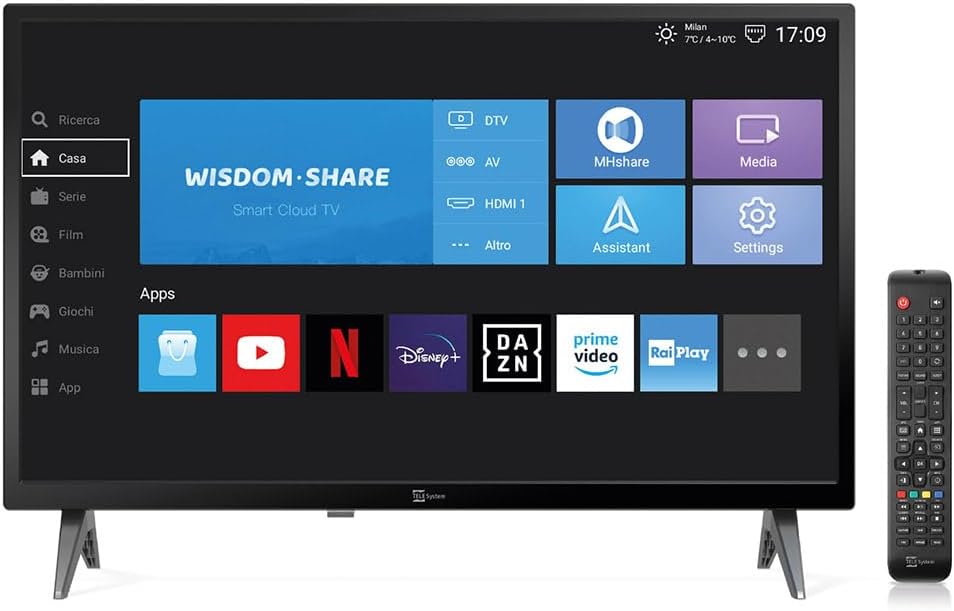
Image: The Tele System SMART24 LS2 A11 Smart TV displaying its home screen, with the included remote control positioned to the right. This illustrates the main components and initial user interface.
3. سیٹ اپ
3.1. پیک کھولنا اور جگہ کا تعین کرنا
- احتیاط سے ٹی وی کو اس کی پیکیجنگ سے ہٹا دیں۔
- Place the TV on a stable, flat surface or mount it on a wall using a compatible VESA 100x100 wall mount (sold separately).
- ٹی وی کے ارد گرد مناسب وینٹیلیشن کو یقینی بنائیں۔
3.2. کنیکٹنگ پاور
Connect the power cable to the TV's power input and then to a suitable electrical outlet (100-240V AC). While the product description mentions 12/220V, the specifications indicate 100-240V AC. Ensure the power source matches the TV's requirements.
3.3. ابتدائی سیٹ اپ وزرڈ
پہلی بار پاور آن ہونے پر، TV ابتدائی سیٹ اپ وزرڈ کے ذریعے آپ کی رہنمائی کرے گا۔ اس میں شامل ہیں:
- زبان کا انتخاب۔
- نیٹ ورک کنکشن (وائی فائی یا ایتھرنیٹ)۔
- Channel scanning for DVB-T2 (Digital Terrestrial) and Satellite channels.
- Tivùsat LCN channel numbering setup (if applicable).
4. آپریٹنگ ہدایات
4.1. ریموٹ کنٹرول اوورview

Image: The standard remote control for the Tele System Smart TV, showing various buttons for power, numbers, volume, channel, navigation, and smart TV functions.
پاور، والیوم، چینل سلیکشن، نیویگیشن، اور سمارٹ ٹی وی فنکشنز کے لیے ریموٹ کنٹرول بٹنوں سے اپنے آپ کو آشنا کریں۔
4.2. Android Smart TV Features
Your TV runs on Android AOSP, providing access to a wide range of applications.
- ایپ تک رسائی: Navigate to the "Apps" section on the home screen to download and use applications like Prime Video, YouTube, Disney Plus, and DAZN.
- اسکرین مررنگ: Use the mirroring function to share content from your mobile devices (smartphone, tablet) to the TV screen. This includes photos, videos, and music.
- MHshare App: Download the free MHshare app on your smartphone to use it as an additional remote control for your TV.

Image: The Smart TV displaying a streaming service interface with various movie and series titles, demonstrating the Android app capabilities.

Image: The Smart TV screen displaying "Mirroring" with an arrow pointing from a smartphone icon to the TV, illustrating the screen mirroring function.
4.3. TV Pause (USB)
The TV Pause function allows you to temporarily pause live TV broadcasts. To use this feature:
- Connect an external USB memory stick (not included) to the TV's USB port.
- While watching live TV, press the 'Play/Pause' button on your remote control to pause the program.
- Press 'Play' again to resume.

Image: A TV screen displaying a "TV Pause" overlay with playback controls, indicating the functionality to pause live television.
4.4. Digital Terrestrial (DVB-T2) and Satellite (Tivùsat LCN)
The TV supports DVB-T2 for digital terrestrial broadcasts and satellite reception. It features a CI+ slot for maximum compatibility with TELE System certified Tivùsat CAMs, enhancing viewing quality and experience.
- چینل کی تلاش: The TV allows for satellite channel search with Tivùsat HD classification.
- CI+ سلاٹ: Insert a compatible CI+ module (e.g., Tivùsat CAM) into the CI+ slot for access to encrypted channels.
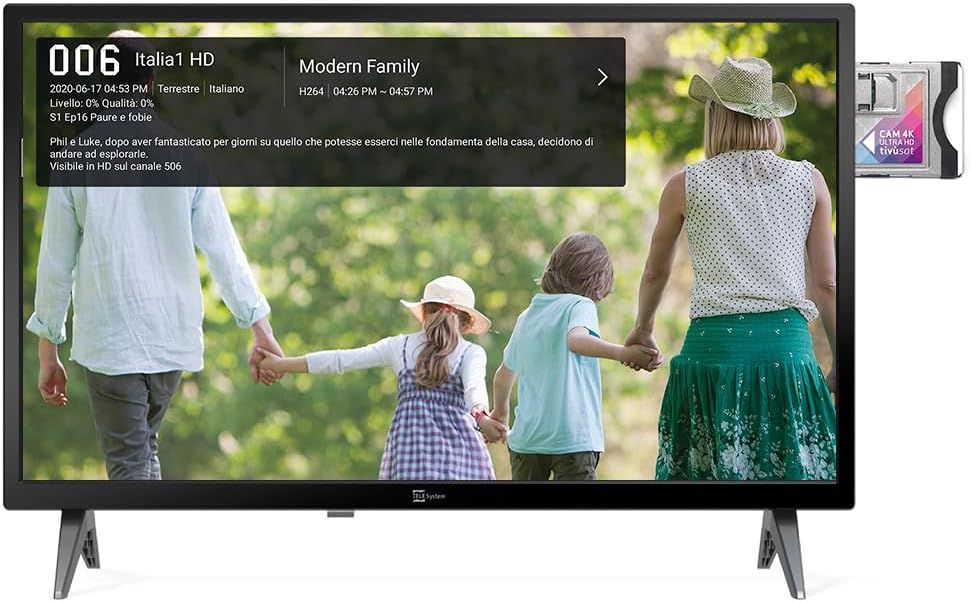
Image: The Smart TV displaying channel information for "Italia 1 HD" and a CI+ module inserted into the side, indicating support for encrypted satellite channels.
4.5 ہوٹل موڈ
The Hotel Mode function is designed for use in hospitality environments. It allows for specific settings to be pre-defined:
- Set maximum audio levels.
- Determine the default channel upon power-on.
- Adjust the initial volume when the unit is turned on.
- Select the default source signal.
5 دیکھ بھال
5.1. صفائی
- صاف کرنے سے پہلے ہمیشہ ٹی وی کو ان پلگ کریں۔
- اسکرین اور کابینہ کو صاف کرنے کے لیے نرم، خشک کپڑا استعمال کریں۔
- ضدی نشانات کے لیے، ہلکے سے ڈیampur پانی کے ساتھ کپڑے یا ہلکا، غیر کھرچنے والا اسکرین کلینر۔
- سخت کیمیکلز یا کھرچنے والے مواد کے استعمال سے پرہیز کریں۔
5.2. ذخیرہ
If storing the TV for an extended period, ensure it is kept in a cool, dry place, protected from dust and extreme temperatures.
6 خرابیوں کا سراغ لگانا
اگر آپ کو مسائل کا سامنا ہے، تو درج ذیل عام حلوں کا حوالہ دیں:
- کوئی طاقت نہیں: چیک کریں کہ آیا پاور کیبل محفوظ طریقے سے TV اور پاور آؤٹ لیٹ دونوں سے منسلک ہے۔ یقینی بنائیں کہ آؤٹ لیٹ فعال ہے۔
- کوئی تصویر/آواز نہیں: Verify the correct input source is selected. Check cable connections for external devices. For broadcast channels, perform a channel scan.
- ریموٹ کنٹرول کام نہیں کر رہا: بیٹریاں بدل دیں۔ یقینی بنائیں کہ ریموٹ اور ٹی وی کے IR سینسر کے درمیان کوئی رکاوٹ نہیں ہے۔
- نیٹ ورک کنکشن کے مسائل: Check your Wi-Fi router or Ethernet cable. Try restarting the TV and your router.
- سافٹ ویئر کی خرابیاں: Perform a factory reset (refer to the TV's settings menu for this option). Note that a factory reset will erase all personal settings and installed apps.
7. وضاحتیں
Below are the technical specifications for the Tele System SMART24 LS2 A11 Smart TV:
| فیچر | تفصیل |
|---|---|
| ماڈل نمبر | TELE System SMART24 LS2 A11 2022 |
| اسکرین کا سائز | 23.6 انچ (60 سینٹی میٹر) |
| ڈسپلے ٹیکنالوجی | ایل ای ڈی |
| قرارداد | 720p (1366 x 768) |
| ریفریش ریٹ | 60 Hz |
| آپریٹنگ سسٹم | Android AOSP |
| کنیکٹوٹی | ایتھرنیٹ، وائی فائی |
| پہلو کا تناسب | 16:9 |
| طول و عرض (اسٹینڈ کے ساتھ) | 60.4 x 37.5 x 10.5 سینٹی میٹر |
| وزن | 3 کلوگرام |
| توانائی کی کارکردگی کی درجہ بندی | E |
| پاور ان پٹ | 100-240V, 50/60Hz (AC) |
| خصوصی خصوصیات | TV Pause (USB), Digital Terrestrial DVB-T2, Satellite, Tivùsat LCN, Hotel Mode, Screen Mirroring |

Image: A detailed table listing the technical specifications of the SMART24 LS2 A11 TV, including display size, resolution, operating system, and connectivity options.

Image: The EU Energy Label for the Tele System SMART24 LS2 A11, showing an energy efficiency rating of 'E' and power consumption details. For more information, visit eprel.ec.europa.eu/qr/1183185.
8. وارنٹی اور سپورٹ
Your Tele System SMART24 LS2 A11 TV comes with a standard manufacturer's warranty. Please refer to the included Warranty Paper for specific terms and conditions.
For technical support, service, or further inquiries, please visit the official Tele System website or contact their customer service department. Contact information can typically be found in the Quick Start Guide or on the manufacturer's webسائٹ
Official Tele System Webسائٹ: www.telesystem-world.com


