تعارف
This manual provides comprehensive instructions for the setup, operation, maintenance, and troubleshooting of your SABLUTE KL3 PRO Wireless Keyboard and Mouse Combo. Please read this manual thoroughly before using the product to ensure optimal performance and longevity.
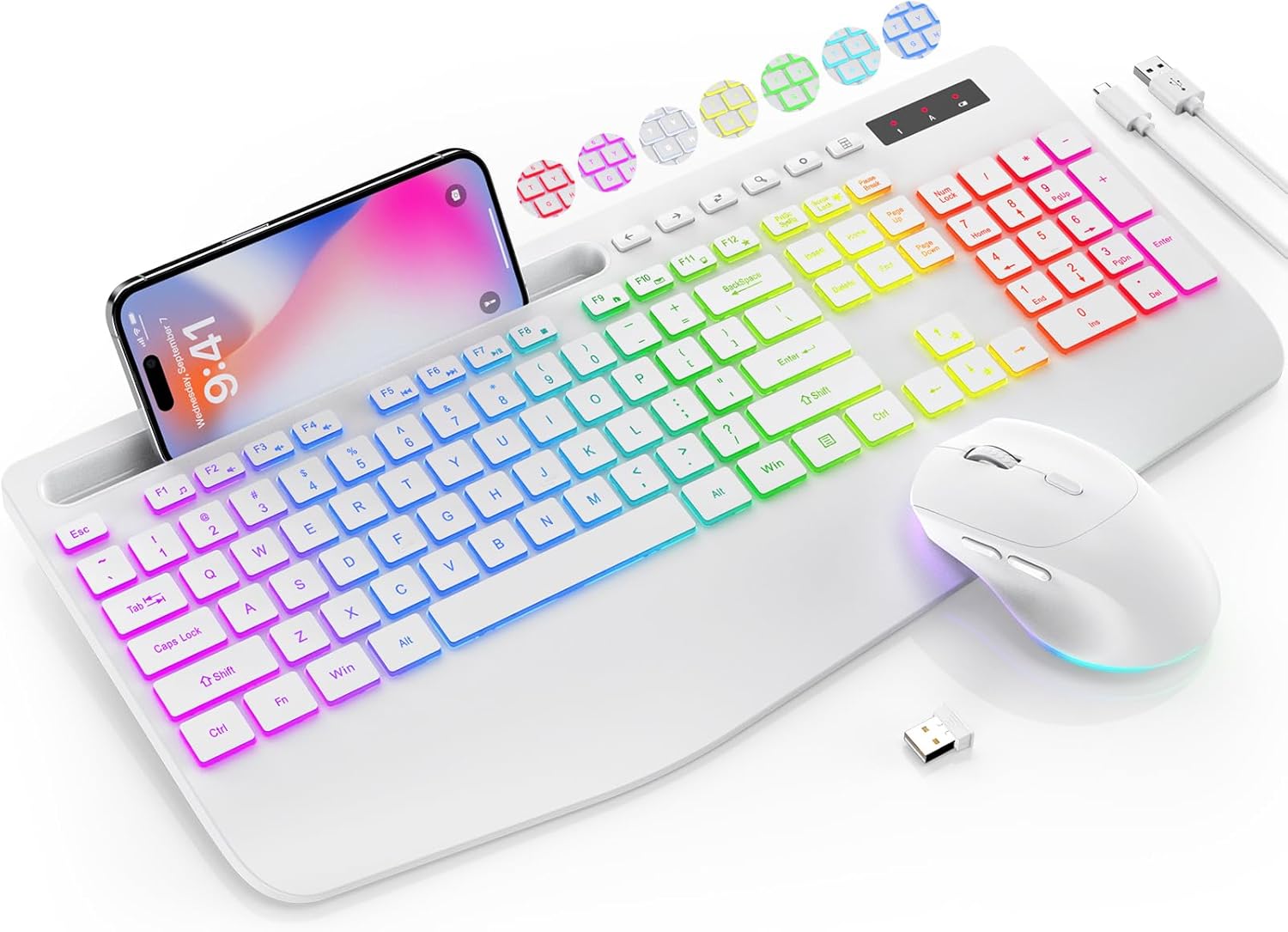
Image: The SABLUTE KL3 PRO Wireless Keyboard and Mouse Combo, featuring a full-size keyboard with a phone holder, a wireless mouse, and a USB receiver.
پیکیج کے مشمولات
اپنا پیکج کھولنے پر، براہ کرم تصدیق کریں کہ درج ذیل تمام اشیاء شامل ہیں:
- SABLUTE KL3 PRO Wireless Keyboard
- SABLUTE Wireless Mouse
- 2.4G USB Receiver (Dongle)
- USB ٹائپ سی چارجنگ کیبل
- صارف دستی (یہ دستاویز)

Image: The SABLUTE KL3 PRO keyboard and mouse, along with the USB receiver and charging cables, as they appear in the package.
سیٹ اپ کی ہدایات
1. آلات کو چارج کرنا
Both the keyboard and mouse are rechargeable. Before initial use, it is recommended to fully charge both devices.
- Connect the provided USB Type-C charging cable to the charging port on the keyboard and mouse.
- کیبل کے دوسرے سرے کو USB پاور سورس (جیسے کمپیوٹر USB پورٹ، USB وال اڈاپٹر) میں لگائیں۔
- Charging typically takes 2-3 hours for a full charge. The indicator light will change to show charging status.
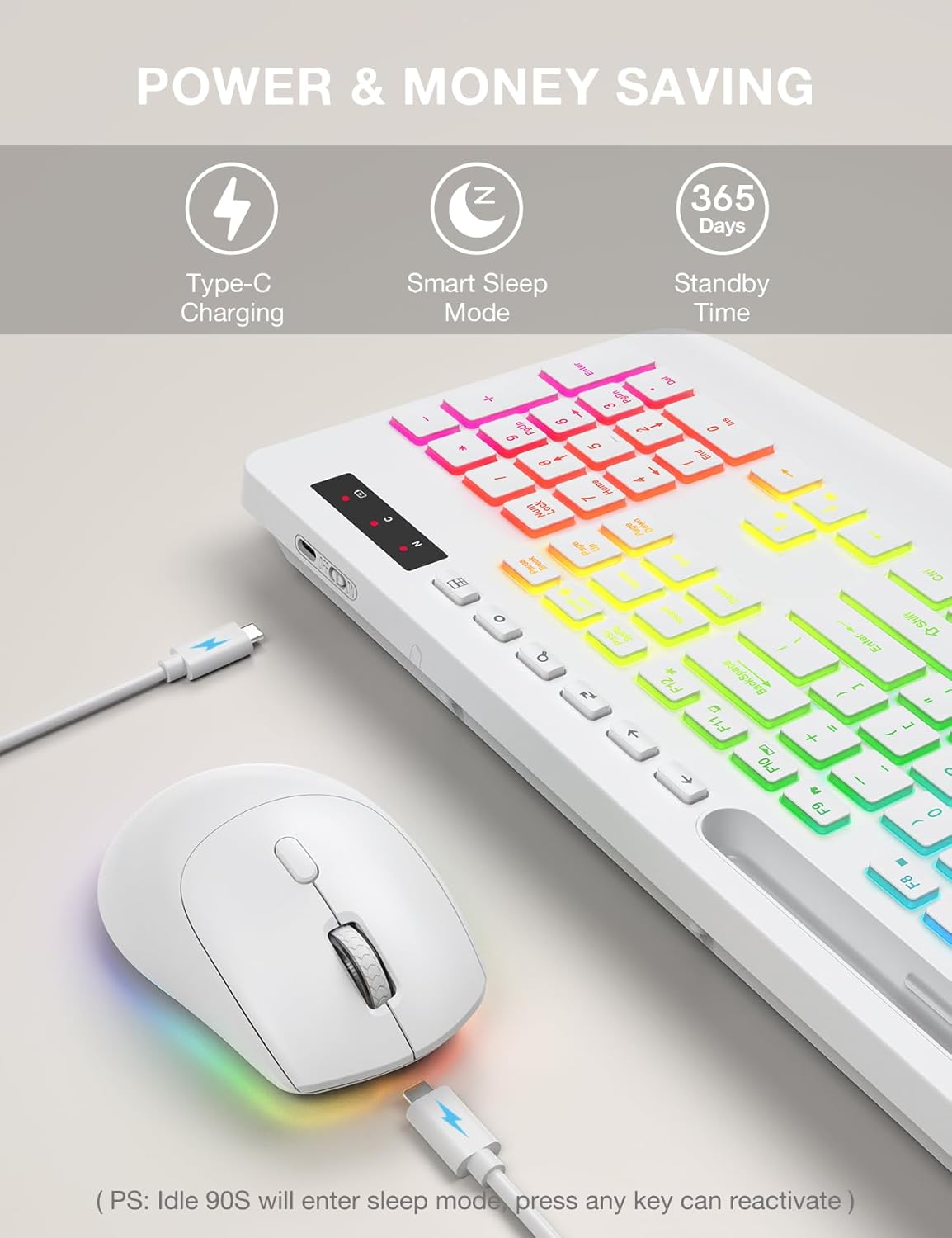
Image: The SABLUTE keyboard and mouse connected to charging cables, illustrating the Type-C charging ports.
2. اپنے آلے سے جڑنا
The SABLUTE KL3 PRO combo uses a 2.4G wireless connection via a single USB receiver.
- Locate the 2.4G USB receiver. It is typically stored in the mouse's battery compartment or within the product packaging.
- Plug the USB receiver into an available USB-A port on your computer or laptop.
- کی بورڈ اور ماؤس کو ان کے متعلقہ پاور سوئچز کا استعمال کرتے ہوئے آن کریں۔
- The devices should connect automatically within seconds. No additional drivers are usually required for most operating systems.
مطابقت: This combo is compatible with Windows, Chrome OS, Linux, and Mac devices. Please note that multimedia keys may have limited functionality on Mac operating systems.
اہم نوٹ: A USB-C dongle is not included. This keyboard and mouse combo cannot connect directly to tablets or phones without a compatible USB-A adapter (not included).

Image: The keyboard and mouse operating wirelessly with a laptop and monitor, demonstrating the 2.4G wireless connectivity and plug-and-play setup.
آپریٹنگ ہدایات
کی بورڈ کی خصوصیات
- بیک لائٹ اثرات: Choose from 7 solid colors and 1 rainbow backlight color. There are 3 distinct backlight modes available.
- بیک لائٹ کنٹرول:
- دبائیں Fn + PrtSc/SysRq بیک لائٹ کو آن یا آف کرنے کے لیے۔
- دبائیں Fn + سکرول لاک to switch between different backlight modes.
- دبائیں Fn + اوپر تیر or Fn + نیچے تیر to adjust the backlight brightness (3 levels).
- ایرگونومک کلائی آرام: The keyboard features an extra-wide 2.8-inch wrist rest designed to reduce wrist fatigue during extended use.
- انٹیگریٹڈ فون ہولڈر: A built-in holder accommodates devices up to 11.9 inches, allowing for convenient multitasking.
- ملٹی میڈیا کیز: Access 6 one-touch media keys and F1-F12 shortcuts for streamlined daily tasks.
- خاموش ٹائپنگ: The keyboard is designed for silent operation, minimizing disturbance in shared environments.
- کم پرو۔file کی کیپس: Features 1mm low-profile keycaps for easier cleaning and quieter typing.

Image: Illustration of the keyboard's 7 color options and the key combinations for controlling backlight on/off, mode switching, and brightness adjustment.
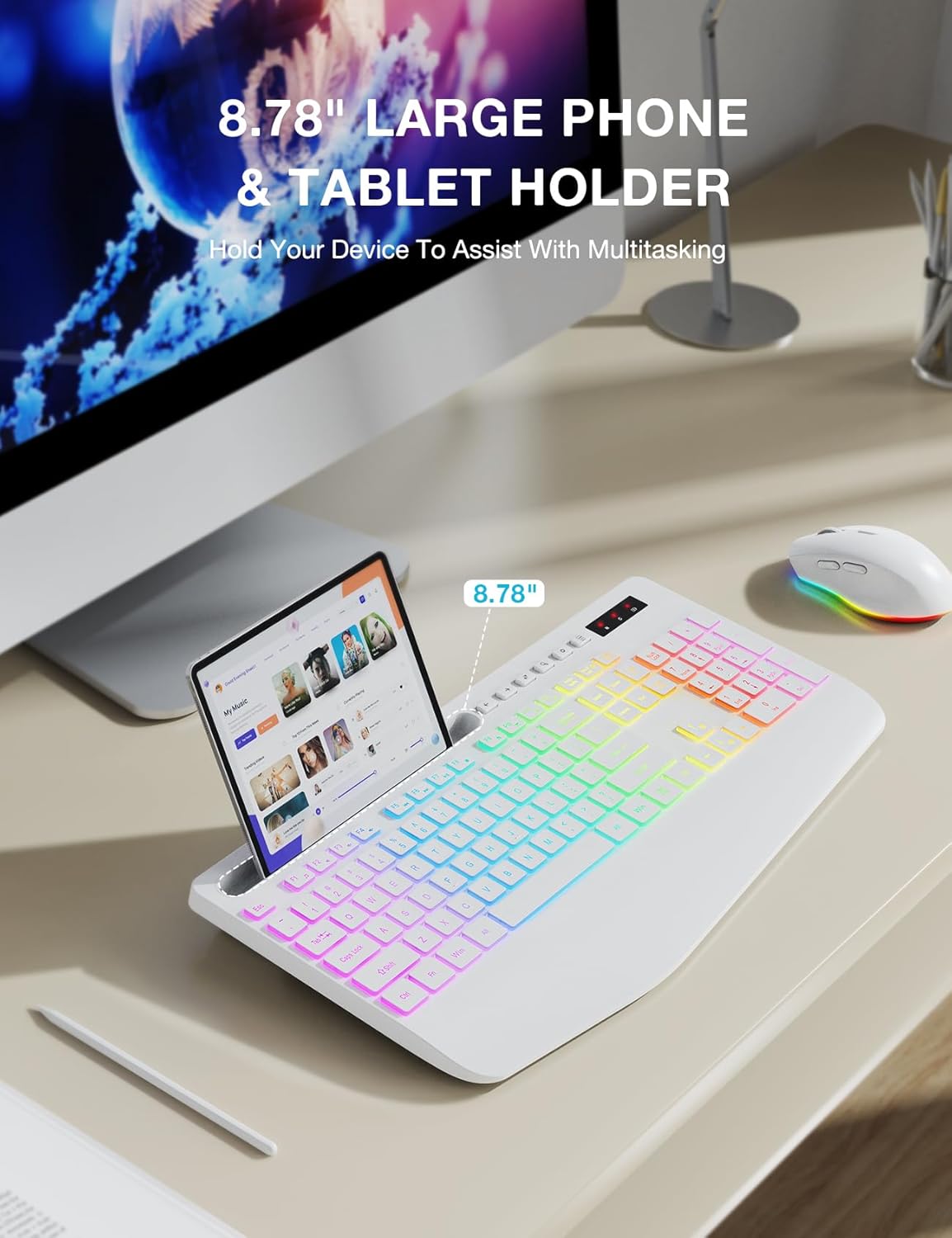
Image: The keyboard displaying a phone securely placed in its integrated holder, highlighting the 8.78-inch capacity for multitasking.
ماؤس کی خصوصیات
- 6-بٹن ڈیزائن: Includes standard left/right click, scroll wheel, DPI button, and forward/backward buttons for enhanced navigation.
- سایڈست DPI: Cycle through 3 DPI levels (800/1200/1600) to adjust tracking speed for different tasks.
- Quiet Clicking: The mouse is designed for silent clicks, providing a quiet working environment.
- بیک لائٹ اثرات: Features 15 light effects that can be switched or turned off.

تصویر: ایک تفصیلی view of the SABLUTE wireless mouse, labeling its 6 buttons including the scroll wheel, left/right click, DPI button, and forward/backward buttons.
پاور مینجمنٹ
The SABLUTE KL3 PRO combo is designed with energy-saving features to extend battery life.
- اسمارٹ سلیپ موڈ: If idle for 90 seconds, the devices will enter a smart sleep mode to conserve power. Press any key on the keyboard or move the mouse to reactivate.
- لانگ اسٹینڈ بائی ٹائم: With the backlight off, the devices can achieve up to 365 days of standby time on a full charge.

Image: An illustration highlighting the energy-saving features of the SABLUTE keyboard and mouse, including 365 days standby time and smart sleep mode activation after 90 seconds of inactivity.
دیکھ بھال اور دیکھ بھال
To ensure the longevity and optimal performance of your SABLUTE KL3 PRO combo, follow these maintenance guidelines:
- صفائی: کی بورڈ اور ماؤس کی سطحوں کو صاف کرنے کے لیے نرم، خشک کپڑا استعمال کریں۔ ضدی گندگی کے لیے، تھوڑا سا ڈیamp ہلکے صابن کے ساتھ کپڑا استعمال کیا جا سکتا ہے، اس بات کو یقینی بناتے ہوئے کہ آلہ میں کوئی مائع داخل نہ ہو۔
- کی کیپ کی صفائی: کم پروfile keycaps are designed for easier cleaning. Use compressed air to remove debris from between keys.
- ذخیرہ: آلات کو ٹھنڈی، خشک جگہ پر براہ راست سورج کی روشنی اور انتہائی درجہ حرارت سے دور رکھیں۔
- مائعات سے پرہیز کریں: Do not expose the keyboard or mouse to excessive moisture or liquids.
- دیکھ بھال کے ساتھ ہینڈل: ڈیوائسز کو گرانے یا ان کو سخت اثرات سے دوچار کرنے سے گریز کریں۔
خرابی کا سراغ لگانا
If you encounter any issues with your SABLUTE KL3 PRO combo, please refer to the following common solutions:
| مسئلہ | ممکنہ حل |
|---|---|
| کی بورڈ/ماؤس جواب نہیں دے رہا ہے۔ |
|
| Lag or delayed response |
|
| بیک لائٹ کام نہیں کر رہی |
|
| Missing USB receiver |
|
| Devices enter sleep mode too quickly |
|
وضاحتیں
| فیچر | تفصیل |
|---|---|
| ماڈل نمبر | KL3 PRO |
| مصنوعات کے طول و عرض | 16.85 x 8.46 x 1.38 انچ |
| شے کا وزن | 2 پاؤنڈ |
| بیٹریاں | 1 لیتھیم میٹل بیٹری درکار ہے (شامل) |
| کنیکٹوٹی ٹیکنالوجی | 2.4G USB وائرلیس |
| خصوصی خصوصیات | 3-level DPI, Backlit, Ergonomic Wrist Rest, Phone Holder, Shortcut Keys, Low-profile keycap |
| ہم آہنگ آلات | پرسنل کمپیوٹر، لیپ ٹاپ |
| کارخانہ دار | SABLUTE |
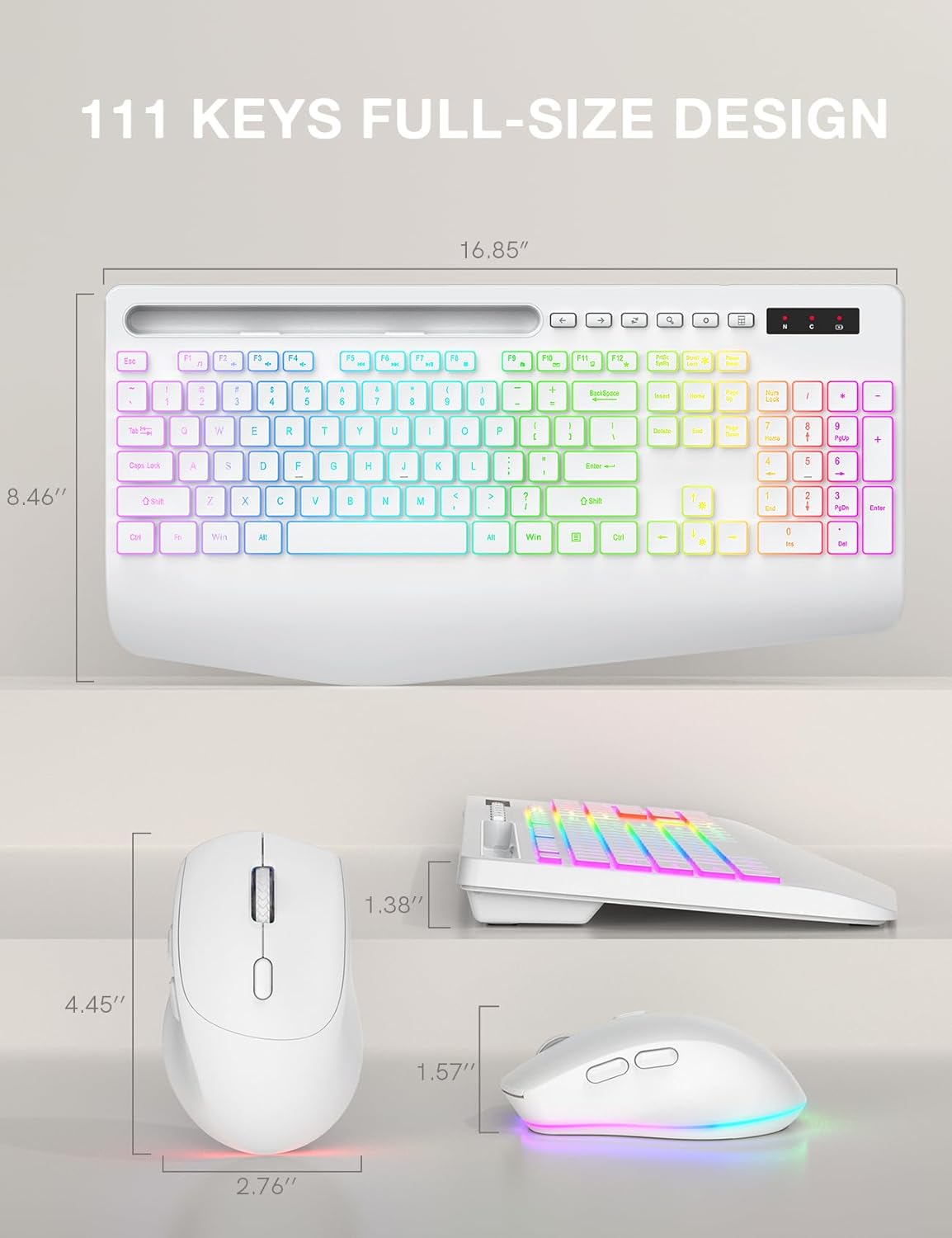
Image: Technical drawing showing the dimensions of the SABLUTE KL3 PRO keyboard and mouse.
وارنٹی اور سپورٹ
SABLUTE is committed to providing quality products and customer satisfaction. Your KL3 PRO Wireless Keyboard and Mouse Combo comes with the following support:
- 90 دن کی تبدیلی: خریداری کے 90 دنوں کے اندر کسی بھی مینوفیکچرنگ نقائص یا مسائل کے لیے۔
- 360-Day Manufacturer Warranty: Covers defects in materials and workmanship for 360 days from the date of purchase.
سپورٹ سے رابطہ کریں۔
For pre-sales questions, troubleshooting assistance, accessory reissue, or returns and exchanges, please contact us:
- ای میل سپورٹ: sabluteservices@outlook.com
- Phone Support (US): +1-888-858-1618 (Monday-Friday, 9 AM - 1 PM PST, 2 PM - 6 PM PST)


