تعارف
The EPOMAKER EK21 VIA Gasket Number Pad is a versatile and customizable mechanical number pad designed to enhance productivity and typing comfort. It features a gasket-mounted design, triple-mode connectivity, hot-swappable switches, and VIA software compatibility for extensive customization. This manual provides detailed instructions for setup, operation, maintenance, and troubleshooting to ensure optimal use of your EK21 number pad.
پروڈکٹ ختمview
کلیدی خصوصیات
- گسکیٹ کی ساخت: Designed for a flexible and comfortable typing experience, reducing impact and noise.
- VIA Programmable: Customize key assignments, macros, and lighting effects using the intuitive VIA software.
- Triple-Mode Connectivity: Supports wired (USB-C), 2.4GHz wireless, and Bluetooth 5.0 connections for versatile use across multiple devices.
- 1000mAh بیٹری: Provides extended wireless usage without frequent recharging.
- گرم بدلنے والا پی سی بی: Compatible with 3/5-pin mechanical switches, allowing for easy switch replacement and customization without soldering.
- Poron Underlay, Sandwich Foam, and IXPE Switch Pads: Enhances typing comfort by reducing finger fatigue and minimizing acoustic noise.
- Aluminum Alloy Knob: Offers precise control for volume or other customizable functions.
- Fine-Tuned Stabilizers: Ensures stable and satisfying keystrokes for larger keys.
- آرجیبی بیک لائٹ: Features 16.8 million colors with various customizable effects.
- ڈبل شاٹ پی بی ٹی کی کیپس: Durable, wear-resistant keycaps with an ergonomic SA-like profile.
پیکیج کے مشمولات
The EPOMAKER EK21 package includes the following items:
- EPOMAKER EK21 Number Pad
- USB-C کیبل
- کیکپ پلر
- سوئچ پلر
- Additional Switches (if included with your specific model)
- صارف دستی (یہ دستاویز)
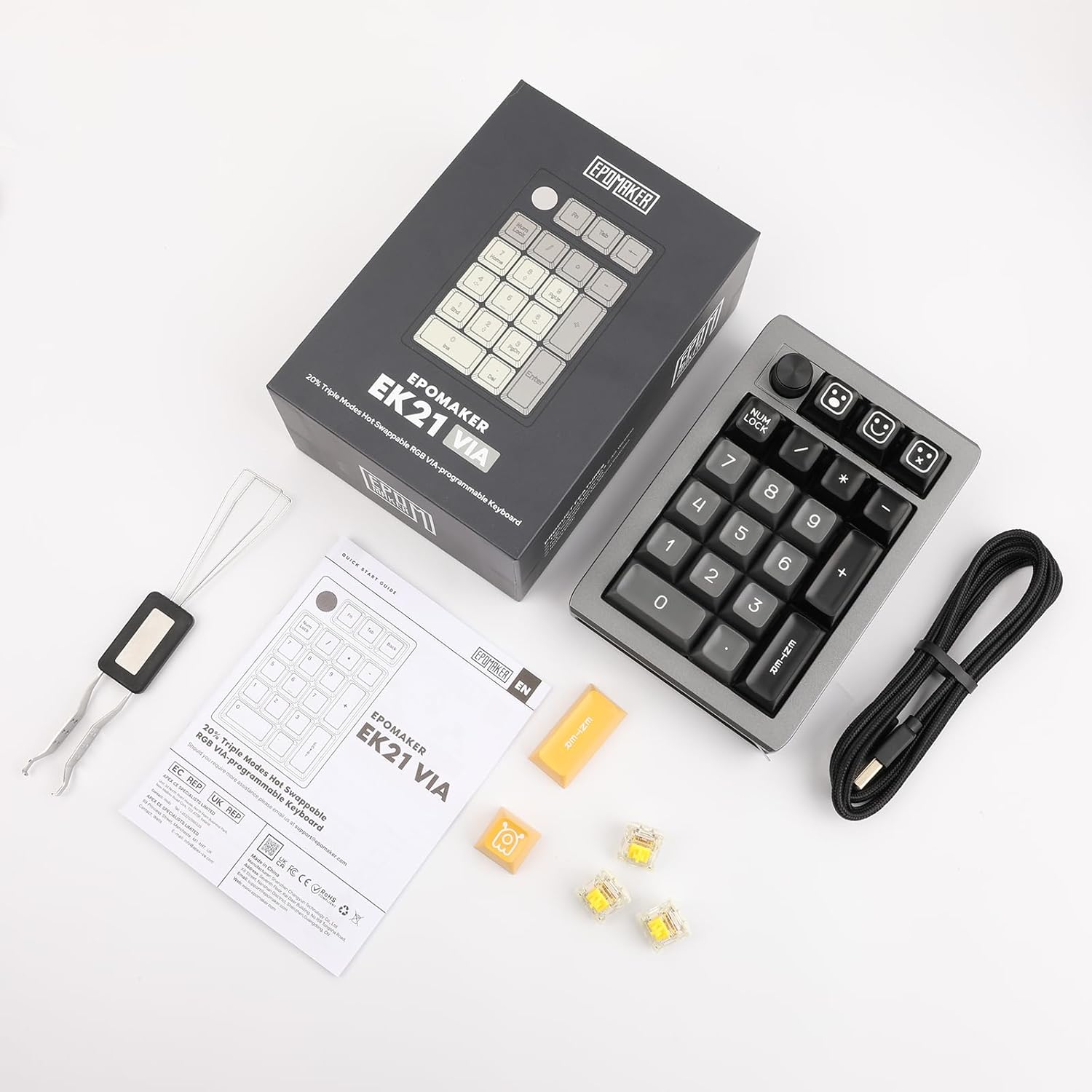
Image: EPOMAKER EK21 package contents.
سیٹ اپ
کنیکٹیویٹی موڈز
The EK21 supports three connection modes: Wired, 2.4GHz Wireless, and Bluetooth. A switch on the side of the number pad allows you to select the desired mode.

Image: EPOMAKER EK21 connectivity options.
1. وائرڈ کنکشن (USB-C)
- Locate the USB-C port on the number pad.
- Connect the provided USB-C cable to the number pad and your computer.
- The number pad will be automatically recognized and ready for use.
2. 2.4GHz وائرلیس کنکشن
- Locate the 2.4G receiver stored in the compartment on the side of the number pad.
- 2.4G ریسیور کو اپنے کمپیوٹر پر دستیاب USB پورٹ میں لگائیں۔
- Switch the mode selector on the number pad to '2.4G'.
- The number pad should connect automatically.
3. بلوٹوتھ 5.0 کنکشن
- Switch the mode selector on the number pad to 'BT'.
- اپنے کمپیوٹر یا ڈیوائس پر، بلوٹوتھ کو فعال کریں اور نئے آلات تلاش کریں۔
- Select 'EPOMAKER EK21' from the list of available devices to pair.
- The indicator light will confirm successful pairing.
Gasket Structure and Hot-Swappable PCB
The EK21 features a gasket-mounted design for improved typing feel and a hot-swappable PCB, allowing you to change mechanical switches without soldering.

تصویر: پھٹا view of the EK21 Gasket Structure.

Image: Hot-swappable PCB and switch replacement.
سوئچز کو تبدیل کرنے کے لیے:
- Use the keycap puller to gently remove the keycap from the desired switch.
- Use the switch puller to carefully grip the switch and pull it straight up to remove it.
- پی سی بی کے سوراخوں کے ساتھ نئے سوئچ کے پنوں کو سیدھ میں رکھیں۔
- Gently press the new switch into place until it clicks securely. Ensure pins are not bent.
آپریٹنگ ہدایات
بنیادی کلیدی افعال
The EK21 number pad includes standard numeric keys, function keys, and a multi-function knob.

Image: RGB Backlight and key combinations.
- نمبر لاک: Toggles the numeric keypad function.
- Fn + درج کریں: Toggles the RGB backlight effect.
- Fn + بیک اسپیس: Turns the RGB backlight on or off.
- Fn + 0 (Hold for 3 seconds): Resets the number pad to factory settings.
- گنبد: By default, controls volume (rotate) and mute (press). Functions can be customized via VIA software.
VIA Software Customization
The EK21 is compatible with VIA software, allowing for extensive customization of key mappings, macros, and lighting.
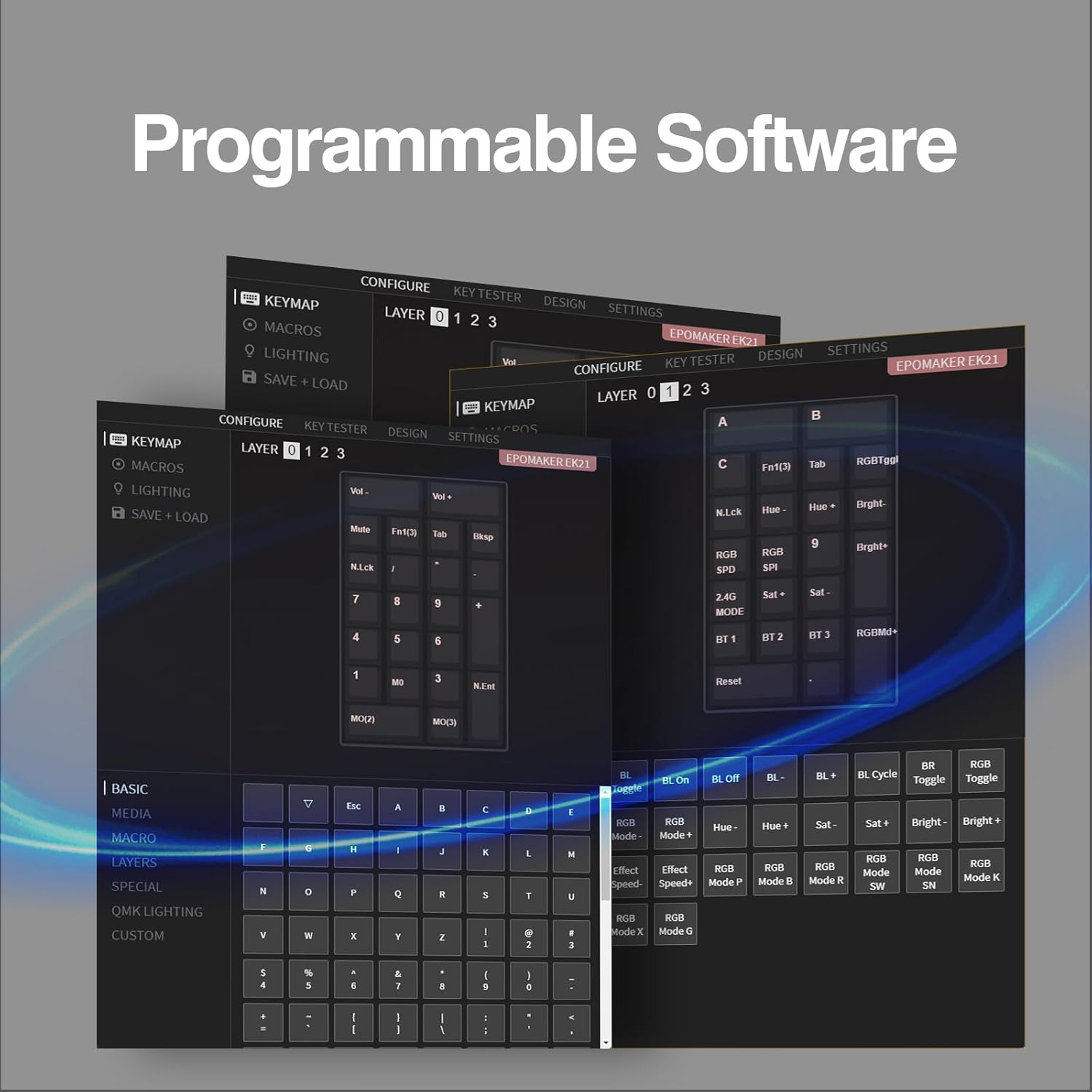
Image: VIA Programmable Software interface.
To use VIA software:
- Download the VIA software from the official EPOMAKER website or the VIA webسائٹ
- Connect the EK21 to your computer via USB-C cable.
- Launch the VIA software. The software should automatically detect the EK21.
- Use the interface to remap keys, create macros, and adjust lighting settings across different layers.
بیٹری مینجمنٹ
The EK21 is equipped with a 1000mAh battery for wireless operation. To charge the battery, connect the number pad to your computer or a USB power adapter using the provided USB-C cable. The indicator light will show charging status.
دیکھ بھال
- صفائی: Use a soft, dry cloth to clean the surface of the number pad. For keycaps, a damp ہلکے صابن کے ساتھ کپڑا استعمال کیا جا سکتا ہے، اس بات کو یقینی بناتے ہوئے کہ سوئچ میں کوئی مائع داخل نہ ہو۔
- کی کیپ اور سوئچ کی تبدیلی: Refer to the 'Setup' section for instructions on how to safely remove and install keycaps and switches.
- ذخیرہ: When not in use for extended periods, store the number pad in a cool, dry place. Ensure the power is off to preserve battery life.
خرابی کا سراغ لگانا
- Number pad not responding:
- Ensure the number pad is charged or connected via USB-C.
- Check the connection mode switch (Wired, 2.4G, BT) is set correctly.
- For 2.4G, ensure the receiver is properly plugged in.
- For Bluetooth, ensure it is paired correctly and your device's Bluetooth is enabled.
- اپنے کمپیوٹر یا ڈیوائس کو دوبارہ شروع کرنے کی کوشش کریں۔
- کلیدیں رجسٹر نہیں ہو رہی ہیں:
- Ensure Num Lock is enabled if you are trying to use the numeric functions.
- If a specific key is not working, try replacing the switch for that key (refer to 'Setup' section).
- Reset the number pad to factory settings (Fn + 0, hold 3s).
- بیک لائٹ کام نہیں کر رہی:
- Ensure the backlight is turned on (Fn + Backspace).
- Check backlight settings in VIA software.
- VIA software not detecting the number pad:
- Ensure the number pad is connected via USB-C.
- Make sure you have the latest version of VIA software.
- Try restarting the VIA software and reconnecting the number pad.
وضاحتیں
| فیچر | تفصیل |
|---|---|
| برانڈ | ایپومیکر |
| ماڈل نمبر | ای کے 21 |
| کنیکٹوٹی ٹیکنالوجی | بلوٹوتھ، 2.4GHz وائرلیس، USB-C وائرڈ |
| ہم آہنگ آلات | Tablet, Laptop, PC (Windows, Mac) |
| بیٹری | 1 لیتھیم آئن بیٹری (شامل)، 1000mAh |
| مواد | ایلومینیم |
| رنگ | سیاہ |
| خصوصی خصوصیات | NKRO, Ergonomic, Customizable Display Keys, Backlit, Hot-Swappable |
| پروڈکٹ کا وزن | 420 گرام |
| پیکیج کے طول و عرض | 26 x 11 x 1.8 سینٹی میٹر |
وارنٹی اور سپورٹ
وارنٹی کی معلومات
Specific warranty details for the EPOMAKER EK21 are not provided in this manual. Please refer to the product packaging, the official EPOMAKER website, or contact EPOMAKER customer support for comprehensive warranty information.
کسٹمر سپورٹ
If you encounter any issues or have questions regarding your EPOMAKER EK21 number pad that are not covered in this manual, please contact EPOMAKER customer support through their official website or the retailer where you purchased the product. Please have your product model and purchase details ready when contacting support.
پروڈکٹ ویڈیوز
EPOMAKER EK21 Wireless Mechanical Number Pad Overview
ویڈیو: یہ ویڈیو ایک اوور فراہم کرتا ہے۔view of the EPOMAKER EK21 Wireless Mechanical Number Pad, showcasing اس کی خصوصیات اور ڈیزائن۔
EPOMAKER EK21 Mechanical Number Pad Features
Video: This video highlights various mechanical aspects and features of the EPOMAKER EK21 Mechanical Number Pad.


