1. تعارف
The ULANZI MA35 Magnetic Phone Camera Grip is designed to enhance your mobile photography and videography experience. This versatile accessory offers a comfortable grip, a detachable wireless remote shutter, and multiple mounting options, transforming your smartphone into a more ergonomic and functional camera.
2. پیکیج کے مشمولات
- ULANZI MA35 Phone Camera Grip x1
- Detachable Wireless Remote Shutter x1
- USB-C Charging Cable (for remote) x1
- Magnetic Ring Sticker x1
- Wet/Dry Wipes x1 set
- Magnetic Ring Alignment Guide x1
- یوزر مینوئل x1
3. پروڈکٹ ختمview
Familiarize yourself with the components of your ULANZI MA35 grip:

Figure 1: Key components of the ULANZI MA35 Phone Camera Grip.
- شٹر بٹن: Activates photo/video capture.
- کولڈ شو ماؤنٹ: For attaching external accessories like LED lights or microphones.
- ٹائپ سی چارجنگ پورٹ: For charging the detachable remote shutter.
- مقناطیسی علاقہ: For MagSafe-compatible phones or cases.
- آئینہ: Integrated for convenient rear-facing selfies.
- Magnetic Ring Sticker: For non-MagSafe devices.
- Hidden Phone Clamp: Provides secure grip for non-magnetic phones or added security.
- 1/4" سکرو ہول: For mounting the grip onto tripods or stands.
4. سیٹ اپ
4.1 Attaching Your Phone
The ULANZI MA35 offers two methods for attaching your smartphone:
Magnetic Attachment (for MagSafe-compatible devices)
Simply align your MagSafe-compatible iPhone or phone with a MagSafe case to the magnetic area on the grip. The strong magnetic force (13N) will securely hold your device.

Figure 2: Magnetic attachment and universal phone clamp.
Using the Phone Clamp (for all smartphones)
For phones without MagSafe compatibility or for added security, pull out the hidden phone clamp. Place your phone between the clamps and ensure it is securely held. The clamp supports phones with a width of 50-90mm (1.97"-3.74").
Attaching the Magnetic Ring Sticker (for non-MagSafe devices)
If your phone or case is not MagSafe compatible, you can use the included magnetic ring sticker. Use the alignment guide to correctly position the sticker on your phone or phone case for optimal magnetic attachment.
Video 1: Demonstrates applying the magnetic ring and Bluetooth pairing.
4.2 Pairing the Remote Shutter
- Remove the detachable wireless remote shutter from the grip.
- Turn on the remote shutter by sliding the ON/OFF switch.
- On your smartphone, go to Bluetooth settings and enable Bluetooth.
- Look for "ULANZI" (or similar name like "PH-30 photo" as seen in some videos) in the list of available devices and tap to connect.
- Once paired, the remote shutter is ready to use.
نوٹ: The remote control is compatible with iOS and Android systems. Some Android phone models (e.g., Samsung S21, Sony Xperia 5 III, Sony Xperia XZ1, Google Pixel, Galaxy S10, Xperia PRO, Pixel 10 xl) may not support the zoom function via the remote.
5. آپریٹنگ ہدایات
5.1 Using the Shutter Button
Once paired, press the shutter button on the detachable remote to capture photos or start/stop video recording. A short press takes a single photo, while a long press may activate continuous shooting on some devices.
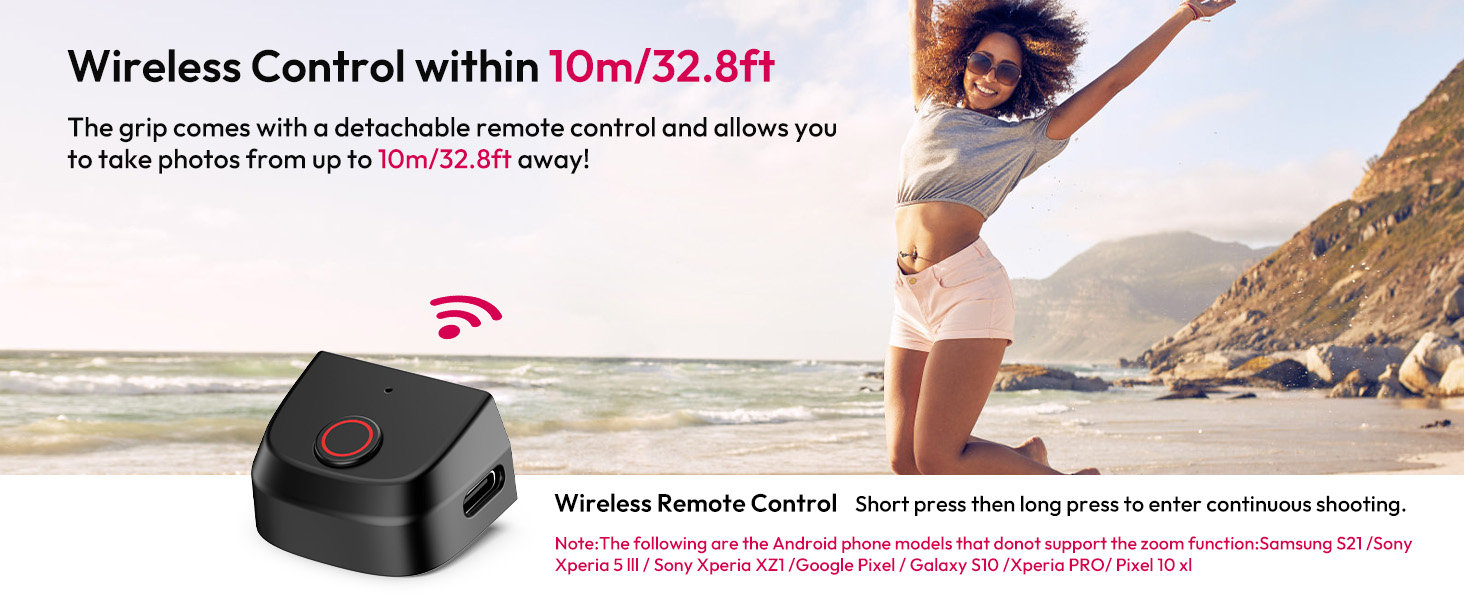
Figure 3: Wireless remote control in use.
5.2 Adjusting Shooting Direction
The magnetic design allows for easy rotation of your phone between vertical and horizontal orientations without removing it from the grip. Simply rotate your phone to the desired position.

Figure 4: Vertical and horizontal shooting modes.
5.3 کولڈ شو ماؤنٹ کا استعمال
The cold shoe mount on top of the grip allows you to attach various accessories such as external LED lights or microphones to enhance your content creation.

Figure 5: Cold shoe mount and tripod screw.
5.4 تپائی چڑھانا
A standard 1/4" threaded hole is located at the bottom of the grip, allowing you to easily mount it onto any compatible tripod or stand for stable shots.
5.5 Rear-facing Selfies
The integrated mirror on the magnetic plate allows you to frame yourself when taking selfies using your phone's higher-quality rear camera, ensuring you look your best.

Figure 6: Using the mirror for rear-facing selfies.
Video 2: Demonstrates the ULANZI MA35 in various usage scenarios.
6 دیکھ بھال
- Keep the device clean by wiping it with a soft, dry cloth. Avoid harsh chemicals.
- گرفت کو کسی ٹھنڈی، خشک جگہ پر براہ راست سورج کی روشنی اور انتہائی درجہ حرارت سے دور رکھیں۔
- Ensure the remote shutter is charged regularly to maintain optimal performance.
- آلے کو گرانے یا اسے شدید اثرات کا نشانہ بنانے سے گریز کریں۔
7 خرابیوں کا سراغ لگانا
- Remote not connecting: Ensure the remote is charged and turned on. Check your phone's Bluetooth settings to confirm it's visible and paired. Try unpairing and re-pairing if issues persist.
- Phone not holding securely: For magnetic attachment, ensure your phone/case is MagSafe compatible or the magnetic ring sticker is correctly applied. For the clamp, ensure the phone is centered and the clamps are fully extended and gripping the phone firmly.
- Remote disconnects after 5 minutes: This is a power-saving feature. Simply press the shutter button again to re-establish the Bluetooth connection.
8. وضاحتیں
| فیچر | تفصیلات |
|---|---|
| ماڈل | MA35 |
| مواد | ABS+Silicone+PCBA+Acrylic |
| مصنوعات کے طول و عرض | 6.06 x 2.01 x 4.92 inches (127*96*45mm ±2mm) |
| شے کا وزن | 4.6 ounces (130g ±5g) |
| فون کل۔amp چوڑائی | 50-95mm (1.97"-3.74") |
| بیٹریاں | 1 لیتھیم پولیمر بیٹری درکار ہے (شامل) |
| کنیکٹوٹی | بلوٹوتھ |
| ریموٹ کنٹرول رینج | 10m/32.8ft تک |

Figure 7: ULANZI MA35 product specifications.
9. وارنٹی اور سپورٹ
ULANZI products are designed with quality and customer satisfaction in mind. For warranty information, technical support, or any inquiries regarding your MA35 Magnetic Phone Camera Grip, please refer to the contact details provided on the product packaging or visit the official ULANZI webسائٹ


