1. پروڈکٹ ختمview
This manual provides essential information for the operation and maintenance of your GHUST MR23GA Replacement Magic Voice Remote Control. This remote is designed as a replacement for various LG Smart TV models, offering convenient control without complex setup.

Image 1.1: The GHUST MR23GA Replacement Magic Voice Remote Control.
اہم خصوصیات:
- براہ راست تبدیلی: Functions as a direct replacement for original LG Magic Remote models.
- کسی پروگرامنگ کی ضرورت نہیں: Ready to use out of the box after battery insertion.
- پائیدار تعمیر: Made of high-quality ABS material for enhanced durability.
- کومپیکٹ ڈیزائن: Small and ergonomic for comfortable grip.
- Voice Search Capability: Supports voice commands for easier navigation (functionality may vary based on TV model and original remote features).
- Dedicated Shortcut Buttons: Netflix اور پرائم ویڈیو جیسی مقبول اسٹریمنگ سروسز تک فوری رسائی۔
2. سیٹ اپ اور انسٹالیشن
The MR23GA remote control is designed for immediate use with compatible LG Smart TVs. No complex programming or pairing procedures are required.
2.1. بیٹری کی تنصیب
- ریموٹ کنٹرول کے پیچھے بیٹری کے ٹوکری کا احاطہ تلاش کریں۔
- کور کو نیچے کی طرف سلائیڈ کریں یا کمپارٹمنٹ کو کھولنے کے لیے لیچ کو دبائیں۔
- Insert two (2) AAA batteries (not included) into the compartment, ensuring the positive (+) and negative (-) terminals align correctly with the indicators inside.
- بیٹری کے کمپارٹمنٹ کور کو دوبارہ اپنی جگہ پر سلائیڈ کرکے بند کریں جب تک کہ یہ محفوظ طریقے سے کلک نہ کرے۔

Image 2.1: The remote control is designed for ease of use with no setup or programming required after battery installation.
Once batteries are installed, the remote is ready to operate your compatible LG Smart TV.
3. آپریٹنگ ہدایات
This section details the basic functions and operation of your MR23GA remote control.
3.1. بنیادی افعال
- پاور بٹن (●): ٹی وی کو آن یا آف کرنے کیلئے دبائیں۔
- نمبر بٹن (0-9): Use to directly input channel numbers.
- والیوم اوپر/نیچے (+/-): TV کے والیوم کی سطح کو ایڈجسٹ کریں۔
- Channel Up/Down (▲/▼): ٹی وی چینلز تبدیل کریں۔
- Mute Button (🔇): Mute or unmute the TV's audio.
- نیویگیشن پیڈ (اوپر، نیچے، بائیں، دائیں، ٹھیک ہے): مینو کے ذریعے تشریف لے جائیں اور اختیارات کو منتخب کریں۔
- Back Button (↶): پچھلی اسکرین یا مینو پر واپس جائیں۔
- Home Button (🏠): Access the TV's Smart Home dashboard.

Image 3.1: The compact size and ergonomic design make the remote easy to hold and operate.
3.2. وائس کنٹرول
دبائیں اور تھامیں۔ مائیکروفون بٹن to activate voice control. Speak clearly into the remote to issue commands or search for content. Release the button when finished speaking. Note that voice control functionality may depend on your specific LG TV model and its original features.
3.3. Dedicated Shortcut Buttons
The remote features dedicated buttons for quick access to popular streaming applications:
- Netflix بٹن: Directly launch the Netflix application.
- پرائم ویڈیو بٹن: Directly launch the Amazon Prime Video application.
- ڈزنی + بٹن: Directly launch the Disney+ application.
- LG Channels Button: Directly launch the LG Channels application.
- Sling Button: Directly launch the Sling TV application.
- الیکسا بٹن: Activate Alexa voice assistant (functionality depends on TV model).

Image 3.2: Dedicated shortcut buttons provide quick access to your favorite applications.
3.4 مطابقت
This replacement remote control is compatible with a wide range of LG Smart TV models, including but not limited to:
- LG OLED Series: OLED42C3AUA, OLED42C3PUA, OLED48C3PUA, OLED55C3PUA, OLED65C3AUA, OLED77C3PUA, OLED83C3PUA, OLED55G3PUA, OLED65G3PUA, OLED77G3PUA, OLED83G3PUA, OLED55B3PUA, OLED65B3PUA, OLED77B3PUA
- LG QNED Series: 43QNED75URA, 50QNED75URA, 55QNED75URA, 65QNED75URA, 75QNED75URA, 50QNED80URA, 55QNED80URA, 65QNED80URA, 75QNED80URA, 86QNED80URA
- LG UR9000 Series: 43UR9000PUA, 50UR9000PUA, 55UR9000PUA, 65UR9000PUA, 75UR9000PUA
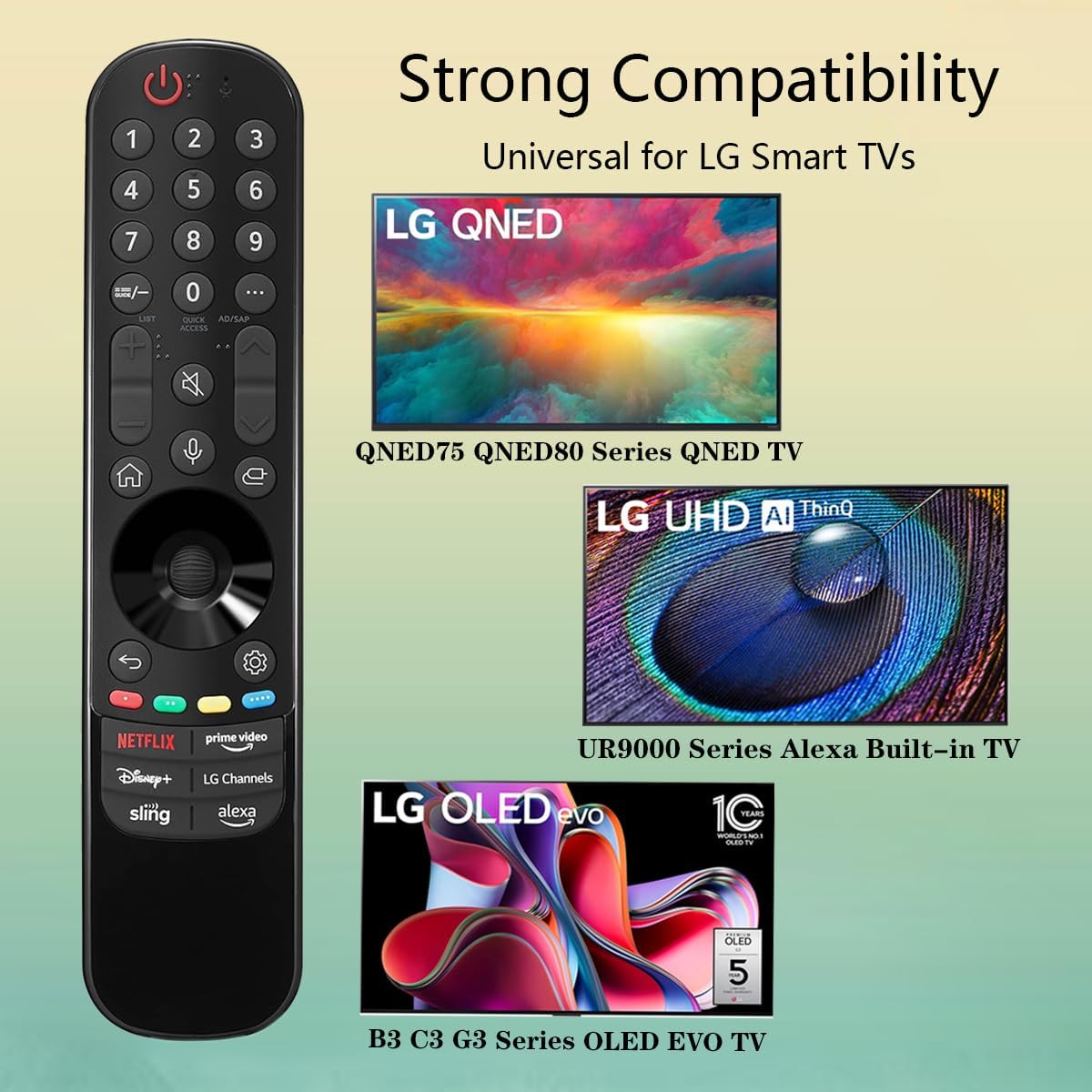
Image 3.3: The remote offers strong compatibility with various LG Smart TV series.
4 دیکھ بھال
Proper care and maintenance will extend the lifespan of your remote control.
4.1. صفائی
- Use a soft, dry cloth to wipe the surface of the remote control.
- ضدی گندگی کے لیے، قدرے ڈیampur کپڑا جس میں پانی یا ہلکا، غیر کھرچنے والا کلینر۔ کلینر کو براہ راست ریموٹ پر نہ چھڑکیں۔
- سخت کیمیکلز، سالوینٹس، یا کھرچنے والے صفائی کے مواد کے استعمال سے گریز کریں، کیونکہ یہ ریموٹ کی تکمیل یا اندرونی اجزاء کو نقصان پہنچا سکتے ہیں۔
4.2. بیٹری کی دیکھ بھال
- Replace batteries when the remote's responsiveness decreases or it stops functioning.
- ہمیشہ ایک ہی وقت میں دونوں بیٹریوں کو ایک ہی قسم کی نئی (AAA) سے تبدیل کریں۔
- اگر ریموٹ ایک توسیعی مدت (مثلاً ایک ماہ یا اس سے زیادہ) کے لیے استعمال نہیں کیا جائے گا، تو ریموٹ کو رساو اور ممکنہ نقصان کو روکنے کے لیے بیٹریاں ہٹا دیں۔
- استعمال شدہ بیٹریوں کو مقامی ضابطوں کے مطابق تلف کریں۔
5 خرابیوں کا سراغ لگانا
اگر آپ کو اپنے ریموٹ کنٹرول کے ساتھ مسائل کا سامنا کرنا پڑتا ہے، تو درج ذیل عام مسائل اور حل دیکھیں:
| مسئلہ | ممکنہ وجہ | حل |
|---|---|---|
| ریموٹ جواب نہیں دے رہا ہے۔ | مردہ یا غلط طریقے سے داخل کی گئی بیٹریاں۔ | بیٹریوں کو نئی AAA بیٹریوں سے تبدیل کریں، درست قطبیت کو یقینی بناتے ہوئے (+/-)۔ |
| ریموٹ وقفے وقفے سے کام کرتا ہے۔ | Low battery power; obstruction between remote and TV; infrared sensor blocked on TV. | Replace batteries. Ensure a clear line of sight to the TV's infrared sensor. Remove any obstructions. |
| Voice control or pointer not working. | This replacement remote may not support all advanced features of the original LG Magic Remote, or your TV model does not fully support these features with a replacement remote. | Verify your TV model's compatibility with replacement remotes for advanced features. Basic functions should still operate. |
| Dedicated app buttons (e.g., Alexa, LG Channels) not working. | Functionality depends on TV model and specific app integration. | Some app buttons may not be universally compatible or require specific TV software versions. Verify if other buttons work. |
اگر ان حلوں کو آزمانے کے بعد بھی مسئلہ برقرار رہتا ہے، تو براہ کرم کسٹمر سپورٹ سے رابطہ کریں۔
6. وضاحتیں
- ماڈل نمبر: ایم آر 23 جی اے
- برانڈ: GHUST
- مصنوعات کے طول و عرض: 7.3 x 1.6 x 1.2 انچ
- آئٹم کا وزن: 2.29 اونس
- طاقت کا منبع: 2 x AAA بیٹریاں (شامل نہیں)
- رنگ: سیاہ
- مواد: اعلیٰ معیار کا ABS
- ہم آہنگ آلات: LG Smart Televisions (specific models listed in Section 3.4)
- خصوصی خصوصیت: Voice Search (functionality may vary)
7. وارنٹی اور سپورٹ
GHUST is committed to providing high-quality products and excellent customer service.
7.1 فروخت کے بعد سروس
If you have any questions regarding the quality or functionality of your GHUST MR23GA remote control, please do not hesitate to contact our customer support team. We are dedicated to resolving any issues promptly and ensuring your satisfaction.
For support, please refer to the contact information provided with your purchase or on the official GHUST product page.


