تعارف
This manual provides comprehensive instructions for the setup, operation, and maintenance of your ESR Rebound 360° Keyboard Case. This accessory is designed to enhance the functionality and protection of your compatible iPad Air 13" device, transforming it into a portable productivity tool.
پروڈکٹ ختمview
The ESR Rebound 360° Keyboard Case integrates a protective cover with a full-featured keyboard and trackpad. Key components include:
- Magnetic Back Case: A detachable protective case for your iPad, allowing use with or without the keyboard.
- انٹیگریٹڈ کی بورڈ: Features a QWERTZ layout for efficient typing.
- ملٹی ٹچ ٹریک پیڈ: Provides precise navigation and gesture support.
- Quick-Set Magnetic Stand: Enables adjustable viewing angles and elevated screen positions.
- Magnetic Clasp: Securely holds your Apple Pencil.
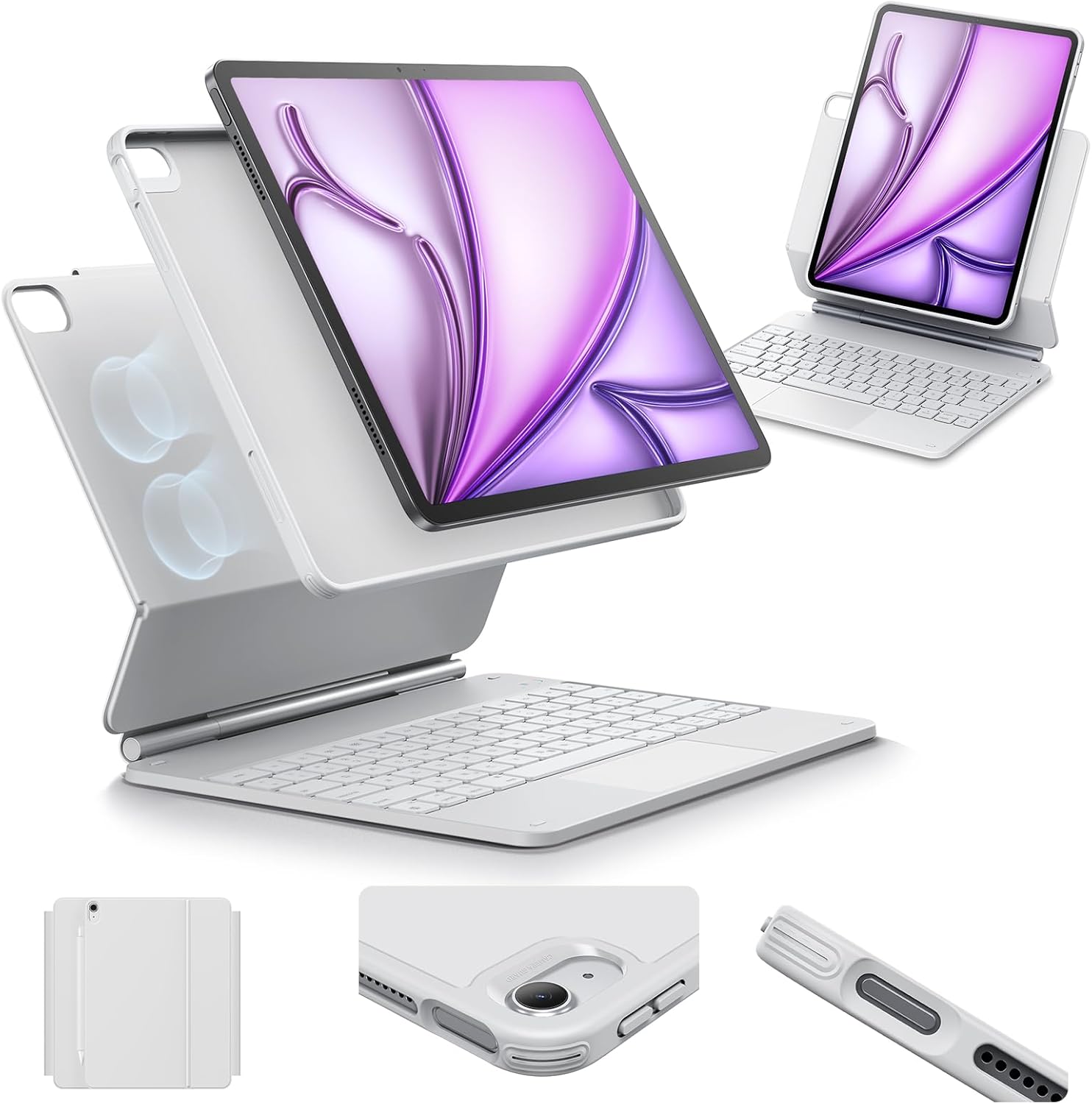
تصویر: ختمview of the ESR Rebound 360° Keyboard Case, showing the detachable iPad case, keyboard, and magnetic stand in various configurations.
مطابقت
یہ کی بورڈ کیس خاص طور پر درج ذیل آئی پیڈ ماڈلز کے لیے ڈیزائن کیا گیا ہے:
- iPad Air 13" (M3) 2025: Model numbers A3268, A3269, A3271
- iPad Air 13" (M2) 2024: Model numbers A2898, A2899, A2900
اپنے آئی پیڈ کے ماڈل نمبر کی تصدیق کرنے کے لیے، اپنے آلے کے پچھلے حصے کو چیک کریں۔
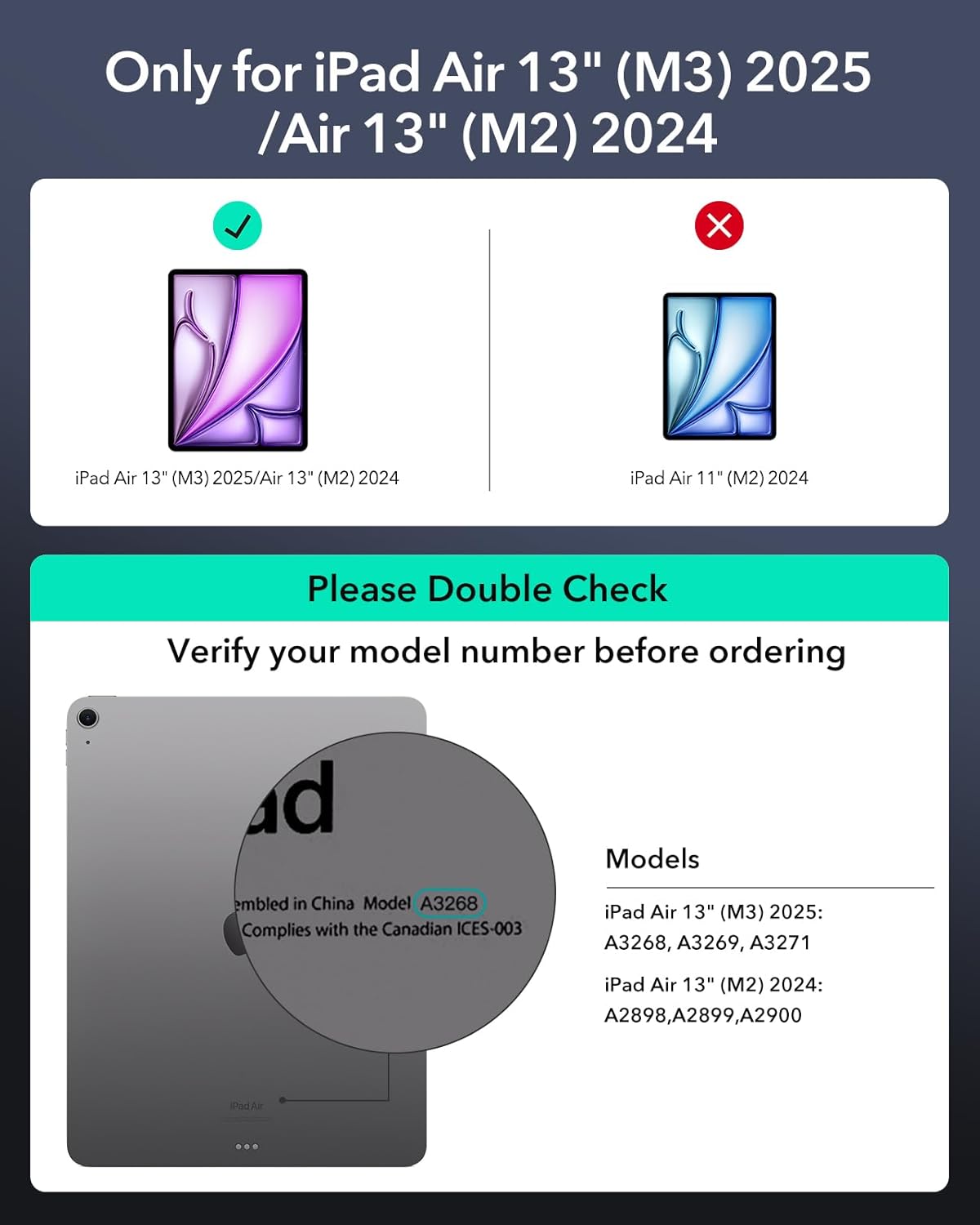
Image: A visual guide illustrating how to check your iPad's model number for compatibility with the keyboard case.
سیٹ اپ کی ہدایات
- Attach the iPad: Align your iPad with the magnetic back case. The strong magnets will securely attach the iPad to the case.
- اسٹینڈ کھولیں: Gently open the magnetic stand to your desired viewing یا ٹائپنگ زاویہ.
- کی بورڈ پر پاور: Locate the power switch on the keyboard and slide it to the 'On' position.
- بلوٹوتھ کے ذریعے جوڑا بنائیں:
- اپنے آئی پیڈ پر، پر جائیں۔ ترتیبات > بلوٹوتھ.
- یقینی بنائیں کہ بلوٹوتھ فعال ہے۔
- On the keyboard, press the Bluetooth pairing button (often indicated by a Bluetooth icon or 'Fn' + a specific key). The indicator light will flash.
- On your iPad, select "ESR Keyboard" (or similar name) from the list of available devices.
- Follow any on-screen prompts to complete the pairing process. The indicator light on the keyboard will stop flashing once paired.
آپریٹنگ ہدایات
کی بورڈ اور ٹریک پیڈ کا استعمال
The integrated QWERTZ keyboard and multi-touch trackpad provide a laptop-like experience for your iPad.
- ٹائپنگ: Utilize the full QWERTZ keyboard for efficient text input.
- Trackpad Gestures: The advanced multi-touch trackpad supports various gestures for navigation, scrolling, pinching, and swiping with precision. Refer to your iPad's settings for a full list of supported gestures.

Image: A hand demonstrating multi-touch gestures on the keyboard's trackpad, highlighting its functionality for precise navigation.
سایڈست ViewING حالتیں
The Quick-Set Magnetic Stand allows for versatile positioning:
- ٹائپنگ موڈ: Position the iPad at an optimal angle for keyboard use.
- Viewing موڈ: Adjust the stand for comfortable media consumption or presentations.
- Raised Screen View: Elevate the iPad screen for improved posture during extended use.
- پورٹریٹ وضع: The detachable case can be positioned for vertical viewing, ideal for FaceTime or reading.

Image: Demonstrates the keyboard case supporting the iPad in three versatile modes: typing, viewing, and browsing, showcasing its adaptability for different tasks.

Image: Illustrates the Quick-Set Magnetic Stand holding the iPad in a raised screen view, designed to improve user posture compared to a normal view.
Detachable Back Case
The back case can be easily detached from the keyboard base, providing full protection for your iPad while allowing for standalone use. The strong magnets ensure a secure connection when reattaching.

Image: Shows the versatile detachable back case, which can be used with or without the keyboard, offering continuous protection for the iPad.
Secure Magnetic Lock
The case features a secure magnetic lock mechanism that keeps your iPad firmly in place, preventing accidental detachment during transport or use.
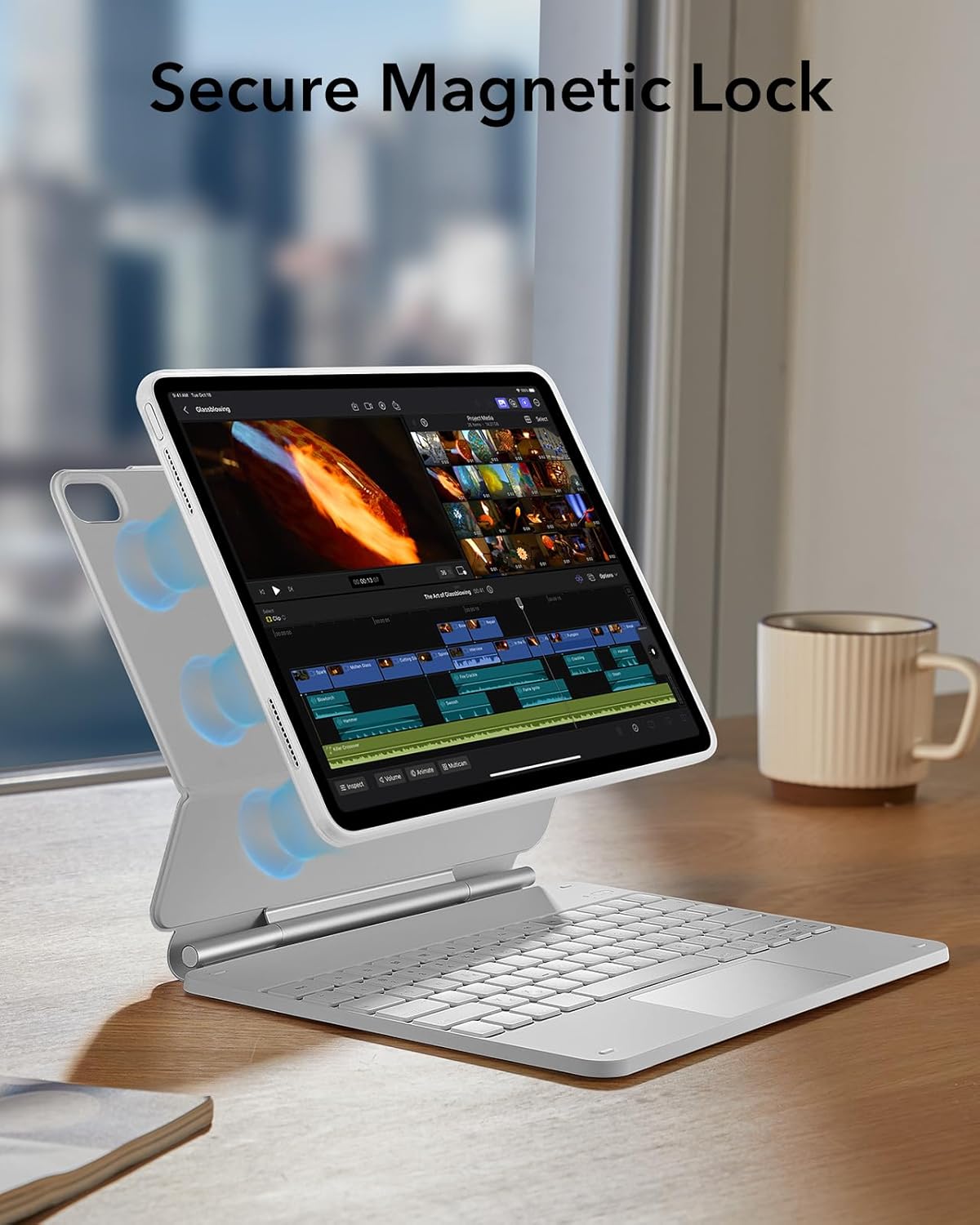
Image: Illustrates the secure magnetic lock feature, showing how the iPad is firmly held in position by strong magnets within the case.
Apple Pencil Protection
A dedicated magnetic clasp is integrated into the design to securely hold and protect your Apple Pencil when not in use.

تصویر: کلوز اپ view of the magnetic clasp designed to securely hold and protect an Apple Pencil, integrated into the keyboard case.
بیٹری کی زندگی اور چارجنگ
The keyboard features an efficient power management system. To charge the keyboard, connect it to a power source using the provided charging cable.
- اسٹینڈ بائی: 1 سال تک
- Daily Use (2 hours/day, backlight off): 3 ماہ تک
- Night Use (2 hours/day, backlight on): Up to 1 week
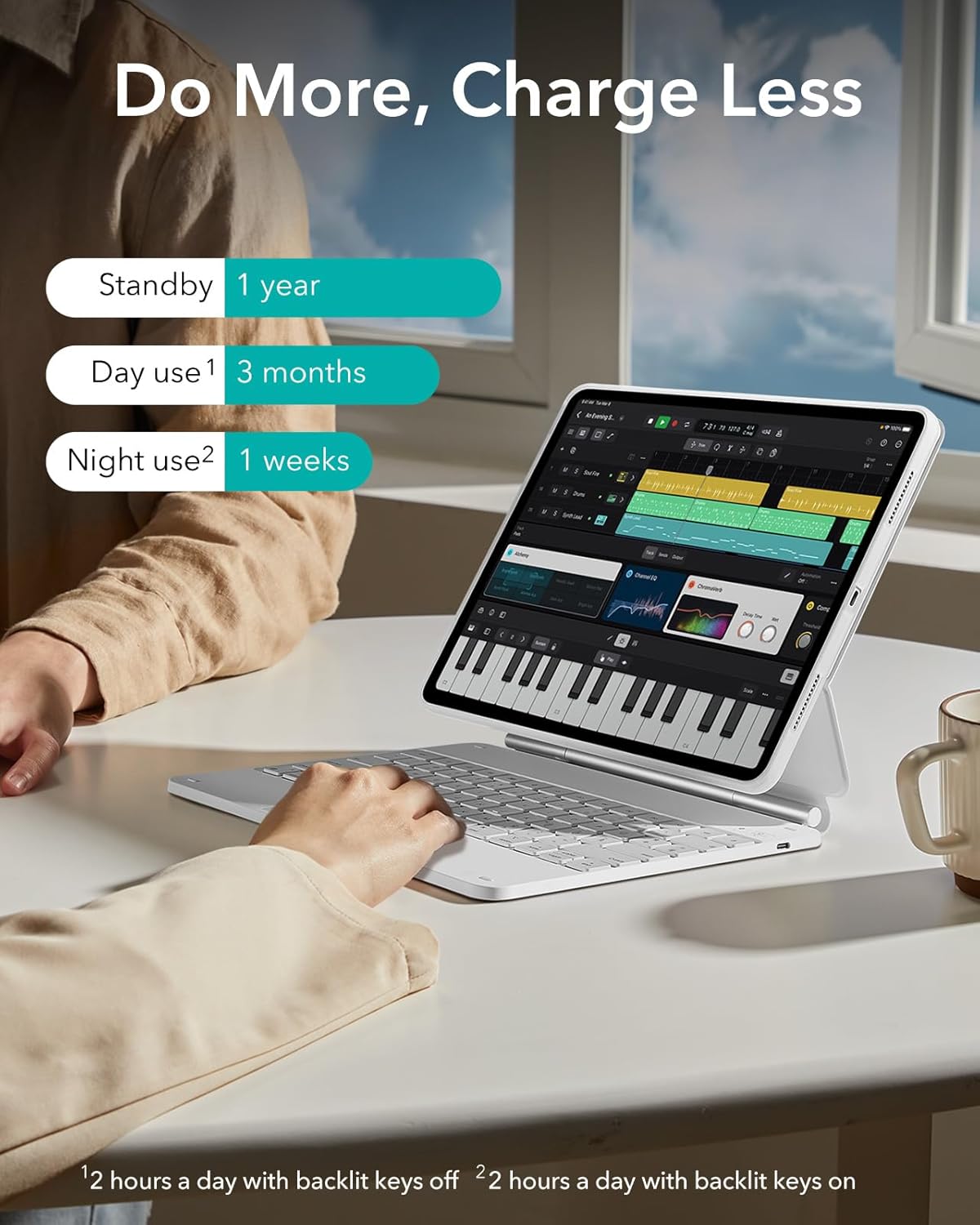
Image: Visual representation of the keyboard's battery life under different usage scenarios, including standby, daily use with backlight off, and daily use with backlight on.
دیکھ بھال
- صفائی: ایک نرم استعمال کریں، ڈیamp cloth to wipe the exterior of the case and keyboard. Avoid harsh chemicals or abrasive materials.
- ذخیرہ: When not in use for extended periods, ensure the keyboard is powered off to conserve battery. Store in a cool, dry place.
- مائعات سے پرہیز کریں: Keep the keyboard and case away from liquids to prevent damage.
خرابی کا سراغ لگانا
- کی بورڈ جواب نہیں دے رہا ہے:
- یقینی بنائیں کہ کی بورڈ آن ہے۔
- بیٹری کی سطح چیک کریں اور اگر ضروری ہو تو چارج کریں۔
- Verify Bluetooth connection on your iPad. If disconnected, re-pair the device.
- اپنے آئی پیڈ اور کی بورڈ کو دوبارہ شروع کریں۔
- Trackpad Not Working:
- یقینی بنائیں کہ کی بورڈ بلوٹوتھ کے ذریعے جڑا ہوا ہے۔
- Check iPad settings for trackpad functionality and gestures.
- کسی بھی ملبے کو ہٹانے کے لیے ٹریک پیڈ کی سطح کو صاف کریں۔
- کنکشن کے مسائل:
- Move the iPad and keyboard closer together to ensure they are within Bluetooth range.
- Disconnect and forget the device in iPad Bluetooth settings, then re-pair.
- یقینی بنائیں کہ کوئی اور بلوٹوتھ ڈیوائسز مداخلت کا باعث نہیں بن رہی ہیں۔
وضاحتیں
| برانڈ | ای ایس آر |
| ہم آہنگ آلات | iPad Air 13" (M3/M2, 2025/2024) |
| کنیکٹوٹی ٹیکنالوجی | بلوٹوتھ |
| کی بورڈ کی تفصیل | Compact, portable, QWERTZ membrane keyboard |
| رنگ | سفید |
| مواد | Polyurethane (PU) |
| طاقت کا منبع | Internal rechargeable battery (no external power source required for operation) |
| کی بورڈ لے آؤٹ | QWERTZ |
| ہاتھ کی واقفیت | متضاد |
وارنٹی اور سپورٹ
ESR provides comprehensive customer support for this product, including:
- Detailed installation videos and Frequently Asked Questions (FAQs).
- A full 12-month warranty.
- Lifetime support and personalized assistance.
For further assistance, please refer to the official ESR support channels or contact customer service.


