1. پروڈکٹ ختمview
The Kungfuking Wall Mount Power Strip with USB is designed to provide convenient power access and charging capabilities for multiple devices. This unit features 3 standard AC outlets, 2 USB-A ports with QC 3.0 fast charging, and 1 USB-C port with 18W power delivery. It includes surge protection and a 6-foot extension cord, making it suitable for various mounting applications such as under desks, on walls, or on tabletops.
اہم خصوصیات:
- 3 AC آؤٹ لیٹس: Provides standard power connections for electronic devices (100V-125V, 12A=1500W).
- 3 USB پورٹس: Includes 2 QC 3.0 USB-A ports and 1 18W USB-C port for fast charging of compatible devices.
- اضافے سے تحفظ: منسلک آلات کو بجلی کے اضافے سے بچاتا ہے۔
- ماؤنٹ ایبل ڈیزائن: Features mounting holes for secure installation on various surfaces (walls, desks, table legs).
- 6-Foot Extension Cord: Offers flexibility in placement.
- UL فہرست میں: Certified for safety standards.

شکل 1: سامنے view of the Kungfuking Wall Mount Power Strip, showing 3 AC outlets, 2 USB-A ports, 1 USB-C port, an on/off switch, and the coiled 6-foot power cord.
2. اہم حفاظتی ہدایات
Please read and follow all safety instructions carefully before using this product to prevent injury or damage.
- 12A / 1500W کی زیادہ سے زیادہ لوڈ کی صلاحیت سے تجاوز نہ کریں۔
- یہ پروڈکٹ صرف اندرونی استعمال کے لیے ہے۔ نمی کو بے نقاب نہ کریں یا گیلے ماحول میں استعمال نہ کریں۔
- Do not disassemble or modify the power strip. Refer all servicing to qualified personnel.
- بچوں اور پالتو جانوروں سے دور رہیں۔
- Ensure the power cord is fully inserted into a grounded wall outlet.
- Avoid running the power cord under carpets or in areas where it can be tripped over or damaged.
- If the power strip shows signs of damage, discontinue use immediately.
- The surge protector feature protects against power surges; however, it is not a substitute for proper grounding or protection against direct lightning strikes.
3. سیٹ اپ اور انسٹالیشن
The Kungfuking Wall Mount Power Strip offers flexible installation options. Choose the method that best suits your needs.
نصب کرنے کی ہدایات:
- ایک مقام منتخب کریں: Choose a flat, stable surface for mounting, such as a wall, under a desk, or on table legs. Ensure the location is dry and free from obstructions.
- نشان بڑھتے ہوئے پوائنٹس: Position the power strip in the desired location. Use a pencil to mark the positions of the four mounting holes located on the flanges at each end of the power strip.
- پائلٹ ہولز ڈرل (اگر ضروری ہو): Depending on the mounting surface material, you may need to drill small pilot holes at the marked points. Use an appropriate drill bit size for the screws provided (or suitable screws for your surface).
- Secure the Power Strip: Align the mounting holes on the power strip with the pilot holes (or marks) and secure the unit using screws. Ensure the power strip is firmly attached and does not wobble.
- پاور سے جڑیں: Plug the 6-foot extension cord into a standard grounded wall outlet.

Figure 2: Illustration of the power strip's mounting holes for secure installation.

شکل 3: سابقamples of mounting locations: tabletop, under desk, and table legs.
4. آپریٹنگ ہدایات
Once installed and connected to power, the power strip is ready for use.
پاور آن/آف:
- Locate the red ON/OFF switch on the power strip.
- Press the switch to the "ON" position to supply power to the outlets and USB ports. The switch will illuminate when power is active.
- Press the switch to the "OFF" position to cut power to all connected devices.
AC آؤٹ لیٹس کا استعمال:
- Plug your electronic devices directly into the 3 AC outlets.
- Ensure that the total power consumption of all connected devices does not exceed 1500W.
USB چارجنگ پورٹس کا استعمال:
- USB-A پورٹس (QC 3.0): Connect compatible devices using a USB-A cable for fast charging. These ports support Quick Charge 3.0 for accelerated charging speeds.
- USB-C Port (18W): Connect compatible devices using a USB-C cable for 18W power delivery. This port is suitable for charging smartphones, tablets, and other USB-C powered devices.
- The USB ports provide power automatically when a device is connected and the power strip is on.
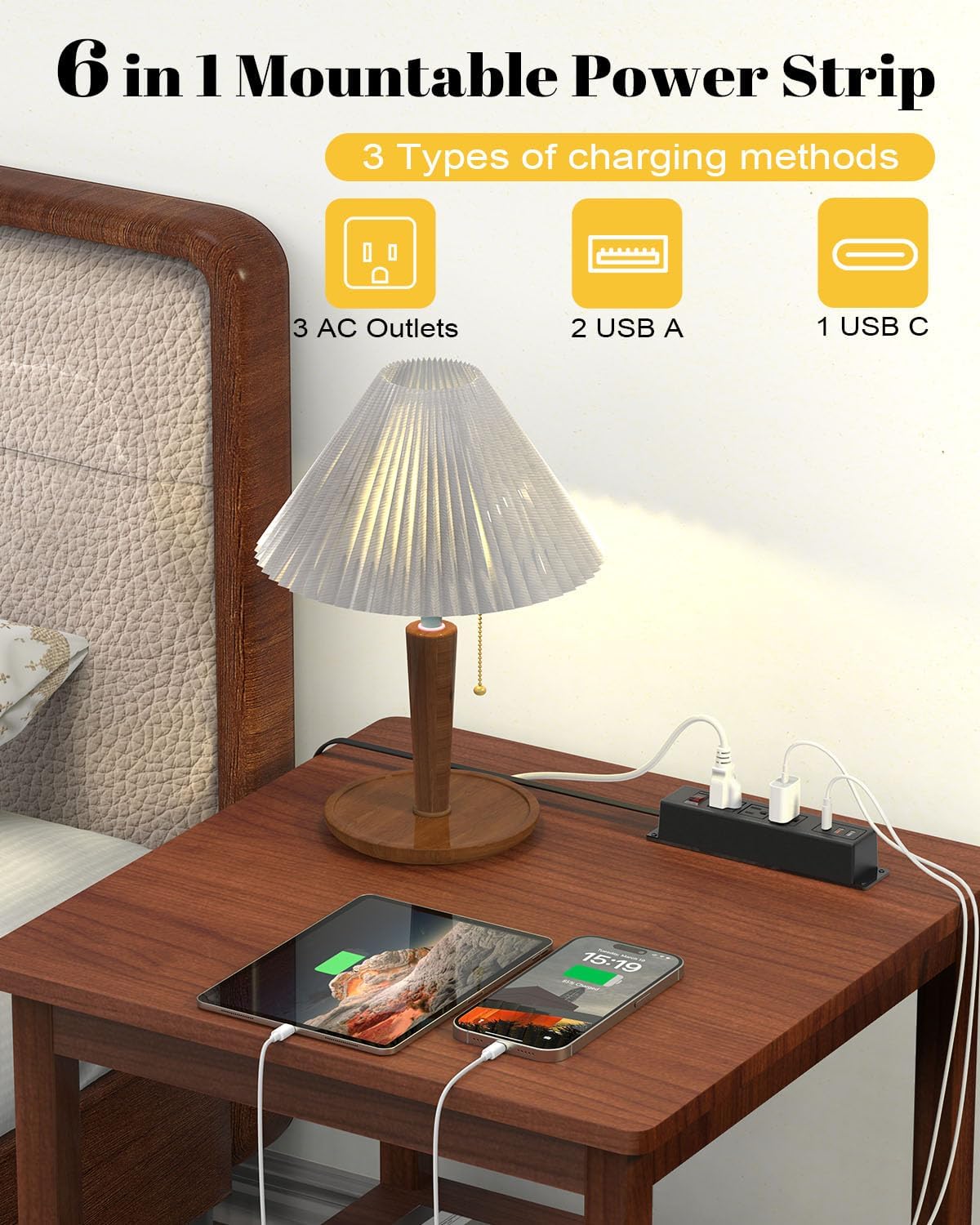
Figure 4: The power strip providing power to a lamp, phone, and tablet via AC and USB ports.

Figure 5: A device charging rapidly via the 18W USB-C port.
5 دیکھ بھال
Proper maintenance ensures the longevity and safe operation of your power strip.
- صفائی: Disconnect the power strip from the wall outlet before cleaning. Use a dry, soft cloth to wipe the exterior. Do not use liquid cleaners or aerosols.
- معائنہ: Periodically inspect the power cord and the power strip for any signs of damage, such as frayed wires, cracks, or loose connections. If damage is found, discontinue use and replace the unit.
- ذخیرہ: If storing the power strip, ensure it is disconnected from power and stored in a dry, cool place away from direct sunlight.
6 خرابیوں کا سراغ لگانا
اگر آپ کو اپنی پاور سٹرپ کے ساتھ مسائل کا سامنا کرنا پڑتا ہے، تو درج ذیل عام مسائل اور حل دیکھیں:
| مسئلہ | ممکنہ وجہ | حل |
|---|---|---|
| آؤٹ لیٹس/USB پورٹس کے لیے کوئی طاقت نہیں۔ |
|
|
| USB کے ذریعے چارج نہ ہونے والے آلات۔ |
|
|
| بجلی کی پٹی گرم محسوس ہوتی ہے۔ |
|
|
7. وضاحتیں
| فیچر | تفصیل |
|---|---|
| برانڈ | کنگ فوکنگ |
| ماڈل | B0CT5QM5KD |
| AC آؤٹ لیٹس | 3 |
| USB پورٹس | 2 x USB-A (QC 3.0), 1 x USB-C (18W) |
| والیومtagای درجہ بندی | 100V-125V |
| AC آؤٹ پٹ | 12A / 1500W (زیادہ سے زیادہ) |
| توسیع کی ہڈی کی لمبائی | 6 فٹ |
| شے کا وزن | 15.8 اونس |
| طول و عرض (پیکیج) | 9.21 x 3.62 x 2.87 انچ |
| خصوصی خصوصیات | Desk Mount, Wall Mount, On/Off Switch, USB Slot, Surge Protection |
| سرٹیفیکیشنز | یو ایل لسٹڈ |
8. وارنٹی اور سپورٹ
For warranty information or technical support, please contact Kungfuking customer service. You can find more information and contact details on the official Kungfuking store page:
