1. تعارف
The HIKMICRO ECO-V Handheld Thermography Camera is a versatile thermal imaging device designed for various professional applications. It offers thermal, bi-spectrum image fusion, and visible light modes to meet diverse business needs. This manual provides essential information for the safe and effective operation of your ECO-V camera.
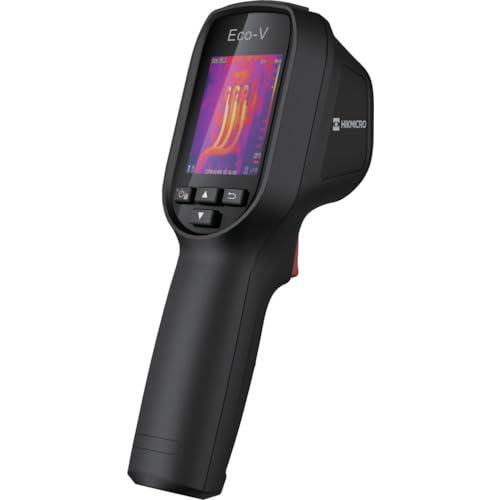
Figure 1: HIKMICRO ECO-V Handheld Thermography Camera
2. حفاظتی معلومات
براہ کرم اس پروڈکٹ کو استعمال کرنے سے پہلے تمام حفاظتی انتباہات اور ہدایات کو پڑھیں اور سمجھیں۔ ان ہدایات پر عمل کرنے میں ناکامی کے نتیجے میں بجلی کا جھٹکا لگ سکتا ہے، آگ لگ سکتی ہے یا شدید چوٹ لگ سکتی ہے۔
عمومی حفاظتی احتیاطی تدابیر
- آلہ کو دھماکہ خیز ماحول میں نہ چلائیں، جیسے آتش گیر مائعات، گیسوں یا دھول کی موجودگی میں۔
- آلے کو پانی اور دیگر مائعات سے دور رکھیں۔
- ڈیوائس کو کھولنے یا اس میں ترمیم کرنے کی کوشش نہ کریں۔ تمام خدمات کو اہل اہلکاروں سے رجوع کریں۔
- Use only HIKMICRO-approved accessories.
- Avoid direct exposure of the thermal lens to strong light sources (e.g., sun, laser) as this may damage the detector.
بیٹری کی حفاظت
- The device contains a built-in Lithium-ion battery. Do not expose the battery to excessive heat, direct sunlight, or fire.
- بیٹری کو پنکچر، نہ کھولیں یا جدا نہ کریں۔
- Charge the battery only with the provided USB cable and a compatible power adapter.
- مقامی قواعد کے مطابق بیٹریاں ڈسپوز کریں۔
3. پیکیج کے مشمولات
The HIKMICRO ECO-V package includes the following items:
- HIKMICRO Handheld Thermography Camera ECO-V
- USB ٹائپ سی کیبل
- Quick Start Guide (not explicitly mentioned but standard)
- Calibration Certificate (not explicitly mentioned but standard)
Video 3.1: Unboxing the HIKMICRO M-Series (similar to ECO-V, showing typical package contents and device appearance).
4. آلہ ختمview
Familiarize yourself with the physical components and interface of your HIKMICRO ECO-V camera.
ظاہری شکل اور انٹرفیس
The ECO-V features a compact, ergonomic design for comfortable handheld use. Key components include the thermal lens, optical lens, laser indicator, white light, trigger button, navigation buttons, and a 2.4-inch display.
Video 4.1: This video demonstrates the physical appearance and interface of a HIKMICRO M-Series camera, which shares similar design elements and interface components with the ECO-V.
5. سیٹ اپ
5.1 ڈیوائس کو چارج کرنا
Before initial use, fully charge the device's built-in Lithium-ion battery.
- Connect the provided USB Type-C cable to the device's USB port.
- Connect the other end of the USB cable to a compatible power adapter (5V2A recommended) and plug it into a power outlet.
- The charging indicator will show red during charging and turn green when fully charged.
Video 5.1: This HIKMICRO ECO operation video demonstrates the charging process for the device.
5.2 پاور آن/آف
To power on the device, press and hold the power button for more than 6 seconds. To power off, press and hold the power button again until the device shuts down.
Video 5.2: This HIKMICRO ECO operation video demonstrates how to power on the device.
6. آپریٹنگ ہدایات
This section covers the basic and advanced operational features of your ECO-V camera.
6.1 Image Capture and Display
To capture a thermal image, aim the camera at the target and press the trigger button. The captured image will be saved to the internal EMMC storage. To view saved images, navigate to the 'Albums' section in the menu.
Video 6.1: This HIKMICRO ECO operation video demonstrates image capture and viewing saved snapshots.
6.2 پیمائش کے اوزار
The ECO-V provides various measurement tools to analyze thermal images:
- گرم جگہ: Automatically identifies and displays the highest temperature point.
- سرد جگہ: Automatically identifies and displays the lowest temperature point.
- مرکز کی جگہ: اسکرین کے مرکز میں درجہ حرارت دکھاتا ہے۔
Video 6.2: This HIKMICRO ECO operation video demonstrates the use of measurement tools like hot, cold, and center spots.
6.3 سپر آئی آر امیج میں اضافہ
SuperIR technology enhances the thermal image resolution, providing more detail for analysis. You can enable or disable this feature in the settings menu.
Video 6.3: This HIKMICRO ECO operation video demonstrates how to enable and use the SuperIR image enhancement feature.
6.4 تصویری موڈز
The ECO-V supports multiple image modes for different inspection needs:
- تھرمل: Displays only the thermal image.
- فیوژن: Blends the thermal and visible light images for enhanced detail.
- PIP (تصویر میں تصویر): Overlays a smaller thermal image on a visible light image.
- نظری: صرف نظر آنے والی روشنی کی تصویر دکھاتا ہے۔
Video 6.4: This HIKMICRO B10S product video demonstrates switching between different image modes, including Thermal, Fusion, PIP, and Optical.
6.5 Parallax Correction
When using fusion modes, adjust the parallax correction based on the distance to the target to ensure accurate alignment between thermal and visible images.
Video 6.5: This HIKMICRO B10S product video demonstrates how to adjust parallax correction for accurate image fusion.
6.6 Palette Adjustment
Select from various color palettes (e.g., White Hot, Black Hot, Rainbow, Ironbow) to visualize temperature differences more effectively. This can be adjusted in the settings menu.
Video 6.6: This HIKMICRO B10S product video demonstrates how to adjust color palettes.
6.7 Emissivity and Distance Settings
For accurate temperature measurements, it is crucial to set the correct emissivity value for the target material and the distance to the target. Refer to the general emissivity reference table in the specifications section.
Video 6.7: This HIKMICRO ECO operation video demonstrates setting emissivity and distance for accurate temperature readings.
6.8 لیزر پوائنٹر
The built-in laser pointer helps to precisely identify the measurement target. It can be enabled or disabled in the settings menu.
Video 6.8: This HIKMICRO ECO operation video demonstrates how to enable and use the laser pointer.
6.9 اعلی درجہ حرارت کا الارم
Set a high temperature alarm threshold to be notified when temperatures exceed a predefined limit. This feature is useful for identifying potential overheating issues.
Video 6.9: This HIKMICRO B10S product video demonstrates how to set a high temperature alarm.
6.10 Hotspot Connection
The ECO-V can connect to a mobile device via Wi-Fi hotspot for live viewing and data transfer. Enable the Wi-Fi hotspot function in the device settings and connect your mobile device.
Video 6.10: This HIKMICRO M-Series video demonstrates how to establish a hotspot connection with a mobile device.
6.11 HIKMICRO Viewer App Connection
HIKMICRO ڈاؤن لوڈ کریں۔ Viewer app on your mobile device to access live view, manage images and videos, and generate reports. Connect the device to your phone via Wi-Fi.
Video 6.11: This HIKMICRO Pocket series video demonstrates connecting the device to the HIKMICRO Viewer app for various functions.
7 دیکھ بھال
7.1 صفائی
- آلے کے جسم کو نرم سے صاف کریں، ڈیamp کپڑا کھرچنے والے کلینر یا سالوینٹس کا استعمال نہ کریں۔
- Gently clean the lenses with a lens cleaning cloth. Avoid touching the lens surface with bare hands.
7.2 اسٹوریج
- آلے کو ٹھنڈی، خشک جگہ پر، براہ راست سورج کی روشنی اور انتہائی درجہ حرارت سے دور رکھیں۔
- اگر لمبے عرصے کے لیے ذخیرہ کرتے ہیں، تو یقینی بنائیں کہ بیٹری جزوی طور پر چارج ہوئی ہے (تقریباً 50%) اور بیٹری کی صحت کو برقرار رکھنے کے لیے اسے ہر چند ماہ بعد دوبارہ چارج کریں۔
8 خرابیوں کا سراغ لگانا
If you encounter issues with your HIKMICRO ECO-V, refer to the following common problems and solutions:
| مسئلہ | ممکنہ وجہ | حل |
|---|---|---|
| ڈیوائس آن نہیں ہے۔ | کم بیٹری؛ ڈیوائس کی خرابی۔ | Charge the battery; Contact support |
| درجہ حرارت کی غلط ریڈنگ | Incorrect emissivity/distance settings; Dirty lens | Adjust emissivity/distance; Clean the lens |
| Cannot connect to Wi-Fi hotspot | Incorrect password; Hotspot not enabled | Verify password; Enable hotspot in settings |
9. وضاحتیں
Detailed technical specifications for the HIKMICRO ECO-V camera:
| فیچر | تفصیلات |
|---|---|
| ماڈل | ECO-V |
| Measurement Temperature Range | -20 ° C سے 550 ° C |
| Minimum Temperature Display | 0.1°C |
| کا میدان View (ایف او وی) | 50° × 50° |
| مقامی ریزولوشن (IFOV) | 8.89 mrad |
| آپریٹنگ درجہ حرارت کی حد | -10 ° C سے 50 ° C |
| اسٹوریج کے درجہ حرارت کی حد | -40 ° C سے 70 ° C |
| ڈسپلے سائز | 2.4 انچ |
| طاقت کا منبع | بلٹ ان لتیم آئن بیٹری |
| بیٹری آپریٹنگ ٹائم | 8 گھنٹے |
| وائی فائی | دستیاب نہیں۔ |
| تحفظ کی سطح | آئی پی 54 |
| انٹرفیس | USB ٹائپ سی |
| پکسل پچ | 12μM |
| Measuring Wavelength | 7.5-14μM |
| NETD | <40 mK (@ 25°C، F#=1.0) |
| فوکل کی لمبائی | 1.35 ملی میٹر |
| یپرچر | F1.0 |
| کم سے کم فوکس فاصلہ | 0.1m (0.33 فٹ) |
| فریم ریٹ | 25Hz |
| فوکس سسٹم | فوکس فری |
| ریکارڈنگ میڈیا | EMMC (4GB) |
| تصویری ذخیرہ کرنے کی صلاحیت | 30,000 تصاویر |
| تصویر File فارمیٹ | BMP (includes measurement data) |
| تھرمل امیج ریزولوشن | 96×96 (9,216 pixels) |
| Visible Image Resolution | 640×480 |
| درستگی | ±2°C or ±2% (whichever is greater), when ambient temperature is 15°C to 35°C and target temperature is 0°C or above. |
| مواد | پولی کاربونیٹ، ABS رال |
| وزن | 360 گرام |
General Emissivity Reference
| مواد | ایمسیوٹی |
|---|---|
| انسانی جلد | 0.98 |
| پی سی بی | 0.91 |
| سیمنٹ کنکریٹ | 0.95 |
| سیرامکس | 0.92 |
| ربڑ | 0.95 |
| پینٹ | 0.93 |
| لکڑی | 0.85 |
| اینٹ | 0.96 |
| ریت | 0.90 |
| مٹی | 0.92 |
| کپاس | 0.98 |
| گتے | 0.90 |
| وائٹ پیپر | 0.96 |
| پانی | 0.96 |
10. وارنٹی اور سپورٹ
HIKMICRO products are covered by a limited warranty. For detailed warranty terms and conditions, please refer to the official HIKMICRO webسائٹ یا اپنے مقامی ڈسٹری بیوٹر سے رابطہ کریں۔
کسٹمر سپورٹ
If you require technical assistance, troubleshooting, or have questions about your ECO-V camera, please contact HIKMICRO customer support through their official webآپ کی مصنوعات کی پیکیجنگ میں فراہم کردہ سائٹ یا رابطے کی معلومات۔


