1. تعارف
This manual provides detailed instructions for the setup, operation, and maintenance of your DANFI AUDIO DF TE-103 Vinyl Record Player. This versatile audio system features a 3-speed turntable, Bluetooth input, USB/SD card playback and recording, FM radio, and auxiliary input/output options. Please read this manual thoroughly before use to ensure proper function and longevity of your device.
2. حفاظتی معلومات
- یونٹ کو بارش یا نمی سے بے نقاب نہ کریں۔
- وینٹیلیشن کے کسی بھی سوراخ کو مسدود نہ کریں۔
- اس بات کو یقینی بنائیں کہ بجلی کی تار چٹکی ہوئی نہیں ہے یا چل رہی ہے۔
- بجلی کے طوفان کے دوران یا طویل عرصے تک غیر استعمال ہونے پر یونٹ کو ان پلگ کریں۔
- تمام سروسنگ کو اہل سروس اہلکاروں سے رجوع کریں۔
- یونٹ کو براہ راست سورج کی روشنی، گرمی کے ذرائع اور مضبوط مقناطیسی میدانوں سے دور رکھیں۔
3. پیکیج کے مشمولات
تصدیق کریں کہ نیچے دی گئی تمام اشیاء آپ کے پیکیج میں شامل ہیں:
- DANFI AUDIO DF TE-103 Vinyl Record Player
- پاور یونٹ
- 45 RPM اڈاپٹر
- سلپ میٹ
- Backup Needle
4. پروڈکٹ ختمview
Familiarize yourself with the main components and controls of your record player.

شکل 4.1: سامنے view of the DANFI AUDIO DF TE-103 Vinyl Record Player.
4.1 فرنٹ پینل کنٹرولز اور کنکشنز

شکل 4.2: تفصیلی view of the front panel with USB, AUX IN, LED Display, and Mode Switch key.
- ایل ای ڈی ڈسپلے: موجودہ موڈ، ٹریک کی معلومات، یا FM فریکوئنسی دکھاتا ہے۔
- موڈ سوئچ کلید: Toggles between Turntable, Bluetooth, USB/SD, FM Radio, and AUX modes.
- USB پورٹ: For USB flash drives for playback and recording.
- AX IN: بیرونی آڈیو آلات کو جوڑنے کے لیے 3.5 ملی میٹر ان پٹ۔
- حجم کنٹرول: آؤٹ پٹ والیوم کو ایڈجسٹ کرتا ہے۔
- EQ بٹن: Selects sound equalizer presets (Jazz, Pop, Classical, Rock, Vocal).
4.2 ریئر پینل کنکشنز

Figure 4.3: Rear panel with RCA Line Out connections.
- آر سی اے لائن آؤٹ: بیرونی سے جوڑتا ہے۔ ampلائفیر یا طاقت سے چلنے والے اسپیکر۔
- پاور ان پٹ: فراہم کردہ پاور اڈاپٹر سے جوڑتا ہے۔
5. سیٹ اپ
- پیک کھولنا: Carefully remove the record player and all accessories from the packaging. Retain packaging for future transport or storage.
- جگہ کا تعین: Place the unit on a stable, level surface away from direct sunlight, heat sources, and excessive dust.
- دھول کا احاطہ: Attach the dust cover to the hinges at the back of the unit.
- پاور کنکشن: Connect the power unit to the DC input on the rear of the record player, then plug the power adapter into a wall outlet.
- ابتدائی پاور آن: Press the power button to turn on the unit. The LED display will illuminate.
6. آپریٹنگ ہدایات
6.1 ونائل ریکارڈز چلانا

Figure 6.1: The turntable supports 3 speeds for various record types.
- یقینی بنائیں کہ یونٹ آن ہے۔
- دھول کا احاطہ اٹھاؤ۔
- Place a vinyl record on the platter. If playing a 45 RPM single, use the included 45 RPM adaptor.
- سپیڈ سلیکٹر سوئچ کا استعمال کرتے ہوئے مناسب رفتار (33، 45، یا 78 RPM) منتخب کریں۔
- Gently move the tonearm to the desired position on the record. The platter will begin to spin automatically.
- حجم کو اپنی ترجیح کے مطابق ایڈجسٹ کریں۔
- The AUTO STOP function will automatically stop the turntable when the record finishes playing.
6.2 Bluetooth Connection (Input Only)
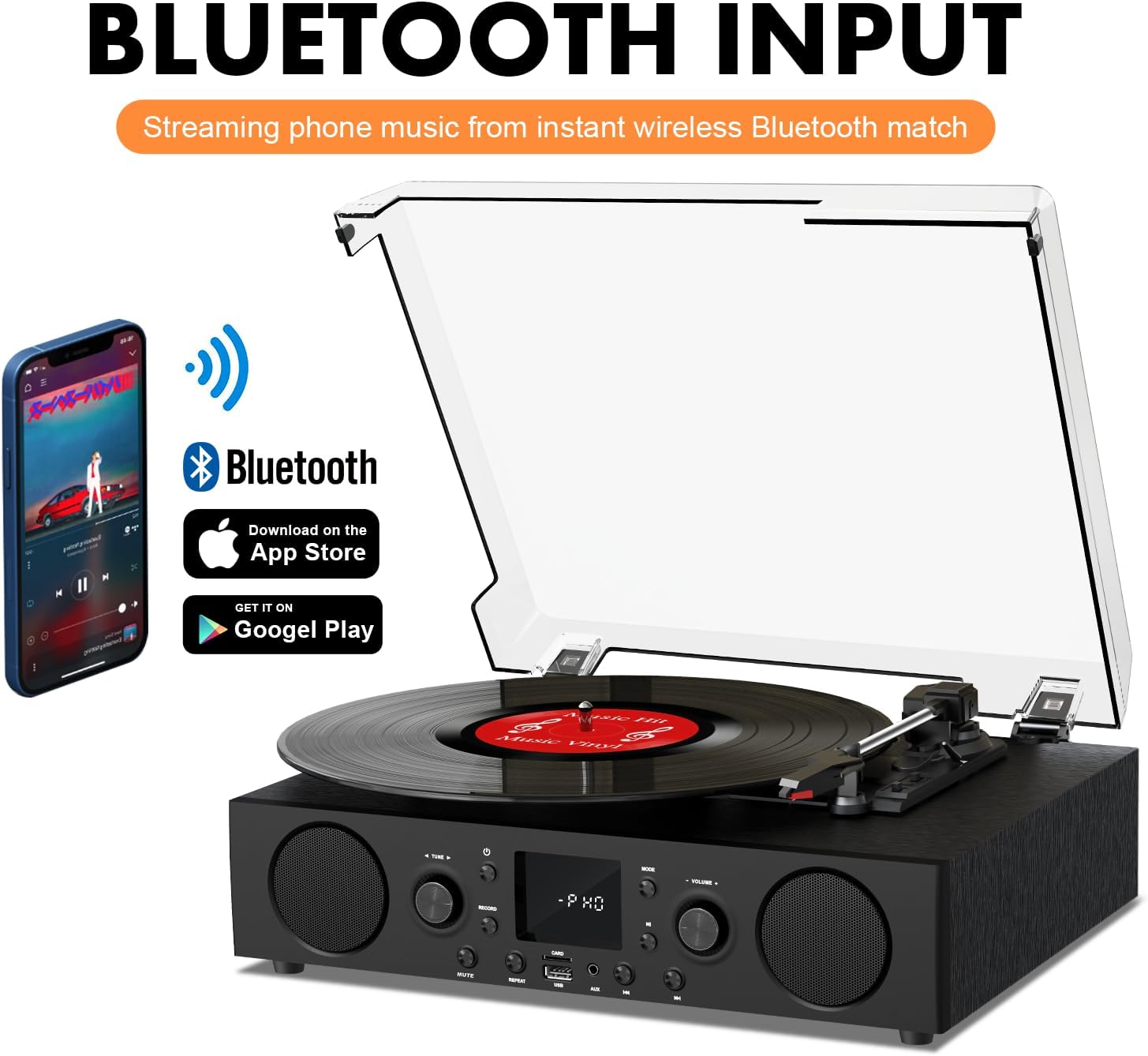
Figure 6.2: Connecting a smartphone via Bluetooth to the turntable.
- دبائیں موڈ button until "Bluetooth" or a similar indicator appears on the LED display. The unit will enter pairing mode.
- On your smartphone, tablet, or computer, enable Bluetooth and search for available devices.
- Select "DANFI AUDIO DF TE-103" (or similar name) from the list of devices to pair.
- Once paired, you can stream audio wirelessly from your device to the record player.
- نوٹ: This turntable supports Bluetooth input only and cannot transmit audio to Bluetooth headphones or speakers.
6.3 USB/SD Input and MP3 Encoding

Figure 6.3: Vinyl to MP3 encoding process using a USB flash drive.
- USB/SD پلے بیک: Insert a USB flash drive or SD card into the respective port. Press the موڈ button to select USB/SD mode. The unit will automatically play compatible audio files.
- Vinyl to MP3 Encoding:
- Insert a USB flash drive or SD card into the port.
- Start playing a vinyl record.
- دبائیں ریکارڈ button. The LED display will indicate recording is in progress.
- دبائیں ریکارڈ button again to stop recording. The recorded audio will be saved as an MP3/WAV file on the USB drive/SD card.
6.4 ایف ایم ریڈیو
- دبائیں موڈ button to select FM Radio mode. The current frequency will appear on the LED display.
- Use the tuning controls (often the Skip/Search buttons) to scan for radio stations.
- The unit can store approximately 20 stations.
6.5 RCA Line Out and AUX Input

Figure 6.4: Connecting to external speakers using RCA Line Out.
- آر سی اے لائن آؤٹ: Connect RCA cables from the rear of the record player to the audio input of an external amplifier or powered speakers. This allows for boosted volume and playback through a larger sound system. The turntable's internal speakers will not be muted automatically when using RCA output.
- AUX ان پٹ: Connect an external audio source (e.g., MP3 player, smartphone) to the 3.5mm AUX IN port on the front panel using an audio cable. Press the موڈ button to select AUX mode to play audio from the connected device.
6.6 ایکویلائزر (EQ)

Figure 6.5: Available equalizer presets for audio customization.
دبائیں EQ button to cycle through the available sound equalizer presets: Jazz, Pop, Classical, Rock, and Vocal. Select the preset that best suits your audio preference.
7 دیکھ بھال
- صفائی: Use a soft, dry cloth to clean the exterior of the unit. For the dust cover, use a slightly damp cloth and then dry thoroughly. Avoid abrasive cleaners.
- اسٹائلس کی دیکھ بھال: Periodically check the stylus (needle) for wear or damage. A worn stylus can damage records and degrade sound quality. Replace the stylus with a compatible backup needle when necessary.
- ریکارڈ کی دیکھ بھال: Keep your vinyl records clean and stored vertically in their sleeves to prevent dust accumulation and warping.
8 خرابیوں کا سراغ لگانا
| مسئلہ | ممکنہ وجہ | حل |
|---|---|---|
| کوئی طاقت نہیں۔ | پاور کی ہڈی منسلک نہیں ہے؛ پاور آؤٹ لیٹ فعال نہیں ہے۔ | یقینی بنائیں کہ بجلی کی تار محفوظ طریقے سے لگائی گئی ہے۔ دوسرے آلے کے ساتھ آؤٹ لیٹ کی جانچ کریں۔ |
| کوئی آواز نہیں۔ | حجم بہت کم؛ غلط موڈ منتخب کیا گیا؛ بیرونی اسپیکر منسلک/طاقت یافتہ نہیں ہیں۔ | Increase volume; Press Mode button to select correct source; Check RCA connections and external speaker power |
| ٹرنٹ ایبل گھومنے والا نہیں۔ | Unit not powered on; Tonearm not moved over record | Ensure power is on; Gently move tonearm over the record to activate platter |
| بلوٹوتھ کنیکٹ نہیں ہو رہا ہے۔ | Not in Bluetooth mode; Device too far; Already paired with another device | Select Bluetooth mode; Move device closer; Disconnect from other devices and try pairing again |
| Poor sound quality from vinyl | Dirty record; Worn stylus; Incorrect speed selected | Clean record; Replace stylus; Select correct RPM speed |
9. وضاحتیں
| فیچر | تفصیل |
|---|---|
| ماڈل کا نام | TE-103 |
| برانڈ | ڈینفی آڈیو ڈی ایف |
| مصنوعات کے طول و عرض | 14.37 x 10.82 x 5.28 انچ |
| شے کا وزن | 6.2 پاؤنڈ |
| مواد | Acrylic, Engineered Wood |
| ٹرن ایبل سپیڈز | 33 1/3، 45، 78 RPM |
| شامل اجزاء | Power unit, 45 rpm adaptor, Slipmat, Backup needle |
| خصوصی خصوصیات | Equalizer (EQ), FM Radio, USB Input, USB/SD Card Recording, Bluetooth Input |
| کنیکٹوٹی | Bluetooth (Input only), USB, SD Card, AUX Input, RCA Line Out |
| ہم آہنگ آلات | Headphones, MP3 Players, Personal Computers, Smartphones, Speakers, Tablets |
| بجلی کی کھپت (آن موڈ) | 5 واٹ |
10. وارنٹی اور سپورٹ
For warranty information or technical support, please refer to the documentation provided with your purchase or contact DANFI AUDIO DF customer service through their official channels. Keep your purchase receipt as proof of purchase for warranty claims.


