تعارف
Welcome to the user manual for your Brondi Raptor Dual SIM mobile phone. This guide provides essential information on how to set up, operate, maintain, and troubleshoot your device. Please read this manual carefully to ensure proper use and to maximize the performance of your phone.
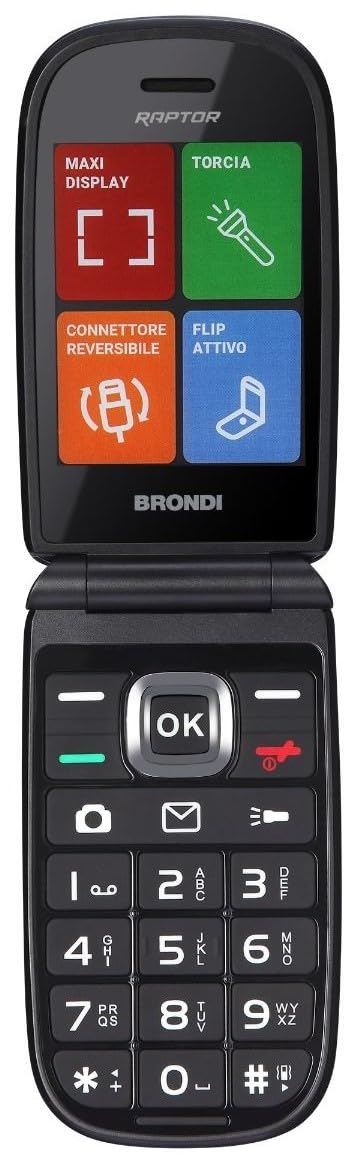
تصویر: سامنے view of the Brondi Raptor Dual SIM mobile phone.
1. سیٹ اپ
1.1 Inserting SIM Cards and Battery
- پیچھے کا احاطہ ہٹا دیں: Gently pry open the back cover of the phone using the designated notch, usually located at the bottom or side.
- سم کارڈ داخل کریں: Locate the SIM card slots. This phone supports Dual SIM. Carefully insert your SIM cards into the respective slots, ensuring the gold contacts face downwards and the cut corner aligns with the slot's orientation.
- بیٹری داخل کریں: Place the battery into its compartment, aligning the metal contacts on the battery with those in the phone.
- پیچھے کا احاطہ تبدیل کریں: Align the back cover with the phone's body and press firmly around the edges until it clicks securely into place.
1.2 بیٹری چارج کرنا
- چارجر کو جوڑیں: Plug the small end of the charging cable into the phone's charging port.
- پاور سے جڑیں: Plug the other end of the charger into a wall outlet.
- ابتدائی چارج: For the first use, it is recommended to charge the battery fully for at least 4 hours to optimize battery performance. The battery indicator on the screen will show charging status.
2. آپریٹنگ ہدایات
2.1 پاور آن/آف
- پاور آن کرنے کے لیے: پاور/اینڈ کال کلید کو دبائے رکھیں جب تک کہ فون وائبریٹ نہ ہو اور اسکرین روشن نہ ہو۔
- پاور آف کرنا: Press and hold the Power/End Call key until the power-off options appear on the screen. Select "Power off" and confirm.
2.2 بنیادی نیویگیشن
- نیویگیشن کیز: Use the directional keys (Up, Down, Left, Right) to navigate through menus and options.
- ٹھیک ہے/کلید منتخب کریں: Press the center key to confirm a selection or open an item.
- کال کی کلید: کال کرنے یا آنے والی کال کا جواب دینے کے لیے دبائیں۔
- اختتامی کال/پاور کلید: Press to end a call, reject an incoming call, or return to the idle screen. Long press to power on/off.
2.3 کال کرنا اور وصول کرنا
- کال کرنے کے لیے: From the idle screen, dial the number using the keypad and press the Call key.
- کال کا جواب دینے کے لیے: جب فون کی گھنٹی بجتی ہے تو کال کی کو دبائیں۔
- کال ختم کرنے کے لیے: اینڈ کال کلید کو دبائیں۔
2.4 پیغامات بھیجنا اور وصول کرنا (SMS)
- Compose Message: Go to Menu > Messages > Write Message. Enter your text.
- وصول کنندہ شامل کریں: Select "Options" or "Send to" and enter the recipient's number or select from contacts.
- پیغام بھیجیں: "بھیجیں" کو منتخب کریں۔
2.5 رابطے
- نیا رابطہ شامل کریں: Go to Menu > Contacts > Add New. Enter the name and number, then save.
- رابطہ تلاش کریں: Go to Menu > Contacts > Search. Enter the name or part of the name.
2.6 کیمرہ
- کیمرے تک رسائی: مینو > کیمرہ پر جائیں۔
- تصویر لیں: Frame your shot and press the OK/Select key to capture the image.
2.7 Dual SIM Management
- Select SIM for Calls/Messages: In the settings menu, navigate to "Dual SIM settings" or "Network settings" to choose which SIM card to use for outgoing calls, messages, or data.
2.8 Bluetooth and Wi-Fi Connectivity
- بلوٹوتھ کو فعال کریں: Go to Menu > Settings > Connectivity > Bluetooth. Turn Bluetooth on and search for devices to pair.
- Wi-Fi کو فعال کریں: Go to Menu > Settings > Connectivity > Wi-Fi. Turn Wi-Fi on, scan for available networks, select your network, and enter the password if required.
3 دیکھ بھال
3.1 ڈیوائس کی صفائی
- Use a soft, dry, lint-free cloth to clean the phone's screen and body.
- Avoid using liquid cleaners, aerosols, or harsh chemicals, as these can damage the device.
3.2 بیٹری کی دیکھ بھال
- بیٹری کو انتہائی درجہ حرارت کے سامنے نہ رکھیں۔
- بیٹری کو بار بار مکمل طور پر خارج کرنے سے گریز کریں۔ اس سے پہلے کہ یہ بہت کم ہو جائے اسے چارج کریں۔
- Use only the original or approved charger for your device.
3.3 اسٹوریج
- فون کو ٹھنڈی، خشک جگہ پر براہ راست سورج کی روشنی اور نمی سے دور رکھیں۔
- If storing for an extended period, ensure the battery is partially charged (around 50%) to prevent deep discharge.
4 خرابیوں کا سراغ لگانا
4.1 عام مسائل اور حل
| مسئلہ | حل |
|---|---|
| فون آن نہیں ہوتا۔ | یقینی بنائیں کہ بیٹری درست طریقے سے داخل اور چارج کی گئی ہے۔ چارجر کو جوڑیں اور دوبارہ کوشش کریں۔ |
| کوئی نیٹ ورک سگنل نہیں ہے۔ | Check if SIM cards are properly inserted. Move to an area with better network coverage. Restart the phone. |
| کالز نہیں کر سکتے | Verify that the SIM card is active and has sufficient credit/plan. Check network settings. |
| بیٹری چارج نہیں ہو رہی۔ | Ensure the charger and cable are not damaged and are properly connected. Try a different power outlet. |
| Phone freezes or is unresponsive. | Remove the battery, wait a few seconds, and reinsert it. Then power on the phone. |
4.2 فیکٹری ری سیٹ
اگر آپ کے فون کو مستقل مسائل کا سامنا ہے، تو فیکٹری ری سیٹ ان کو حل کر سکتا ہے۔ انتباہ: A factory reset will erase all personal data, settings, and installed applications from your phone. Back up any important data before proceeding.
- Go to Menu > Settings > Restore Factory Settings (or similar).
- You may be prompted to enter a password (default is often 1122, 1234, or 0000).
- Confirm the reset. The phone will restart after the process is complete.
5. وضاحتیں
| فیچر | تفصیل |
|---|---|
| برانڈ | برونڈی۔ |
| ماڈل کا نام | ریپٹر |
| سی پی یو ماڈل | سنیپ ڈریگن |
| اسکرین کا سائز | 2.8 انچ |
| قرارداد | 320 x 240 |
| Wireless Service Provider | غیر مقفل |
| سیلولر ٹیکنالوجی | 4G |
| کنیکٹوٹی ٹیکنالوجی | بلوٹوتھ |
| وائرلیس نیٹ ورک ٹیکنالوجی | وائی فائی |
6. وارنٹی اور سپورٹ
Your Brondi Raptor mobile phone comes with a standard manufacturer's warranty. Please refer to the warranty card included in your product packaging for specific terms and conditions. For technical support, service, or further inquiries, please visit the official Brondi website or contact their customer service department. Contact information can typically be found on the Brondi webسائٹ یا مصنوعات کی پیکیجنگ میں۔
آن لائن وسائل: For the latest information, FAQs, and support, please visit the Brondi Store on Amazon.


