تعارف
This manual provides detailed instructions for the setup, operation, maintenance, and troubleshooting of your OBSBOT Tail Air Bundle. This bundle includes the OBSBOT Tail Air 4K smart streaming PTZ camera, a SanDisk Extreme 128 GB microSDXC card, and a Pearstone Standard Series HDMI to HDMI High-Speed Ethernet Cable.
The OBSBOT Tail Air is designed to provide high-quality video capture and streaming with advanced AI tracking capabilities, making it suitable for remote work, content creation, and conference environments.
باکس میں کیا ہے۔
براہ کرم تصدیق کریں کہ نیچے دی گئی تمام اشیاء آپ کے پیکیج میں موجود ہیں:
- 1x OBSBOT Tail Air Camera (OSB-2108-CW)
- 1x اسٹوریج کیس
- 1x USB-C Male to Dual USB-C Female Splitter
- 1x USB-C کیبل
- 1x USB-C سے USB-A اڈاپٹر
- 1x SanDisk Extreme 128 GB microSDXC Card (SDSQXA1-128G-AN6MA)
- 1x Pearstone Standard Series HDMI to HDMI High-Speed Ethernet Cable (PEHDA106), 6'
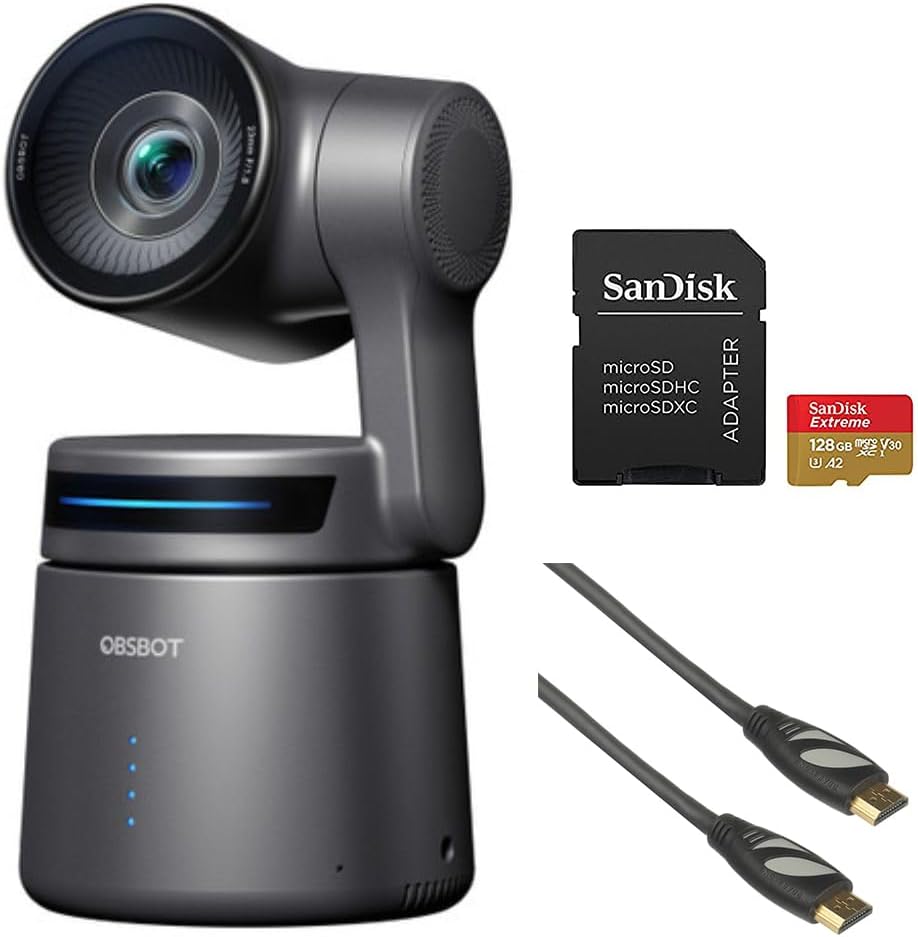
Image: Contents of the OBSBOT Tail Air Bundle, showing the camera, SanDisk Extreme 128 GB microSDXC card, and Pearstone 6' HDMI cable.
سیٹ اپ
1 کیمرے کی جگہ کا تعین
Place the OBSBOT Tail Air camera on a stable, flat surface or mount it on a compatible tripod. Ensure the camera has a clear line of sight to the area you intend to capture.
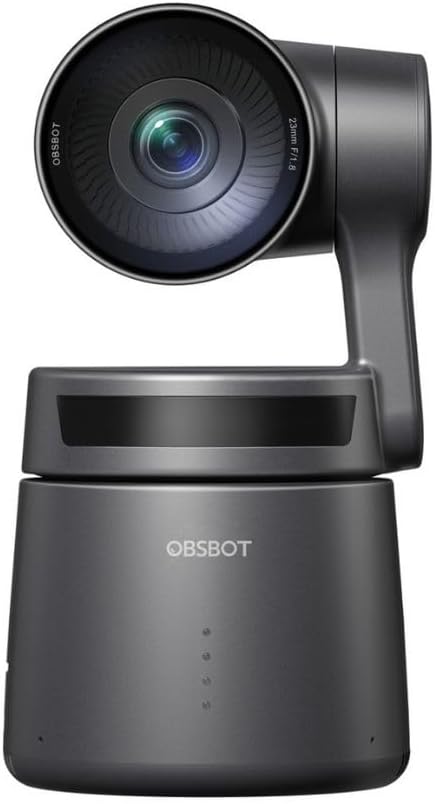
تصویر: سامنے view of the OBSBOT Tail Air camera, showing the lens and base.
2. پاور کنکشن
- Connect the USB-C cable to the camera's USB-C port.
- Connect the other end of the USB-C cable to a power source (e.g., a USB wall adapter or computer USB port). Use the provided USB-C to USB-A adapter if your power source only has USB-A ports.
- The camera's indicator lights will illuminate upon successful power connection.

Image: OBSBOT Tail Air camera with its blue indicator lights active, signifying power or operational status.
3. مائیکرو ایس ڈی کارڈ کی تنصیب
To enable local recording, insert the SanDisk Extreme 128 GB microSDXC card into the camera's microSD card slot. Ensure the card is inserted with the correct orientation until it clicks into place.

Image: SanDisk Extreme 128 GB microSDXC card, suitable for high-speed data storage.
4. کنیکٹیویٹی کے اختیارات
The OBSBOT Tail Air offers multiple connectivity options:
- USB: Connect the camera to a computer via USB-C for use as a webکیم یا ڈیٹا ٹرانسفر کے لیے۔
- HDMI: Use the Pearstone HDMI cable to connect the camera's micro-HDMI output to a display or capture card for high-quality video output.
- Ethernet/PoE: For network connectivity and Power over Ethernet (PoE), an optional adapter is required. This enables NDI|HX3 support for professional streaming setups.
- وائی فائی: Connect the camera to your wireless network for remote control and streaming via the OBSBOT app.

تصویر: پیچھے view of the OBSBOT Tail Air camera, highlighting its various connectivity ports including USB-C and micro-HDMI.

Image: Pearstone Standard Series HDMI to HDMI High-Speed Ethernet Cable, 6 feet in length.
Operating the OBSBOT Tail Air
1. ابتدائی پاور آن
Once powered, the camera will perform a self-calibration. The lens will pan and tilt to its home position. Wait for the indicator lights to stabilize before proceeding.
2. OBSBOT App Control
For full control and advanced features, download the official OBSBOT app on your smartphone or tablet. Connect the camera to the app via Wi-Fi or USB.
- ریموٹ کنٹرول: Pan, tilt, and zoom the camera remotely.
- AI ٹریکنگ: Activate and manage AI human, animal, or object tracking.
- اشارہ کنٹرول 2.0: Learn and utilize various hand gestures for quick control of tracking, recording, and zoom.
- ترتیبات: Adjust video resolution (up to 4K), frame rate, exposure, white balance, and other camera parameters.
3. AI Tracking Features
The Tail Air features advanced AI tracking:
- انسانی ٹریکنگ: Automatically follows a designated person, keeping them centered in the frame.
- جانوروں سے باخبر رہنا: Capable of tracking pets or other animals.
- آبجیکٹ ٹریکنگ: Can track specific objects, useful for demonstrations or product showcases.
To activate tracking, use the OBSBOT app or specific gesture controls.
4. ریکارڈنگ اور سٹریمنگ
- مقامی ریکارڈنگ: ویڈیو footage can be recorded directly to the inserted microSD card.
- لائیو سٹریمنگ: The camera supports direct streaming to platforms via the OBSBOT app or through NDI|HX3 (with optional adapter) for professional broadcast setups.
- آڈیو ان پٹ: Utilize the 3.5mm audio input jack for external microphone connection to enhance audio quality.
دیکھ بھال
1. صفائی
- کیمرے کی باڈی کو صاف کرنے کے لیے نرم، خشک کپڑا استعمال کریں۔
- لینس کے لیے، لینس صاف کرنے والا کپڑا اور مخصوص لینس کی صفائی کا محلول استعمال کریں۔ کھرچنے والے مواد سے پرہیز کریں۔
- Do not use strong detergents or solvents.
2. ذخیرہ
When not in use, store the camera in its provided storage case in a cool, dry place, away from direct sunlight and extreme temperatures.
3. فرم ویئر اپڈیٹس
Regularly check for firmware updates via the OBSBOT app to ensure optimal performance and access to new features. Follow the app's instructions carefully during updates.
خرابی کا سراغ لگانا
| مسئلہ | ممکنہ وجہ | حل |
|---|---|---|
| کیمرا آن نہیں ہو رہا ہے۔ | Loose power connection; faulty cable/adapter; insufficient power source. | Check all cable connections. Try a different USB port or power adapter. Ensure power source meets camera requirements. |
| AI ٹریکنگ کام نہیں کر رہی ہے۔ | Poor lighting; subject too far/close; camera obstruction; AI tracking not activated. | Ensure adequate lighting. Position subject within optimal range (1-5 meters). Clear any obstructions. Activate tracking via the OBSBOT app or gesture. |
| مائیکرو ایس ڈی کارڈ کی شناخت نہیں ہوئی۔ | Card not inserted correctly; card corrupted; incompatible card. | Reinsert the card. Try formatting the card (this will erase data). Ensure the card is a genuine SanDisk Extreme 128 GB microSDXC or similar compatible card. |
| No video output via HDMI. | HDMI cable faulty; display input not selected; camera not in video output mode. | Check the Pearstone HDMI cable for damage. Ensure the display is set to the correct HDMI input. Verify camera settings in the OBSBOT app. |
| ایپ کنکشن کے مسائل۔ | Wi-Fi interference; incorrect network; camera not discoverable. | Ensure camera and device are on the same Wi-Fi network. Restart both camera and app. Check for app updates. |
وضاحتیں
| فیچر | تفصیل |
|---|---|
| ماڈل | OBSBOT Tail Air (OSB-2108-CW) |
| سینسر | 1/1.8" CMOS 8MP |
| ویڈیو کیپچر ریزولوشن | 4K تک |
| کنیکٹوٹی ٹیکنالوجی | USB-C, Micro-HDMI, Wi-Fi, Ethernet (with optional adapter) |
| آڈیو ان پٹ | 3.5 ملی میٹر جیک |
| ٹریکنگ | AI Human/Animal/Object Tracking |
| کنٹرول | Gesture Control 2.0, OBSBOT App |
| ذخیرہ | MicroSDXC (SanDisk Extreme 128 GB included) |
| یو پی سی | 810160682202 |
وارنٹی اور سپورٹ
وارنٹی کی معلومات اور تکنیکی مدد کے لیے، براہ کرم آفیشل OBSBOT سے رجوع کریں۔ webسائٹ یا ان کی کسٹمر سروس سے براہ راست رابطہ کریں۔ خریداری کے ثبوت کے طور پر اپنی خریداری کی رسید اپنے پاس رکھیں۔
OBSBOT Official Webسائٹ: www.obsbot.com


