1. تعارف
Thank you for choosing the FLEXISPOT Mobile Standing Desk with Wheels (Model: 32x18 Maple). This pneumatic laptop desk is designed to provide a versatile and ergonomic workstation for various environments, including home offices, bedrooms, and living areas. Its height-adjustable feature and mobile design offer flexibility for both sitting and standing use. This manual provides essential information for assembly, operation, maintenance, and safety to ensure optimal performance and longevity of your desk.

Image: The FLEXISPOT Mobile Standing Desk in a home environment, showcasing its compact and versatile design.
2. اہم حفاظتی معلومات
براہ کرم اس پروڈکٹ کو جمع کرنے یا استعمال کرنے سے پہلے تمام حفاظتی ہدایات کو پڑھیں اور سمجھیں۔ ان ہدایات پر عمل کرنے میں ناکامی کے نتیجے میں مصنوعات کو چوٹ یا نقصان پہنچ سکتا ہے۔
- اسمبلی کی ہدایات پر ہمیشہ احتیاط سے عمل کریں۔
- Ensure the desk is placed on a stable, level surface.
- Do not exceed the maximum weight limit of the desk. (Refer to specifications for details).
- Keep fingers and other body parts clear of moving parts during height adjustment.
- Use caution when moving the desk, especially on uneven surfaces or around obstacles, to prevent tipping.
- Do not allow children to play on or around the desk, especially during height adjustments.
- اس بات کو یقینی بنائیں کہ استعمال سے پہلے تمام اسکرو اور فاسٹنرز کو محفوظ طریقے سے سخت کیا گیا ہے اور وقتاً فوقتاً ڈھیلا پن چیک کریں۔
3. حصہ کی فہرست
اسمبلی شروع کرنے سے پہلے، براہ کرم تصدیق کر لیں کہ نیچے دیے گئے تمام پرزے موجود ہیں اور بغیر کسی نقصان کے۔ اگر کوئی پرزہ غائب یا خراب ہے تو، براہ کرم کسٹمر سپورٹ سے رابطہ کریں۔
تصویر: پھٹا view of the FLEXISPOT Mobile Standing Desk components. This image shows the base, tabletop, lifting column, crossbeam, wrench spring, Phillips screwdriver, and cup holder, all labeled for easy identification.
- ٹیبل ٹاپ (1)
- Lifting Column (1)
- Crossbeam (1)
- بیس (1)
- کپ ہولڈر (1)
- Wrench Spring (1)
- فلپس سکریو ڈرایور (1)
- Assembly Screws/Hardware (various, typically labeled A, B, C)
4. سیٹ اپ اور اسمبلی
Assembly is designed to be straightforward and typically takes about 10 minutes. All necessary tools are included.
- Install the Lifting Column Spring: Insert the wrench spring into the top of the lifting column. Ensure proper alignment of the spring and handle protrusion with the handle notch.
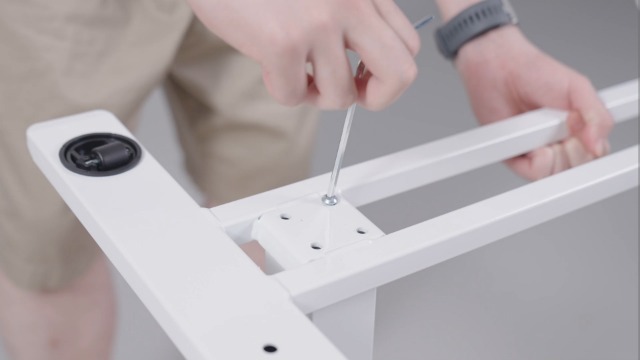
- Install the Crossbeam: Attach the crossbeam to the lifting column using the provided screws. Note that the notch on the crossbeam needs to be installed facing up. Secure tightly with the Phillips screwdriver.
- ٹیبل ٹاپ انسٹال کریں: Carefully align the tabletop with the assembled lifting column and crossbeam. Secure the tabletop to the crossbeam using the appropriate screws.
- بیس انسٹال کریں: Attach the base to the bottom of the lifting column. Ensure all screws are tightened for stability.
- کپ ہولڈر انسٹال کریں: Assemble the cup holder components and attach it to the side of the tabletop using the provided screws and Phillips screwdriver.
- Turn Over the Desk: With assistance if needed, carefully turn the desk upright.
Video: FLEXISPOT H7 Overbed Bedside Table Installation Guide. This video provides a step-by-step visual guide for assembling the desk, demonstrating how to install each component and adjust the height.
5. آپریٹنگ ہدایات
اونچائی کی ایڈجسٹمنٹ
The desk features a gas spring pneumatic lift system for smooth and easy height adjustments.
- بڑھانا: Gently pull the lever located under the tabletop and apply slight upward pressure to the tabletop. The desk will smoothly rise. Release the lever at the desired height.
- نیچے کرنا: Gently pull the lever located under the tabletop and apply slight downward pressure to the tabletop. The desk will smoothly lower. Release the lever at the desired height.
- The height can be adjusted from 26 inches to 41.7 inches.

Image: Easy Height Adjustment. This image illustrates the simple one-hand operation for adjusting the desk's height using the pneumatic lift system.
نقل و حرکت
The desk is equipped with hidden casters for easy movement.
- To move the desk, simply push or pull it to your desired location. The hidden casters allow for smooth 360-degree rotation.
- کم پروfile base (1.2 inches high) is designed to easily tuck beneath furniture like beds and sofas, saving space.

Image: C-Shape & Hidden Casters. This image highlights the desk's design, which allows it to fit under low furniture, and shows the hidden wheels for easy movement.
ورسٹائل استعمال
This desk is designed for multi-functional use:
- Use as a standing desk for improved posture and energy.
- Position over a bed or sofa for comfortable laptop use, reading, or dining.
- Ideal for small craft projects or as a portable workstation in any room.

Image: Multi-functional Use. This collage demonstrates various applications of the desk, including as a yoga side table, pet grooming station, small craft desk, and solo dining table.
6 دیکھ بھال
Regular maintenance will help prolong the life and appearance of your FLEXISPOT Mobile Standing Desk.
- صفائی: ٹیبل ٹاپ اور فریم کو نرم سے صاف کریں، ڈیamp کپڑا سخت کیمیکلز یا کھرچنے والے کلینر سے پرہیز کریں جو ختم کو نقصان پہنچا سکتے ہیں۔
- ہارڈ ویئر چیک: وقتاً فوقتاً تمام پیچ اور فاسٹنرز کو چیک کریں تاکہ یہ یقینی بنایا جا سکے کہ وہ سخت ہیں۔ اگر ضروری ہو تو دوبارہ سخت کریں۔
- حرکت پذیر حصے: Ensure the gas spring mechanism operates smoothly. Do not apply lubricants unless specifically recommended by the manufacturer.
- ذخیرہ: When not in use, store the desk in a dry, temperate environment away from direct sunlight or extreme temperatures.
7 خرابیوں کا سراغ لگانا
اگر آپ کو اپنے ڈیسک کے ساتھ کوئی مسئلہ درپیش ہے، تو براہ کرم مندرجہ ذیل عام ٹربل شوٹنگ ٹپس سے رجوع کریں:
| مسئلہ | ممکنہ وجہ | حل |
|---|---|---|
| ڈیسک اونچائی کو آسانی سے ایڈجسٹ نہیں کرتا ہے۔ | Lever not fully engaged or gas spring issue. | Ensure the lever is fully pulled. If the issue persists, contact customer support. |
| ڈیسک ہل جاتا ہے یا غیر مستحکم ہے۔ | ڈھیلا بندھن یا ناہموار سطح۔ | Check and tighten all assembly screws. Ensure the desk is on a flat, stable surface. |
| Casters do not roll freely. | Obstruction or debris in casters. | Inspect casters for any obstructions and remove them. Clean casters if necessary. |
If these solutions do not resolve the issue, please contact FLEXISPOT customer support for further assistance.
8. مصنوعات کی تفصیلات
| فیچر | تفصیل |
|---|---|
| برانڈ | فلیکسپوٹ |
| ماڈل | 32x18 |
| شکل | مستطیل |
| ڈیسک ڈیزائن | اسٹینڈنگ ڈیسک |
| مصنوعات کے طول و عرض | 18"D x 32"W x 37"H |
| رنگ | میپل |
| انداز | جدید |
| بنیادی مواد | دھات اور لکڑی |
| سب سے اوپر مواد کی قسم | Wood (FSC-Certified) |
| ختم کی قسم | پینٹ شدہ |
| خصوصی خصوصیت | Portable, Wheel |
| کم از کم اونچائی | 26 انچ |
| زیادہ سے زیادہ اونچائی | 41.7 انچ |
| اسمبلی کی ضرورت ہے۔ | جی ہاں |
| تمام اسمبلی ٹولز پر مشتمل ہے۔ | جی ہاں |
9. وارنٹی اور سپورٹ
This FLEXISPOT product comes with a Limited Warranty. For specific details regarding warranty coverage, terms, and conditions, please refer to the documentation included with your purchase or visit the official FLEXISPOT webسائٹ
کسٹمر سپورٹ: If you have any questions, require assistance with assembly, or need troubleshooting support, please contact FLEXISPOT customer service. Our team is available to help you within 24 hours.
- آن لائن مدد: کا دورہ کریں۔ FLEXISPOT Store on Amazon عمومی سوالنامہ اور اضافی وسائل کے لیے۔
- ای میل/فون: Refer to your product packaging or the official FLEXISPOT webبراہ راست رابطے کی معلومات کے لیے سائٹ۔


