تعارف
Thank you for choosing the Grundig Wireless Bluetooth Open-Ear Earbuds. These earbuds are designed to provide a comfortable listening experience with an open-ear design, allowing you to stay aware of your surroundings while enjoying your audio. This manual provides essential information on how to set up, operate, and maintain your earbuds.
باکس میں کیا ہے۔
- Grundig Wireless Bluetooth Open-Ear Earbuds
- USB-C چارجنگ کیبل
- صارف دستی
پروڈکٹ ختمview
Familiarize yourself with the components of your earbuds:
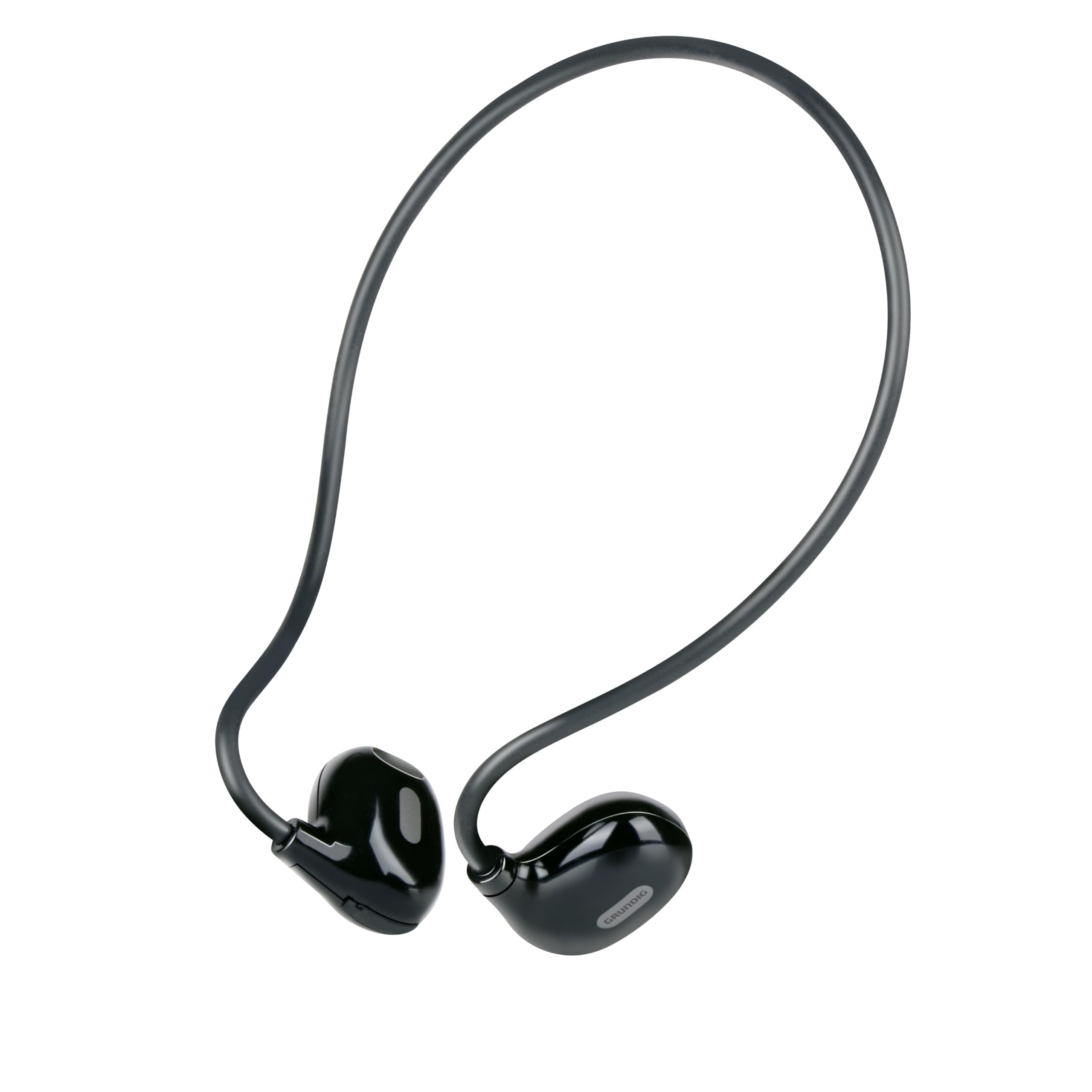
Figure 1: Close-up of a single earbud, highlighting the speaker and flexible ear hook.
- Earbud Unit: Contains the speaker and internal electronics.
- Flexible Ear Hook: Designed to fit securely around your ear.
- مائیکروفون: ہینڈز فری کالز کے لیے۔
- ٹچ کنٹرول ایریا: For managing music and calls.
- USB-C چارجنگ پورٹ: Located on one of the earbuds for power input.
سیٹ اپ
1. ایئربڈز کو چارج کرنا
- Connect the supplied USB-C charging cable to the charging port on the earbuds.
- USB-C کیبل کے دوسرے سرے کو ایک ہم آہنگ USB پاور سورس (جیسے وال اڈاپٹر، کمپیوٹر USB پورٹ) سے جوڑیں۔
- The indicator light on the earbuds will show the charging status. A full charge takes approximately 1.5 hours.
- مکمل چارج ہونے کے بعد، چارجنگ کیبل کو منقطع کریں۔
2. آلے کے ساتھ جوڑا بنانا
اپنے ایئربڈز کو بلوٹوتھ فعال ڈیوائس سے جوڑنے کے لیے:
- یقینی بنائیں کہ ایئربڈز چارج اور پاور آف ہیں۔
- Press and hold the touch control area on one earbud until the indicator light flashes, indicating pairing mode.
- اپنے آلے (فون، ٹیبلیٹ، لیپ ٹاپ) پر، بلوٹوتھ کو فعال کریں اور دستیاب آلات تلاش کریں۔
- Select "Grundig Earbuds" (or similar name) from the list of found devices.
- Once connected, the indicator light on the earbuds will change, usually to a slow flash or off, and you will hear an audible confirmation.
- The earbuds will automatically attempt to reconnect to the last paired device when powered on.
3. ایئربڈز پہننا
For optimal comfort and sound, wear the earbuds as shown:

Figure 2: Proper placement of the earbuds with the ear hook.
- Place the earbud unit near your ear canal, ensuring the speaker is positioned to direct sound into your ear.
- Gently hook the flexible ear hook behind your ear to secure the earbud in place.
- Adjust for a comfortable and stable fit.
ایئربڈز کو آپریٹ کرنا
پاور آن/آف
- پاور آن: Press and hold the touch control area for a few seconds until you hear a power-on prompt.
- بجلی بند: Press and hold the touch control area for a few seconds until you hear a power-off prompt.
میوزک پلے بیک
- چلائیں/روکیں: Tap the touch control area once.
- اگلا ٹریک: Double-tap the right earbud's touch control area.
- پچھلا ٹریک: Double-tap the left earbud's touch control area.
کال مینجمنٹ
- جواب / کال ختم کریں: Tap the touch control area once during an incoming call or an active call.
- کال مسترد کریں: آنے والی کال کے دوران ٹچ کنٹرول ایریا کو 2 سیکنڈ تک دبائے رکھیں۔
والیوم کنٹرول
Volume control is typically managed directly from your connected device. The earbuds support media control functions for play/pause and track skipping.
دیکھ بھال
- صفائی: Use a soft, dry cloth to clean the earbuds. Do not use abrasive cleaners or immerse them in water.
- ذخیرہ: ایئربڈز کو براہ راست سورج کی روشنی اور انتہائی درجہ حرارت سے دور ٹھنڈی، خشک جگہ پر اسٹور کریں۔
- بیٹری کی دیکھ بھال: To prolong battery life, charge the earbuds regularly, even if not in frequent use. Avoid fully discharging the battery for extended periods.
خرابی کا سراغ لگانا
| مسئلہ | حل |
|---|---|
| ایئربڈز آن نہیں ہوتے ہیں۔ | Ensure the earbuds are fully charged. Connect them to the USB-C charging cable and allow 1.5 hours for a full charge. |
| آلہ کے ساتھ جوڑا نہیں بنایا جا سکتا۔ | Make sure Bluetooth is enabled on your device. Ensure the earbuds are in pairing mode (indicator light flashing). Move the earbuds closer to your device. Forget previous pairings on your device and try again. |
| کوئی آواز یا کم والیوم نہیں۔ | Check the volume level on both your connected device and the earbuds. Ensure the earbuds are properly seated on your ears. Reconnect the earbuds to your device. |
| کالز غیر واضح ہیں۔ | Ensure the microphone is not obstructed. Move to an area with less background noise. Check your device's call settings. |
| ایئربڈز اکثر منقطع ہو جاتے ہیں۔ | Ensure the earbuds are within the Bluetooth range of your device. Avoid obstacles between the earbuds and your device. Charge the earbuds if the battery is low. |
وضاحتیں
| ماڈل نمبر | 8711252259871 |
| برانڈ | گرونڈیگ |
| کنیکٹوٹی ٹیکنالوجی | وائرلیس (بلوٹوتھ 5.3) |
| کان کی جگہ کا تعین | کان کھولیں۔ |
| کنٹرول کا طریقہ | ٹچ کنٹرول |
| بیٹری کی زندگی | 5 گھنٹے تک |
| چارج کرنے کا وقت | تقریباً 1.5 گھنٹے |
| چارجنگ پورٹ | USB-C |
| مواد | پلاسٹک اور سلیکون |
| پانی کی مزاحمت کی سطح | واٹر پروف نہیں۔ |
| ہم آہنگ آلات | Mobile phones, tablets, laptops, game consoles, desktop computers, smart speakers |
| خصوصی خصوصیات | Fast charging, Hands-free calls |
حفاظتی معلومات
- سماعت کو پہنچنے والے نقصان کو روکنے کے لیے ایئربڈز کو زیادہ والیوم میں طویل عرصے تک استعمال نہ کریں۔
- ایسے حالات میں ایئربڈز کا استعمال نہ کریں جہاں محیطی آوازیں سننے سے قاصر ہونا خطرناک ہو سکتا ہے (مثلاً گاڑی چلانا، سائیکل چلانا، ٹریفک میں چلنا)۔
- Keep the earbuds away from water and moisture.
- Do not attempt to disassemble or modify the earbuds.
- بچوں کی پہنچ سے دور رکھیں۔
- مقامی قواعد و ضوابط کے مطابق ذمہ داری کے ساتھ مصنوعات کو ضائع کریں۔
وارنٹی اور سپورٹ
Grundig products are designed for reliability and performance. For warranty information and customer support, please refer to the documentation provided with your purchase or visit the official Grundig webسائٹ کسی بھی وارنٹی دعووں کے لیے براہ کرم اپنے خریداری کا ثبوت اپنے پاس رکھیں۔


