1. تعارف
Thank you for choosing the Baseus MagPro II Magnetic Car Mount. This all-metal magnetic phone holder is designed to provide a secure and flexible mounting solution for your smartphone in your vehicle. Its innovative tri-foldable design, powerful N56 magnets, and robust adhesive ensure stability and convenience on the go.
Please read this manual carefully before using the product to ensure proper installation and operation.
2. پروڈکٹ ختمview
The Baseus MagPro II Magnetic Car Mount features a unique foldable structure and a strong magnetic surface for holding your device.

This image displays the Baseus MagPro II Magnetic Car Mount, showcasing its compact folded form and its extended, ready-to-use unfolded configuration. The sleek, metallic design is visible, highlighting its flexible hinge mechanism.
اہم خصوصیات:
- Multi-Shape Versatility: Flexible foldable design allows for various mounting shapes and compact storage.
- Powerful Magnetic Hold: Equipped with 20x N56 strong magnets for a secure grip, even on rough roads.
- Enhanced Adhesive Durability: Features a 20% larger 3M adhesive surface designed to withstand high temperatures (up to 80°C) without leaving marks.
- 360° گھومنے کے قابل بنیاد: Ensures customizable viewزاویہ (پورٹریٹ یا زمین کی تزئین)
- عالمگیر مطابقت: Compatible with various iPhone and Android phone models, includes a magnetic ring for non-MagSafe devices.

This graphic highlights the powerful 20x N56 magnets integrated into the car mount, capable of holding up to 2.1 KG. It visually represents the magnetic force and stability, even during emergency braking, sharp turns, or bumpy roads.

This image focuses on the enhanced 3M adhesive pad, which is 20% larger and designed to withstand temperatures up to 80°C. It emphasizes the non-marking property and long-lasting durability of the adhesive for secure mounting.
3. سیٹ اپ اور انسٹالیشن
Follow these steps for optimal installation and adhesion:
- ایک مقام کا انتخاب کریں: Select a flat, smooth surface in your car such as the dashboard, center console, or the back of a car screen. The mount is adaptable to various vehicle models and locations.
- سطح صاف کریں: Use an alcohol wipe to thoroughly clean the chosen mounting surface. Ensure the surface is completely dry and free of any dust, grease, or debris before proceeding.
- Apply the Mount: Peel off the protective film from the 3M adhesive pad on the base of the mount. Carefully position the mount on the cleaned surface and press firmly for at least 30 seconds to ensure good contact.
- علاج کرنے کی اجازت دیں: For maximum adhesion and stability, allow the adhesive to cure for at least 24 hours before attaching your phone or using the mount. This is crucial for long-lasting performance.

This image provides a visual guide for installation: Step 1 shows cleaning the surface with an alcohol wipe; Step 2 shows peeling the 3M adhesive film and sticking the mount; Step 3 advises waiting 24 hours before use for optimal adhesion.

This composite image demonstrates the versatility of the Baseus MagPro II mount, showing it securely installed in various car locations including the dashboard, the back of a car screen (like Tesla), an air vent, and the center console, illustrating its adaptability.

This image illustrates the flexibility of the Baseus MagPro II mount, indicating multiple suitable locations on a car's dashboard and interior for installation, emphasizing its 'stick anywhere' capability on smooth surfaces.
4. آپریٹنگ ہدایات
اپنا فون منسلک کرنا:
- For MagSafe compatible iPhones (iPhone 12 series and newer) or cases with built-in MagSafe: Simply align your phone with the magnetic surface of the mount. The magnets will securely snap your phone into place.
- For other iPhone models or Android phones: Use the included magnetic ring. Adhere the magnetic ring to the back of your phone or phone case, ensuring it is centered for optimal magnetic connection. Once the ring is attached, your phone can be magnetically mounted.

This image illustrates the broad compatibility of the car mount with both iPhone and Android devices. It highlights that a magnetic ring is included in the package to enable magnetic attachment for phones without built-in MagSafe compatibility.
کو ایڈجسٹ کرنا Viewزاویہ:
- تہ ڈیزائن: The mount features a tri-foldable design. Unfold it to your desired height and angle for optimal viewing. When not in use, fold it back down for a compact and neat appearance.
- 360° گردش: The base of the mount can rotate 360 degrees. Gently rotate the base to adjust the overall direction of your phone.
- زاویہ ایڈجسٹمنٹ: The hinged arms allow for precise angle adjustments. Tilt and swivel your phone to achieve the perfect portrait or landscape orientation.
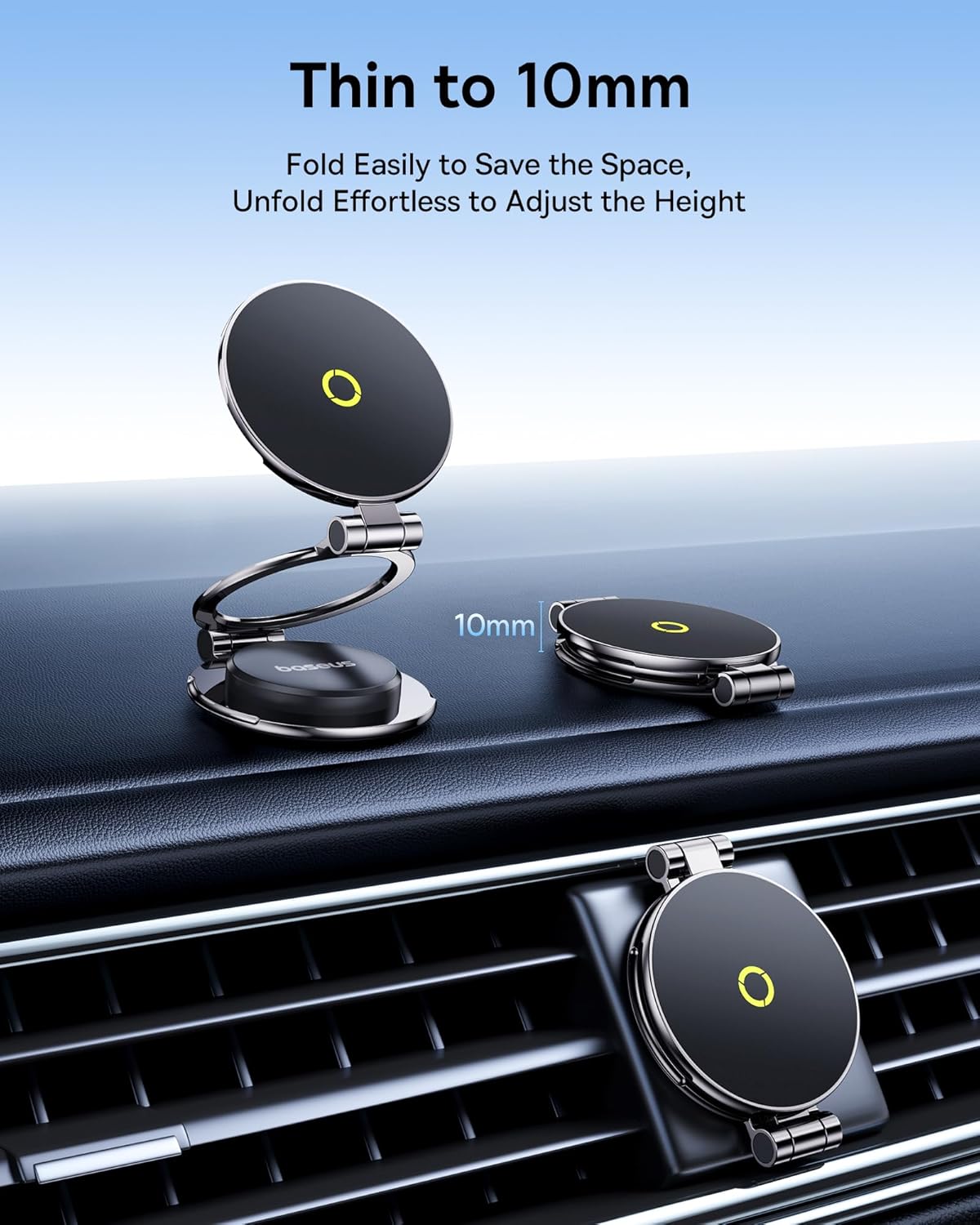
This image demonstrates the ultra-thin design of the mount when folded, measuring only 10mm, making it easy to store. It also shows how it unfolds effortlessly to adjust the height for optimal viewing
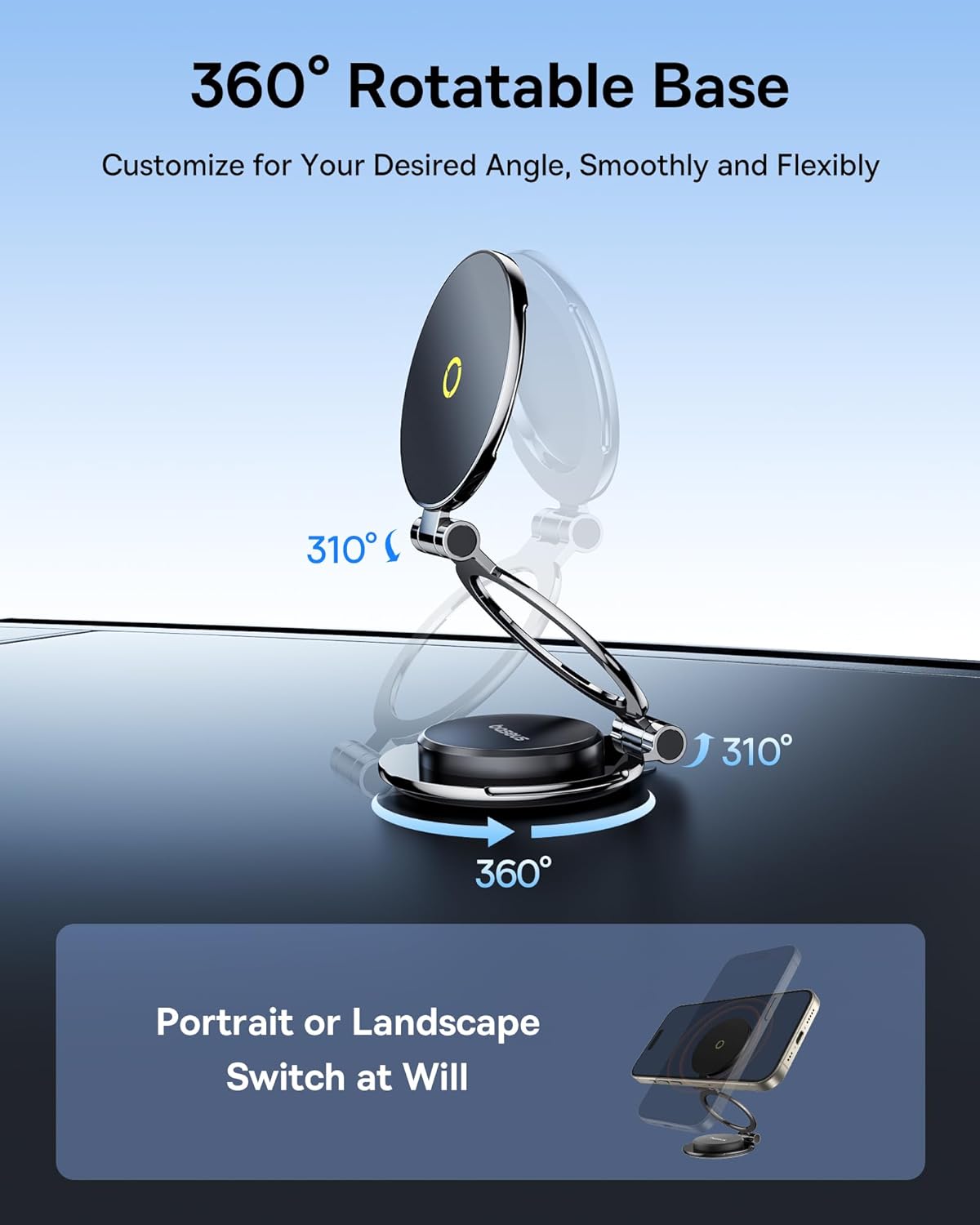
This image highlights the 360° rotatable base and the flexible 310° adjustment range of the mount, allowing users to customize their desired viewing angle. It also shows the ability to switch between portrait and landscape modes.
5 دیکھ بھال
To ensure the longevity and optimal performance of your Baseus MagPro II Magnetic Car Mount, follow these simple maintenance guidelines:
- صفائی: Wipe the surface of the mount with a soft, slightly damp cloth. Avoid using harsh chemicals or abrasive cleaners, as they may damage the finish or the adhesive.
- چپکنے والی دیکھ بھال: The 3M adhesive is designed for long-term use. Avoid frequently repositioning the mount once installed, as this can weaken the adhesive bond. If you need to remove it, do so carefully to prevent damage to your car's surface.
- مقناطیسی سطح: Keep the magnetic surface clean and free of metallic dust or debris, which could interfere with the magnetic hold.
6 خرابیوں کا سراغ لگانا
- فون محفوظ نہیں ہے:
- Ensure your phone or case is MagSafe compatible, or that the included magnetic ring is properly attached and centered on your device.
- Check if your phone case is too thick or has a non-magnetic component (e.g., a ring holder or wallet) that interferes with the magnetic connection. Some cases may require the magnetic ring to be placed directly on the phone, or the interfering component to be removed.
- Verify that the magnetic surface of the mount and your phone/ring are clean and free of obstructions.
- Mount Not Sticking to Surface:
- Ensure the mounting surface was thoroughly cleaned with an alcohol wipe and completely dry before installation.
- Confirm that the surface is smooth and flat. Textured or porous surfaces may not allow for proper adhesion.
- Allow the adhesive to cure for the recommended 24 hours before placing any weight on the mount. Insufficient curing time can lead to weak adhesion.
- Avoid installing in extremely cold or hot conditions, as this can affect the adhesive's initial bond.
7. وضاحتیں
| فیچر | تفصیل |
|---|---|
| برانڈ | بیسیس |
| ماڈل نمبر | 6e9559e5-33ea-474c-b404-c379baa0a03b |
| شے کا وزن | 5.3 اونس |
| پیکیج کے طول و عرض | 7.4 x 3.94 x 1.38 انچ |
| رنگ | سیاہ |
| خصوصی خصوصیات | Adjustable, Foldable, 360° Rotation |
| چڑھنے کی قسم | Vehicle Mount (Adhesive) |
| ہم آہنگ آلات | Smartphones (MagSafe compatible or with included magnetic ring) |
| میگنےٹ | 20 x N56 Strong Magnets |
| چپکنے والی | Upgraded 3M Non-Marking Adhesive Pad |
8. وارنٹی اور سپورٹ
Warranty information for this product is not explicitly provided in the product details. For specific warranty terms and conditions, please refer to the official Baseus website or contact Baseus customer service directly.
For technical support, troubleshooting assistance, or any inquiries regarding your Baseus MagPro II Magnetic Car Mount, please visit the official Baseus support page or contact their customer service team through the contact information provided on their webسائٹ
Baseus Official Webسائٹ: www.baseus.com


