1. تعارف
Thank you for choosing the XIAOMI Flexible Rechargeable Lamp. یہ کتابچہ آپ کے نئے ایل کے محفوظ اور موثر استعمال کے لیے ضروری معلومات فراہم کرتا ہے۔amp. Please read it thoroughly before operation and retain it for future reference.

Figure 1: XIAOMI Flexible Rechargeable Lamp
2. حفاظتی معلومات
- ایل کو جدا، مرمت یا ترمیم نہ کریں۔amp اپنے آپ کو
- ایل رکھیںamp away from water, moisture, and high temperatures.
- چارج کرنے کے لیے صرف فراہم کردہ چارجنگ کیبل یا تصدیق شدہ USB-C کیبل استعمال کریں۔
- لمبے عرصے تک روشنی کے منبع سے براہ راست آنکھ کی نمائش سے گریز کریں۔
- پروڈکٹ اور اس کی بیٹری کو مقامی ضابطوں کے مطابق ذمہ داری سے ضائع کریں۔
3. پیکیج کے مشمولات
تصدیق کریں کہ تمام اشیاء پیکیج میں موجود ہیں:
- XIAOMI Flexible Rechargeable Lamp یونٹ
- Lamp بیس
- Clamp اٹیچمنٹ
- USB-C چارجنگ کیبل
- صارف دستی (یہ دستاویز)
4. پروڈکٹ ختمview
The XIAOMI Flexible Rechargeable Lamp is designed for versatile illumination, functioning as a desk lamp, clip-on lamp, or handheld light source. It features a magnetic attachment for easy angle adjustment and multiple lighting modes.

Figure 2: Versatile Usage Modes

Figure 3: Design Details (Charging Port, Button, Anti-slip Strip)
5. سیٹ اپ
- ابتدائی چارج: پہلے استعمال سے پہلے، ایل کو مکمل طور پر چارج کریں۔amp using the provided USB-C cable. Connect the cable to the lamp's Type-C port and a compatible USB power adapter (not included). The battery status indicator will show charging progress.
- Assembly (Desk Lamp): ایل رکھیںamp unit onto the circular lamp base. The magnetic connection will secure it.
- Assembly (Clip-on Lamp): cl منسلک کریںamp accessory to a suitable surface (e.g., desk edge, shelf). Then, magnetically attach the lamp unit to the designated area on the clamp.
6. آپریٹنگ ہدایات
6.1 پاور آن/آف اور موڈ کا انتخاب
- مختصر پریس: Briefly press the power button to turn the lamp آن یا آف۔
- لانگ پریس: Press and hold the power button to cycle through the four available lighting modes.

Figure 4: Four Lighting Modes
6.2 زاویہ ایڈجسٹمنٹ
Lamp head is attached magnetically, allowing for flexible positioning:
- عمودی گردش: ایل کو ایڈجسٹ کریں۔amp head up or down by up to 180 degrees.
- افقی گردش: ایل کو گھمائیں۔amp head horizontally by up to 360 degrees.
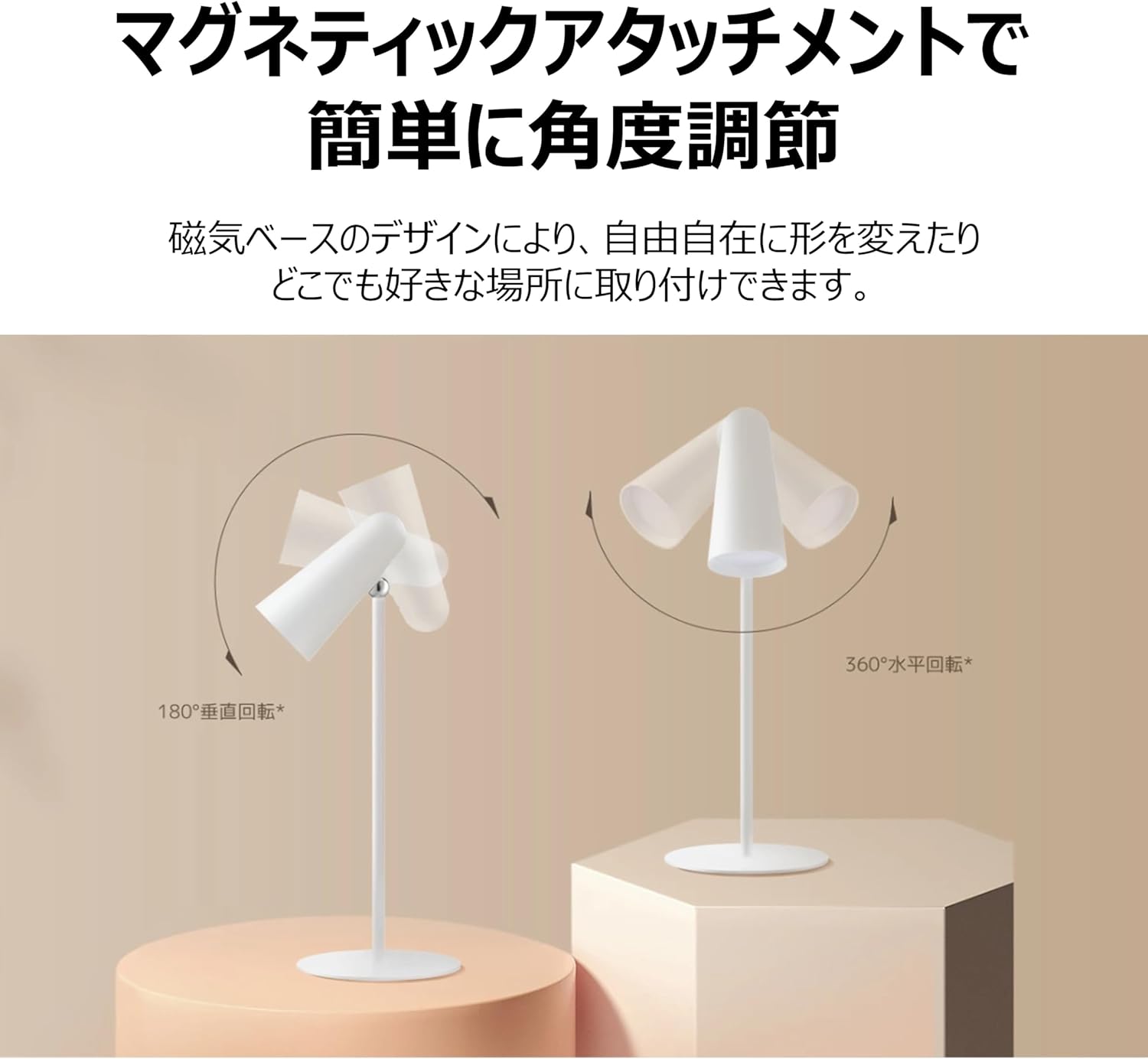
Figure 5: Magnetic Angle Adjustment
6.3 چارج کرنا
ایل کو جوڑیں۔amp to a power source using the USB-C cable. The lamp maintains consistent brightness even while charging. A full charge provides over 40 hours of illumination at the lowest brightness setting.

Figure 6: Charging the Lamp
7 دیکھ بھال
- صفائی: ایل کو مسح کریں۔amp ایک نرم، خشک کپڑے کے ساتھ. کھرچنے والے کلینر یا سالوینٹس کا استعمال نہ کریں۔
- ذخیرہ: ایل کو اسٹور کریں۔amp ایک ٹھنڈی، خشک جگہ میں جب طویل مدت تک استعمال نہ ہو۔
- بیٹری کی دیکھ بھال: بیٹری کی زندگی کو طول دینے کے لیے، ایل کو مکمل طور پر خارج کرنے سے گریز کریں۔amp frequently. Charge it regularly, even if not in constant use.
8 خرابیوں کا سراغ لگانا
| مسئلہ | ممکنہ وجہ | حل |
|---|---|---|
| Lamp آن نہیں ہوتا | کم بیٹری؛ پاور بٹن درست طریقے سے نہیں دبایا گیا۔ | ایل کو چارج کریں۔amp; Ensure a firm short press on the power button. |
| Lamp چارج نہیں کر رہا ہے | Faulty cable or adapter; Loose connection | Check USB-C cable and adapter; Ensure connections are secure; Try a different cable/adapter. |
| روشنی مدھم ہے یا ٹمٹما رہی ہے۔ | کم بیٹری | ایل کو چارج کریں۔amp مکمل طور پر |
| Magnetic attachment feels loose | Lamp not properly seated on base/clamp | Re-seat the lamp unit firmly onto the magnetic base or clamp. |
9. وضاحتیں
| فیچر | تفصیلات |
|---|---|
| ماڈل نمبر | BHR8959GL |
| ابعاد (D x W x H) | 4.72" x 2.21" x 11.42" |
| شے کا وزن | 14.1 اونس (400 گرام) |
| طاقت کا منبع | بیٹری سے چلنے والا (لتیم آئن) |
| بیٹری کی زندگی | Up to 40 Hours (lowest brightness) |
| روشنی کے منبع کی قسم | ایل ای ڈی |
| واٹtage | 5 واٹ |
| والیومtage | 5 وولٹ |
| مواد | Plastic (Acrylonitrile Butadiene Styrene base) |
| کنٹرول کا طریقہ | Touch (Magnetic Switch) |
| کلر رینڈرنگ انڈیکس (CRI) | را90 |
| شامل اجزاء | Stand, Clamp |
10. وارنٹی اور سپورٹ
This XIAOMI product is covered by a limited warranty. For detailed warranty terms and conditions, please refer to the warranty card included with your purchase or visit the official XIAOMI webسائٹ
For technical support, troubleshooting assistance, or service inquiries, please contact XIAOMI customer support through their official channels. Contact information can typically be found on the XIAOMI webسائٹ یا آپ کی خریداری کی دستاویزات۔


