1. تعارف
This manual provides essential instructions for the safe and efficient use of your DALI IO-8 Wireless/Wired Hi-Fi Headphones. Please read this manual thoroughly before using the product and retain it for future reference. The DALI IO-8 headphones are designed to deliver a high-fidelity audio experience with advanced features such as Active Noise Cancellation (ANC), Bluetooth AptX Adaptive connectivity, and a long-lasting battery.
2. پروڈکٹ ختمview
Familiarize yourself with the components and controls of your DALI IO-8 headphones.

تصویر 2.1: سامنے والا view of the DALI IO-8 headphones, showcasing the caramel and white color scheme and overall design.

تصویر 2.2: اپر سے نیچے view of the DALI IO-8 headphones, highlighting the earcups and visible control buttons on the side.
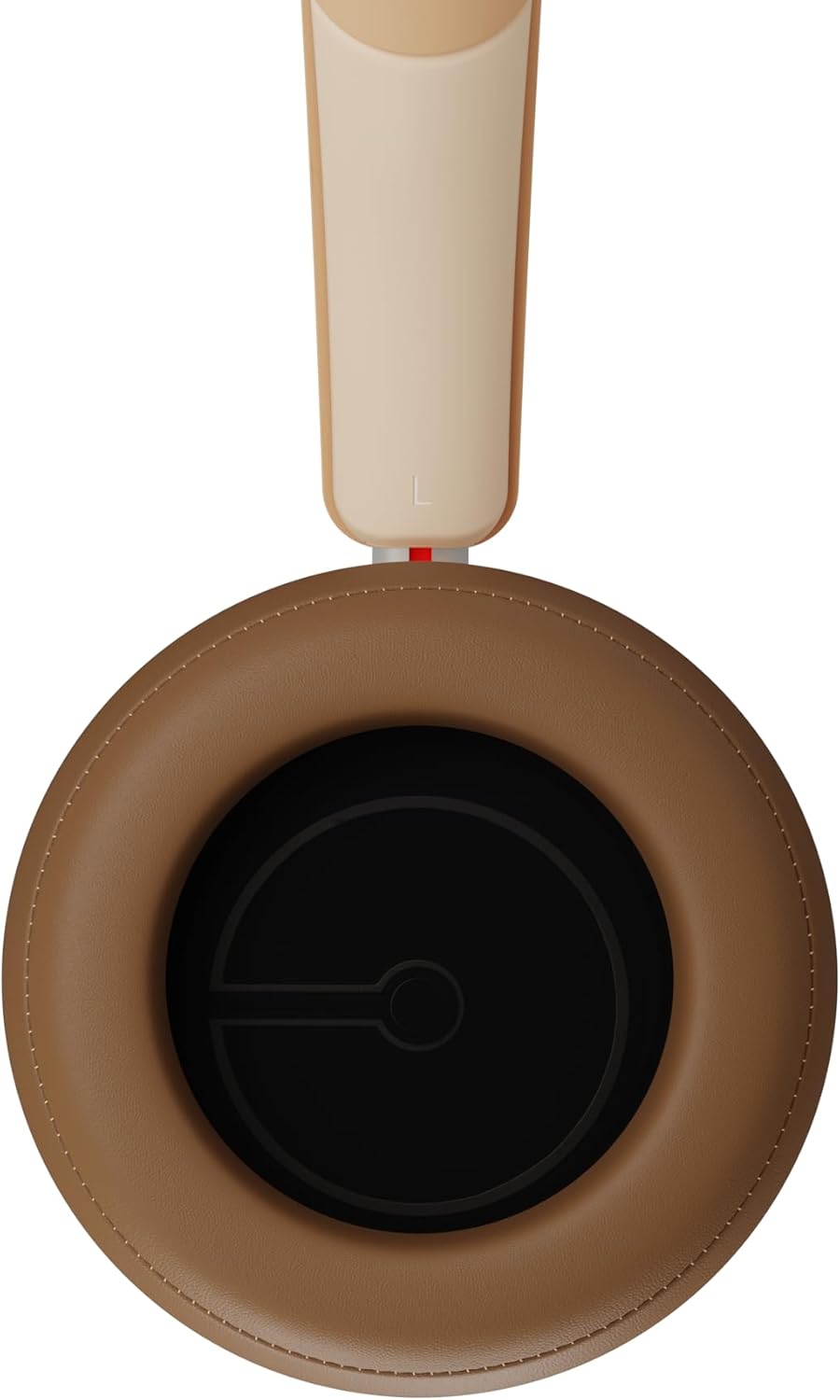
تصویر 2.3: داخلہ view of a DALI IO-8 earcup, showing the soft padding and driver grille, designed for comfort and sound delivery.

تصویر 2.4: کلوز اپ view of the DALI IO-8 earcup, showing the USB-C charging port and other control buttons.
2.1 پیکیج کے مشمولات
- DALI IO-8 ہیڈ فون
- USB-C چارجنگ کیبل
- 3.5 ملی میٹر آڈیو کیبل
- Travel Case (if included)
- صارف دستی (یہ دستاویز)
2.2 ہیڈ فون کے اجزاء

تصویر 2.5: پھٹا view illustrating the internal components of the DALI IO-8 headphones, including the 50mm driver, circuitry, and earcup structure.
- Headband (Adjustable)
- Earcups (Over-ear design with genuine leather)
- 50mm Driver (SMC Driver Technology)
- Control Buttons (Power, Volume, ANC, Multifunction)
- USB-C Port (Charging and Wired Audio)
- 3.5mm Audio Jack (Wired Audio)
- Microphones (for ANC and calls)
3. سیٹ اپ
3.1 ہیڈ فون چارج کرنا
Before initial use, fully charge your DALI IO-8 headphones.
- Connect the supplied USB-C cable to the USB-C port on the headphone earcup.
- Connect the other end of the USB-C cable to a compatible USB power source (e.g., computer USB port, USB wall adapter).
- The LED indicator will show charging status. A full charge provides up to 35 hours of playback with ANC enabled.
- مکمل چارج ہونے کے بعد، کیبل کو منقطع کریں۔
3.2 پاور آن/آف
- پاور آن کرنے کے لیے: Press and hold the Power button for approximately 2 seconds until the LED indicator illuminates.
- پاور آف کرنا: پاور بٹن کو تقریباً 3 سیکنڈ تک دبائے رکھیں جب تک کہ LED انڈیکیٹر بند نہ ہو جائے۔
3.3 بلوٹوتھ جوڑی
The DALI IO-8 supports Bluetooth AptX Adaptive for high-quality wireless audio.
- یقینی بنائیں کہ ہیڈ فون بند ہیں۔
- Press and hold the Power button for approximately 5 seconds until the LED indicator flashes blue rapidly. This indicates pairing mode.
- اپنے آڈیو ڈیوائس (اسمارٹ فون، ٹیبلیٹ، کمپیوٹر) پر، بلوٹوتھ کو فعال کریں اور دستیاب آلات تلاش کریں۔
- Select "DALI IO-8" from the list of found devices.
- Once paired, the LED indicator will glow solid blue or flash slowly.
- پاور آن ہونے پر ہیڈ فون خود بخود آخری جوڑی والے آلے سے دوبارہ جڑنے کی کوشش کریں گے۔
3.4 وائرڈ کنکشن
The DALI IO-8 can be used with a wired connection via the 3.5mm audio jack or USB-C.
- 3.5 ملی میٹر آڈیو کیبل: Connect one end of the supplied 3.5mm audio cable to the headphone's 3.5mm jack and the other end to your audio source's headphone output. The headphones can be used passively in this mode, or actively with ANC and amplification if powered on.
- USB-C Audio: Connect the supplied USB-C cable to the headphone's USB-C port and the other end to a compatible USB audio output on your computer or device. This mode allows for digital audio transmission and charging simultaneously.
4. ہیڈ فون چلانا
4.1 فعال شور منسوخی (اے این سی)
The DALI IO-8 features three distinct ANC modes and wind noise suppression.
- Press the dedicated ANC button to cycle through the available modes:
- ANC آن: Maximum noise cancellation.
- شفافیت موڈ: Allows ambient sounds to pass through for situational awareness.
- ANC آف: Active noise cancellation is disabled.
- Wind noise suppression is automatically engaged in ANC modes to reduce interference from wind.
4.2 ساؤنڈ موڈز
Customize your listening experience with two sound profiles.
- Press the Sound Mode button (if available, or refer to specific button on device) to switch between:
- ہائی فائی موڈ: Delivers a balanced and neutral sound signature.
- باس موڈ: Enhances low-frequency response for a more impactful bass.
4.3 Playback and Volume Control
Use the control buttons on the earcup for media playback and volume adjustments.
- اواز بڑھایں: '+' بٹن دبائیں۔
- آواز کم: '-' بٹن دبائیں۔
- چلائیں/روکیں: ایک بار ملٹی فنکشن بٹن دبائیں۔
- اگلا ٹریک: Double-press the Multifunction button.
- پچھلا ٹریک: Triple-press the Multifunction button.
4.4 کال مینجمنٹ
Manage phone calls when connected via Bluetooth.
- جواب / کال ختم کریں: ایک بار ملٹی فنکشن بٹن دبائیں۔
- کال مسترد کریں: ملٹی فنکشن بٹن کو 2 سیکنڈ تک دبائے رکھیں۔
- متحرک صوتی معاون: Press and hold the Multifunction button for 2 seconds (when not on a call).
5 دیکھ بھال
5.1 صفائی
- ہیڈ فون کو نرم، خشک، لنٹ فری کپڑے سے صاف کریں۔
- کھرچنے والے کلینر، سالوینٹس یا کیمیائی سپرے استعمال نہ کریں۔
- ایئرکپس کے لیے، تھوڑا سا ڈی سے آہستہ سے صاف کریں۔amp کپڑا اگر ضروری ہو تو فوراً خشک کر لیں۔
- اس بات کو یقینی بنائیں کہ بندرگاہوں یا سوراخوں میں کوئی نمی داخل نہ ہو۔
5.2 اسٹوریج
- When not in use, store the headphones in their protective travel case to prevent damage.
- ہیڈ فون کو انتہائی درجہ حرارت، نمی، یا براہ راست سورج کی روشنی کے سامنے لانے سے گریز کریں۔
6 خرابیوں کا سراغ لگانا
| مسئلہ | ممکنہ وجہ | حل |
|---|---|---|
| کوئی طاقت نہیں۔ | بیٹری ختم ہو گئی ہے۔ | فراہم کردہ USB-C کیبل کا استعمال کرتے ہوئے ہیڈ فون چارج کریں۔ |
| بلوٹوتھ کے ذریعے جوڑا نہیں بنایا جا سکتا | ہیڈ فون پیئرنگ موڈ میں نہیں ہیں۔ ڈیوائس بلوٹوتھ آف؛ ڈیوائس سے بہت دور۔ | Ensure headphones are in pairing mode (rapid blue LED flash). Turn on Bluetooth on your device. Move headphones closer to the device. Forget "DALI IO-8" on your device and re-pair. |
| کوئی آواز نہیں۔ | Volume too low; incorrect input source; headphones not connected. | Increase volume on headphones and source device. Check Bluetooth connection or wired cable. Ensure the correct audio output is selected on your device. |
| ANC مؤثر طریقے سے کام نہیں کر رہا ہے۔ | ANC mode off; poor earcup seal. | Ensure ANC is enabled. Adjust headphones for a proper seal around your ears. |
7. وضاحتیں
| فیچر | تفصیل |
|---|---|
| ماڈل کا نام | ڈالی IO-8 |
| برانڈ | ڈالی |
| کنیکٹوٹی ٹیکنالوجی | وائرڈ، وائرلیس (بلوٹوتھ) |
| وائرلیس کمیونیکیشن ٹیکنالوجی | Bluetooth (AptX Adaptive) |
| شور کی منسوخی | Active Noise Suppression (ANC) with Wind Noise Suppression |
| کان کی جگہ کا تعین | کان سے زیادہ |
| ڈرائیور کا سائز | 50mm (SMC Driver Technology) |
| رکاوٹ | 25 اوہم |
| ہیڈ فون جیک | 3.5 ملی میٹر |
| بیٹری کی زندگی | 35 گھنٹے تک (ANC کے ساتھ) |
| مواد | Genuine Leather (earcups) |
8. حفاظتی معلومات
Please observe the following safety guidelines to ensure safe operation and prevent damage to your headphones or injury to yourself.
- Do not expose the headphones to water, rain, or moisture.
- انتہائی درجہ حرارت سے پرہیز کریں۔
- Do not disassemble, repair, or modify the headphones. This voids the warranty.
- سماعت کو پہنچنے والے نقصان کو روکنے کے لیے اعتدال کے حجم کی سطح پر سنیں۔
- بچوں کی پہنچ سے دور رکھیں۔
- مقامی قواعد و ضوابط کے مطابق ذمہ داری کے ساتھ مصنوعات کو ضائع کریں۔
9. وارنٹی اور سپورٹ
DALI products are manufactured to high standards and are covered by a limited warranty. For specific warranty terms and conditions, please refer to the warranty card included with your product or visit the official DALI website. For technical support, troubleshooting assistance, or service inquiries, please contact your authorized DALI dealer or DALI customer support.

تصویر 9.1: A person wearing the DALI IO-8 headphones, demonstrating their comfortable fit and use in a real-world environment.


