1. تعارف
This manual provides essential information for the setup, operation, maintenance, and troubleshooting of your MINISFORUM MS-A1 Workstation Barebone Mini PC. The MS-A1 is designed as a high-performance barebone system, offering flexibility for users to customize components such as the CPU, RAM, SSD, and operating system.

Image: The MINISFORUM MS-A1 Workstation Mini PC, showcasing its compact design and various ports from front and side perspectives.
2. حفاظتی معلومات
- کسی بھی تنصیب یا دیکھ بھال کو انجام دینے سے پہلے ہمیشہ بجلی منقطع کریں۔
- Handle internal components with care to avoid electrostatic discharge. Use an anti-static wrist strap if available.
- زیادہ گرم ہونے سے بچنے کے لیے آلے کے ارد گرد مناسب وینٹیلیشن کو یقینی بنائیں۔
- آلے کو نمی یا انتہائی درجہ حرارت کے سامنے نہ رکھیں۔
- Use only the provided power adapter and cable.
3. پیکیج کے مشمولات
تصدیق کریں کہ تمام اشیاء آپ کے پیکیج میں موجود ہیں:
- 1x MS-A1 Mini Workstation
- 1x پاور اڈاپٹر
- 1x پاور کارڈ
- 1x HDMI کیبل
- 1x Manual (this document)
4. Setup & Hardware Installation
As a barebone system, the MS-A1 requires user installation of the CPU, RAM, SSD, and operating system. Follow these steps for initial setup and component installation:
4.1. Component Installation (DIY)
The MS-A1 supports AMD AM5 Socket CPUs. For memory, it features two DDR5-5200 slots, allowing for up to 96GB of RAM. Storage options include one M.2 2280 PCIe4.0 SSD slot (compatible with RAID0 and RAID1) and three additional M.2 NVMe SSD slots for extensive storage capacity.
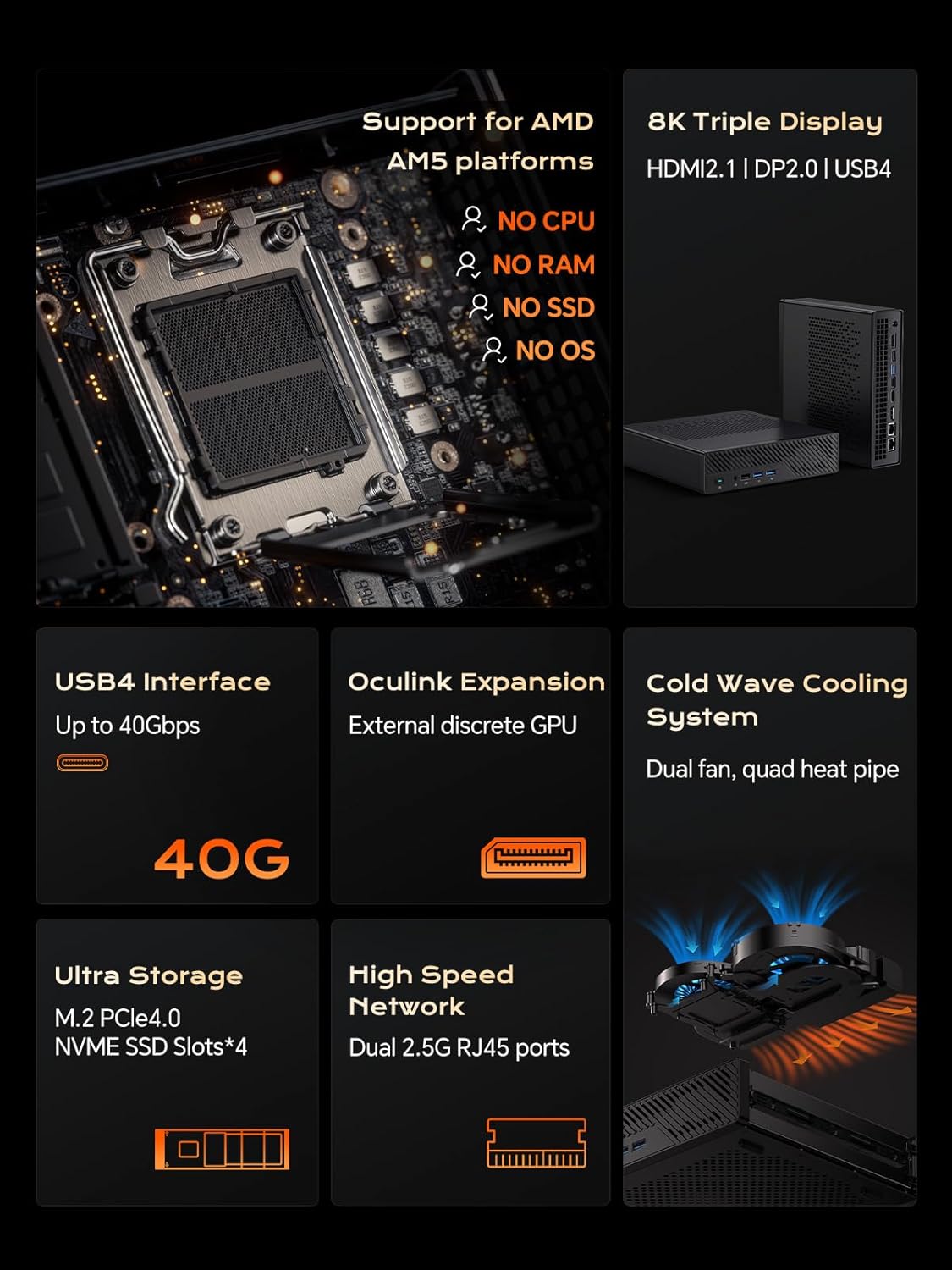
تصویر: اندرونی view of the MS-A1, highlighting the AMD AM5 CPU socket, DDR5 RAM slots, and M.2 SSD expansion slots.
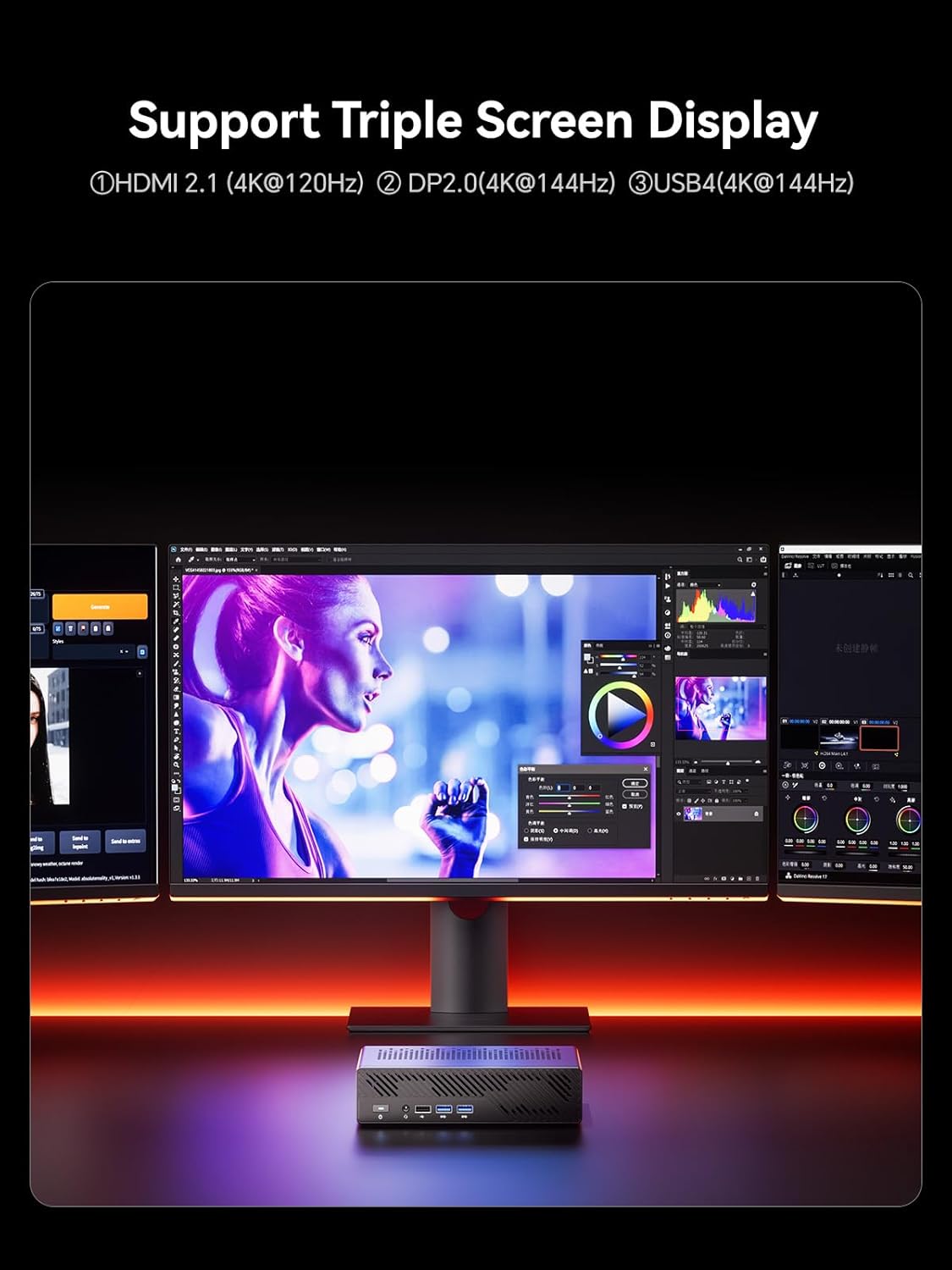
تصویر: تفصیلی view of the MS-A1's storage capabilities, showing flexible expansion with multiple M.2 PCIe4.0 NVMe SSD slots.
4.2 بیرونی رابطے
Connect your peripherals and displays to the available ports:
- ڈسپلے آؤٹ پٹس: 1x HDMI (4K@60Hz), 1x DP (4K@144Hz), 1x USB-C (Alt DP, 4K@144Hz) for triple display support.
- USB پورٹس: Multiple USB 2.0 and USB 3.0 ports for connecting keyboards, mice, and other USB devices.
- نیٹ ورک: 2x 2.5G RJ45 LAN ports for high-speed wired network connections.
- آڈیو: 3.5mm Combo Jack for headphones/microphone.
- طاقت: Connect the provided power adapter to the DC-in port.
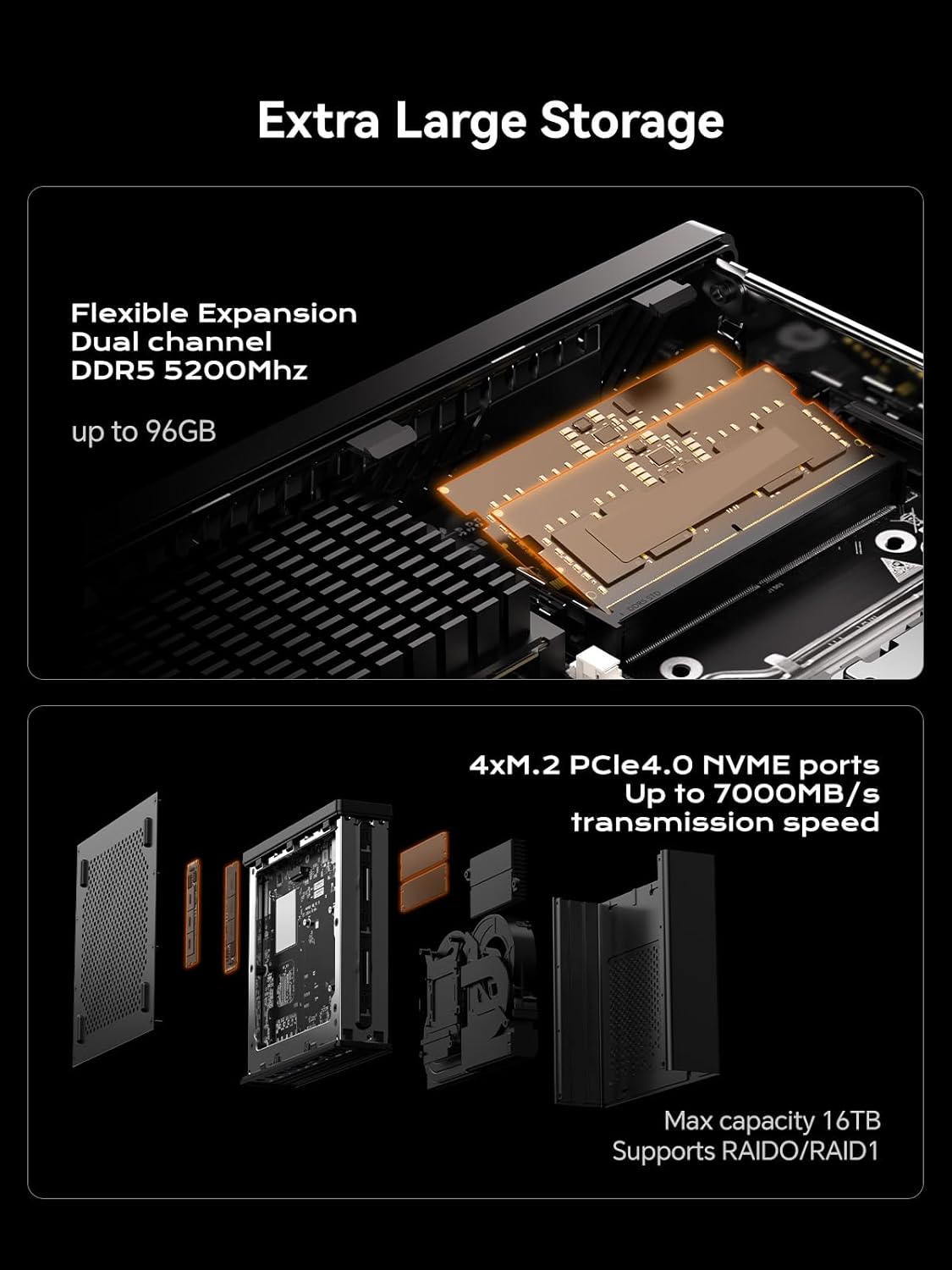
Image: A diagram illustrating the layout of all front and rear ports on the MINISFORUM MS-A1 Workstation.

Image: Close-up of the dual 2.5Gbps RJ45 Ethernet ports and a full-capacity USB4 Speed Port on the MS-A1.
ایک بصری اوور کے لیےview of the workstation, refer to the following video:
ویڈیو: ایک مختصر ختمview of the MINISFORUM MS-A1 Workstation, demonstrating its compact size and various connectivity options.
5. Operating Your MS-A1
5.1. پاور آن/آف
Press the power button located on the front panel to turn the device on or off. A short press will initiate power-on, while a longer press (typically 5 seconds) will force a shutdown.
5.2. ڈسپلے کنفیگریشن
The MS-A1 supports up to three independent displays simultaneously, utilizing its HDMI, DisplayPort, and USB-C (Alt DP) outputs. This allows for an expanded workspace and improved multitasking capabilities.

Image: The MS-A1 connected to three monitors, demonstrating its triple display output capability for an expansive visual experience.
5.3. نیٹ ورک کنیکٹیویٹی
Utilize the dual 2.5G RJ45 LAN ports for robust and high-speed wired network connections. The device also includes Dual Band WiFi and Bluetooth 5.2 for wireless connectivity to networks and peripherals.
6 دیکھ بھال
Regular maintenance ensures the longevity and optimal performance of your MS-A1 Workstation.
- دھول ہٹانا: Periodically clean the ventilation grilles and internal components (if comfortable opening the chassis) to prevent dust buildup, which can hinder cooling performance.
- کولنگ سسٹم: The workstation features an upgraded dual-fan 4-heat pipe cooling system. Ensure that the fans are not obstructed and are operating correctly.

Image: A diagram illustrating the internal components of the MS-A1's Cold Wave Pro Cooling System, featuring dual fans and four heat pipes.
7 خرابیوں کا سراغ لگانا
If you encounter issues with your MS-A1, consider the following common solutions:
- کوئی طاقت نہیں: Ensure the power adapter is securely connected to both the device and a working power outlet. Verify the power cord is properly seated.
- کوئی ڈسپلے نہیں: Check all display cable connections (HDMI, DP, USB-C). Ensure your monitor is set to the correct input source.
- ڈرائیور کے مسائل: After installing an operating system, ensure all necessary drivers are installed. MINISFORUM typically provides drivers on their official webسائٹ
- SSD رفتار: If experiencing slower-than-expected SSD performance, check the BIOS settings under "Advanced" -> "AMD PBS" to ensure M.2 NVMe SSD slots are configured for Gen4 speed if your SSD supports it. Note that setting Gen4 mode may increase heat.
- Overheating/Noise: Ensure the device has adequate airflow. Consider adjusting fan settings in the BIOS (e.g., "Quiet" or "Balance" mode) or disabling CPU boost if sustained high loads cause excessive heat or noise.
8. وضاحتیں
| فیچر | تفصیل |
|---|---|
| برانڈ | MINISFORUM |
| ماڈل کا نام | DeskMini (MS-A1) |
| سی پی یو ساکٹ | AMD AM5 Socket (CPU not included) |
| میموری کی قسم | DDR5 RAM (2x SODIMM slots, up to 96GB, 5200 MHz) |
| ذخیرہ | 1x M.2 2280 PCIe4.0 SSD slot (RAID0/RAID1), 3x additional M.2 NVMe SSD slots (Max 16TB) |
| گرافکس آؤٹ پٹ | 1x HDMI (4K@60Hz), 1x DP (4K@144Hz), 1x USB-C (Alt DP, 4K@144Hz) |
| نیٹ ورک | 2x 2.5G RJ45 LAN Ports, Dual Band WiFi, Bluetooth 5.2 |
| USB پورٹس | 2x USB 2.0, 3x USB 3.0, 1x USB-C (USB4, 40Gbps) |
| کولنگ سسٹم | Dual-fan 4-heat pipe cooling (noise levels as low as 37 dB) |
| طول و عرض | 9.92 x 9.92 x 7.64 انچ (پیکیج) |
| وزن | 7.98 پاؤنڈ (آئٹم) |
| رنگ | سیاہ |
9. وارنٹی اور سپورٹ
For warranty information and technical support, please refer to the official MINISFORUM webسائٹ یا ان کی کسٹمر سروس سے براہ راست رابطہ کریں۔ وارنٹی کے دعووں کے لیے اپنی خریداری کی رسید اپنے پاس رکھیں۔
MINISFORUM is committed to providing innovative products and customer satisfaction. For driver downloads or further assistance, visit the official MINISFORUM support page.
متعلقہ دستاویزات - ایم ایس- A1
 |
MINISFORUM MS-A1 نیو جنرل منی ورک سٹیشن سیریز یوزر مینوئل MINISFORUM MS-A1 نیو جنر مینی ورک سٹیشن سیریز کے لیے یوزر مینوئل اور انسٹالیشن گائیڈ۔ سیٹ اپ، حفاظت، انٹرفیس، اور اجزاء کی تنصیب کا احاطہ کرتا ہے۔ |
 |
Minisforum Mini PC یوزر مینوئل اور انسٹالیشن گائیڈ Minisforum Mini PCs کے لیے یوزر مینوئل، سیٹ اپ کی تفصیل، پورٹ فنکشنز (USB4، HDMI، DisplayPort، OCulink)، DDR اور SSD کی تنصیب، اور آپریشنل گائیڈز۔ FCC تعمیل کی معلومات پر مشتمل ہے۔ |
 |
Minisforum UM760 Mini PC صارف دستی Minisforum UM760 Mini PC کے لیے یوزر مینوئل، پیکیج کے مواد کی تفصیل، ہارڈ ویئر اوورview، انٹرفیس کی وضاحتیں، سیٹ اپ گائیڈ، RAM اور SSD کی DIY انسٹالیشن، اور بڑھتے ہوئے ہدایات۔ |
 |
Minisforum MGP01 سوئچ وائرلیس کنٹرولر صارف دستی اور وضاحتیں Minisforum MGP01 وائرلیس کنٹرولر کے لیے جامع گائیڈ، اس کی خصوصیات، سوئچ، PC، Android، اور iOS کے لیے رابطے کے اختیارات، میکرو پروگرامنگ، ٹربو فنکشن، وائبریشن سیٹنگز، اور تکنیکی خصوصیات کی تفصیل۔ |
 |
MINISFORUM MKB i83 تھری موڈ مکینیکل کی بورڈ کوئیک سٹارٹ گائیڈ MINISFORUM MKB i83 مکینیکل کی بورڈ، کورنگ سیٹ اپ، کنیکٹیویٹی (بلوٹوتھ، 2.4G، وائرڈ)، فنکشن کیز، بیک لائٹنگ، اور وضاحتیں کے لیے مختصر گائیڈ۔ |
 |
MINISFORUM نیو جنرل وینس سیریز منی پی سی صارف دستی MINISFORUM New Gen Venus Series Mini PC کے لیے جامع صارف دستی۔ پیکیج کے مواد، سسٹم اوور کے بارے میں تفصیلی معلومات حاصل کریں۔viewآپ کے MINISFORUM منی کمپیوٹر کے لیے بندرگاہیں، انٹرفیس، اور حفاظتی رہنما خطوط۔ |