1. تعارف
The BOYA BY-V10 is a compact and lightweight wireless lavalier microphone system designed for use with USB-C compatible devices, including Android smartphones, iPhone 15/16, iPads, and laptops. It offers high-quality audio recording with features like one-click noise cancellation and stable wireless transmission, making it suitable for various content creation scenarios.

Image: The BOYA BY-V10 USB-C Wireless Lavalier Microphone system, showing the transmitter and receiver.
ویڈیو: ایک اوورview of the BOYA BY-V10 Wireless Microphone, highlighting its ease of use for recording.
2. باکس میں کیا ہے۔
تصدیق کریں کہ آپ کے پیکیج میں تمام اجزاء موجود ہیں:
- 1 ایکس ٹرانسمیٹر (TX)
- 1 x Receiver (RXU) with USB-C connector
- 1 x USB-A سے USB-C چارجنگ کیبل۔
- 1 ایکس فوم ونڈ اسکرین۔
- 1 ایکس لے جانے والا بیگ
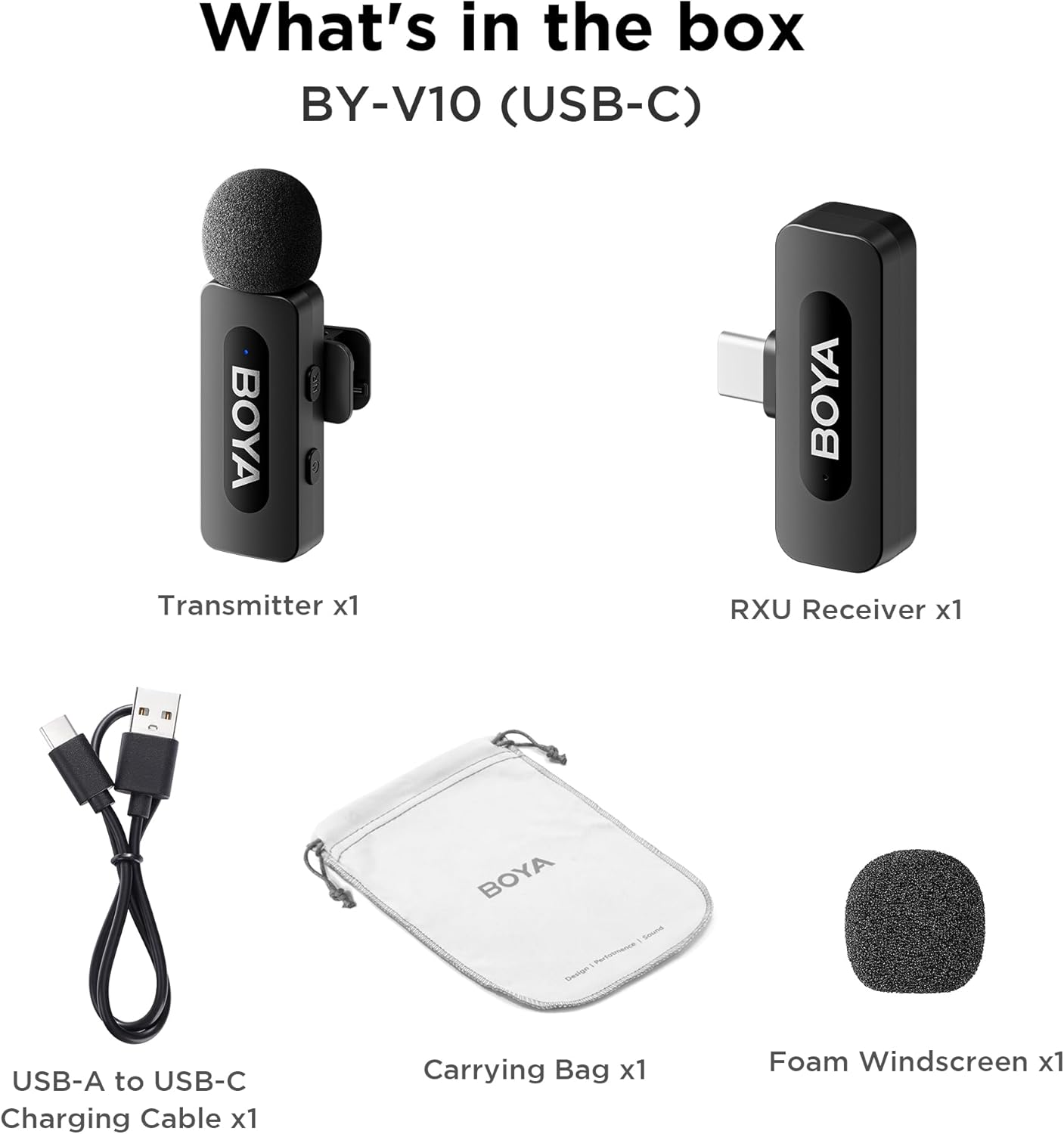
Image: The complete packing list for the BY-V10, showing all included accessories.
Video: An unboxing video demonstrating the contents of the BOYA BY-V Wireless Lavalier Microphone package.
3. سیٹ اپ گائیڈ
3.1 ابتدائی چارجنگ
Before first use, ensure the transmitter is fully charged using the provided USB-A to USB-C charging cable. The receiver does not require charging as it draws power directly from your connected device.

Image: Battery life and charging details for the BY-V10 transmitter.
3.2 اپنے آلے سے جڑنا
- Press and hold the power button on the Transmitter (TX) for 2 seconds to turn it on. The indicator light will blink.
- Plug the Receiver (RXU) directly into the USB-C port of your smartphone, iPad, or laptop.
- The Transmitter and Receiver will automatically pair within 10 seconds. The indicator light on both units will turn solid blue once successfully paired.
- اینڈرائیڈ صارفین کے لیے نوٹ: Enable the "OTG" function in your device's settings before connecting the USB Type-C microphone.

Image: Visual instructions for the plug-and-play setup process.
3.3 ڈیوائس کی مطابقت
The BY-V10 is compatible with devices featuring a USB-C port, including:
- اینڈرائیڈ اسمارٹ فونز
- آئی فون 15/16 ماڈل
- iPads with USB-C
- Laptops with USB-C
Please ensure your device supports external USB-C audio input.

Image: Visual representation of compatible devices for the BY-V10 microphone.
4. آپریٹنگ ہدایات
4.1 مائیکروفون پہننا
The transmitter features a 360° rotatable clip for easy attachment to your clothing. For optimal sound capture, clip the microphone approximately 6-8 inches from your mouth.

Image: The compact size and clip-on design of the BY-V10 transmitter.
4.2 One-Click Noise Cancellation
To activate or deactivate the noise reduction mode, press the 'NR' button on the side of the transmitter. The indicator light will change to static green when noise reduction is enabled, and blink blue slowly when muted.

Image: Visual comparison of audio with and without noise cancellation enabled.

Image: Detailed explanation of the noise cancellation button and indicator lights.
4.3 خاموش فنکشن
To mute the microphone, briefly press the power button on the transmitter. The indicator light will blink blue slowly. Press again to unmute.
4.4 ٹرانسمیشن رینج
The BY-V10 offers a stable audio signal transmission range of up to 100 meters (328 feet) in open environments without obstacles or interference.

Image: Demonstration of the microphone's long-distance transmission capability.

Image: Further illustration of the extended transmission range.
4.5 ریکارڈنگ کے دوران چارج کرنا
The receiver allows you to charge your phone or connected device while recording, ensuring uninterrupted long sessions for streaming or course recording.

Image: The receiver connected to a smartphone, illustrating the ability to charge the phone during recording.

Image: Another visual of the 'Support Using While Charging' feature.
5 دیکھ بھال
To ensure the longevity and optimal performance of your BOYA BY-V10 microphone, follow these maintenance guidelines:
- صفائی: مائیکروفون اور ریسیور کو صاف کرنے کے لیے نرم، خشک کپڑا استعمال کریں۔ مائعات یا کھرچنے والے کلینر کے استعمال سے پرہیز کریں۔
- ذخیرہ: Store the microphone system in its carrying bag when not in use to protect it from dust, moisture, and physical damage.
- بیٹری کی دیکھ بھال: Fully charge the transmitter before long periods of storage to maintain battery health.
- دیکھ بھال کے ساتھ ہینڈل: Avoid dropping the devices or exposing them to extreme temperatures.
6 خرابیوں کا سراغ لگانا
If you encounter problems when using the unit, please refer to the following checklist. If the problem cannot be solved, please contact the seller for after-sales service.
- یونٹ جوڑا بنانے میں ناکام ہے: ٹرانسمیٹر کو ایک رسیور کے ساتھ جوڑنا یقینی بنائیں۔ اگر ایک سے زیادہ وصول کنندگان کے ساتھ جوڑا بنایا جائے، تو کون سا وصول کنندہ ٹرانسمیٹر کے ساتھ جوڑا جائے گا اس کی وضاحت نہیں کی جا سکتی۔
- بیرونی ڈیوائس سے منسلک ہونے پر یونٹ سے کوئی آواز یا کوئی آواز نہیں:
- یقینی بنائیں کہ رسیور پر کنیکٹر آپ کے آلے سے اچھی طرح سے جڑا ہوا ہے۔
- یقینی بنائیں کہ ٹرانسمیٹر خاموش نہیں ہے۔ اگر اس کا اشارے نیلے رنگ میں آہستہ سے جھپکتا ہے، تو صارفین کو ٹرانسمیٹر کو چالو کرنے کے لیے ایک بار پاور بٹن دبانے کی ضرورت ہے۔
- یونٹ کے آپریشن کی حد محدود ہے اور آواز اکثر وقفے وقفے سے آتی ہے: یقینی بنائیں کہ ٹرانسمیٹر اور وصول کنندہ کے درمیان کوئی مداخلت نہیں ہے۔ اگر وقفے وقفے سے آواز اب بھی کثرت سے آتی ہے، تو برائے مہربانی فروخت کے بعد سروس کے لیے ہم سے رابطہ کریں۔
- یونٹ خود بخود بند ہو جاتا ہے: جوڑا نہ بنائے جانے پر، ٹرانسمیٹر 10 منٹ کے بعد خود بخود بند ہو جائے گا۔
- یونٹ پر چلنے میں ناکام ہے: اس بات کو یقینی بنائیں کہ یونٹ میں اتنی بیٹری ہے کہ اسے آن کیا جائے۔ سرکٹ کو چالو کرنے کے لیے چارجنگ کیبل لگانے کی کوشش کریں۔
- چارجنگ کیس یونٹ کو چارج کرنے میں ناکام ہے:
- یقینی بنائیں کہ چارجنگ کیس کی بیٹری ختم نہیں ہوئی ہے۔ کیس چارج کرنے کی کوشش کریں۔
- یونٹ کے چارجنگ کانٹیکٹس اور چارجنگ کیس کے چارجنگ پنوں کو صاف کپڑے سے صاف کریں اور اس بات کو یقینی بنائیں کہ ان پر کوئی دھول نہ چڑھے۔
- چارجنگ کیس میں رکھے ہوئے یونٹ کو اس وقت تک نیچے دھکیلنے کی کوشش کریں جب تک کہ چارجنگ رابطے مکمل طور پر جڑ نہ جائیں۔ اس کے بعد، اگر یونٹ اب بھی چارج ہونے میں ناکام رہتا ہے، تو مقناطیسی قوت عمر بڑھ سکتی ہے۔ برائے مہربانی فروخت کے بعد سروس کے لیے ہم سے رابطہ کریں۔

Image: A troubleshooting guide with solutions for common operational problems.
7. وضاحتیں
| فیچر | تفصیل |
|---|---|
| برانڈ | بویا |
| ماڈل کا نام | BY-V10(USB-C) |
| مائیکروفون فارم فیکٹر | لاولیئر |
| کنیکٹوٹی ٹیکنالوجی | یو ایس بی |
| کنیکٹر کی قسم | USB ٹائپ سی |
| پولر پیٹرن | ہمہ جہتی |
| آڈیو حساسیت | 42 ڈیسیبل |
| سگنل ٹو شور کا تناسب | 80 ڈی بی |
| شے کا وزن | 1.76 اونس (0.05 کلوگرام) |
| مصنوعات کے طول و عرض | 3.27 x 4.45 x 1.38 انچ |
| طاقت کا منبع | بیٹری سے چلنے والا (ٹرانسمیٹر) |
| بیٹری کی زندگی (ٹرانسمیٹر) | 9 گھنٹے تک |
| چارج کرنے کا وقت (ٹرانسمیٹر) | تقریبا 2 گھنٹے |
| خصوصی خصوصیت | Mute Function, One-Click Noise Cancellation |
| ہم آہنگ آلات | لیپ ٹاپ، اسمارٹ فون (USB-C) |
8. وارنٹی اور سپورٹ
For warranty information, technical support, or any inquiries regarding your BOYA BY-V10 microphone, please refer to the official BOYA webسائٹ یا اپنے خریداری کے پلیٹ فارم کے ذریعے بیچنے والے سے براہ راست رابطہ کریں۔ وارنٹی کے دعووں کے لیے اپنی خریداری کا ثبوت رکھیں۔


